Page 302 of 595
Audio system
40
5
Bluetooth®Wireless Technology
When No Devices have been
Paired
➀ Press the [PHONE] button or the
[CALL] button on the steering
wheel controls. The following
screen is displayed.
➁ Press the [OK] button to enter the
Pair Phone screen. Vehicle Name : Name of device as
shown when searching from your
Bluetooth®Wireless Technology
device
Passkey : Passkey used to pair the device
➂ From your
Bluetooth®Wireless
Technology device (i.e. Mobile
Phone), search and select your
car audio system.
❈ SSP: Secure Simple Pairing
Non SSP supported device :
\b After a few moments, a screen is
displayed where the passkey is
entered.
Enter the passkey “0000” to pair your
Bluetooth®Wireless Technology
device with the car audio system. SSP supported device :
\b
After a few moments, a screen is
displayed 6 digits passkey.
Check the passkey on your
Bluetooth®Wireless Technology
device and confirm.
➄ Once pairing is complete, the fol-
lowing screen is displayed.
Page 303 of 595
Audio system
541
✽ ✽NOTICE
If Bluetooth®Wireless Technology
devices are paired but none are cur-
rently connected, pressing the
[PHONE] button or the [CALL]
but-
ton
on the steering wheel controls dis-
plays the following screen. Press the
[Pair] button to pair a new device or
press the [Connect]
to connect a previ-
ously paired device.
Pairing through [PHONE] Setup
Press the [SETUP] button
�Select
[Pair]
Pair Phone
The following steps are the same as
those described in the section “When
No Devices have been Paired” on the
previous page.
Paired Phone List
Press the [SETUP] button
�Select
[Phone] �Select [Pair Phone List]
Connected Phone : Device that is currently connected
Paired Phone : Device that is paired but not connected
Connecting a Device
From the paired phone list, select the
device you want to connect and
press the [Connect](1) button.
Page 309 of 595
![KIA Sportage 2017 QL / 4.G Owners Manual Audio system
547
Voice Recognition Mode
Using Voice Recognition
Starting Voice Recognition
Shortly press the button on the
steering wheel controls. Say a com-
mand.
If prompt feedback is in [ON], th](/manual-img/2/2985/w960_2985-308.png "KIA Sportage 2017 QL / 4.G Owners Manual Audio system
547
Voice Recognition Mode
Using Voice Recognition
Starting Voice Recognition
Shortly press the button on the
steering wheel controls. Say a com-
mand.
If prompt feedback is in [ON], th")
Audio system
547
Voice Recognition Mode
Using Voice Recognition
Starting Voice Recognition
Shortly press the button on the
steering wheel controls. Say a com-
mand.
If prompt feedback is in [ON], then
the system will say “Please say a
command after the beep (BEEP)”
If prompt feedback is in [ON]mode, then the system will only
say “(BEEP)”
To change Prompt Feedback [ON]/[OFF], go to [SETUP] �
[System] �[Prompt Feedback]
For proper recognition, say the com-
mand after the voice instruction and
beep tone.
✽ ✽ NOTICE
Contact List Best Practices
1) Do not store single-name entries
(e.g., “Bob”, “Mom”, “Kim” etc.).
Instead, always use full names
(including first and last names)
for all contacts (e.g., use “Jacob
Stevenson” instead of “Dad”).
2) Do not use abbreviations (i.e., use “Lieutenant” instead of “Lt.” or
“Sergeant” instead of “Sgt.”).
3) Do not use acronyms (i.e., use “County Finance Department”
instead of “CFD”).
4) Do not use special characters (e.g., “@”, “hyphen -”, “aster-
isk*”, “ampersand &”).
5) If a name is not recognized from the contact list, change it to a
more descriptive name (e.g., use
“Grandpa Joseph” instead of “Pa
Joe”).
Skipping Prompt Messages
While prompt message is being stat-
ed �Shortly press the button on
the steering wheel controls.
The prompt message is immediately
ended and the beep tone will sound.
After the “Beep”, say the voice com-
mand.
Re-starting Voice Recognition
While system waits for a command
� Shortly press the button on the
steering wheel controls.
The command wait state is immedi-
ately ended and the beep tone will
sound. After the “Beep”, say the
voice command.
Page 331 of 595
65
Driving your vehicle
WARNING- Check sur-roundings
Always check the surrounding
areas near your vehicle for peo-
ple, especially children, before
putting a vehicle into D (Drive)
or R (Reverse).
WARNING- Fire risk
When you intend to park or stop
the vehicle with the engine on,
be careful not to depress the
accelerator pedal for a long
period of time. It may overheat
the engine or exhaust system
and cause fire.WARNING- Loose objects
Securely store items in your
vehicle. When you make a sud-
den stop or turn the steering
wheel rapidly, loose objects
may drop on the floor and it
could interfere with the opera-
tion of the foot pedals, possibly
causing an accident.WARNING- Driving while intoxicated
Do not drive while intoxicated.
Drinking and driving is danger-
ous. Even a small amount of
alcohol will affect your reflexes,
perceptions and judgment.
Driving while under the influ-
ence of drugs is as dangerous
as or more dangerous than driv-
ing drunk.
Page 332 of 595
Driving your vehicle
66
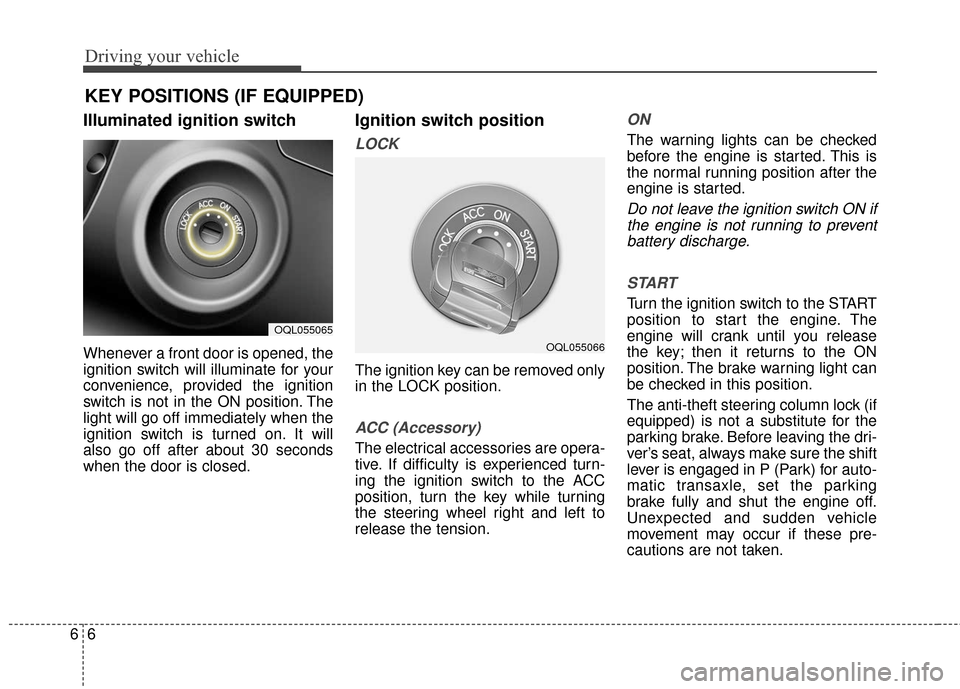
Illuminated ignition switch
Whenever a front door is opened, the
ignition switch will illuminate for your
convenience, provided the ignition
switch is not in the ON position. The
light will go off immediately when the
ignition switch is turned on. It will
also go off after about 30 seconds
when the door is closed.
Ignition switch position
LOCK
The ignition key can be removed only
in the LOCK position.
ACC (Accessory)
The electrical accessories are opera-
tive. If difficulty is experienced turn-
ing the ignition switch to the ACC
position, turn the key while turning
the steering wheel right and left to
release the tension.
ON
The warning lights can be checked
before the engine is started. This is
the normal running position after the
engine is started.
Do not leave the ignition switch ON ifthe engine is not running to preventbattery discharge.
START
Turn the ignition switch to the START
position to start the engine. The
engine will crank until you release
the key; then it returns to the ON
position. The brake warning light can
be checked in this position.
The anti-theft steering column lock (if
equipped) is not a substitute for the
parking brake. Before leaving the dri-
ver’s seat, always make sure the shift
lever is engaged in P (Park) for auto-
matic transaxle, set the parking
brake fully and shut the engine off.
Unexpected and sudden vehicle
movement may occur if these pre-
cautions are not taken.
KEY POSITIONS (IF EQUIPPED)
OQL055065
OQL055066
Page 334 of 595
Driving your vehicle
86
3. Turn the ignition switch to STARTand hold it there until the engine
starts (a maximum of 10 sec-
onds), then release the key.
It should be started withoutdepressing the accelerator.
4. Do not wait for the engine to warm up while the vehicle remains sta-
tionary.
Start driving at moderate engine
speeds. (Steep accelerating and
decelerating should be avoided.) If the engine stalls while you are in
motion, do not attempt to move the
shift lever to the P (Park) position. If
traffic and road conditions permit,
you may put the shift lever in the N
(Neutral) position while the vehicle is
still moving and turn the ignition
switch to the START position in an
attempt to restart the engine.
Starting and stopping the engine for
turbocharger intercooler
1. Do not race or accelerate the
engine immediately after starting.
If the engine is cold, idle for sever-
al seconds before sufficient lubri-
cation is ensured in the tur-
bocharger unit.
2. After high speed or extended driv- ing, requiring a heavy engine load,
run the engine on idle condition
about 1 minute before turning it off.
This idle time will allow the tur- bocharger to cool prior to shutting
the engine off.
CAUTION- Starter
Do not engage the starter for more than 10 seconds. If theengine stalls or fails to start,wait 5 to 10 seconds before re-engaging the starter. Improperuse of the starter may damageit.
WARNING- Steering
wheel
Never reach for any controls
through the steering wheel
while the vehicle is in motion.
The presence of your hand or
arm in this area could cause a
loss of vehicle control.
CAUTION
Do not turn off the engine imme- diately after it has been subject-ed to a heavy load. Doing somay cause severe damage tothe engine or turbo charger unit.
Page 347 of 595
621
Driving your vehicle
✽ ✽NOTICE
If the AWD system warning light
( ) illuminates, this indicates that
there is a malfunction in the AWD
system.
If this occurs, we recommend that
the system be checked by an author-
ized Kia dealer.
Tight corner brake effect
✽ ✽NOTICE- AWD
When turning sharply on a paved
road at low speed while in all wheel
drive, steering control will be difficult.
Tight corner brake effect is a unique
characteristic of all wheel drive vehi-
cles caused by the difference in tire
rotation at the four wheels and the
zero-degree alignment of the front
wheels and suspension.
Sharp turns at low speeds should be
carried out with caution.
Page 350 of 595
Driving your vehicle
24
6
You must consciously take the
effort to learn how to corner in a
AWD vehicle. Do not rely on your
experience in conventional FWD
vehicles in choosing safe cornering
speed in AWD mode. For starters,
you must drive more slowly in
AWD.
Drive carefully off-road because your vehicle may be damaged by
rocks or roots of trees. Become
familiar with the off-road conditions
where you are going to drive
before you begin driving. Always hold the steering wheel firm-
ly when you are driving off-road.
Make sure all passengers are wearing seat belts.
WARNING - Steering
wheel
Do not grab the inside of the
steering wheel when you are
driving off-road. You may hurt
your arm by a sudden steering
maneuver or from steering
wheel rebound due to impact
with objects on the ground. You
could also lose control of your
steering wheel while driving on
rough terrain.
WARNING - Wind danger
If you are driving in heavy wind,
the vehicle's higher center of
gravity decreases your steering
control capacity and requires
you to drive more slowly.
OQLE055127
WARNING - AWD
Reduce speed when you turn
corners. The center of gravity of
AWD vehicles is higher than
that of conventional FWD vehi-
cles, making them more likely to
roll over when you turn corners
too fast.
![KIA Sportage 2017 QL / 4.G Owners Manual Audio system
40
5
Bluetooth®Wireless Technology
When No Devices have been
Paired
➀ Press the [PHONE] button or the
[CALL] button on the steering
wheel controls. The following
screen is displayed.](/manual-img/2/2985/w960_2985-301.png "KIA Sportage 2017 QL / 4.G Owners Manual Audio system
40
5
Bluetooth®Wireless Technology
When No Devices have been
Paired
➀ Press the [PHONE] button or the
[CALL] button on the steering
wheel controls. The following
screen is displayed.")
![KIA Sportage 2017 QL / 4.G Owners Manual Audio system
541
✽ ✽NOTICE
If Bluetooth®Wireless Technology
devices are paired but none are cur-
rently connected, pressing the
[PHONE] button or the [CALL]
but-
ton
on the steering wheel contr](/manual-img/2/2985/w960_2985-302.png "KIA Sportage 2017 QL / 4.G Owners Manual Audio system
541
✽ ✽NOTICE
If Bluetooth®Wireless Technology
devices are paired but none are cur-
rently connected, pressing the
[PHONE] button or the [CALL]
but-
ton
on the steering wheel contr")