2017 KIA Sportage lane change warning
[x] Cancel search: lane change warningPage 400 of 595
Driving your vehicle
74
6
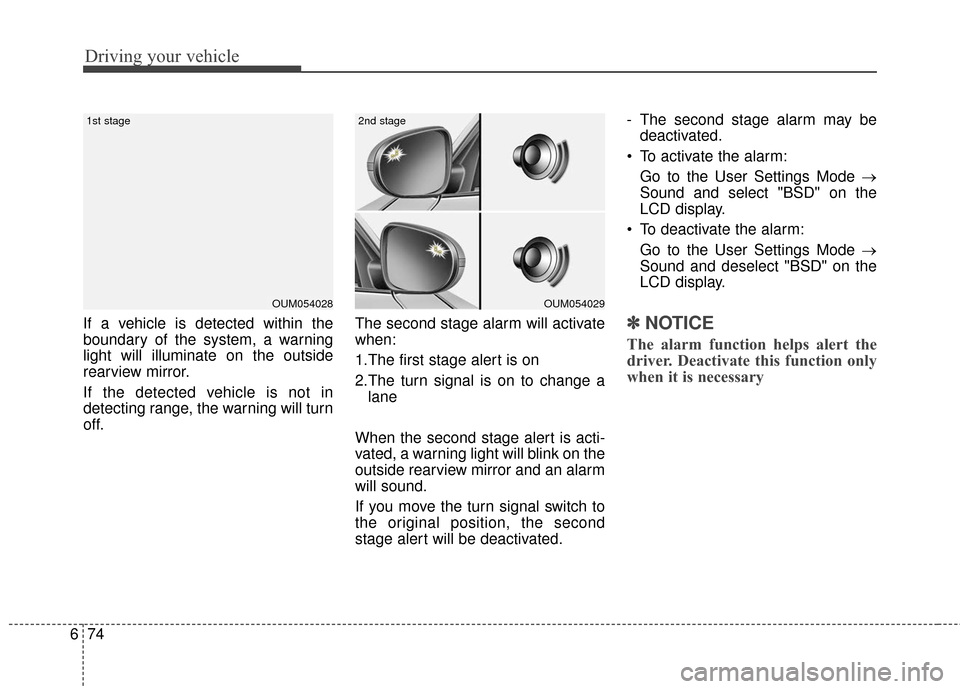
If a vehicle is detected within the
boundary of the system, a warning
light will illuminate on the outside
rearview mirror.
If the detected vehicle is not in
detecting range, the warning will turn
off. The second stage alarm will activate
when:
1.The first stage alert is on
2.The turn signal is on to change a
lane
When the second stage alert is acti-
vated, a warning light will blink on the
outside rearview mirror and an alarm
will sound.
If you move the turn signal switch to
the original position, the second
stage alert will be deactivated. - The second stage alarm may be
deactivated.
To activate the alarm: Go to the User Settings Mode →
Sound and select "BSD" on the
LCD display.
To deactivate the alarm: Go to the User Settings Mode →
Sound and deselect "BSD" on the
LCD display.✽ ✽
NOTICE
The alarm function helps alert the
driver. Deactivate this function only
when it is necessary
OUM054029
2nd stage
OUM054028
1st stage
Page 404 of 595
Driving your vehicle
78
6
✽ ✽
NOTICE
• The system may not work proper-
ly if the bumper has been replaced
or if repair work has been done
near the sensor.
• The detection area differs accord- ing to the road's width. If the road
is narrow the system may detect
other vehicles in the next lane.
• If the road is very wide the system may not detect other vehicles.
• The system may turn off due to strong electromagnetic interference.
Limitations condition
Driver's Attention
The driver must be cautious in the
below situations for the system may
not assist the driver and may not
work properly.
- Curved roads, tollgates, etc.
- The surrounding of the sensor cover
is dirty with rain, snow, mud, etc.
- The rear bumper near the sensor is covered or obstructed with foreign
matter such as a sticker, bumper
guard, bicycle racks, etc.
- The rear bumper is damaged or the sensor is out of place.
- The height of the vehicle has signif- icantly changed such as when the
trunk is loaded with heavy objects,
abnormal tire pressure etc.
- Due to bad weather such as heavy rain or snow. - A fixed object is near such as a
guardrail, etc.
- A substantial amount of metallic objects such as a construction
area.
- A large vehicle is nearby such as a bus or truck.
- A motorcycle or bicycle is near.
- A flat trailer is near.
- If two vehicles near each other accelerate together.
- When another vehicle passes by at a high rate of speed.
- When changing lanes.
- When going down or up a steep road where the height of the lane is
different.
- When another vehicle drives very close the back bumper/trunk.
- When a trailer or carrier is installed.
WARNING
The Blind Spot Detection
System with Lane Change
Assist and Rear Cross Traffic
Alert is not a substitute for
proper and safe lane changing
procedures. Always drive safely
and use caution when changing
lanes. The Blind Spot Detection
System and Rear Cross Traffic
Alert may not detect every
object alongside the vehicle.
Page 406 of 595
Driving your vehicle
80
6
LANE DEPARTURE WARNING SYSTEM (LDWS) (IF EQUIPPED)
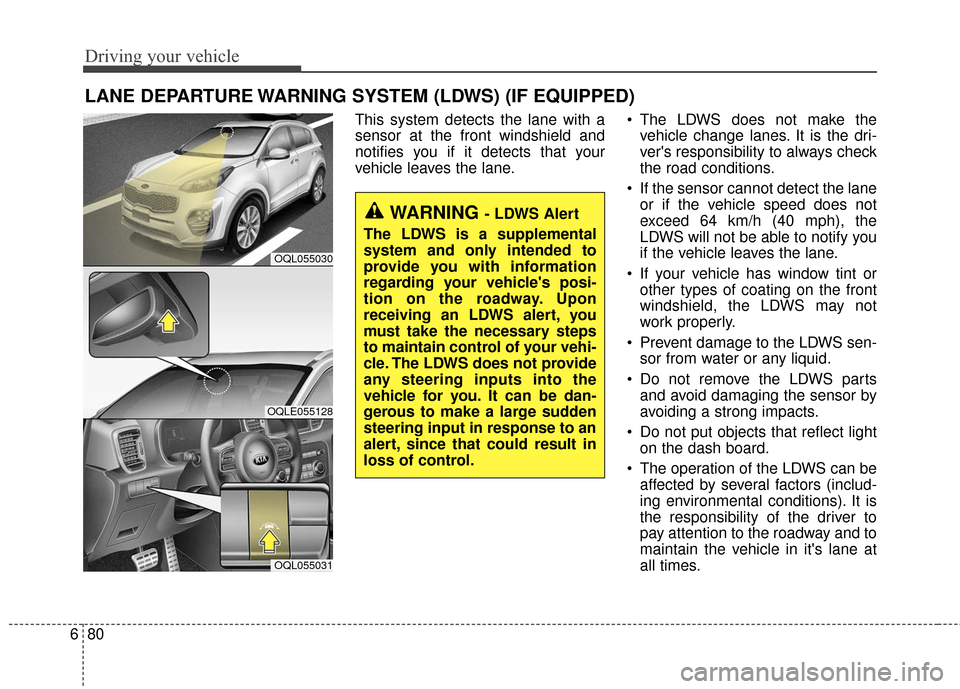
This system detects the lane with a
sensor at the front windshield and
notifies you if it detects that your
vehicle leaves the lane. The LDWS does not make the
vehicle change lanes. It is the dri-
ver's responsibility to always check
the road conditions.
If the sensor cannot detect the lane or if the vehicle speed does not
exceed 64 km/h (40 mph), the
LDWS will not be able to notify you
if the vehicle leaves the lane.
If your vehicle has window tint or other types of coating on the front
windshield, the LDWS may not
work properly.
Prevent damage to the LDWS sen- sor from water or any liquid.
Do not remove the LDWS parts and avoid damaging the sensor by
avoiding a strong impacts.
Do not put objects that reflect light on the dash board.
The operation of the LDWS can be affected by several factors (includ-
ing environmental conditions). It is
the responsibility of the driver to
pay attention to the roadway and to
maintain the vehicle in it's lane at
all times.
WARNING - LDWS Alert
The LDWS is a supplemental
system and only intended to
provide you with information
regarding your vehicle's posi-
tion on the roadway. Upon
receiving an LDWS alert, you
must take the necessary steps
to maintain control of your vehi-
cle. The LDWS does not provide
any steering inputs into the
vehicle for you. It can be dan-
gerous to make a large sudden
steering input in response to an
alert, since that could result in
loss of control.
OQL055030
OQLE055128
OQL055031
Page 408 of 595
Driving your vehicle
82
6
2. Auditory warning
If you leave the lane, the warning
sound operates for maximum 3 sec-
onds.
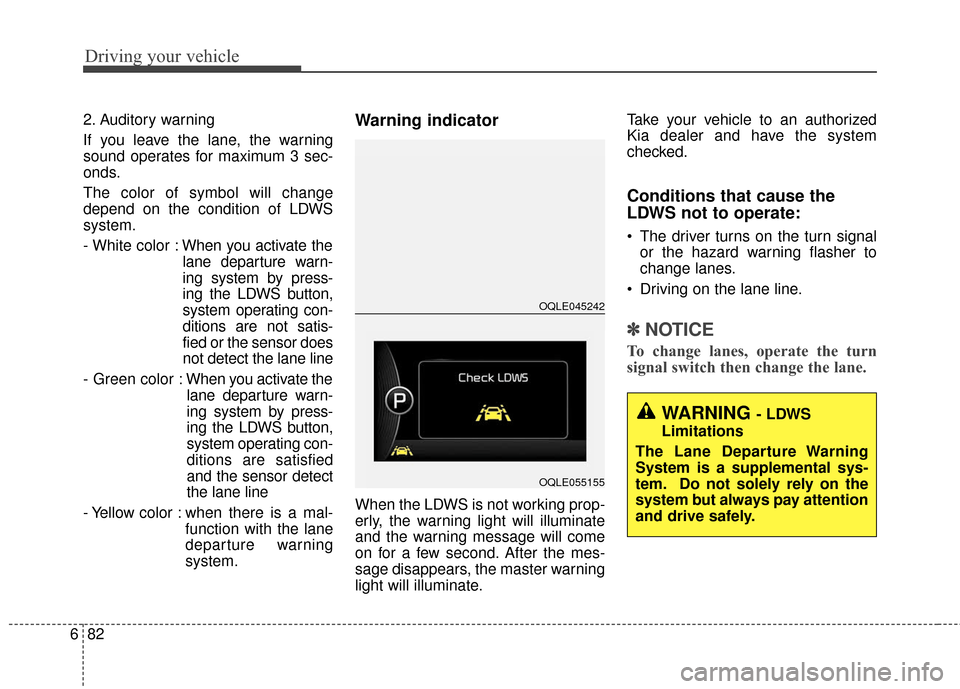
The color of symbol will change
depend on the condition of LDWS
system.
- White color : When you activate the
lane departure warn-
ing system by press-
ing the LDWS button,
system operating con-
ditions are not satis-
fied or the sensor does
not detect the lane line
- Green color : When you activate the
lane departure warn-
ing system by press-
ing the LDWS button,
system operating con-
ditions are satisfied
and the sensor detect
the lane line
- Yellow color : when there is a mal- function with the lane
departure warning
system.Warning indicator
When the LDWS is not working prop-
erly, the warning light will illuminate
and the warning message will come
on for a few second. After the mes-
sage disappears, the master warning
light will illuminate. Take your vehicle to an authorized
Kia dealer and have the system
checked.
Conditions that cause the
LDWS not to operate:
The driver turns on the turn signal
or the hazard warning flasher to
change lanes.
Driving on the lane line.
✽ ✽ NOTICE
To change lanes, operate the turn
signal switch then change the lane.
WARNING - LDWS
Limitations
The Lane Departure Warning
System is a supplemental sys-
tem. Do not solely rely on the
system but always pay attention
and drive safely.
OQLE045242
OQLE055155
Page 409 of 595
683
Driving your vehicle
Conditions that cause missed
warnings and false warnings:
The lane is not visible due to snow,rain, debris, puddles or other envi-
ronmental conditions.
The brightness outside changes suddenly such as when
entering/exiting a tunnel.
The headlights are off at night or in a tunnel.
The color of the lane marking from the road is difficult to distinguish.
Driving on a steep grade or a curve.
Light such as street lights, sunlight or oncoming vehicle lights reflect
off of water on the road.
The lens or windshield is obscured by debris.
The sensor cannot detect the lane because of fog, heavy rain or
heavy snow.
The rear view mirror housing has overheated from exposure to direct
sunlight.
The lane is very wide or narrow. The lane line is damaged or indis-
tinct.
The windshield is fogged up by humidity.
Objects in the median or along the side of the road cast shadows over
the lane markings
The sensor cannot distinguish the lane from the road due to the
dust/dirt.
There are other markings similar to lane lines.
There are lane boundaries instead of markings.
The vehicle ahead is very close, obscuring the view of the lane
markings, or the vehicle ahead is
driving over the lane markings.
The vehicle vibrates heavily due to poor road conditions.
The lanes are merging, expanding, or otherwise overlapping
Something reflective is placed on the dashboard. Driving with the sun in front of you.
Driving in areas under construc-
tion.
Lanes are marked by more than two sets of lines.
The windshield is fogged by humid air in the vehicle.
This device complies with
Industry Canada licence-exempt
RSS standard(s).
Operation is subject to the following
two conditions:
(1) This device may not cause inter- ference, and
(2) This device must accept any interference, including interfer-
ence that may cause undesired
operation of the device.
Page 447 of 595
715
What to do in an emergency
IF YOU HAVE A FLAT TIRE (WITH SPARE TIRE, IF EQUIPPED)
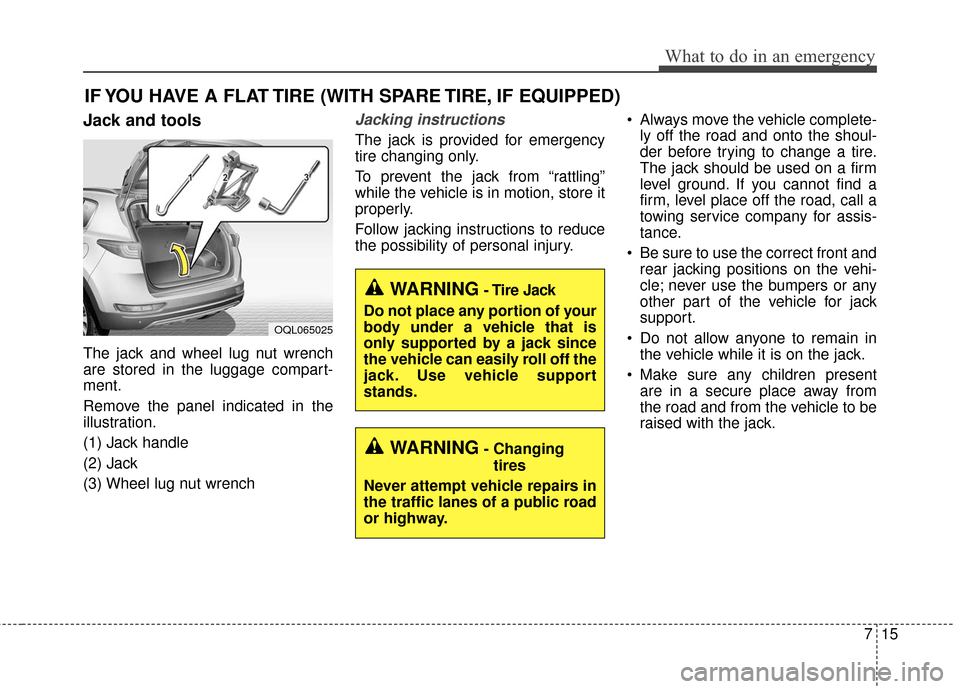
Jack and tools
The jack and wheel lug nut wrench
are stored in the luggage compart-
ment.
Remove the panel indicated in the
illustration.
(1) Jack handle
(2) Jack
(3) Wheel lug nut wrench
Jacking instructions
The jack is provided for emergency
tire changing only.
To prevent the jack from “rattling”
while the vehicle is in motion, store it
properly.
Follow jacking instructions to reduce
the possibility of personal injury. Always move the vehicle complete-
ly off the road and onto the shoul-
der before trying to change a tire.
The jack should be used on a firm
level ground. If you cannot find a
firm, level place off the road, call a
towing service company for assis-
tance.
Be sure to use the correct front and rear jacking positions on the vehi-
cle; never use the bumpers or any
other part of the vehicle for jack
support.
Do not allow anyone to remain in the vehicle while it is on the jack.
Make sure any children present are in a secure place away from
the road and from the vehicle to be
raised with the jack.
WARNING- Changing
tires
Never attempt vehicle repairs in
the traffic lanes of a public road
or highway.
OQL065025
WARNING- Tire Jack
Do not place any portion of your
body under a vehicle that is
only supported by a jack since
the vehicle can easily roll off the
jack. Use vehicle support
stands.
Page 588 of 595
I3
Index
Recognizing pedestrians ............................................6-61
Sensor to detect the distance from the vehicle in front (front radar) ......................................................6-56
System malfunction ....................................................6-57
System setting and activation ....................................6-51
Battery........................................................................\
....8-44 For best battery service ..............................................8-44
Recharging the battery ................................................8-45
Reset items ..................................................................8-46
Before driving ..................................................................6-4 Before entering vehicle ................................................6-4
Before starting ........................................................\
......6-4
Necessary inspections ..................................................6-4
Blind spot detection system (BSD) ..............................6-72 BSD (Blind Spot Detection) /LCA (Lane Change Assist) ......................................6-73
Limitations condition ..................................................6-78
RCTA (Rear Cross Traffic Alert) ................................6-76
Brake fluid ....................................................................8-34\
Checking the brake fluid level ....................................8-34
Brake system..................................................................6-28 Anti-lock brake system (ABS)....................................6-42
AUTO HOLD..............................................................6-38
Electronic parking brake (EPB) ..................................6-31
Electronic stability control (ESC) ..............................6-44 Good braking practices ..............................................6-50
Hill-start assist control (HAC) ....................................6-49
Parking brake – Foot type ..........................................6-30
Power brakes ..............................................................6-28
Vehicle stability management (VSM) ........................6-48
Warning messages ......................................................6-40
Bulb wattage ....................................................................9-3
Child restraint system (CRS) ........................................3-32 Children Always in the Rear ......................................3-32
Installing a Child Restraint System (CRS) ................3-36
Selecting a Child Restraint System (CRS) ................3-33
Clean air ......................................................................4-\
161
Climate control air filter ................................................8-39 Filter inspection ..........................................................8-39
Cruise Control system ..................................................6-66 To cancel cruise control ..............................................6-68
To decrease the cruising speed ..................................6-68
To increase cruise control set speed ..........................6-67
To resume cruising speed at more than approximately 30 km/h (20 mph) ............................6-69
To set cruise control speed..........................................6-67
To temporarily accelerate with the cruise control on ..6-68
To turn cruise control off ............................................6-69
B
C
Page 592 of 595
I7
Index
Light bulb position (Rear) ..........................................8-82
Light bulb position (Side) ..........................................8-83
Map lamp bulb replacement ......................................8-91
Personal lamp bulb replacement ................................8-93
Position lamp + DRL bulb replacement ....................8-86
Room lamp bulb replacement ....................................8-92
Side repeater lamp (LED type) bulb replacement ......8-91
Stop and tail lamp (LED type) bulb replacement ......8-89
Stop and tail lamp bulb replacement ..........................8-87
Tail lamp (inside) bulb replacement ..........................8-88
Tailgate room lamp bulb replacement ........................8-94
Vanity mirror lamp bulb replacement ........................8-91
Lighting........................................................................\
4-119 AFLS (Adaptive Front Lighting System) ................4-125
Battery saver function ..............................................4-119
Check headlight ......................................................4-125
Daytime running light ..............................................4-119
Front fog light ..........................................................4-124
High Beam Assist ....................................................4-122
High beam operation ................................................4-121
Lighting control ........................................................4-119
Turn signals and lane change signals........................4-124
Luggage volume ..............................................................9-6
Maintenance services ......................................................8-4 Owner maintenance precautions ..................................8-5 Owner’s responsibility ..................................................8-4
Manual climate control system....................................4-135 Checking the amount of air conditioner refrigerantand compressor lubricant ........................................4-143
Climate control air filter ..........................................4-143
Heating and air conditioning ....................................4-136
System operation ......................................................4-141
Mirrors ........................................................................\
..4-58 Inside rearview mirror ................................................4-58
Outside rearview mirror ............................................4-65
Owner maintenance ........................................................8-6 Owner maintenance schedule ......................................8-6
Panoramic sunroof ........................................................4-48 Closing the sunroof ....................................................4-52
Resetting the sunroof ..................................................4-52
Sliding the sunroof ....................................................4-50
Sunroof open warning ................................................4-49
Sunshade ....................................................................4-49\
Tilting the sunroof ....................................................4-52
Parking assist system ..................................................4-113 Non-operational conditions of parking assist system .. 4-115
Operation of the parking assist system ....................4-113
M
O
P