Page 275 of 589
Audio system
40
5
✽
✽
NOTICE
• When the incoming call screen is
displayed, audio mode and the set-
tings screen cannot be shown.
Only call volume control is sup-
ported.
• Some Bluetooth
®Wireless Technology
devices may not support the call
reject function.
• Some Bluetooth
®Wireless Technology
devices may not support the phone
number display function.
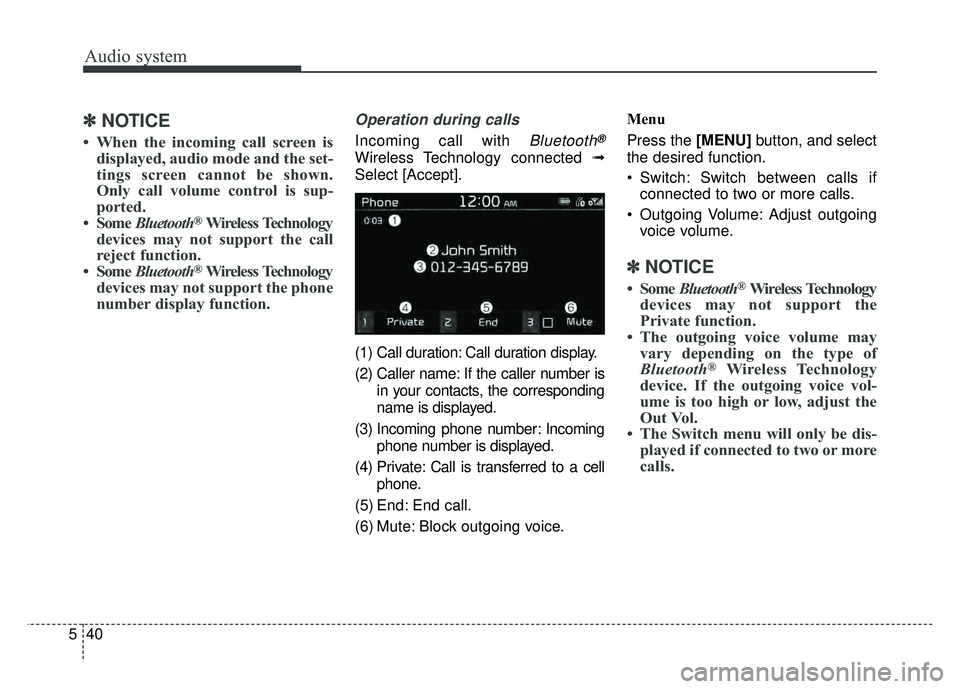
Operation during calls
Incoming call with Bluetooth®
Wireless Technology connected ➟
Select [Accept].
(1) Call duration: Call duration display.
(2) Caller name: If the caller number is in your contacts, the corresponding
name is displayed.
(3) Incoming phone number: Incoming phone number is displayed.
(4) Private: Call is transferred to a cell phone.
(5) End: End call.
(6) Mute: Block outgoing voice. Menu
Press the [MENU]
button, and select
the desired function.
Switch: Switch between calls if connected to two or more calls.
Outgoing Volume: Adjust outgoing voice volume.
✽ ✽ NOTICE
• Some Bluetooth®Wireless Technology
devices may not support the
Private function.
• The outgoing voice volume may vary depending on the type of
Bluetooth
®Wireless Technology
device. If the outgoing voice vol-
ume is too high or low, adjust the
Out Vol.
• The Switch menu will only be dis- played if connected to two or more
calls.
Page 276 of 589
![KIA SOUL 2017 Owners Manual Audio system
541
Favorites
Select the [PHONE]button on the
audio system ➟ Select [Favorites] ➟
Favorites list displayed.
(1) Add to Favorites: Add a down- loaded phone number to
favorites.
(2) Fav](/manual-img/2/54636/w960_54636-275.png "KIA SOUL 2017 Owners Manual Audio system
541
Favorites
Select the [PHONE]button on the
audio system ➟ Select [Favorites] ➟
Favorites list displayed.
(1) Add to Favorites: Add a down- loaded phone number to
favorites.
(2) Fav")
Audio system
541
Favorites
Select the [PHONE]button on the
audio system ➟ Select [Favorites] ➟
Favorites list displayed.
(1) Add to Favorites: Add a down- loaded phone number to
favorites.
(2) Favorites list: A list of paired favorites is displayed
Connect a call when selected.
Menu
Press the [MENU] button, and select
the desired function.
Delete: Delete a saved favorite.
✽ ✽ NOTICE
• Up to 20 favorites can be paired
for each paired Bluetooth®
Wireless Technology device.
• Favorites can be accessed when the Bluetooth
®Wireless Technology
device they were paired from is
connected.
• The audio system does not down- load favorites from Bluetooth
®
Wireless Technology devices.
Favorites must be newly saved
before use.
• To add to favorites, contacts must be downloaded first.
• Saved favorites are not updated even if the contacts of the connected
Bluetooth
®Wireless Technology
device are changed. In this case,
favorites need to be deleted and
added again.
Call history
Select the [PHONE] button on the
audio system ➟ Select [Call history]
➟ Call history is displayed.
(1) Call history: Display the down- loaded call history list.
Connect a call when selected.
(2) Call duration: Display the time the call was connected.
Page 277 of 589
![KIA SOUL 2017 Owners Manual Audio system
42
5 Menu
Press the [MENU]
button, and select
the desired function.
All Calls: Display all call history.
Missed Calls: Display missed calls.
Dialed Calls: Display dialed calls.
Receiv](/manual-img/2/54636/w960_54636-276.png "KIA SOUL 2017 Owners Manual Audio system
42
5 Menu
Press the [MENU]
button, and select
the desired function.
All Calls: Display all call history.
Missed Calls: Display missed calls.
Dialed Calls: Display dialed calls.
Receiv")
Audio system
42
5 Menu
Press the [MENU]
button, and select
the desired function.
All Calls: Display all call history.
Missed Calls: Display missed calls.
Dialed Calls: Display dialed calls.
Received Calls: Display received calls.
Download: Download call history from connected
Bluetooth®Wireless
Technology devices.
✽ ✽ NOTICE
• Up to 50 dialed, received and
missed calls are saved.
• When the latest call history is received, the existing call history is
deleted.
Contacts
Select the [PHONE] button on the
audio system ➟ Select [Contacts] ➟
Select letter (ABC) ➟ Contacts dis-
played.
(1) Contacts: Display downloaded contacts.
If one phone number is saved, the
number will be dialed when
selected.
If two or more phone numbers are
saved, a list of saved numbers will
be displayed when selected. Menu
Press the [MENU]
button, and select
the desired function.
Download: Download contacts from connected
Bluetooth®Wireless
Technology devices.
✽ ✽ NOTICE
• Up to 2,000 contacts can be saved.
• In some cases, additional confir-
mation from your Bluetooth
®
Wireless Technology device is nec-
essary when downloading con-
tacts. If downloading of contacts
unsuccessful, consult your
Bluetooth
®Wireless Technology
device’s settings or the audio
screen to approve the download.
• Contacts without phone numbers are not displayed.
Settings
Select the [PHONE] button on the
audio ➟Select [Settings]
- For phone setup, refer to Setup page .
Page 278 of 589
Audio system
543
Siri
✽
✽NOTICE - Using Siri
• If you want to use Siri, you have to
connect your iOS device to multi-
media system through Bluetooth
®
Wireless Technology. (Please
check whether your iOS device
supports Siri and turning Siri On)
• If the iOS version is changed, the functions and response may be dif-
ferent according to the iOS device
and the latest version.
• Siri automatically stops in the fol- lowing events.
1) Outgoing and incoming phone calls.
2) Media (USB, etc.) is connected. (Siri mode is maintained when
iPod®s are connected)
3) Rear camera is activated (option).
4) Vehicle is started or engine is turned off.
5) Screen transition buttons, such as RADIO or MEDIA, are
selected. (Continued)(Continued)
6) When a pop-up message is dis- played on the screen due to
accidental execution of Siri.
• The microphone is located above the driver’s seat. To ensure proper
Siri, state your voice while main-
taining proper driving posture.
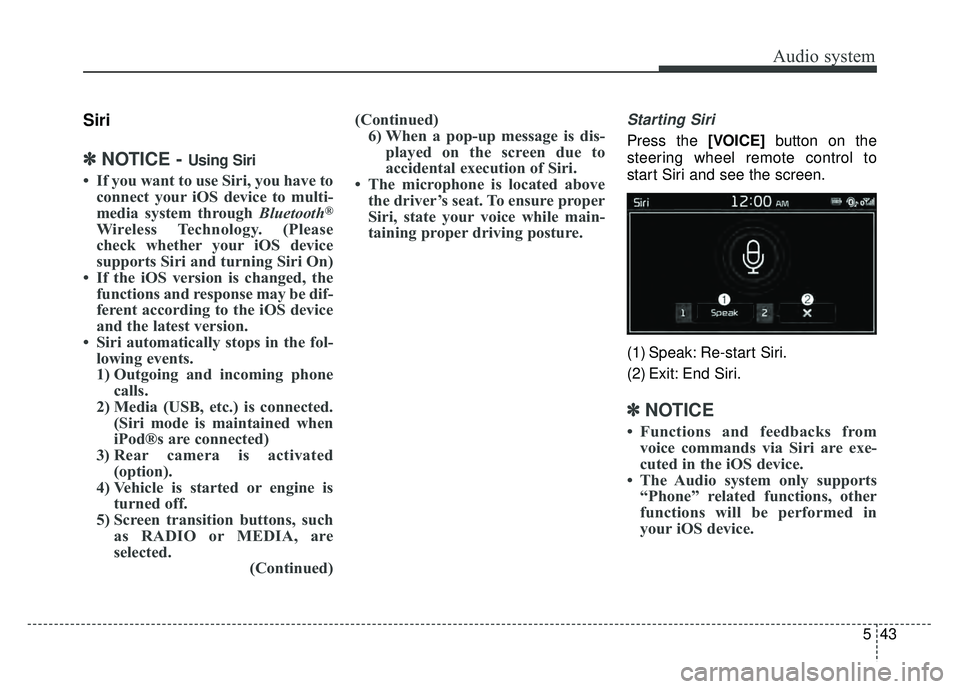
Starting Siri
Press the [VOICE] button on the
steering wheel remote control to
start Siri and see the screen.
(1) Speak: Re-start Siri.
(2) Exit: End Siri.
✽ ✽ NOTICE
• Functions and feedbacks from
voice commands via Siri are exe-
cuted in the iOS device.
• The Audio system only supports “Phone” related functions, other
functions will be performed in
your iOS device.
Page 279 of 589
![KIA SOUL 2017 Owners Manual Audio system
44
5
Setup
Access Display, Sound, Date/Time,
Bluetooth, System and Display Off
settings.
Select the [SETUP/CLOCK] button
on the audio system.
Display
Select the [SETUP/CLOCK] button on
t](/manual-img/2/54636/w960_54636-278.png "KIA SOUL 2017 Owners Manual Audio system
44
5
Setup
Access Display, Sound, Date/Time,
Bluetooth, System and Display Off
settings.
Select the [SETUP/CLOCK] button
on the audio system.
Display
Select the [SETUP/CLOCK] button on
t")
Audio system
44
5
Setup
Access Display, Sound, Date/Time,
Bluetooth, System and Display Off
settings.
Select the [SETUP/CLOCK] button
on the audio system.
Display
Select the [SETUP/CLOCK] button on
the audio system ➟ Select [Display].
Mode: Audio screen brightness can be adjusted to the time of day.
Illumination: The brightness of the audio screen can be changed.
Screen Saver: Set the information displayed when the audio system
is switched off or the screen is
turned off.
Sound
Select the [SETUP/CLOCK] button
on the audio system ➟Select
[Sound].
Position: Sound balance and pan- ning can be adjusted.
Tone: Sound tone color can be adjusted.
Speed Dependent Volume: Automatically adjust volume based
on vehicle speed.
Date/Time
Select the [SETUP/CLOCK] button
on the audio system ➟Select
[Date/Time].
Set Time: Set the time displayed on the audio screen.
Time Format: Choose between 12- hour and 24-hour time formats.
Set Date: Set the date displayed on the audio screen.
Bluetooth
Select the [SETUP/CLOCK] button
➟ Select [Bluetooth].
Connections: Control pairing, dele- tion, connection and disconnection
of
Bluetooth®Wireless Technology
devices.
Auto Connection Priority: Set the connection priority of
Bluetooth®
Wireless Technology devices when
the vehicle is started.
Download Contacts: Contacts can be downloaded from connected
Bluetooth®Wireless Technology
devices.
Bluetooth Voice Prompts: Play or mute voice prompts for
Bluetooth®
Wireless Technology device pair-
ing, connection and errors.
Page 280 of 589
Audio system
545
✽
✽NOTICE
• When paired devices are deleted,
the call history and contacts of the
device saved to the audio system
are deleted.
• For Bluetooth
®Wireless Technology
connections with low connection
priority, some time may be
required for the connection to be
established.
• Contacts can be downloaded only from the currently connected
Bluetooth
®Wireless Technology
device.
• If no Bluetooth
®Wireless Technology
device is connected, the download
contacts button is disabled.
• If the language setting is Korean, Bluetooth
®Wireless Technology
voice prompts are not supported.
System
Select the [SETUP/CLOCK] button
on the audio system ➟Select
[System].
Memory Information: View My Music memory usage.
Language: Change the user lan- guage.
Default: Reset the audio system.
System Information: At the System Information screen, Software ver-
sion information, updates are avail-
able.
- System Update: At the SystemInformation screen, insert the
USB memory with the latest file
downloaded, and then select the
[Update] to begin updating. The
system with then reboot auto-
matically.
✽ ✽ NOTICE
• The system resets to the default
values, and all saved data and set-
tings are lost.
• This product needs supplemented software updates and additional
functions, which collectively may
take some time to complete,
depending on the amount of data.
• If the Power is disconnected or the USB is removed during an update,
the data might be damaged. Please
wait until the update is complete
while engine is on.
Display Off
To prevent glare, the screen can be
turned off with the audio system in
operation.
Select the [SETUP/CLOCK] button
on the audio system ➟Select
[Display Off].
✽ ✽ NOTICE
Use ‘Screen Saver’ to set the infor-
mation to be displayed when the
screen is turned off.
Page 281 of 589
Audio system
46
5
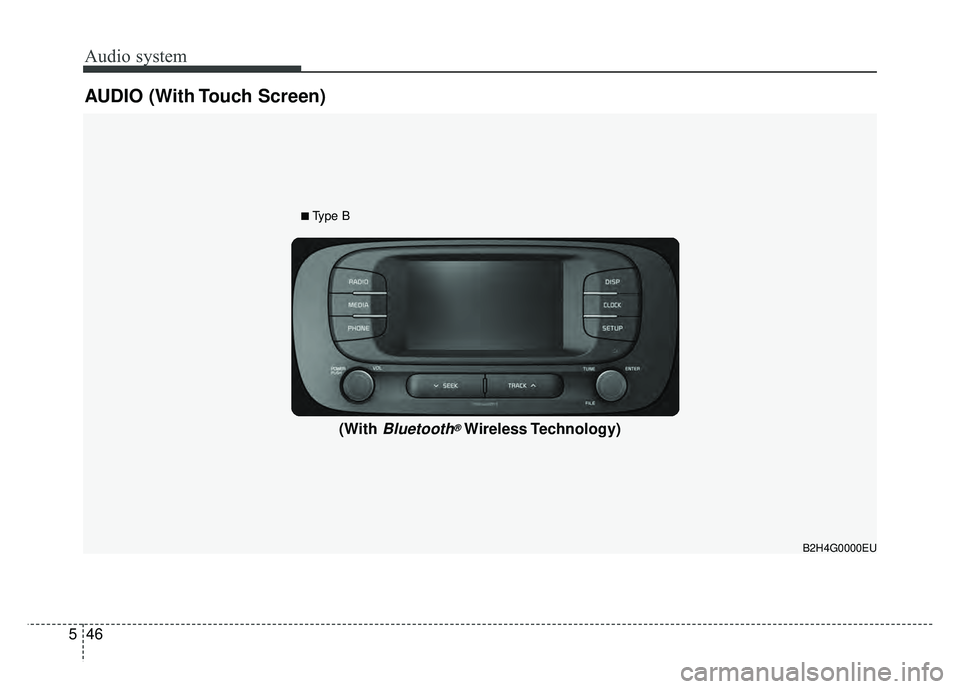
AUDIO (With Touch Screen)
B2H4G0000EU
(With Bluetooth®Wireless Technology)
■Type B
Page 282 of 589
Audio system
547
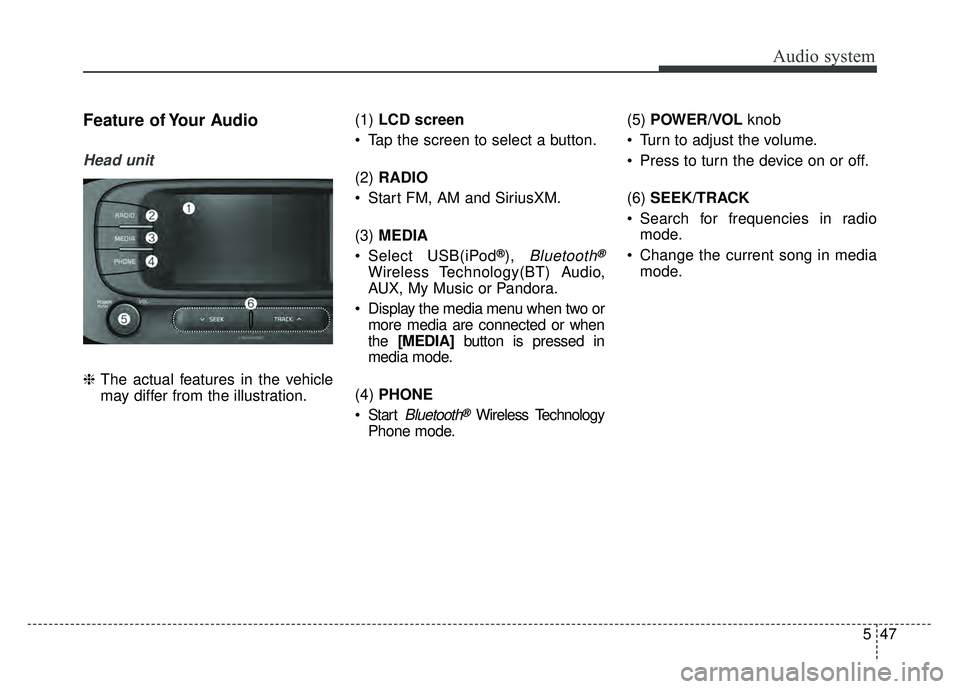
Feature of Your Audio
Head unit
❈The actual features in the vehicle
may differ from the illustration. (1)
LCD screen
Tap the screen to select a button.
(2) RADIO
Start FM, AM and SiriusXM.
(3) MEDIA
Select USB(iPod
®), Bluetooth®
Wireless Technology(BT) Audio,
AUX, My Music or Pandora.
Display the media menu when two or more media are connected or when
the [MEDIA] button is pressed in
media mode.
(4) PHONE
Start
Bluetooth®Wireless Technology
Phone mode. (5)
POWER/VOL knob
Turn to adjust the volume.
Press to turn the device on or off.
(6) SEEK/TRACK
Search for frequencies in radio mode.
Change the current song in media mode.