Page 171 of 470
4101
Features of your vehicle
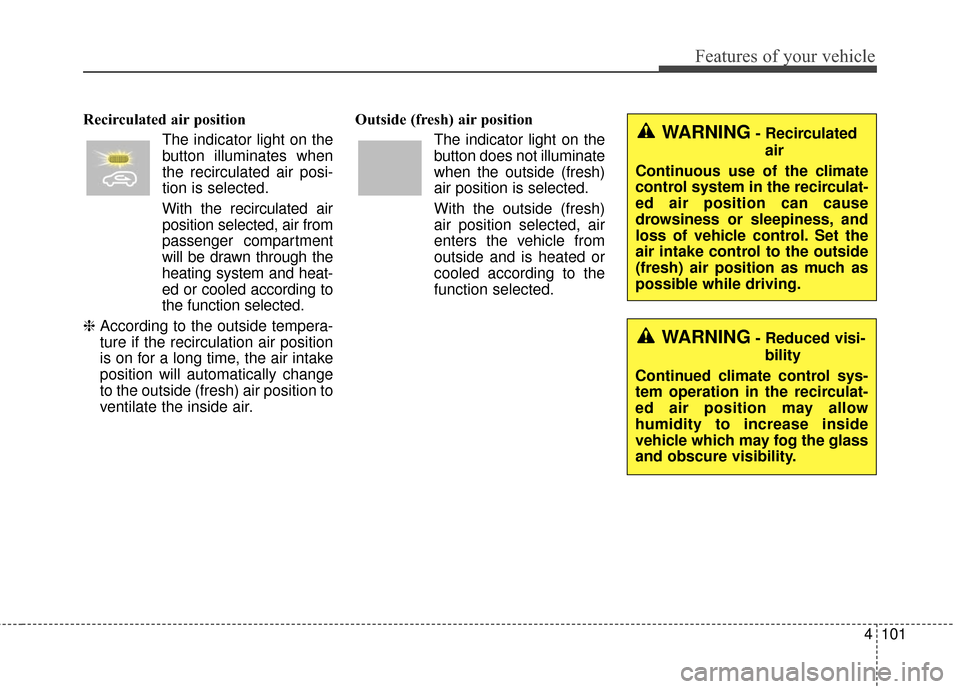
Recirculated air positionThe indicator light on the
button illuminates when
the recirculated air posi-
tion is selected.
With the recirculated air position selected, air from
passenger compartment
will be drawn through the
heating system and heat-
ed or cooled according to
the function selected.
❈ According to the outside tempera-
ture if the recirculation air position
is on for a long time, the air intake
position will automatically change
to the outside (fresh) air position to
ventilate the inside air. Outside (fresh) air position
The indicator light on the
button does not illuminate
when the outside (fresh)
air position is selected.
With the outside (fresh)
air position selected, air
enters the vehicle from
outside and is heated or
cooled according to the
function selected.WARNING- Recirculatedair
Continuous use of the climate
control system in the recirculat-
ed air position can cause
drowsiness or sleepiness, and
loss of vehicle control. Set the
air intake control to the outside
(fresh) air position as much as
possible while driving.
WARNING- Reduced visi- bility
Continued climate control sys-
tem operation in the recirculat-
ed air position may allow
humidity to increase inside
vehicle which may fog the glass
and obscure visibility.
Page 173 of 470
4103
Features of your vehicle
Air conditioning
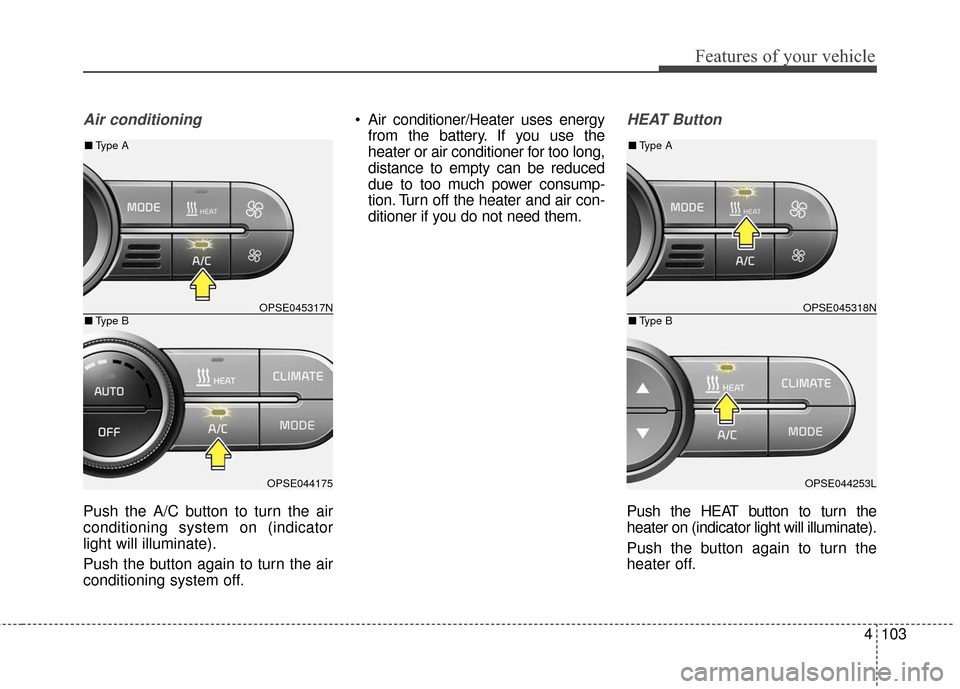
Push the A/C button to turn the air
conditioning system on (indicator
light will illuminate).
Push the button again to turn the air
conditioning system off. Air conditioner/Heater uses energy
from the battery. If you use the
heater or air conditioner for too long,
distance to empty can be reduced
due to too much power consump-
tion. Turn off the heater and air con-
ditioner if you do not need them.
HEAT Button
Push the HEAT button to turn the
heater on (indicator light will illuminate).
Push the button again to turn the
heater off.
OPSE045317N
OPSE044175
■ Type B
■Type A
OPSE045318N
OPSE044253L
■Type B
■Type A
Page 175 of 470
4105
Features of your vehicle
Reserved Climate Control Button(if equipped)
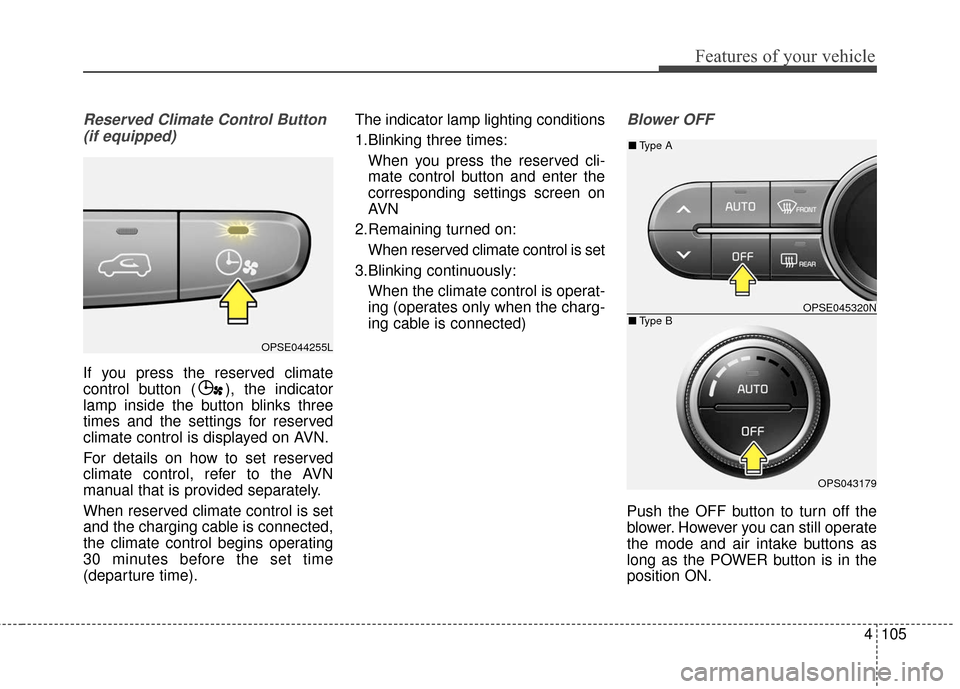
If you press the reserved climate
control button ( ), the indicator
lamp inside the button blinks three
times and the settings for reserved
climate control is displayed on AVN.
For details on how to set reserved
climate control, refer to the AVN
manual that is provided separately.
When reserved climate control is set
and the charging cable is connected,
the climate control begins operating
30 minutes before the set time
(departure time). The indicator lamp lighting conditions
1.Blinking three times:
When you press the reserved cli-
mate control button and enter the
corresponding settings screen on
AVN
2.Remaining turned on: When reserved climate control is set
3.Blinking continuously: When the climate control is operat-
ing (operates only when the charg-
ing cable is connected)
Blower OFF
Push the OFF button to turn off the
blower. However you can still operate
the mode and air intake buttons as
long as the POWER button is in the
position ON.
OPSE044255L
OPSE045320N
OPS043179
■ Type B
■Type A
Page 177 of 470
4107
Features of your vehicle
Air conditioning
All Kia Air Conditioning Systems are
filled with R-134a refrigerant.
1. Start the vehicle. Press the airconditioning button.
2. Set the mode to the position.
3. Set the air intake control to the outside air or recirculated air posi-
tion.
4. Adjust the fan speed control and temperature control to maintain
maximum comfort.
When maximum cooling is desired, set the temperature control to the
extreme left position, set the mode
control to the MAX A/C position,
then set the fan speed control to
the highest speed. Air conditioning system operation tips
If the vehicle has been parked in
direct sunlight during hot weather,
open the windows for a short time
to let the hot air inside the vehicle
escape.
To help reduce moisture inside of the windows on rainy or humid
days, decrease the humidity inside
the vehicle by operating the air
conditioning system.
During air conditioning system operation, you may occasionally
notice a slight change in vehicle
speed as the air conditioning com-
pressor cycles. This is a normal
system operation characteristic.
Use the air conditioning system every month only for a few minutes
to ensure maximum system per-
formance.CAUTION- Excessive A/C
When using the air condition- ing system, monitor thecoolant closely while drivingup hills or in heavy trafficwhen outside temperaturesare high. Air conditioning sys-tem operation may causeoverheating. Continue to usethe blower fan but turn the airconditioning system off if theengine coolant temperaturegauge indicates overheating.
When opening the windows in humid weather air condition-ing may create water dropletsinside the vehicle. Sinceexcessive water droplets maycause damage to electricalequipment, air conditioningshould only be used with thewindows closed.
Page 188 of 470
Features of your vehicle
118
4
Sunvisor
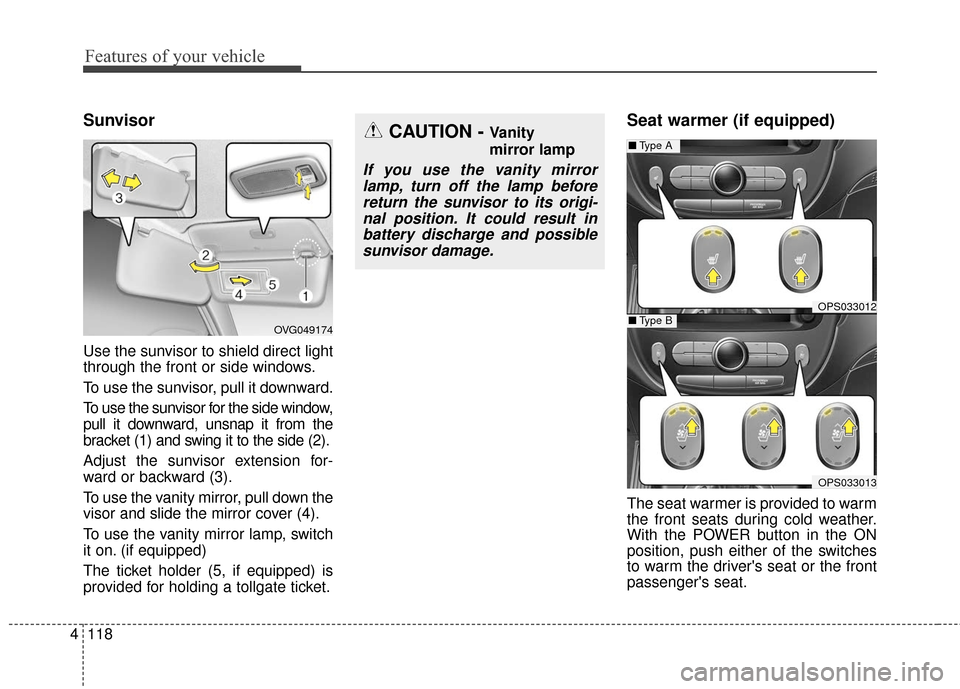
Use the sunvisor to shield direct light
through the front or side windows.
To use the sunvisor, pull it downward.
To use the sunvisor for the side window,
pull it downward, unsnap it from the
bracket (1) and swing it to the side (2).
Adjust the sunvisor extension for-
ward or backward (3).
To use the vanity mirror, pull down the
visor and slide the mirror cover (4).
To use the vanity mirror lamp, switch
it on. (if equipped)
The ticket holder (5, if equipped) is
provided for holding a tollgate ticket.
Seat warmer (if equipped)
The seat warmer is provided to warm
the front seats during cold weather.
With the POWER button in the ON
position, push either of the switches
to warm the driver's seat or the front
passenger's seat.
CAUTION - Vanity
mirror lamp
If you use the vanity mirror
lamp, turn off the lamp beforereturn the sunvisor to its origi-nal position. It could result inbattery discharge and possiblesunvisor damage.
OPS033012
■ Type A
OPS033013
■Type BOVG049174
Page 198 of 470
Features of your vehicle
128
4
Speaker lights (if equipped)
The speaker lights that lights around
the front speaker is adjusted by turn-
ing the knob as follows. 1. OFF : The light turns off.
2. MUSIC :
The red light blinks according to the
sound of the audio.
If the audio is not turned on, the
light does not turn on.
3. MOOD : The light color changes automati-
cally at regular interval.
4. +/- : When the lights are on, push the
illumination button to adjust the
light intensity.
If low lighting grade is selected, the
intensity of light may be weak or
may not illuminate according to the
audio volume or selected condition.
The lighting around the front speaker
may not illuminate when the sound of
the audio is low.
Do not use the lights for extended
periods when engine is not running.
It may cause battery discharge.
✽ ✽ NOTICE
When the doors are opened, the
lighting system will not operate.
OPSE044195
OPSE044196
Page 201 of 470
4131
Features of your vehicle
Using a cellular phone or a two-way radio
When a cellular phone is used inside
the vehicle, noise may be produced
from the audio system. This does not
mean that something is wrong with
the audio equipment. In such a case,
try to operate mobile devices as far
from the audio equipment as possi-
ble.
When using a communication sys-
tem such as a cellular phone or a
radio set inside the vehicle, a sepa-
rate external antenna must be fitted.
When a cellular phone or a radio set
is used with an internal antenna
alone, it may interfere with the vehi-
cle's electrical system and adversely
affect safe operation of the vehicle.
WARNING- Cell phone use
Do not use a cellular phone
while driving. Stop at a safe
location to use a cellular phone.
WARNING- Driver Distraction
• Do not stare at the screen while driving. Staring at the
screen for prolonged periods
of time could lead to traffic
accidents.
Using the phone while driving may lead to a lack of attention
of traffic conditions and
increase the likelihood of
accidents. Use the phone fea-
ture after parking the vehicle.
WARNING- Audio System
Do not disassemble, assemble,
or modify the audio system.
Such acts could result in fire or
electric shock.
WARNING- Antenna
Do not touch the antenna dur-
ing thunder or lightening as
such acts may lead to lightning
induced electric shock.
CAUTION
Refrain from use if the screen is blank or no sound can be hearas these signs may indicateproduct malfunction.
Page 248 of 470
53
Driving your vehicle
Before entering vehicle
• Be sure that all windows, outsidemirror(s), and outside lights are
clean.
Check the condition of the tires.
Check under the vehicle for any sign of leaks.
Be sure there are no obstacles behind you if you intend to back up.
Necessary inspections
Fluid levels, such as coolant, brake
fluid, and washer fluid should be
checked on a regular basis, at the
exact interval depending on the fluid.
Further details are provided in chap-
ter 7, “Maintenance”.
Before starting
Close and lock all doors.
Position the seat so that all con-trols are easily reached.
Buckle your seat belt.
Adjust the inside and outside rearview mirrors.
Be sure that all lights work.
Check all gauges.
Check the operation of warning lights when the POWER button is
turned to the ON position.
Release the parking brake and make sure the brake warning light
goes out.
For safe operation, be sure you are
familiar with your vehicle and its
equipment.
BEFORE DRIVING
WARNING - Distracted driving
Focus on the road while driving.
The driver's primary responsibil-
ity is in the safe and legal opera-
tion of the vehicle. Use of any
handled devices, other equip-
ment or vehicle systems that
distract the drive should not be
used during vehicle operation.