2017 KIA Soul EV service
[x] Cancel search: servicePage 135 of 470
465
Features of your vehicle
Warning lights
✽ ✽NOTICE - Warning lights
Make sure that all warning lights
are OFF after starting the vehicle. If
any light is still ON, this indicates a
situation that needs attention.
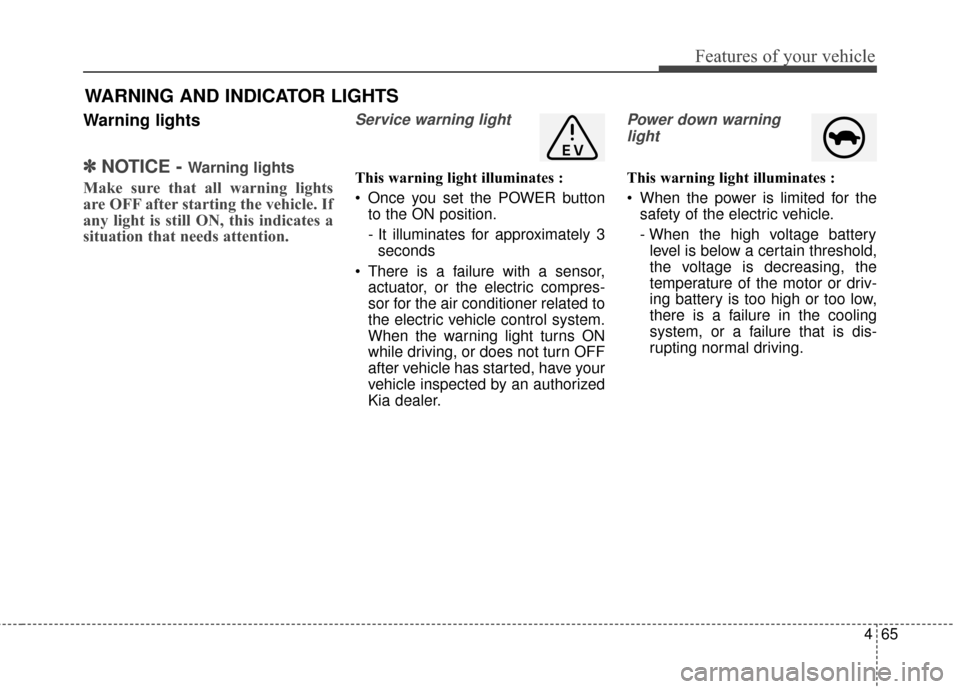
Service warning light
This warning light illuminates :
Once you set the POWER button
to the ON position.
- It illuminates for approximately 3seconds
There is a failure with a sensor, actuator, or the electric compres-
sor for the air conditioner related to
the electric vehicle control system.
When the warning light turns ON
while driving, or does not turn OFF
after vehicle has started, have your
vehicle inspected by an authorized
Kia dealer.
Power down warning
light
This warning light illuminates :
When the power is limited for the safety of the electric vehicle.
- When the high voltage batterylevel is below a certain threshold,
the voltage is decreasing, the
temperature of the motor or driv-
ing battery is too high or too low,
there is a failure in the cooling
system, or a failure that is dis-
rupting normal driving.
WARNING AND INDICATOR LIGHTS
Page 179 of 470
4109
Features of your vehicle
Checking the amount of air
conditioner refrigerant and
compressor lubricant
When the amount of refrigerant is
low, the performance of the air con-
ditioning is reduced. Overfilling also
has a negative impact on the air con-
ditioning system.
(Heater performance as well as air
conditioner performance can be
deteriorated on the vehicle that is
equipped with a heat pump.)
Therefore, if abnormal operation is
found, have the system inspected by
an authorized Kia dealer.
WARNING
The air conditioning system for
the Electric Vehicle (EV) should
be serviced by an authorized
Kia dealer. The Electric Vehicle
(EV) air conditioning system is
connected to the high voltage
system and requires special flu-
ids, tools and service proce-
dures. Improperly servicing the
Electric Vehicle (EV) air condi-
tioning system could result in
electrical shock, serious injury,
or even death.
WARNING
The oil and refrigerant in your
vehicle's air conditioning sys-
tem is under very high pres-
sure. If proper service proce-
dures are not followed an explo-
sion may result. To reduce the
risk of serious injury or death,
the air conditioning system in
your vehicle should only be
serviced by trained and certi-
fied technicians.
CAUTION - AC Repair
It is important that the correcttype and amount of oil andrefrigerant is used, otherwisedamage to the vehicle and injurymay occur. To prevent damage,the air conditioning system inyour vehicle should only beserviced by trained and certifiedtechnicians.
Page 202 of 470
Features of your vehicle
132
4
Adjust the volume to levels that
allow the driver to hear sounds from
outside of the vehicle. Driving in a
state where external sounds cannot
be heard may lead to accidents. Pay attention to the volume setting
when turning the device on. A sud-
den output of extreme volume
upon turning the device on could
lead to hearing impairment. (Adjust
the volume to a suitable levels
before turning off the device.)
Turn on the car ignition before using the audio system. Do not
operate the audio system for long
periods of time with the ignition
turned off as such operations may
lead to battery discharge.
In case of product malfunction, please contact your place of pur-
chase or After Service center.
Placing the audio system within an electromagnetic environment may
result in noise interference.
CAUTION- LCD Monitor
Do not subject the device tosevere shock or impact. Directpressure onto the front side ofthe monitor may cause damageto the LCD or touch screen.
CAUTION
When cleaning the device, make sure to turn off theaudio system and use a dryand smooth cloth.
Never use tough materials, chemical cloths, or solvents(alcohol, benzene, thinners,etc.) as such materials maydamage the device panel orcause color/quality deteriora-tion.
Prevent caustic solutions such as perfume and cosmetic oilfrom contacting the dashboardbecause they may cause dam-age or discoloration.
WARNING- Distracted
Driving
Driving while distracted can
result in a loss of vehicle control
that may lead to an accident,
severe personal injury, and
death. The driver’s primary
responsibility is in the safe and
legal operation of a vehicle, and
use of any handheld devices,
other equipment, or vehicle sys-
tems which take the driver’s
eyes, attention and focus away
from the safe operation of a vehi-
cle or which are not permissible
by law should never be used dur-
ing operation of the vehicle.
Page 214 of 470
Features of your vehicle
144
4
(Continued)
If you want to change the posi- tion of device installation,please inquire with your placeof purchase or service mainte-nance center. Technicalexpertise is required to installor disassemble the device.
Turn on the car ignition before using this device. Do not oper-ate the audio system for longperiods of time with the igni-tion turned off as such opera-tions may lead to battery dis-charge.
Do not subject the device to severe shock or impact. Directpressure onto the front side ofthe monitor may cause damageto the LCD or touch screen.
(Continued)(Continued) When cleaning the device, make sure to turn off thedevice and use a dry andsmooth cloth. Never usetough materials, chemicalcloths, or solvents (alcohol,benzene, thinners, etc.) assuch materials may damagethe device panel or causecolor/quality deterioration
Do not place beverages close to the audio system. Spillingbeverages may lead to systemmalfunction.
In case of product malfunc- tion, please contact your placeof purchase or After Servicecenter.
Placing the audio system with- in an electromagnetic environ-ment may result in noise inter-ference.
Page 217 of 470
Features of your vehicle
4147
✽ ✽NOTICE - SiriusXM®Satellite
Radio information
• Satellite Radio channels: Enjoy SiriusXM Satellite Radio
with a 3-month trial subscription
to the Sirius Select package. You’ll
get over variable channels, includ-
ing commercialfree music, plus all
your favorite sports, exclusive
talk, entertainment, and a selec-
tion of premium programming.
For more information and a com-
plete list of SiriusXM channels,
visit siriusxm.com in the United
States, siriusxm.ca in Canada, or
call SiriusXM at 1-888-539-7474.
• Satellite Radio reception factors: To receive the satellite signal, your
vehicle has been equipped with a
satellite radio antenna located on
the roof of your vehicle. The vehi-
cle roof provides the best location
for an unobstructed, open view of
the sky, a requirement of a satellite
radio system. Like AM/FM, there
are several factors that can affect
satellite radio reception perform-
ance: (Continued)(Continued)
- Antenna obstructions: For opti-mal reception performance, keep
the antenna clear of snow and
ice build-up and keep luggage
and other material as far away
from the antenna as possible.
• SiriusXM Satellite Radio service: SiriusXM is a subscription-based
satellite radio service that broad-
casts music, sports, news and
entertainment programming to
radio receivers, which are avail-
able for installation in motor vehi-
cles or factory installed, as well as
for the home, portable and wire-
less devices, and through an Internet
connection on a personal computer.
Vehicles that are equipped with a
factory installed SiriusXM Satellite
Radio system include:
- Hardware and an introductorytrial subscription term, which
begins on the date of sale or lease
of the vehicle.
- For a small upgrade fee, access to SiriusXM music channels, and
other select channels over the
Internet using any computer con-
nected to the Internet (U.S. cus-
tomers only).
(Continued)(Continued)
• SiriusXM services require a sub-
scription sold separately, or as a
package, by Sirius XM Radio Inc.
If you decide to continue service
after your trial, the subscription
plan you choose will automatically
renew thereafter and you will be
charged according to your chosen
payment method at then-current
rates. Fees and taxes apply. To
cancel you must call SiriusXM at
1-866-635-2349. See SiriusXM
Customer Agreement for complete
terms at www.siriusxm.com.
SiriusXM U.S. satellite and data
services are available only in the
48 contiguous states, DC and
Puerto Rico (with coverage limita-
tions). SiriusXM satellite service is
also available in Canada; see
www.siriusxm. ca. All fees and
programming subject to change.
Sirius, XM and all related marks
and logos are trademarks of Sirius
XM Radio Inc.
Page 239 of 470
![KIA Soul EV 2017 2.G Owners Manual Features of your vehicle
4169
Operation during calls
Incoming call with Bluetooth®
Wireless Technology connected ➟
Select [Accept].
(1) Call duration: Call duration display.
(2) Caller name: If th](/manual-img/2/2984/w960_2984-238.png "KIA Soul EV 2017 2.G Owners Manual Features of your vehicle
4169
Operation during calls
Incoming call with Bluetooth®
Wireless Technology connected ➟
Select [Accept].
(1) Call duration: Call duration display.
(2) Caller name: If th")
Features of your vehicle
4169
Operation during calls
Incoming call with Bluetooth®
Wireless Technology connected ➟
Select [Accept].
(1) Call duration: Call duration display.
(2) Caller name: If the caller number is in your contacts, the corresponding
name is displayed.
(3) Incoming phone number: Incoming phone number is displayed.
(4) Keypad: Number keypad for Automatic Response Service input
is displayed.
(5) Private: Call is transferred to a cell phone.
(6) Outgoing Volume: Adjust outgo- ing voice volume.
(7) End: End call.
✽ ✽ NOTICE
• Some Bluetooth®Wireless Technology
devices may not support the
Private function.
• The outgoing voice volume may vary depending on the type of
Bluetooth
®Wireless Technology
device. If the outgoing voice vol-
ume is too high or low, adjust the
Out Vol.
Favorites
Select the [PHONE] button on the
audio system ➟ Select [Favorites] ➟
Favorites list displayed.
(1) Favorites list: A list of paired favorites is displayed.
Connect a call when selected. (2) Add to Favorites: Add a down-
loaded phone number to favorites.
(3) Delete: Delete a saved favorites.
✽ ✽ NOTICE
• Up to 20 favorites can be paired
for each paired Bluetooth®
Wireless Technology device.
• Favorites can be accessed when the Bluetooth
®Wireless Technology
device they were paired from is
connected.
• The audio system does not down- load favorites from Bluetooth
®
Wireless Technology devices.
Favorites must be newly saved
before use.
• To add to favorites, contacts must be downloaded first.
• Saved favorites are not updated even if the contacts of the connected
Bluetooth
®Wireless Technology
device are changed. In this case,
favorites need to be deleted and
added again.
Page 256 of 470
511
Driving your vehicle
Reduction gear operation
When stopped on an incline, do not
hold the vehicle with the motor
power. Use the service brake or the
parking brake.
Transaxle ranges
The indicator in the instrument clus-
ter displays the shift lever position
when the POWER button is in the
ON position.P (Park)
Always come to a complete stop
before shifting into P (Park). This
position locks the gear and prevents
the drive wheels from rotating.
Shifting into P (Park) while the vehi-
cle is in motion will cause the drive
wheels to lock which will cause you
to lose control of the vehicle.
R (Reverse)
Use this position to drive the vehicle
backward.
WARNING- Leaving the
vehicle
Before leaving the driver’s seat,
always make sure the shift lever
is in the P (Park) position; then
set the parking brake fully and
shut the vehicle off. Do not use
the P position in place of the
parking brake. Always make
sure the shift lever is latched in
the P position and set the park-
ing brake fully. Unexpected and
sudden vehicle movement can
occur if these precautions are
not followed.
CAUTION- Reduction gear
To avoid damage to your reduc-tion gear, do not accelerate thevehicle in R (Reverse) or anyforward gear position with thebrakes on. The reduction gearmay be damaged if you shiftinto P (Park) while the vehicle isin motion.
CAUTION- Shifting
Always come to a complete stopbefore shifting into or out of R(Reverse); you may damage thegear if you shift into R (Reverse)while the vehicle is in motion,except when “Rocking the vehi-cle” explained in this section.
Page 257 of 470
Driving your vehicle
12
5
N (Neutral)
The wheels and gear are not
engaged. The vehicle will roll freely
even on the slightest incline unless
the parking brake or service brakes
are applied.
D (Drive)
This is the normal forward driving
position. The gear will automatically
shift providing the best energy econ-
omy and power.
✽ ✽
NOTICE
Always come to a complete stop
before shifting into D (Drive).
B (Regenerative brake): maximum
regenerative braking mode
Use it when you desire to use regen-
erative braking.
It is useful when you drive on a long
downhill on a highway, mountain
trails, or a slope.
❈ If you use regenerative braking,
you can achieve the same effect
as engine brake of a combustion
engine. - Parking in N (Neutral) gear
Follow below steps when parking
and you want the vehicle to move
when pushed.
1. After stopping your vehicle,
depress the brake pedal and move
the shift lever to [P] with the
POWER button in [ON] or while
vehicle is in the ready ( ) mode.
2. If the parking brake is applied, release the parking brake.
❈ For EPB (Electronic Parking
Brake) equipped vehicles, depress
the brake pedal and press the EPB
(Electronic Parking Brake) switch,
while the POWER button is in [ON]
or vehicle is in the ready ( )
mode to release the parking brake.