Page 356 of 470
737
Maintenance
Wheel alignment and tire bal-
ance
The wheels on your vehicle were
aligned and balanced carefully at the
factory to give you the longest tire life
and best overall performance.
In most cases, you will not need to
have your wheels aligned again.
However, if you notice unusual tire
wear or your vehicle pulling one way
or the other, the alignment may need
to be reset.
If you notice your vehicle vibrating
when driving on a smooth road, your
wheels may need to be rebalanced.
Tire replacement
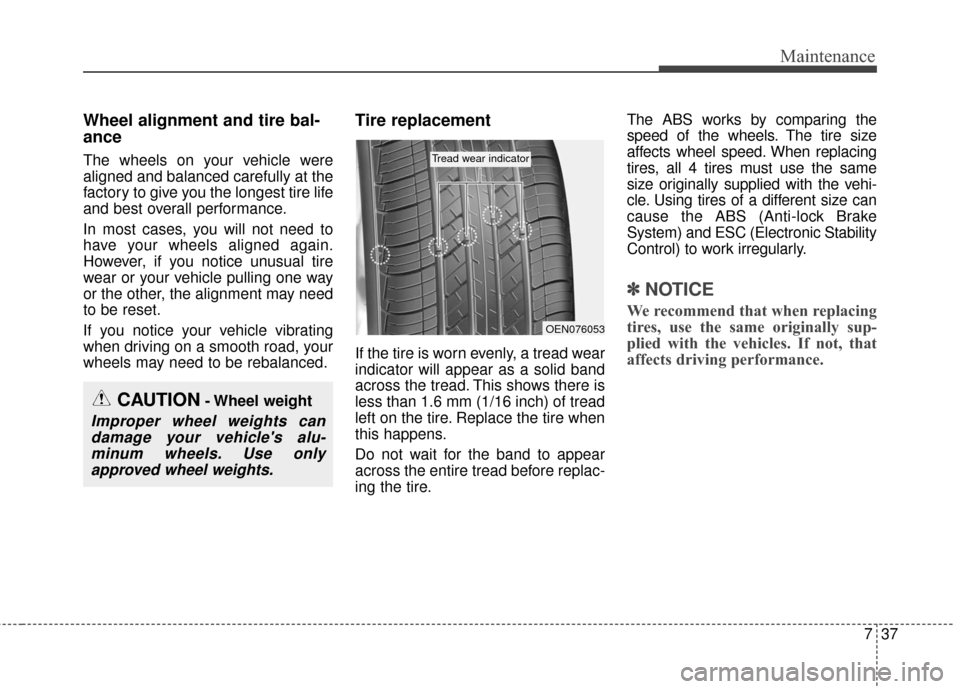
If the tire is worn evenly, a tread wear
indicator will appear as a solid band
across the tread. This shows there is
less than 1.6 mm (1/16 inch) of tread
left on the tire. Replace the tire when
this happens.
Do not wait for the band to appear
across the entire tread before replac-
ing the tire.The ABS works by comparing the
speed of the wheels. The tire size
affects wheel speed. When replacing
tires, all 4 tires must use the same
size originally supplied with the vehi-
cle. Using tires of a different size can
cause the ABS (Anti-lock Brake
System) and ESC (Electronic Stability
Control) to work irregularly.
✽ ✽
NOTICE
We recommend that when replacing
tires, use the same originally sup-
plied with the vehicles. If not, that
affects driving performance.
CAUTION- Wheel weight
Improper wheel weights can
damage your vehicle's alu-minum wheels. Use onlyapproved wheel weights.
OEN076053
Tread wear indicator
Page 382 of 470
763
Maintenance
Front side marker
Follow the steps 1 to 6 from the pre-
vious page.
7.Remove the socket from theassembly by turning the socket
counterclockwise until the tabs on
the socket align with the slots on
the assembly.
8.Pull the bulb out of the socket.
9.Insert a new bulb into the socket.
10. Install the socket into the assem- bly by aligning the tabs on the
socket with the slots on the
assembly and turning the socket
clockwise.
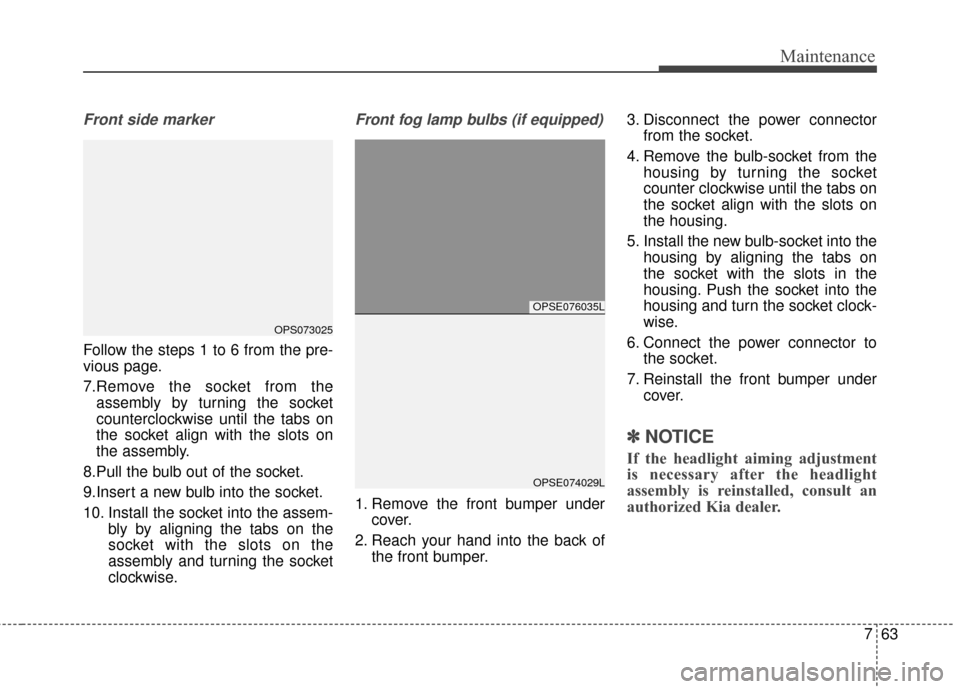
Front fog lamp bulbs (if equipped)
1. Remove the front bumper undercover.
2. Reach your hand into the back of the front bumper. 3. Disconnect the power connector
from the socket.
4. Remove the bulb-socket from the housing by turning the socket
counter clockwise until the tabs on
the socket align with the slots on
the housing.
5. Install the new bulb-socket into the housing by aligning the tabs on
the socket with the slots in the
housing. Push the socket into the
housing and turn the socket clock-
wise.
6. Connect the power connector to the socket.
7. Reinstall the front bumper under cover.
✽ ✽NOTICE
If the headlight aiming adjustment
is necessary after the headlight
assembly is reinstalled, consult an
authorized Kia dealer.
OPSE076035L
OPSE074029L
OPS073025
Page 384 of 470
765
Maintenance
Turn signal light
4. Remove the socket from theassembly by turning the socket
counterclockwise until the tabs on
the socket align with the slots on
the assembly.
5. Remove the bulb from the socket by pressing it in and rotating it
counterclockwise until the tabs on
the bulb align with the slots in the
socket. 6. Insert a new bulb by inserting it
into the socket and rotating it until
it locks into place.
7. Install the socket in the assembly by aligning the tabs on the socket
with the slots in the assembly and
turning the socket clockwise.
8. Reinstall the light assembly to the body of the vehicle.
Back-up light
Follow the steps 1 to 3 from the pre-
vious page.
4. Remove the socket from theassembly by turning the socket
counterclockwise until the tabs on
the socket align with the slots on
the assembly.
5. Pull the bulb out of the socket.
6. Insert a new bulb into the socket.
7. Install the socket into the assembly by aligning the tabs on the socket
with the slots on the assembly and
turning the socket clockwise.
8. Reinstall the light assembly to the body of the vehicle.
OPS073034OPS073045
Back-up
Page 386 of 470
767
Maintenance
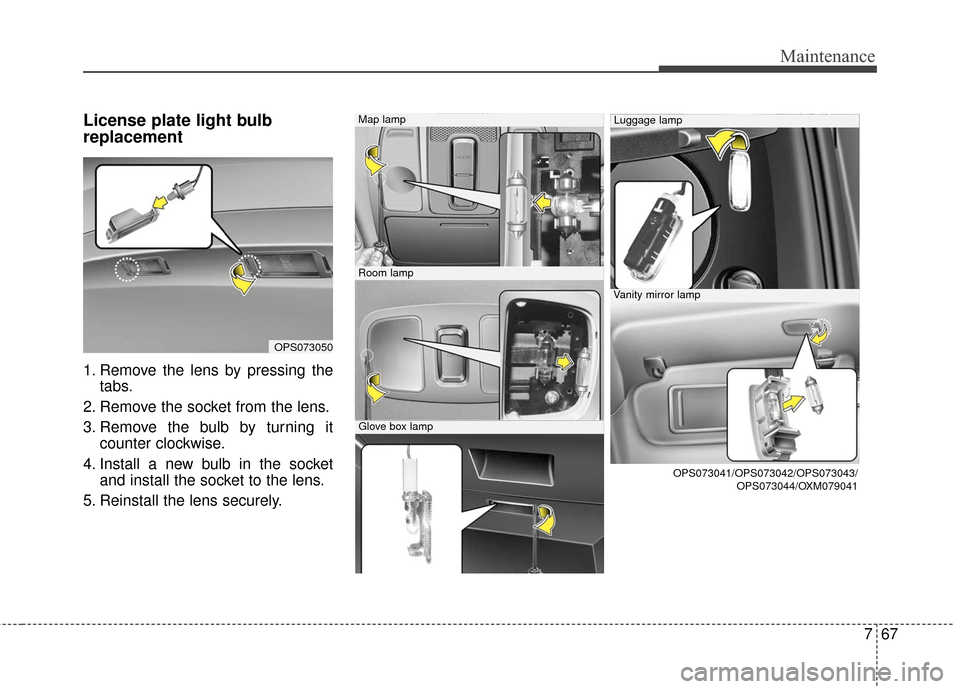
License plate light bulb
replacement
1. Remove the lens by pressing thetabs.
2. Remove the socket from the lens.
3. Remove the bulb by turning it counter clockwise.
4. Install a new bulb in the socket and install the socket to the lens.
5. Reinstall the lens securely.
OPS073050
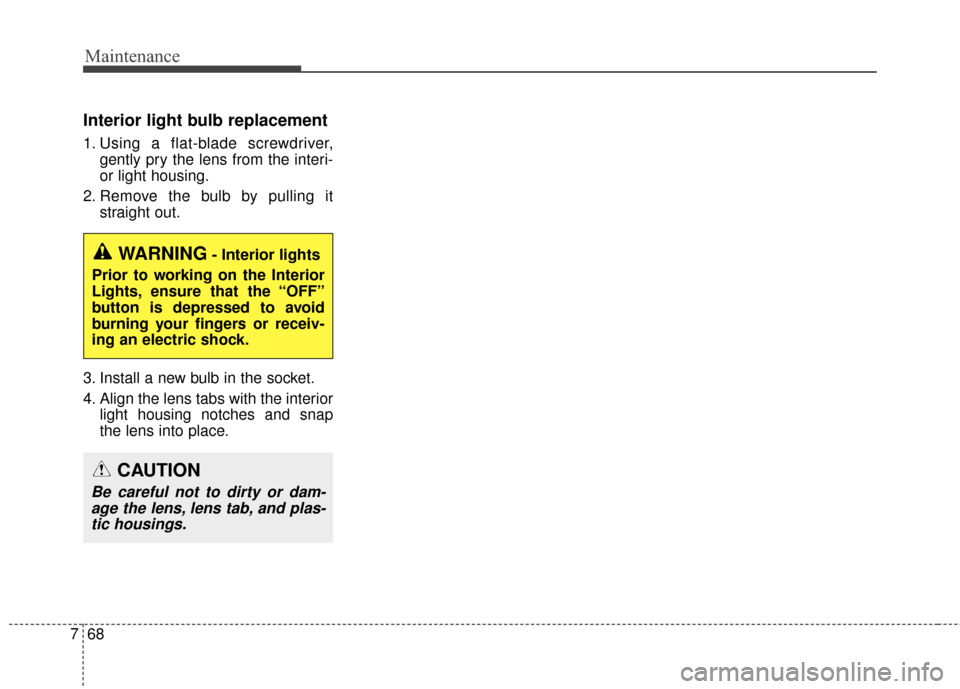
Map lamp
Room lamp
Glove box lamp
Luggage lamp
Vanity mirror lamp
OPS073041/OPS073042/OPS073043/ OPS073044/OXM079041
Page 387 of 470
Maintenance
68
7
Interior light bulb replacement
1. Using a flat-blade screwdriver,
gently pry the lens from the interi-
or light housing.
2. Remove the bulb by pulling it straight out.
3. Install a new bulb in the socket.
4. Align the lens tabs with the interior light housing notches and snap
the lens into place.
WARNING- Interior lights
Prior to working on the Interior
Lights, ensure that the “OFF”
button is depressed to avoid
burning your fingers or receiv-
ing an electric shock.
CAUTION
Be careful not to dirty or dam- age the lens, lens tab, and plas-tic housings.
Page 404 of 470

Index
2I
Active ECO system. . . . . . . . . . . . . . . . . . . . . . . . . . . . . 5-9Active ECO operation . . . . . . . . . . . . . . . . . . . . . . . . 5-9
Air bag - advanced supplemental restraint system . . . . 3-34 Adding equipment to or modifying your airbag-equipped vehicle . . . . . . . . . . . . . . . . . . . . . . . 3-57
Air bag warning label. . . . . . . . . . . . . . . . . . . . . . . . 3-57
Air bag warning light . . . . . . . . . . . . . . . . . . . . . . . . 3-37
Curtain air bag . . . . . . . . . . . . . . . . . . . . . . . . . . . . . 3-50
Do not installing a child restraint on a front passenger's seat . . . . . . . . . . . . . . . . . . . . . . . . . . . 3-37
Driver's and passenger's front air bag . . . . . . . . . . . 3-46
How does the air bag system operate . . . . . . . . . . . 3-35
Inflation and non-inflation conditions of the air bag . . 3-51
Occupant Detection System (ODS) . . . . . . . . . . . . . 3-41
Side air bag. . . . . . . . . . . . . . . . . . . . . . . . . . . . . . . . 3-49
SRS Care . . . . . . . . . . . . . . . . . . . . . . . . . . . . . . . . . 3-56
SRS components and functions . . . . . . . . . . . . . . . . 3-38
Air conditioning system . . . . . . . . . . . . . . . . . . . . . . . . . 8-3
Appearance care . . . . . . . . . . . . . . . . . . . . . . . . . . . . . . 7-69 Exterior care . . . . . . . . . . . . . . . . . . . . . . . . . . . . . . . 7-69
Interior care . . . . . . . . . . . . . . . . . . . . . . . . . . . . . . . 7-74
Audio system . . . . . . . . . . . . . . . . . . . . . . . . . . . . . . . 4-126 Antenna . . . . . . . . . . . . . . . . . . . . . . . . . . . . . . . . . 4-126
Audio . . . . . . . . . . . . . . . . . . . . . . . . . . . . . . . . . . . 4-\
139
AUX, USB and iPod
®port. . . . . . . . . . . . . . . . . . . 4-127 Bluetooth
®Wireless Technology . . . . . . . . . . . . . . 4-135
How vehicle audio works . . . . . . . . . . . . . . . . . . . . 4-129
Speaker lights . . . . . . . . . . . . . . . . . . . . . . . . . . . . . 4-128
Using iPod
®device . . . . . . . . . . . . . . . . . . . . . . . . 4-134
Using the USB device . . . . . . . . . . . . . . . . . . . . . . 4-133
Auto defogging system . . . . . . . . . . . . . . . . . . . . . . . . 4-114
Automatic climate control system . . . . . . . . . . . . . . . . 4-94 Automatic heating and air conditioning. . . . . . . . . . 4-95
Checking the amount of air conditioner refrigerantand compressor lubricant . . . . . . . . . . . . . . . . . . . 4-109
Climate control air filter. . . . . . . . . . . . . . . . . . . . . 4-108
Manual heating and air conditioning . . . . . . . . . . . . 4-96
System operation . . . . . . . . . . . . . . . . . . . . . . . . . . 4-106
Battery. . . . . . . . . . . . . . . . . . . . . . . . . . . . . . . . . . . . \
. . 7-31 Battery recharging . . . . . . . . . . . . . . . . . . . . . . . . . . 7-32
For best battery service . . . . . . . . . . . . . . . . . . . . . . 7-31
Reset items . . . . . . . . . . . . . . . . . . . . . . . . . . . . . . . . 7-33
Before driving . . . . . . . . . . . . . . . . . . . . . . . . . . . . . . . . . 5-3 Before entering vehicle . . . . . . . . . . . . . . . . . . . . . . . 5-3
Before starting . . . . . . . . . . . . . . . . . . . . . . . . . . . . . . 5-3
Necessary inspections . . . . . . . . . . . . . . . . . . . . . . . . 5-3
Brake fluid . . . . . . . . . . . . . . . . . . . . . . . . . . . . . . . . . . 7-23\
Checking the brake fluid level . . . . . . . . . . . . . . . . . 7-23
Brake system. . . . . . . . . . . . . . . . . . . . . . . . . . . . . . . . . 5-16 Anti-lock brake system (ABS) . . . . . . . . . . . . . . . . . 5-22
A
B