2017 KIA Sorento cruise control
[x] Cancel search: cruise controlPage 314 of 576

Driving your vehicle
Before driving . . . . . . . . . . . . . . . . . . . . . . . . . . . . . . 5-4
• Before entering vehicle . . . . . . . . . . . . . . . . . . . . . . . . . 5-4
• Necessary inspections . . . . . . . . . . . . . . . . . . . . . . . . . . 5-4
• Before starting . . . . . . . . . . . . . . . . . . . . . . . . . . . . . . . 5-4
Key positions . . . . . . . . . . . . . . . . . . . . . . . . . . . . . . . 5-6
• Illuminated ignition switch . . . . . . . . . . . . . . . . . . . . . 5-6
• Ignition switch position . . . . . . . . . . . . . . . . . . . . . . . . . 5-6
• Starting the engine . . . . . . . . . . . . . . . . . . . . . . . . . . . . 5-7
ENGINE START/STOP button . . . . . . . . . . . . . . . 5-9
• Illuminated ENGINE START/STOP button . . . . . . . 5-9
• ENGINE START/STOP button position . . . . . . . . . . . 5-9
• Starting the engine with a smart key . . . . . . . . . . . . . 5-11
Automatic transaxle . . . . . . . . . . . . . . . . . . . . . . . . 5-13
• Automatic transaxle operation. . . . . . . . . . . . . . . . . . 5-13
• Good driving practices . . . . . . . . . . . . . . . . . . . . . . . . 5-19
All wheel drive (AWD) . . . . . . . . . . . . . . . . . . . . . . 5-20
• Tight corner brake effect . . . . . . . . . . . . . . . . . . . . . . 5-21
• All wheel drive (AWD) transfer mode selection . . . . 5-22
• For safe all wheel drive operation . . . . . . . . . . . . . . . 5-23
Brake system . . . . . . . . . . . . . . . . . . . . . . . . . . . . . . 5-27
• Power brakes . . . . . . . . . . . . . . . . . . . . . . . . . . . . . . . . 5-27
• Parking brake – Foot type . . . . . . . . . . . . . . . . . . . . . 5-29
• Electronic parking brake (EPB) . . . . . . . . . . . . . . . . 5-30
• AUTO HOLD. . . . . . . . . . . . . . . . . . . . . . . . . . . . . . . . 5-37
• Anti-lock brake system (ABS) . . . . . . . . . . . . . . . . . . 5-40
• Electronic stability control (ESC) . . . . . . . . . . . . . . . 5-42• Vehicle stability management (VSM) . . . . . . . . . . . . 5-46
• Hill-start assist control (HAC) . . . . . . . . . . . . . . . . . . 5-47
• Good braking practices. . . . . . . . . . . . . . . . . . . . . . . . 5-48
Autonomous Emergency Braking (AEB)/
Forward Collision Warning (FCW) . . . . . . . . . . 5-50
• System setting and activation . . . . . . . . . . . . . . . . . . . 5-50
• AEB warning message and system control . . . . . . . . 5-52
• Brake operation . . . . . . . . . . . . . . . . . . . . . . . . . . . . . . 5-54
• Sensor to detect the distance from the vehicle
in front (front radar) . . . . . . . . . . . . . . . . . . . . . . . . 5-54
• System malfunction . . . . . . . . . . . . . . . . . . . . . . . . . . . 5-55
• Limitation of the system . . . . . . . . . . . . . . . . . . . . . . . 5-56
• Recognizing pedestrians . . . . . . . . . . . . . . . . . . . . . . . 5-59
Cruise control system. . . . . . . . . . . . . . . . . . . . . . . 5-61
• To set cruise control speed . . . . . . . . . . . . . . . . . . . . . 5-62
• To increase cruise control set speed. . . . . . . . . . . . . . 5-62
• To decrease the cruising speed . . . . . . . . . . . . . . . . . . 5-63
• To temporarily accelerate with the cruise control on . . . . . . . . . . . . . . . . . . . . . . . . . . . . . . . . . . 5-63\
• To cancel cruise control . . . . . . . . . . . . . . . . . . . . . . . 5-63
• To resume cruising speed . . . . . . . . . . . . . . . . . . . . . . 5-64
• To turn cruise control off. . . . . . . . . . . . . . . . . . . . . . . 5-64
Advanced smart cruise control system (ASCC). . 5-65
• Speed setting (ASCC) . . . . . . . . . . . . . . . . . . . . . . . . . 5-66
• Vehicle to vehicle distance setting (ASCC) . . . . . . . . 5-70
• To adjust the sensitivity of advanced smart
cruise control . . . . . . . . . . . . . . . . . . . . . . . . . . . . . . 5-74
5
Page 315 of 576

• To convert to cruise control mode . . . . . . . . . . . . . . . 5-75
• Limitations of the system . . . . . . . . . . . . . . . . . . . . . . 5-75
Drive mode integrated control system . . . . . . . . . 5-81
• Drive mode . . . . . . . . . . . . . . . . . . . . . . . . . . . . . . . . . . 5-81\
Blind spot detection system (BSD) . . . . . . . . . . . . 5-84
• BSD (Blind Spot Detection) / LCA (Lane Change Assist) . . . . . . . . . . . . . . . . . . . 5-85
• RCTA (Rear Cross Traffic Alert). . . . . . . . . . . . . . . . 5-88
• Non-operating condition . . . . . . . . . . . . . . . . . . . . . . . 5-90
Lane departure warning system (LDWS) . . . . . . 5-92
• Warning indicator . . . . . . . . . . . . . . . . . . . . . . . . . . . . 5-94
• The LDWS does not operate when . . . . . . . . . . . . . . 5-94
Economical operation . . . . . . . . . . . . . . . . . . . . . . 5-96
Special driving conditions . . . . . . . . . . . . . . . . . . . 5-98
• Hazardous driving conditions . . . . . . . . . . . . . . . . . . 5-98
• Reducing the risk of a rollover . . . . . . . . . . . . . . . . . 5-98
• Rocking the vehicle . . . . . . . . . . . . . . . . . . . . . . . . . . . 5-99
• Smooth cornering . . . . . . . . . . . . . . . . . . . . . . . . . . . 5-100
• Driving at night . . . . . . . . . . . . . . . . . . . . . . . . . . . . . 5-100
• Driving in the rain . . . . . . . . . . . . . . . . . . . . . . . . . . . 5-101
• Driving in flooded areas . . . . . . . . . . . . . . . . . . . . . . 5-101
• Driving off-road . . . . . . . . . . . . . . . . . . . . . . . . . . . . . 5-102
• Highway driving . . . . . . . . . . . . . . . . . . . . . . . . . . . . 5-102
Winter driving . . . . . . . . . . . . . . . . . . . . . . . . . . . 5-103
• Snowy or icy conditions . . . . . . . . . . . . . . . . . . . . . . 5-103
• Use high quality ethylene glycol coolant . . . . . . . . . 5-104
• Check battery and cables . . . . . . . . . . . . . . . . . . . . . 5-104 • Change to "winter weight" oil if necessary . . . . . . 5-104
• Check spark plugs and ignition system. . . . . . . . . . 5-104
• To keep locks from freezing . . . . . . . . . . . . . . . . . . . 5-104
• Use approved window washer anti-freeze in
system . . . . . . . . . . . . . . . . . . . . . . . . . . . . . . . . . . . . \
5-104
• Don't let your parking brake freeze . . . . . . . . . . . . 5-105
• Don't let ice and snow accumulate underneath . . . 5-105
• Carry emergency equipment . . . . . . . . . . . . . . . . . . 5-105
Trailer towing . . . . . . . . . . . . . . . . . . . . . . . . . . . . 5-106
• Hitches . . . . . . . . . . . . . . . . . . . . . . . . . . . . . . . . . . . . \
5-106
• Safety chains . . . . . . . . . . . . . . . . . . . . . . . . . . . . . . . 5-106
• Trailer brakes . . . . . . . . . . . . . . . . . . . . . . . . . . . . . . 5-106
• Driving with a trailer . . . . . . . . . . . . . . . . . . . . . . . . 5-108
• Maintenance when trailer towing . . . . . . . . . . . . . . 5-111
• If you do decide to pull a trailer . . . . . . . . . . . . . . . 5-112
Vehicle load limit . . . . . . . . . . . . . . . . . . . . . . . . . 5-114
• Tire and loading information label . . . . . . . . . . . . . 5-114
• Certification label . . . . . . . . . . . . . . . . . . . . . . . . . . . 5-118
Vehicle weight glossary . . . . . . . . . . . . . . . . . . . . 5-120
• Base curb weight . . . . . . . . . . . . . . . . . . . . . . . . . . . 5-120
• Vehicle curb weight . . . . . . . . . . . . . . . . . . . . . . . . . . 5-120
• Cargo weight . . . . . . . . . . . . . . . . . . . . . . . . . . . . . . . 5-120
• GAW (Gross axle weight) . . . . . . . . . . . . . . . . . . . . . 5-120
• GAWR (Gross axle weight rating) . . . . . . . . . . . . . . 5-120
• GVW (Gross vehicle weight) . . . . . . . . . . . . . . . . . . 5-120
• GVWR (Gross vehicle weight rating) . . . . . . . . . . . 5-120
5
Page 374 of 576

561
Driving your vehicle
The cruise control system allows you
to program the vehicle to maintain a
constant speed without depressing
the accelerator pedal.
This system is designed to function
above approximately 30 km/h (20
mph).
If the cruise control is left on,
(CRUISE indicator light in the instru-
ment cluster illuminated) the cruise
control can be switched on acciden-
tally. Keep the cruise control system
off (CRUISE indicator light OFF)
when the cruise control is not in use,
to avoid inadvertently setting a
speed.Use the cruise control system only
when traveling on open highways in
good weather.
Do not use the cruise control when
driving in heavy or varying traffic, or
on slippery (rainy, icy or snow-cov-
ered) or winding roads or over 6%
up-hill or down-hill roads.
✽ ✽
NOTICE
• During normal cruise control
operation, when the SET switch is
activated or reactivated after
applying the brakes, the cruise
control will energize after approx-
imately 3 seconds. This delay is
normal.
• To activate cruise control, depress the brake pedal at least once after
turning the ignition switch to the
ON position or starting the engine.
This is to check if the brake switch
which is important part to cancel
cruise control is in normal condi-
tion.
CRUISE CONTROL SYSTEM
WARNING - Misuse of
Cruise Control
Do not use cruise control if the
traffic situation does not allow
you to drive safely at a constant
speed and with sufficient dis-
tance to the vehicle in front.
OUMA054021
Page 375 of 576

Driving your vehicle
62
5
To set cruise control speed:
1.Press the CRUISE button on the
steering wheel to turn the system
on. The CRUISE indicator light in the
instrument cluster will illuminate.
2.Accelerate to the desired speed, which must be more than 30 km/h
(20 mph). 3.Move the lever down (to SET-), and
release it at the desired speed. The
SET indicator light in the instru-
ment cluster will illuminate.
Release the accelerator at the
same time. The desired speed will
automatically be maintained.
On a steep grade, the vehicle mayslow down or speed up slightly whilegoing downhill.
To increase cruise control set
speed:
Follow either of these procedures:
Move the lever up (to RES+) and hold it. Your vehicle will accelerate.
Release the lever at the speed you
want.
Move the lever up (to RES+) and release it immediately. The cruising
speed will increase by 2 km/h (1.0
mph) each time the lever is operat-
ed in this manner.
OUMA054022
OUMA054023
OUMA054024
Page 376 of 576
563
Driving your vehicle
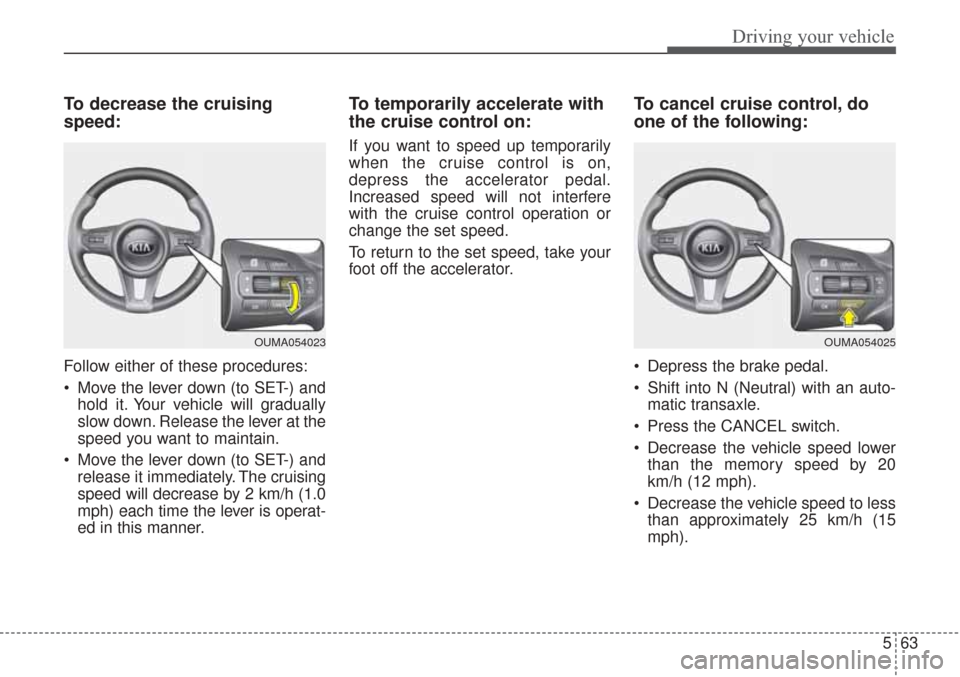
To decrease the cruising
speed:
Follow either of these procedures:
Move the lever down (to SET-) andhold it. Your vehicle will gradually
slow down. Release the lever at the
speed you want to maintain.
Move the lever down (to SET-) and release it immediately. The cruising
speed will decrease by 2 km/h (1.0
mph) each time the lever is operat-
ed in this manner.
To temporarily accelerate with
the cruise control on:
If you want to speed up temporarily
when the cruise control is on,
depress the accelerator pedal.
Increased speed will not interfere
with the cruise control operation or
change the set speed.
To return to the set speed, take your
foot off the accelerator.
To cancel cruise control, do
one of the following:
Depress the brake pedal.
Shift into N (Neutral) with an auto- matic transaxle.
Press the CANCEL switch.
Decrease the vehicle speed lower than the memory speed by 20
km/h (12 mph).
Decrease the vehicle speed to less than approximately 25 km/h (15
mph).
OUMA054025OUMA054023
Page 377 of 576

Driving your vehicle
64
5
Each of these actions will cancel
cruise control operation (the SETindicator light in the instrument clus-ter will go off), but it will not turn thesystem off. If you wish to resumecruise control operation, move thelever up (to RES+). You will return toyour previously preset speed.To resume cruising speed at
more than approximately 30
km/h (20 mph):
If any method other than the
CRUISE ON-OFF switch was used
to cancel cruising speed and the sys-
tem is still activated, the most recent
set speed will automatically resume
when you move the lever up.
It will not resume, however, if the
vehicle speed has dropped below
approximately 30 km/h (20 mph).
To turn cruise control off, do
one of the following:
Press the CRUISE button (the CRUISE indicator light in the
instrument cluster will go off).
Turn the ignition off.
Both of these actions will cancel the cruise control operation. If you wantto resume the cruise control opera-tion, repeat the steps provided in “Toset cruise control speed” on the pre-vious page.
OUMA054024
OUMA054022
Page 378 of 576

565
Driving your vehicle
ADVANCED SMART CRUISE CONTROL SYSTEM (ASCC) (IF EQUIPPED)
➀Cruise indicator
➁ Set speed
➂ Vehicle-to-vehicle distance
The ASCC allows you to program the
vehicle to maintain a set speed so
long as it is not limited by traffic.
When traffic is encountered the vehi-
cle will slow down to maintain a set
distance behind traffic without
depressing the accelerator or brake
pedal.
WARNING - Advanced
Smart Cruise Control
Inadvertent Activation
If the advanced smart cruise
control is left on (CRUISE indi-
cator in the instrument cluster
illuminated), it can be activated
inadvertently. Keep the
advanced smart cruise control
system off (CRUISE indicator
turn off) when the advanced
smart cruise control is not in
use to avoid setting a speed
which the driver is not aware of.
WARNING- Advanced
Smart Cruise Control
Limitations
The advanced smart cruise control is a supplemental sys-
tem and is not a substitute for
safe driving practices. It is the
responsibility of the driver to
always check the speed and
distance to the vehicle ahead.
(Continued)
OUM056156
(Continued)
Do not use the advanced smartcruise control when it may not
be safe to keep the car at a con-
stant speed, for instance, driv-
ing in heavy or varying traffic,
or on slippery (rainy, icy or
snow-covered) or winding
roads or over 6% up-hill or
down-hill roads.
The advanced smart cruise control system cannot recog-
nize a stopped vehicle, pedes-
trians or an oncoming vehicle.
Always look ahead cautiously
to prevent unexpected and
sudden situations from occur-
ring.
Use the advanced smart cruise control system only when trav-
eling on open highways in
good weather conditions.
Limited visibility (rain, snow, smog, etc)
Cruise function should not be used when the vehicle is being
towed to prevent any damage.
Page 379 of 576

Driving your vehicle
66
5
Speed setting (ASCC)
To set cruise control speed:
1.Press the CRUISE button, to turn
the system on. The CRUISE indi-
cator in the instrument cluster will
illuminate.
2. Accelerate to the desired speed. (110 mph) : when there is no
vehicle in front
mph) : when there is a vehicle in
front 3. Move the lever down (to SET-),
and release it at the desired
speed. The set speed and vehicle
to vehicle distance on the LDC
screen will illuminate.
4.Release the accelerator pedal. The desired speed will automatically be
maintained.
If there is a vehicle in front of you, thespeed may decrease to maintain thedistance to the vehicle ahead.
On a steep grade, the vehicle mayslow down or speed up slightly whilegoing uphill or downhill. To increase cruise control set
speed:
Follow either of these procedures:
Move the lever up (to RES+), and hold it. Your vehicle set speed will
increase by 10 km/h (5 mph).
Release the lever at the speed you
want.
Move the lever up (to RES+), and release it immediately. The cruising
speed will increase by 1.0 km/h (1
mph) each time you move the lever
up (to RES+) in this manner.
ASCC will operate to a maximum setting of 180 km/h (110 mph).
However all local speed limit laws
must be followed.
OUMA054200
OUMA054201
OUMA054202