Page 158 of 576
473
Features of your vehicle
INSTRUMENT CLUSTER
1. Tachometer
2. Speedometer
3. Engine coolant temperature gauge
4. Fuel gauge
5. LCD display
6. Warning and indicator lights
OUMA044100C/OUMA044101C
■ ■Type A
❈The actual cluster in the vehicle may differ
from the illustration.
For more details, refer to the "Gauges" in
this chapter.
■ ■ Type B
Page 161 of 576

Features of your vehicle
76
4
Engine Coolant Temperature
Gauge
This gauge indicates the tempera-
ture of the engine coolant when the
ignition switch or Engine Start/Stop
button is ON. If the gauge pointer moves beyond
the normal range area toward the “H”
position, it indicates overheating that
may damage the engine.
Do not continue driving with an over-
heated engine. If your vehicle over-
heats, refer to “If the Engine
Overheats” in chapter 6.
Fuel Gauge
This gauge indicates the approxi-
mate amount of fuel remaining in the
fuel tank.
✽ ✽
NOTICE
• The fuel tank capacity is given in
chapter 8.
• The fuel gauge is supplemented by a low fuel warning light, which
will illuminate when the fuel tank
is nearly empty.
• On inclines or curves, the fuel gauge pointer may fluctuate or the
low fuel warning light may come
on earlier than usual due to the
movement of fuel in the tank.
WARNING - Hot radiator
Never remove the radiator cap
when the engine is hot. The
engine coolant is under pres-
sure and could cause severe
burns. Wait until the engine is
cool before adding coolant to
the reservoir.
OUM044105
■ Type A■Type B
OUM044106
■Type A■Type B
Page 163 of 576
Features of your vehicle
78
4
To change the temperature unit (from
°C to °F or from °F to °C)
The temperature unit can be
changed by using the "User
Settings" mode of the LCD display.
❈ For more details, refer to “LCD
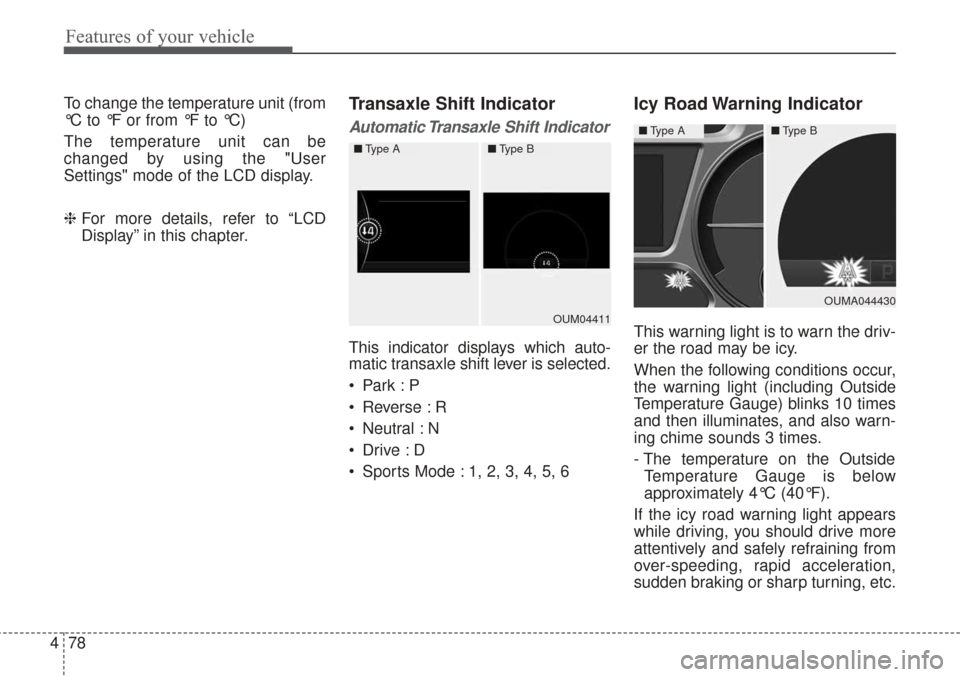
Display” in this chapter.Transaxle Shift Indicator
Automatic Transaxle Shift Indicator
This indicator displays which auto-
matic transaxle shift lever is selected.
Reverse : R
Neutral : N
Sports Mode : 1, 2, 3, 4, 5, 6
Icy Road Warning Indicator
This warning light is to warn the driv-
er the road may be icy.
When the following conditions occur,
the warning light (including Outside
Temperature Gauge) blinks 10 times
and then illuminates, and also warn-
ing chime sounds 3 times.
- The temperature on the Outside
Temperature Gauge is below
approximately 4°C (40°F).
If the icy road warning light appears
while driving, you should drive more
attentively and safely refraining from
over-speeding, rapid acceleration,
sudden braking or sharp turning, etc.OUM04411
■ Type A■Type B
OUMA044430
■Type A■Type B
Page 164 of 576

479
Features of your vehicle
LCD DISPLAY
❈For controlling the LCD modes, refer to "LCD Display Control" in this chapter.
LCD Modes
Modes SymbolExplanation
Trip ComputerThis mode displays driving information like the tripmeter, fuel economy, and so on.
For more details, refer to “Trip Computer” in this chapter.
Tu r n B y Tu r n
(if equipped)This mode displays the state of the navigation.
ASCC/LDWS (if equipped)
This mode displays the state of the Advanced Smart Cruise Control system (ASCC)
and Lane Departure Warning System (LDWS).
For more details, refer to "Advanced Smart Cruise Control system (ASCC)" or
"Lane Departure Warning System (LDWS)" in chapter 5.
A/V
(if equipped)This mode displays the state of the A/V system.
Information
This mode informs of service interval (km or days).
This mode informs of warning messages related to washer fluid or malfunction of
Blind Spot Detection system (BSD) and so on.
When any door is not closed securely, this symbol is illuminated.
User SettingsIn this mode, you can change settings of the doors, lamps and so on.
Page 169 of 576
Features of your vehicle
84
4
Turn By Turn Mode (if equipped)
This mode displays the state of the
navigation.
ASCC/LDWS Mode
(if equipped)
This mode displays the state of the
Advanced Smart Cruise Control
(ASCC) and Lane Departure
Warning System (LDWS).
For more information, refer to
"Advanced Smart Cruise Control
(ASCC)" and "Lane Departure
Warning System (LDWS)" in chapter
5.
A/V Mode (if equipped)
This mode displays the state of the
A/V system.OUM054126L
OYP044273NOUMA057232
Page 170 of 576

485
Features of your vehicle
Service Mode
Service Interval
Service interval
It calculates and displays when you
need a scheduled maintenance
service (km or days).
If the remaining km or time reaches
1,500 km (900 mi.) or 30 days.
Service interval message is dis-
played for several seconds each time
you set the ignition switch or Engine
Start/Stop Button to the ON position.Service required
If you do not have your vehicle serv-
iced according to the preset service
interval.
“Service required” message is dis-
played for several seconds each time
you set the ignition switch or Engine
Start/Stop Button to the ON position.
To reset the service interval to the
km and days y
ou presetbefore:
Press the OK button (reset) for more
than 1 second. Service interval OFF
If the service interval is not set
"Service interval OFF” message is
displayed on the LCD display.
If you want to activate Service inter-
val function, set the service interval
in the User setting mode.
For more details, refer to “User set-
ting mode" in this chapter.
OYP044314C
OYP044119COYP044122N
Page 175 of 576

Features of your vehicle
90
4
Other features
Fuel economy auto reset
The average fuel economy will not
reset automatically whenever refuel-
ing.
The average fuel economy will reset
automatically when refueling.
For more details, refer to “Trip
modes" in this chapter.
Wiper/Light Display (if equipped)
If this item checked, LCD display
shows a selected wiper/light mode
whenever you changed its mode. Sub-Scale (for Type B cluster)
If this item checked, Sub-scale
speedometer will be displayed in the
cluster.
Fuel Economy Unit
Choose the fuel economy unit.
Temperature Unit
Convert the temperature unit from °C
to °F or from °F to °C.
Language
Choose the language you prefer
within the LCD.
Warning Messages
Shift to P position
(for smart key system)
This warning message illuminates if you try to turn off the engine without
the shift lever in P (Park) position.
At this time, the Engine Start/Stop Button turns to the ACC position (If
you press the Engine Start/Stop
Button once more, it will turn to the
ON position).
OYP044131N
Page 180 of 576
495
Features of your vehicle
Low Washer Fluid (if equipped)
This warning message illuminateson the service reminder mode if
the washer fluid level in the reser-
voir is nearly empty.
It means that you should refill the washer fluid.
Turn on FUSE SWITCH
This warning message illuminatesif the fuse switch on the fuse box is
OFF.
It means that you should turn the fuse switch on.
For more details, refer to “Fuses” in
chapter 7.
Low Fuel
This warning message illuminates if
the fuel tank is nearly empty.
- When the low fuel level warning light is illuminated.
- When the trip computer displays "--- km (or mile)" as range.
Add fuel as soon as possible.
OYP044139NOYP044135NOYP044276N


