Page 327 of 625
Audio system
557
®Commands: Commands available during iPod®
operation. My Music Commands: Commands available during
My Music operation.
Command Function
Random Randomly plays the songs within the current
category.
Random Off Cancels random play to play songs in sequen-
tial order.
Repeat Repeats the current song.
Repeat Off Cancels repeat play to play songs in sequen-
tial order.
Command Function
Random Randomly plays all saved files.
Random Off Cancels random play to play files in sequential
order.
RepeatRepeats the current file.
Repeat Off Cancels repeat play to play files in sequential
order.
Delete Deletes the current file. You will bypass an
additional confirmation process.
Page 328 of 625
Audio system
58
5
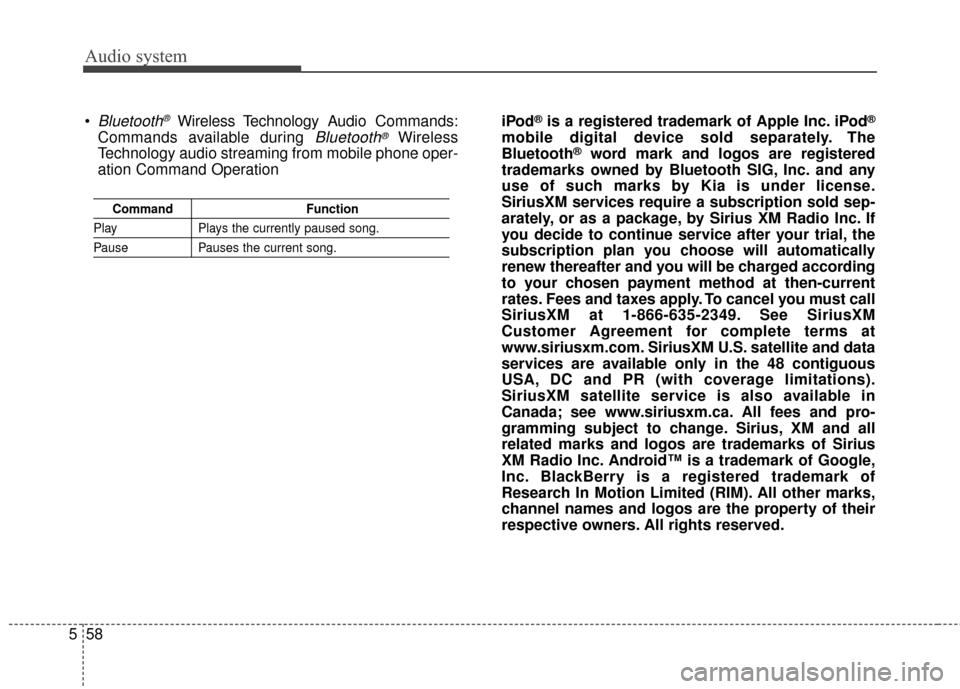
Command Function
PlayPlays the currently paused song.
PausePauses the current song.
Bluetooth®Wireless Technology A udio Commands:
Commands available during
Bluetooth®Wireless
Technology audio streaming from mobile phone oper-
ation Command Operation iPod
®is a registered trademark of Apple Inc. iPod®
mobile digital device sold separately. The
Bluetooth®word mark and logos are registered
trademarks owned by Bluetooth SIG, Inc. and any
use of such marks by Kia is under license.
SiriusXM services require a subscription sold sep-
arately, or as a package, by Sirius XM Radio Inc. If
you decide to continue service after your trial, the
subscription plan you choose will automatically
renew thereafter and you will be charged according
to your chosen payment method at then-current
rates. Fees and taxes apply. To cancel you must call
SiriusXM at 1-866-635-2349. See SiriusXM
Customer Agreement for complete terms at
www.siriusxm.com. SiriusXM U.S. satellite and data
services are available only in the 48 contiguous
USA, DC and PR (with coverage limitations).
SiriusXM satellite service is also available in
Canada; see www.siriusxm.ca. All fees and pro-
gramming subject to change. Sirius, XM and all
related marks and logos are trademarks of Sirius
XM Radio Inc. Android™ is a trademark of Google,
Inc. BlackBerry is a registered trademark of
Research In Motion Limited (RIM). All other marks,
channel names and logos are the property of their
respective owners. All rights reserved.
Page 329 of 625
Audio system
559
A4H3G0000EC
AUDIO (With Touch Screen)
(With Bluetooth®Wireless Technology)
■Type B
Page 330 of 625
Audio system
60
5
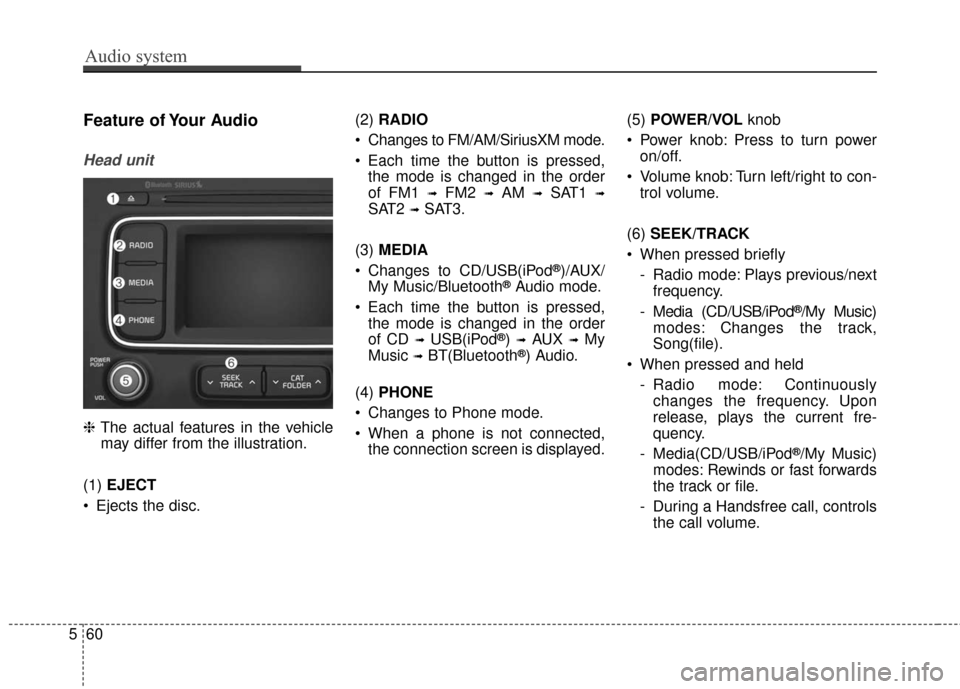
Feature of Your Audio
Head unit
❈ The actual features in the vehicle
may differ from the illustration.
(1) EJECT
Ejects the disc. (2)
RADIO
Changes to FM/AM/SiriusXM mode.
Each time the button is pressed, the mode is changed in the order
of FM1
➟FM2 ➟AM ➟SAT1 ➟
SAT2 ➟SAT3.
(3) MEDIA
Changes to CD/USB(iPod
®)/AUX/
My Music/Bluetooth®Audio mode.
Each time the button is pressed, the mode is changed in the order
of CD
➟USB(iPod®) ➟AUX ➟My
Music
➟BT(Bluetooth®) Audio.
(4) PHONE
Changes to Phone mode.
When a phone is not connected, the connection screen is displayed. (5)
POWER/VOL knob
Power knob: Press to turn power on/off.
Volume knob: Turn left/right to con- trol volume.
(6) SEEK/TRACK
When pressed briefly - Radio mode: Plays previous/nextfrequency.
- Media (CD/USB/iPod
®/My Music)
modes: Changes the track,
Song(file).
When pressed and held - Radio mode: Continuouslychanges the frequency. Upon
release, plays the current fre-
quency.
- Media(CD/USB/iPod
®/My Music)
modes: Rewinds or fast forwards
the track or file.
- During a Handsfree call, controls the call volume.
Page 331 of 625
Audio system
561
(7) DISP
(8) CLOCK
When pressed briefly: Display time screen.
When pressed and held: Move to the time setting mode. (9)
SCAN
Radio mode: Previews all receiv- able broadcasts for 5 seconds
each.
Media (CD/USB/My Music) modes: Previews each song (file) for 10
seconds each.
(10) SETUP
Changes to Setup mode.
(11) TUNE knob
Radio mode: Turn to change broadcast frequencies.
Media (CD/USB/iPod®/My Music)
modes: Turn to search Tracks/
chan nels/files.
(12) CAT/FOLDER
SiriusXM Radio: Category Search.
MP3 CD/USB mode: Search Folder. (13)
RESET
Forced system termination and system restart.
Page 332 of 625

Audio system
62
5
WARNING
-
Audio System Safety
Warnings
Do not stare at the screen while driving. Staring at the
screen for prolonged periods
of time could lead to traffic
accidents.
Do not disassemble, assem- ble, or modify the audio sys-
tem. Such acts could result in
accidents, fire, or electric
shock.
Using the phone while driving may lead to a lack of attention
of traffic conditions and
increase the likelihood of
accidents. Use the phone fea-
ture after parking the vehicle.
Exercise caution not to spill water or introduce foreign
objects into the device. Such
acts could lead to smoke, fire,
or product malfunction.
(Continued)
(Continued)
Please refrain from use if thescreen is blank or no sound
can be heard as these signs
may indicate product mal func-
tion. Continued use in such
conditions could lead to acci-
dents (fires, electric shock) or
product malfunctions.
Do not touch the antenna dur- ing thunder or lightening as
such acts may lead to light-
ning induced electric shock.
Do not stop or park in park- ing-restricted areas to operate
the product. Such acts could
lead to traffic accidents.WARNING - Distracted
Driving
Driving while distracted can
result in a loss of vehicle con-
trol that may lead to an acci-
dent, severe personal injury,
and death. The driver’s primary
responsibility is in the safe and
legal operation of a vehicle, and
use of any handheld devices,
other equipment, or vehicle sys-
tems which take the driver’s
eyes, attention and focus away
from the safe operation of a
vehicle or which are not permis-
sible by law should never be
used during operation of the
vehicle.
Page 333 of 625

Audio system
563
✽ ✽NOTICE
• If you want to change the position
of device installation, please
inquire with your place of pur-
chase or service maintenance cen-
ter. Technical expertise is required
to install or disassemble the
device.
• Turn on the car ignition before using this device. Do not operate
the audio system for long periods
of time with the ignition turned off
as such operations may lead to
battery discharge.
✽ ✽ NOTICE
In case of product malfunction,
please contact your dealer or vehicle
service center.CAUTION
Do not subject the device to
severe shock or impact. Directpressure onto the front side ofthe monitor may cause damageto the LCD or touch screen.
When cleaning the device, make sure to turn off thedevice and use a dry andsmooth cloth. Never usetough materials, chemicalcloths, or solvents (alcohol,benzene, thinners, etc.) assuch materials may damagethe device panel or causecolor/quality deterioration
Do not place beverages close to the audio system. Spillingbeverages may lead to systemmalfunction.
Placing the audio system with- in an electromagnetic environ-ment may result in noise inter-ference.
Page 334 of 625

Audio system
64
5
✽ ✽
NOTICE - Using Compact
Discs
• This device has been manufactured to be com-
patible with software
bearing the following logo marks.
• Do not clean discs with chemical solutions, such as record sprays,
antistatic sprays, antistatic liq-
uids, benzene, or thinners.
• After using a disc, put the disc back in its original case to prevent
disc scratches.
• Hold discs by their edges or within the center hole to prevent damage
to disc surfaces.
• Do not introduce foreign sub- stances into the disc insert/eject
slot. Introducing foreign sub-
stances could damage the device
interior.
• Do not insert two discs simultane- ously.
• When using CD-R/CD-RW discs, differences in disc reading and
playing times may occur depend-
ing on the disc manufacturer, pro-
duction method and the recording
method used. (Continued)(Continued)
• Clean fingerprints and dust off the
disc surface (coated side) with a
soft cloth.
• The use of CD-R/CD-RW discs attached with labels may result in
disc slot jams or difficulties in disc
removal. Such discs may also
result in noise while playing.
• Some CD-R/CD-RW discs may not properly operate depending on
the disc manufacturer, production
method and the recording method
used. If problems persist, trying
using a different CD as continued
use may result in malfunctions.
• The performance of this product may differ depending on the CD-
RW Drive Software.
• Copy-protected CDs such as S- type CDs may not function in the
device. DATA discs cannot be
played. (However, such discs may
still operate but will do so abnor-
mally.) (Continued)(Continued)
• Do not use abnormally shaped
discs (8cm, heart-shaped, octagon-
shaped) as such discs could lead to
malfunctions.
• If the disc is straddled on the disc slot without removal for 10 sec-
onds, the disc will automatically
be re-inserted into the disc player.
• Only genuine audio CDs are sup- ported. Other discs may result in
recognition failure. (e.g. copy CD-
R, CDs with labels)


