2017 KIA RIO instrument panel
[x] Cancel search: instrument panelPage 54 of 449
339
Safety features of your vehicle
Occupant detection system
Your vehicle is equipped with an occu-
pant detection system in the front pas-
senger's seat.
The occupant detection system is
designed to detect the presence of a
properly-seated front passenger and
determine if the passenger's front air bag
should be enabled (may inflate) or not.
The driver's front air bag is not affected
or controlled by the occupant detection
system.
Main components of occupant detec-tion system
A detection device located within the front passenger seat track.
Electronic system to determine whether passenger air bag systems
should be activated or deactivated.
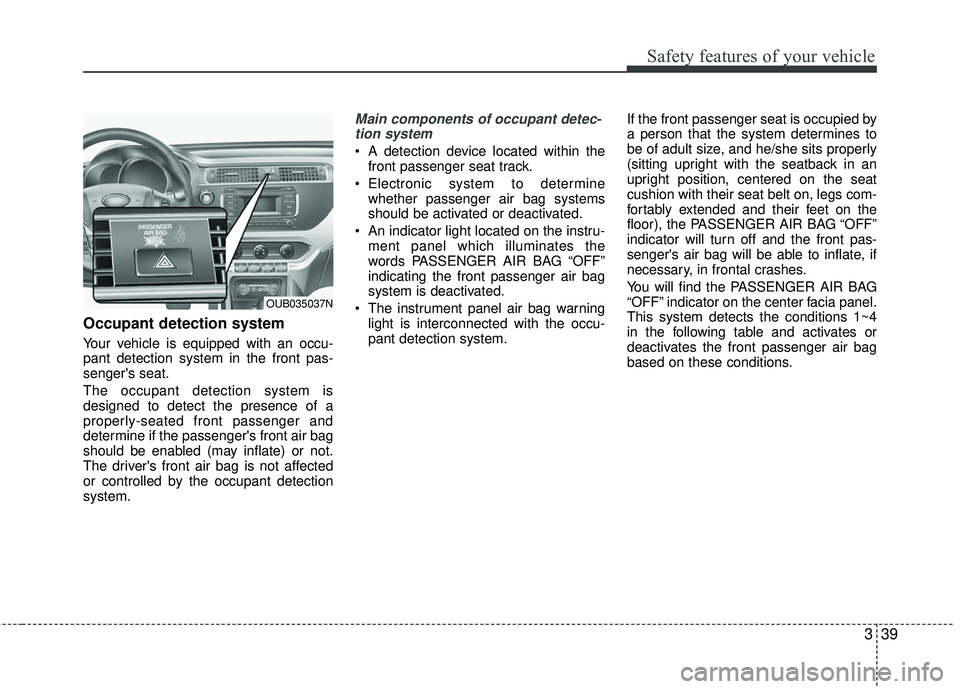
An indicator light located on the instru- ment panel which illuminates the
words PASSENGER AIR BAG “OFF”
indicating the front passenger air bag
system is deactivated.
The instrument panel air bag warning light is interconnected with the occu-
pant detection system. If the front passenger seat is occupied by
a person that the system determines to
be of adult size, and he/she sits properly
(sitting upright with the seatback in an
upright position, centered on the seat
cushion with their seat belt on, legs com-
fortably extended and their feet on the
floor), the PASSENGER AIR BAG “OFF”
indicator will turn off and the front pas-
senger's air bag will be able to inflate, if
necessary, in frontal crashes.
You will find the PASSENGER AIR BAG
“OFF” indicator on the center facia panel.
This system detects the conditions 1~4
in the following table and activates or
deactivates the front passenger air bag
based on these conditions.
OUB035037N
Page 59 of 449
Safety features of your vehicle
44
3
Any child age 12 and under should ride
in the rear seat. Children too large for
child restraints should use the available
lap/shoulder belts. No matter what type
of crash, children of all ages are safer
when restrained in the rear seat.
✽ ✽
NOTICE
Do not modify or replace the front pas-
senger seat. Don't place anything on or
attach anything such as a blanket, front
seat covers or after market seat heater
to the front passenger seat. This can
adversely affect the occupant detection
system.
If the occupant detection system is not
working properly, the SRS air bag warn-
ing light on the instrument panel will
illuminate because the passenger's front
air bag is connected with the occupant
detection system. If there is a malfunc-
tion of the occupant detection system,
the PASSENGER AIR BAG “OFF” indica-
tor will not illuminate and the passenger's
front air bag will inflate in frontal impact
crashes even if there is no occupant in
the front passenger's seat.
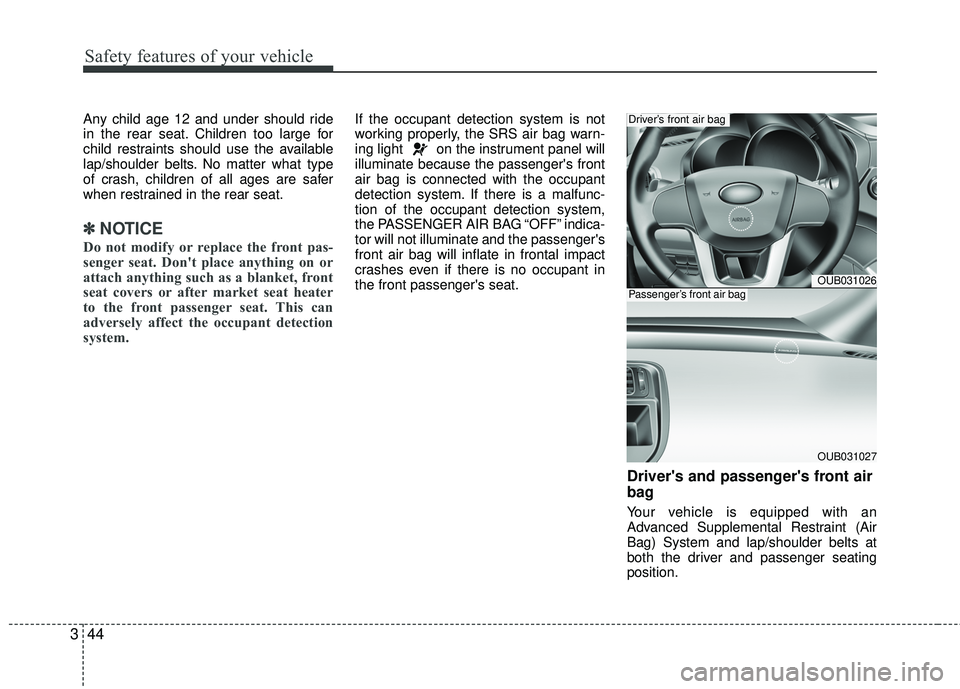
Driver's and passenger's front air
bag
Your vehicle is equipped with an
Advanced Supplemental Restraint (Air
Bag) System and lap/shoulder belts at
both the driver and passenger seating
position.
OUB031026
OUB031027
Driver’s front air bag
Passenger’s front air bag
Page 60 of 449

345
Safety features of your vehicle
The indications of the system's presence
are the letters "AIR BAG" embossed on
the air bag pad cover in the steering
wheel and the passenger's side front
panel pad above the glove box.
The SRS consists of air bags installed
under the pad covers in the center of the
steering wheel and the passenger's side
front panel above the glove box.
The purpose of the SRS is to provide the
vehicle's driver and/or the front passen-
ger with additional protection than that
offered by the seat belt system alone in
case of a frontal impact of sufficient
severity. The SRS uses sensors to gather
information about the driver's seat posi-
tion, the driver's and front passenger's
seat belt usage and impact severity.The advanced SRS offers the ability to
control the air bag inflation with two lev-
els. A first stage level is provided for mod-
erate-severity impacts. A second stage
level is provided for more severe impacts.
The passenger’s front air bag is designed
to help reduce the injury of children sit-
ting close to the instrument panel in low
speed collisions. However, children are
safer if they are restraint in the rear seat.
According to the impact severity, seating
position and seat belt usage, the SRSCM
(SRS Control Module) controls the air
bag inflation. Failure to properly wear
seat belts can increase the risk or sever-
ity of injury in an accident.
Additionally, your vehicle is equipped
with an occupant detection system in the
front passenger's seat. The occupant
detection system detects the presence of
a passenger in the front passenger's seat
and will turn off the front passenger's air
bag under certain conditions. For more
detail, see "Occupant detection system"
in this section.
Do not place any objects that may cause
magnetic fields near the front seat. These
may cause a malfunction of the seat
track position sensor.
Page 115 of 449
Features of your vehicle
44
4
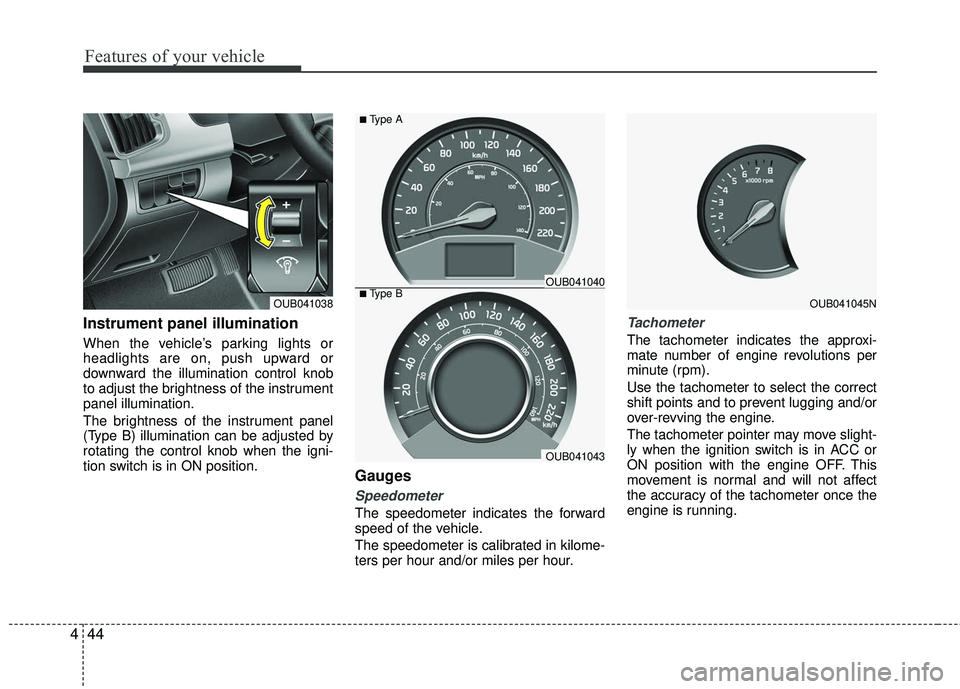
Instrument panel illumination
When the vehicle’s parking lights or
headlights are on, push upward or
downward the illumination control knob
to adjust the brightness of the instrument
panel illumination.
The brightness of the instrument panel
(Type B) illumination can be adjusted by
rotating the control knob when the igni-
tion switch is in ON position.
Gauges
Speedometer
The speedometer indicates the forward
speed of the vehicle.
The speedometer is calibrated in kilome-
ters per hour and/or miles per hour.
Tachometer
The tachometer indicates the approxi-
mate number of engine revolutions per
minute (rpm).
Use the tachometer to select the correct
shift points and to prevent lugging and/or
over-revving the engine.
The tachometer pointer may move slight-
ly when the ignition switch is in ACC or
ON position with the engine OFF. This
movement is normal and will not affect
the accuracy of the tachometer once the
engine is running.
OUB041045NOUB041038■Type BOUB041040
OUB041043
■Type A
Page 122 of 449
451
Features of your vehicle
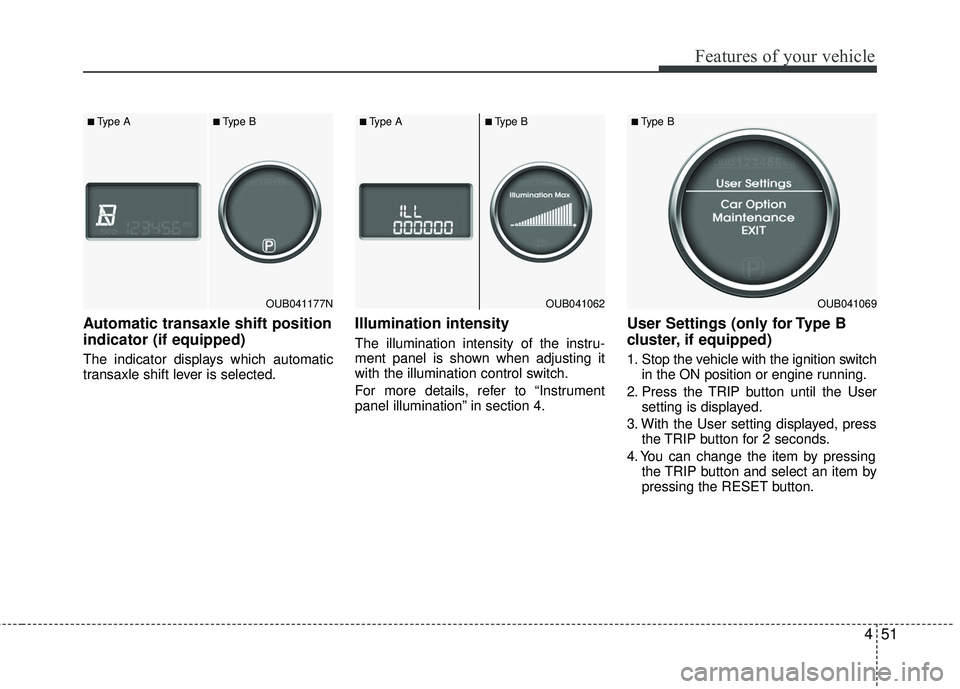
Automatic transaxle shift position
indicator (if equipped)
The indicator displays which automatic
transaxle shift lever is selected.
Illumination intensity
The illumination intensity of the instru-
ment panel is shown when adjusting it
with the illumination control switch.
For more details, refer to “Instrument
panel illumination” in section 4.
User Settings (only for Type B
cluster, if equipped)
1. Stop the vehicle with the ignition switchin the ON position or engine running.
2. Press the TRIP button until the User setting is displayed.
3. With the User setting displayed, press the TRIP button for 2 seconds.
4. You can change the item by pressing the TRIP button and select an item by
pressing the RESET button.
OUB041177N
■Type A■Type B
OUB041062
■Type A■Type B
OUB041069
■Type B
Page 135 of 449

Features of your vehicle
64
4
ECOMINDER®indicator
(if equipped)
The ECOMINDER®indicator is displayed
to help you improve fuel efficiency when
you are driving.
The ECOMINDER
®indicator will turn
the ECO light green on the instrument
panel when you are driving efficiently
in the ECO ON mode.
If you don't want the indicator dis-
played, you can turn the ECO ON
mode to OFF mode by pressing the
TRIP button.
When the instant fuel consumption mode(if equipped) is displayed on the
LCD display or the system is not work-
ing properly, the indicator turns off. If
the indicator turns off when the instant
fuel consumption mode or ECO OFF
mode is not selected, have the system
checked by an authorized Kia dealer
as soon as possible.
Fuel efficiency depends on the driver's driving habit and road condition.
The system stops operating when the transaxle is in the P (Park), R
(Reverse), N (Neutral) position or
sports mode, or when the instant fuel
consumption mode is selected.
Auto stop indicator(if equipped)
This indicator will illuminate when the
engine enters the Idle Stop mode of the
ISG (Idle Stop and Go) system.
When the automatic starting occurs, the
auto stop indicator on the cluster will
blink for 5 seconds.
For more details, refer to the ISG (Idle
Stop and Go) system in chapter 5.
✽ ✽ NOTICE
When the engine automatically starts by
the ISG system, some warning lights
(ABS, ESC, ESC OFF, ESC or Parking
brake warning light) may turn on for a
few seconds.
This happens because of the low battery
voltage. It does not mean the system is
malfunctioning.
WARNING - ECOMINDER®
indicator
Don't keep watching the “ECO”
ECOMINDER®indicator while driv-
ing. It may distract you while driv-
ing and cause an accident.
Page 145 of 449

Features of your vehicle
74
4
Parking light position ( )
When the light switch is in the parking
light position (1st position), the tail, posi-
tion, license and instrument panel lights
will turn ON.
Headlight position ( )
When the light switch is in the headlight
position (2nd position) the head, tail,
position, license and instrument panel
lights will turn ON.
The ignition switch must be in the ON
position to turn on the headlights.
Auto light position (if equipped)
When the light switch is in the AUTO light
position, the taillights and headlights will
turn ON or OFF automatically depending
on the amount of light outside the vehicle.
Never place anything over sensor (1)
located on the instrument panel. This will
ensure better auto-light system control.
Don’t clean the sensor using a window
cleaner. The cleaner may leave a light film
which could interfere with sensor operation.
If your vehicle has window tint or other
types of metallic coating on the front
windshield, the Auto light system may not
work properly.
OAM049041OAM049042OFS040084
Page 147 of 449
Features of your vehicle
76
4
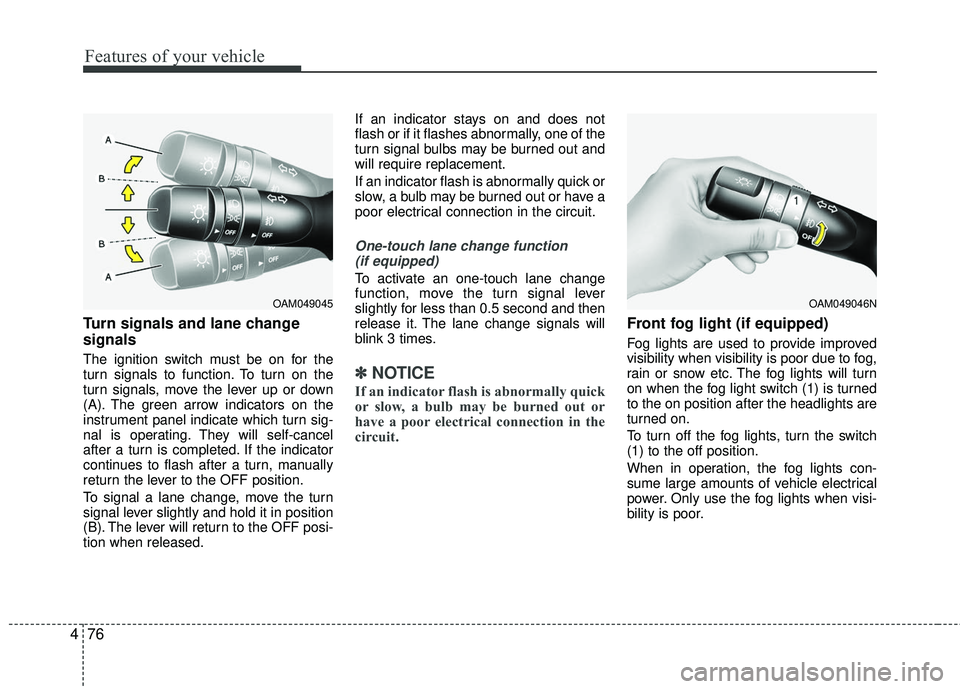
Turn signals and lane change
signals
The ignition switch must be on for the
turn signals to function. To turn on the
turn signals, move the lever up or down
(A). The green arrow indicators on the
instrument panel indicate which turn sig-
nal is operating. They will self-cancel
after a turn is completed. If the indicator
continues to flash after a turn, manually
return the lever to the OFF position.
To signal a lane change, move the turn
signal lever slightly and hold it in position
(B). The lever will return to the OFF posi-
tion when released. If an indicator stays on and does not
flash or if it flashes abnormally, one of the
turn signal bulbs may be burned out and
will require replacement.
If an indicator flash is abnormally quick or
slow, a bulb may be burned out or have a
poor electrical connection in the circuit.
One-touch lane change function
(if equipped)
To activate an one-touch lane change
function, move the turn signal lever
slightly for less than 0.5 second and then
release it. The lane change signals will
blink 3 times.
✽ ✽ NOTICE
If an indicator flash is abnormally quick
or slow, a bulb may be burned out or
have a poor electrical connection in the
circuit.
Front fog light (if equipped)
Fog lights are used to provide improved
visibility when visibility is poor due to fog,
rain or snow etc. The fog lights will turn
on when the fog light switch (1) is turned
to the on position after the headlights are
turned on.
To turn off the fog lights, turn the switch
(1) to the off position.
When in operation, the fog lights con-
sume large amounts of vehicle electrical
power. Only use the fog lights when visi-
bility is poor.
OAM049046NOAM049045