2017 KIA PICANTO key
[x] Cancel search: keyPage 267 of 488
![KIA PICANTO 2017 Owners Manual Features of your vehicle
1924Phone MENU
Type A-3
(for Colombia model)
Press the key to display four
menus (Favorites, Call History, Contacts,Phone Setup).
Favorites
Press the key Set [ FAV]
t](/manual-img/2/57964/w960_57964-266.png "KIA PICANTO 2017 Owners Manual Features of your vehicle
1924Phone MENU
Type A-3
(for Colombia model)
Press the key to display four
menus (Favorites, Call History, Contacts,Phone Setup).
Favorites
Press the key Set [ FAV]
t")
Features of your vehicle
1924Phone MENU
Type A-3
(for Colombia model)
Press the key to display four
menus (Favorites, Call History, Contacts,Phone Setup).
Favorites
Press the key Set [ FAV]
through the TUNE knob or key.
Up to 20 frequently used contacts saved
for easy access
History
Press the key Set [ History]
through the TUNE knob or key.
The call history is displayed and can be
used to select a number and make a call.
If call history does not exist, a screen ask-
ing whether to download call history is
displayed. (The download feature may not
be supported in some mobile phones)Contacts
Press the key Set [ Contacts]
through the TUNE knob or key.
The contacts are displayed and can be
used to select a number and make a call. ❈
If more than one number is saved to
one contact, then a screen showing
the mobile phone number, Home and
office number is displayed. Select the
desired number to make the call.
❈ If contacts do not exist, a screen asking
whether to download contacts are dis-
played. (The download feature may not
be supported in some mobile phones)
Setup
Press the key Set [ Setup]
through the TUNE knob or key. The
Bluetooth®Wireless Technology
mobile phone setup screen is displayed.
For more information, refer to “PhoneSetup”.
4
PHONE
3
PHONE
2
RDM
PHONE
1
RPT
PHONE
PHONE
Page 268 of 488
![KIA PICANTO 2017 Owners Manual 193
Features of your vehicle
4
Phone MENU
Type A-3
Press the key to display three
menus (Call History, Contacts, PhoneSetup).
History
Press the key Set [ History]
through the TUNE knob or ke](/manual-img/2/57964/w960_57964-267.png "KIA PICANTO 2017 Owners Manual 193
Features of your vehicle
4
Phone MENU
Type A-3
Press the key to display three
menus (Call History, Contacts, PhoneSetup).
History
Press the key Set [ History]
through the TUNE knob or ke")
193
Features of your vehicle
4
Phone MENU
Type A-3
Press the key to display three
menus (Call History, Contacts, PhoneSetup).
History
Press the key Set [ History]
through the TUNE knob or key.
The call history is displayed and can be
used to select a number and make a call.
If call history does not exist, a screen ask-
ing whether to download call history is
displayed. (The download feature may not
be supported in some mobile phones) Contacts
Press the key Set [ Contacts]
through the TUNE knob or key.
The contacts are displayed and can be
used to select a number and make a call. ❈
If more than one number is saved to
one contact, then a screen showing
the mobile phone number, Home and
office number is displayed. Select the
desired number to make the call.
❈ If contacts do not exist, a screen asking
whether to download contacts are dis-
played. (The download feature may not
be supported in some mobile phones) Setup
Press the key Set [ Setup]
through the TUNE knob or key. The
Bluetooth®Wireless Technology
mobile phone setup screen is displayed.
For more information, refer to “PhoneSetup”.
3
PHONE
2
RDM
PHONE
1
RPT
PHONE
PHONE
Page 272 of 488
197
Features of your vehicle
4
VOICE COMMAND (if equipped)
Starting Voice Command
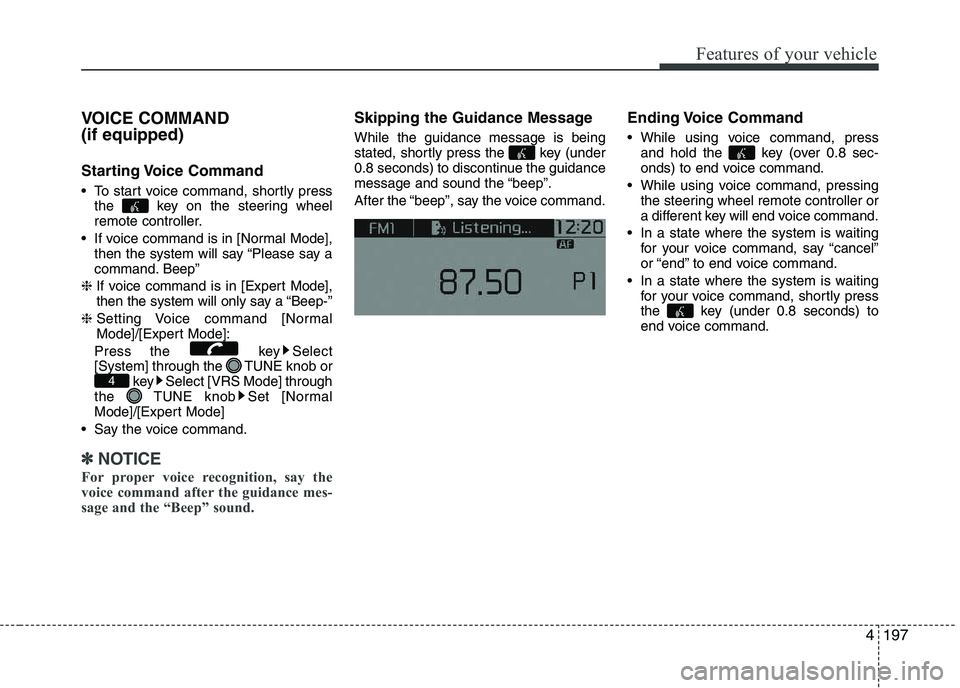
To start voice command, shortly press
the key on the steering wheel
remote controller.
If voice command is in [Normal Mode], then the system will say “Please say a
command. Beep”
❈ If voice command is in [Expert Mode],
then the system will only say a “Beep-”
❈ Setting Voice command [Normal
Mode]/[Expert Mode]:
Press the key Select
[System] through the TUNE knob or key Select [VRS Mode] through
the TUNE knob Set [Normal
Mode]/[Expert Mode]
Say the voice command.
✽✽ NOTICE
For proper voice recognition, say the
voice command after the guidance mes-
sage and the “Beep” sound.
Skipping the Guidance Message While the guidance message is being
stated, shortly press the key (under
0.8 seconds) to discontinue the guidance
message and sound the “beep”.
After the “beep”, say the voice command. Ending Voice Command
While using voice command, press
and hold the key (over 0.8 sec-
onds) to end voice command.
While using voice command, pressing the steering wheel remote controller or
a different key will end voice command.
In a state where the system is waiting for your voice command, say “cancel”
or “end” to end voice command.
In a state where the system is waiting for your voice command, shortly press
the key (under 0.8 seconds) to
end voice command.
4
Page 273 of 488
Features of your vehicle
1984❈
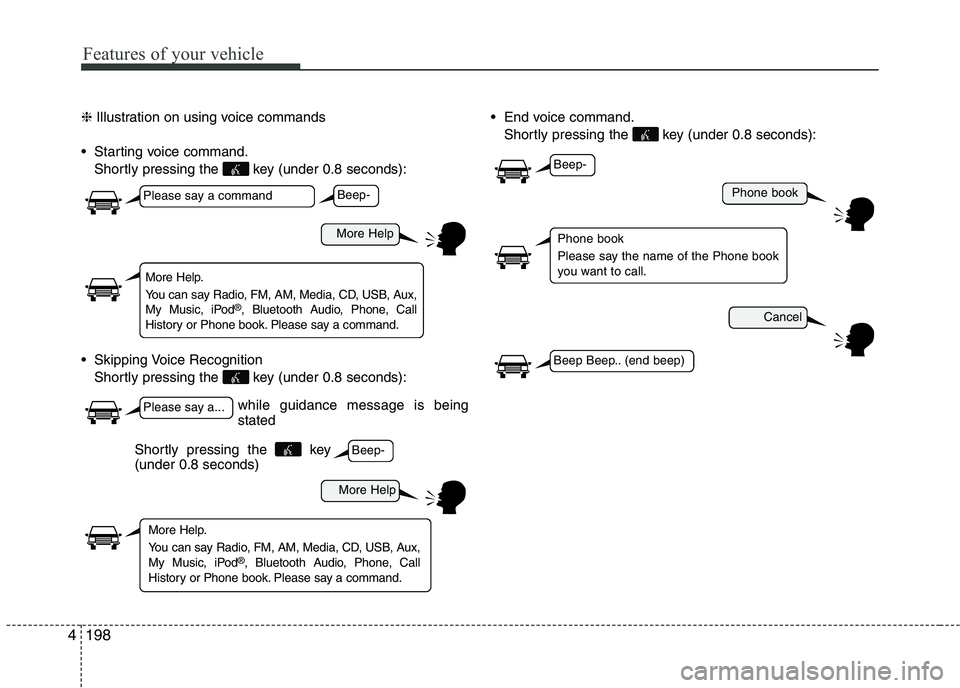
Illustration on using voice commands
Starting voice command. Shortly pressing the key (under 0.8 seconds):
Skipping Voice Recognition Shortly pressing the key (under 0.8 seconds): End voice command.
Shortly pressing the key (under 0.8 seconds):
while guidance message is being stated
More Help
Phone book
Cancel
More Help
Please say a command
Please say a...
More Help.
You can say Radio, FM, AM, Media, CD, USB, Aux,
My Music, iPod ®
, Bluetooth Audio, Phone, Call
History or Phone book. Please say a command.
Phone book
Please say the name of the Phone book
you want to call.
More Help.
You can say Radio, FM, AM, Media, CD, USB, Aux,
My Music, iPod ®
, Bluetooth Audio, Phone, Call
History or Phone book. Please say a command.
Beep-
Beep-
Beep-
Beep Beep.. (end beep)
Shortly pressing the key (under 0.8 seconds)
Page 283 of 488

5
Before driving / 5-3
Key positions / 5-5
Engine start/stop button / 5-6
Starting the engine / 5-9
LPG system / 5-12
Manual transaxle / 5-18
Automatic transaxle / 5-21
Brake system / 5-27
ISG (Idle Stop and Go) system / 5-39
Cruise control system / 5-44
Speed limit control system / 5-49
Economical operation / 5-52
Special driving conditions / 5-54
Winter driving / 5-58
Vehicle weight / 5-62
Driving your vehicle
Page 287 of 488

55
Driving your vehicle
Ignition switch position
LOCK
The steering wheel locks to protect
against theft. The ignition key can be
removed only in the LOCK position.
When turning the ignition switch to the
LOCK position, push the key inward at
the ACC position and turn the key towardthe LOCK position.
ACC (Accessory)
The steering wheel is unlocked and elec-
trical accessories are operative.
✽✽NOTICE
If difficulty is experienced turning the
ignition switch to the ACC position, turn
the key while turning the steering wheel
right and left to release the tension.
ON
The warning lights can be checked
before the engine is started. This is the
normal running position after the engine
is started.
Do not leave the ignition switch ON if the engine is not running to prevent batterydischarge.
START
Turn the ignition switch to the START
position to start the engine. The engine
will crank until you release the key; then
it returns to the ON position. The brake
warning light can be checked in this posi-tion.
KEY POSITIONS
WARNING
- Ignition switch
Never turn the ignition switch to LOCK or ACC while the vehicle is
moving. This would result in loss
of directional control and braking
function, which could cause anaccident.
The anti-theft steering column lock is not a substitute for the parking
brake. Before leaving the driver’s
seat, always make sure the shift
lever is engaged in 1 st
gear for the
manual transaxle or P (Park) for
the automatic transaxle, set the
parking brake fully and shut the
engine off. Unexpected and sud-
den vehicle movement may occurif these precautions are not taken.
Never reach for the ignition switch, or any other controls
through the steering wheel while
the vehicle is in motion. The pres-
ence of your hand or arm in this
area could cause a loss of vehicle
control, an accident and serious
bodily injury or death.
Do not place any movable objects around the driver’s seat as they
may move while driving, interferewith the driver and lead to anaccident.
OSA057001
Page 291 of 488
59
Driving your vehicle
✽✽
NOTICE - Kick down mecha- nism (if equipped)
If your vehicle is equipped with a kick
down mechanism in the accelerator
pedal, it prevents you from driving at
full throttle unintentionally by making
the driver require increased effort to
depress the accelerator pedal. However,
if you depress the pedal more than
approximately 80%, the vehicle can be
at full throttle and the accelerator pedal
will be easier to depress. This is not a
malfunction but a normal condition.
Starting the engine with an igni-
tion key (if equipped)
1. Make sure the parking brake is applied.
2. Manual Transaxle - Depress the
clutch pedal fully and shift the
transaxle into Neutral. Keep the clutch
pedal and brake pedal depressed
while turning the ignition switch to the
start position.
Automatic Transaxle - Place the
transaxle shift lever in P (Park).
Depress the brake pedal fully.
You can also start the engine when
the shift lever is in the N (Neutral)position.
3. Turn the ignition switch to START and hold it there until the engine starts (a
maximum of 10 seconds), then
release the key.
It should be started without depressing
the accelerator.
4. Do not wait for the engine to warm up while the vehicle remains stationary.
Start driving at moderate engine
speeds. (Steep accelerating and
decelerating should be avoided.)
STARTING THE ENGINE
WARNING
Always wear appropriate shoes when operating your vehicle.
Unsuitable shoes (high heels, ski
boots,etc.) may interfere with your
ability to use the brake, accelera-
tor pedal, and clutch (if equipped).
Do not start the vehicle with the accelerator pedal depressed. The
vehicle can move and lead to anaccident.
Wait until the engine rpm is normal. The vehicle may suddenly move ifthe brake padel is released whenthe rpm is high.CAUTION
If the engine stalls while the vehicle
is in motion, do not attempt to move
the shift lever to the P (Park) posi- tion. If traffic and road conditionspermit, you may put the shift lever inthe N (Neutral) position while the
vehicle is still moving and turn theignition switch to the START position in an attempt to restart the engine.
CAUTION
Do not engage the starter for more than 10 seconds. If the
engine stalls or fails to start, wait 5 to 10 seconds before re-engag-ing the starter. Improper use of the starter may damage it.
Do not turn the ignition switch to the START position with theengine running. It may damagethe starter.
Page 292 of 488

Driving your vehicle
10
5
Starting the engine with a smart
key (if equipped)
✽✽
NOTICE - Kick down mecha- nism (if equipped)
If your vehicle is equipped with a kick
down mechanism in the accelerator
pedal, it prevents you from driving at
full throttle unintentionally by making
the driver require increased effort to
depress the accelerator pedal. However,
if you depress the pedal more than
approximately 80%, the vehicle can be
at full throttle and the accelerator pedal
will be easier to depress. This is not a
malfunction but a normal condition.
1. Carry the smart key or leave it inside the vehicle.
2. Make sure the parking brake is firmly applied.
3. Manual Transaxle - Depress the
clutch pedal fully and shift the
transaxle into Neutral. Keep the clutch
pedal and brake pedal depressed
while starting the engine.
Automatic Transaxle - Place the
transaxle shift lever in P (Park).
Depress the brake pedal fully.
You can also start the engine when
the shift lever is in the N (Neutral)position.
4. Press the ENGINE START/STOP but- ton.
It should be started without depressing
the accelerator.
5. Do not wait for the engine to warm up while the vehicle remains stationary.
Start driving at moderate engine
speeds. (Steep accelerating and
decelerating should be avoided.)
OTA050003
WARNING
Always wear appropriate shoes when operating your vehicle.
Unsuitable shoes (high heels, ski
boots, etc.) may interfere with
your ability to use the brake andaccelerator pedal.
Do not start the vehicle with the accelerator pedal depressed. The
vehicle can move and lead to anaccident.
Wait until the engine rpm is nor- mal. The vehicle may suddenly
move if the brake padel isreleased when the rpm is high.
CAUTION
If the engine stalls while you are in
motion, do not attempt to move the
shift lever to the P (Park) position. If traffic and road conditions permit,you may put the shift lever in the N (Neutral) position while the vehicleis still moving and press the
ENGINE START/STOP button in an attempt to restart the engine.