Page 143 of 604

413
Features of your vehicle
DOOR LOCKS
Operating door locks from
outside the vehicle
To remove the cover
1. Pull out the door handle (4).
2. Press the lever (3) located insidethe bottom part of the cover with a
key or flat-head screwdriver.
3. Push out the cover while pressing the lever.
Turn the key clockwise to lock (1) and counterclockwise to unlock (2).
If you lock the driver’s door with a key, all vehicle doors will lock auto-
matically. From the driver’s door, turn the key
to the right once to unlock the door
and once more within 4 seconds to
unlock all doors.
Doors can also be locked and unlocked with the transmitter.
Once the doors are unlocked, they may be opened by pulling the door
handle.
When closing the door, push the door by hand. Make sure the doors
are closed securely.
✽ ✽ NOTICE
• In cold and wet climates, door lock
and door mechanisms may not
work properly due to freezing con-
ditions.
• If the door is locked/unlocked multiple times in rapid succession
with either the vehicle key or door
lock switch, the system may stop
operating temporarily in order to
protect the circuit and prevent
damage to system components.
To lock a door without the key,
push the inside door lock button (1)
or central door lock switch (2) to
the “Lock” position and close the
door (3).
If you lock the door with the central door lock switch (2), all vehicle
doors will lock automatically.
✽ ✽ NOTICE
Always turn the Engine Start/Stop
button to OFF position, engage the
parking brake, close all windows,
and lock all doors when leaving your
vehicle unattended.
OJF045215L
OJFA045336
Page 159 of 604

429
Features of your vehicle
Opening the fuel filler lid
The fuel filler lid must be opened
from inside the vehicle by pressing
the fuel filler lid opener button.
If the fuel filler lid does not open
because ice has formed around it,
tap lightly or push on the lid to break
the ice and release the lid. Do not pry
on the lid. If necessary, spray around
the lid with an approved de-icer fluid
(do not use radiator anti-freeze) or
move the vehicle to a warm place
and allow the ice to melt.1. Stop the engine.
2. To open the fuel filler lid, push the
fuel filler lid opener button.
3. Pull open the fuel filler lid (1).
4. To remove the cap, turn the fuel filler cap (2) counterclockwise(3).
5. Refuel as needed.
Closing the fuel filler lid
1. To install the cap, turn it clockwise until it “clicks” once. This indicates
that the cap is securely tightened.
2. Close the fuel filler lid and push it in lightly making sure that it is
securely closed.
✽ ✽NOTICE
There may be an intermittent noise
near the refueling hole while the
engine is idling if the fuel cap is not
closed securely. This occurs normal-
ly with the OBD system.
✽ ✽NOTICE
When refueling on unlevel ground,
the fuel gauge may not point to the F
position.
It is not a malfunction. If you move
your vehicle to a level ground, the fuel
gauge will move to the full position.
FUEL FILLER LID (HYBRID)
OJF045021
OJF045022L
Page 164 of 604
Features of your vehicle
34
4
1. Stop the engine.
2. To open the fuel filler lid, push the
fuel filler lid opener button.
3. Pull open the fuel filler lid (1).
4. To remove the cap, turn the fuel filler cap (2) counterclockwise(3).
5. Refuel as needed.
✽ ✽ NOTICE
• Add fuel into the fuel tank within
20 minutes after opening the fuel
filler lid. After 20 minutes, the fuel
tank may shut off, causing fuel to
overflow. In this case, re-press the
fuel filler lid opening button.
• Close the fuel filler lid after fuel- ing the vehicle. If you start the
vehicle with the fuel filler lid
opened, the message, “Check fuel
door”, illuminates on the LCD dis-
play.
OJF045022L
CAUTION
Do not leave the fuel filler door
open for an extended period oftime. Doing so may cause thebattery to discharge.
WARNING
Do not refuel the vehicle while
charging the high voltage
hybrid battery. Doing so may
cause a fire or an explosion due
to static electricity.
Page 165 of 604
435
Features of your vehicle
Closing the fuel filler lid
1. To install the cap, turn it clockwiseuntil it “clicks” once. This indicates
that the cap is securely tightened.
2. Close the fuel filler lid and push it in lightly making sure that it is
securely closed.
✽ ✽NOTICE - Refueling
Do not "top off" after the nozzle
automatically shuts off when refuel-
ing. If pressurized fuel sprays out, it
can cover your clothes or skin and
subject you to the risk of fire and
burns. Always remove the fuel cap
carefully and slowly. If the cap is
venting fuel or if you hear a hissing
sound, wait until the condition stops
before completely removing the cap.
✽ ✽NOTICE
Always check that the fuel cap is
installed securely to prevent fuel
spillage in the event of an accident.
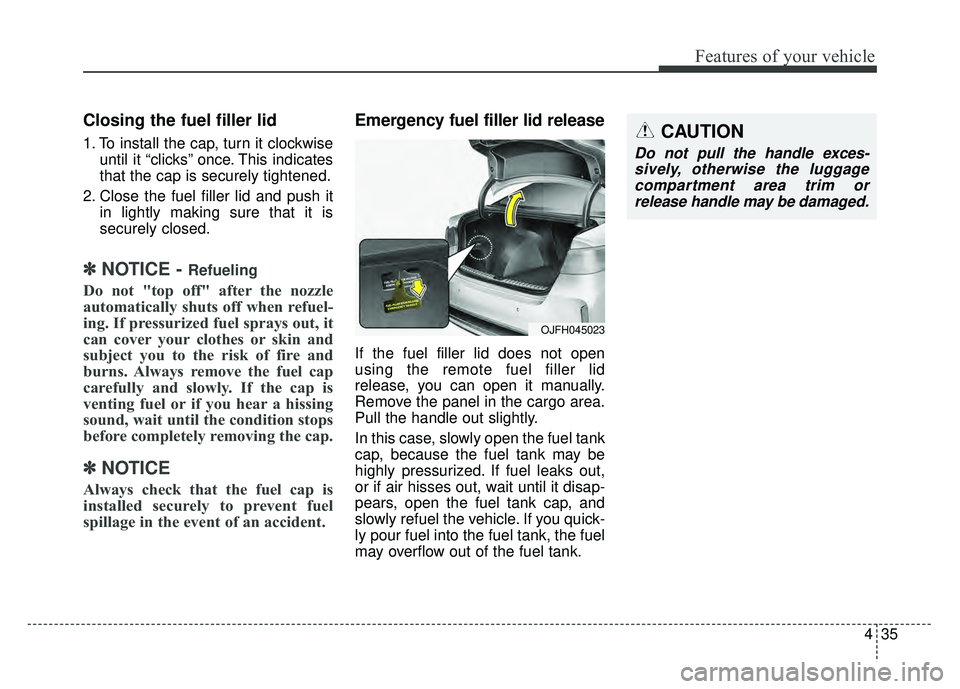
Emergency fuel filler lid release
If the fuel filler lid does not open
using the remote fuel filler lid
release, you can open it manually.
Remove the panel in the cargo area.
Pull the handle out slightly.
In this case, slowly open the fuel tank
cap, because the fuel tank may be
highly pressurized. If fuel leaks out,
or if air hisses out, wait until it disap-
pears, open the fuel tank cap, and
slowly refuel the vehicle. If you quick-
ly pour fuel into the fuel tank, the fuel
may overflow out of the fuel tank.
CAUTION
Do not pull the handle exces-
sively, otherwise the luggagecompartment area trim orrelease handle may be damaged.
OJFH045023
Page 281 of 604
Audio system
10
5 (7)
DISP
(8) SCAN
Radio mode : previews all receiv- able broadcasts for 5 seconds
each
Media (CD/USB/My Music) modes : previews each song (file) for 10
seconds each. (9)
SETUP
Changes to Setup mode.
(10) CLOCK
When pressed briefly : Display time screen
When pressed and held : Move to the time setting mode
(11) CAT/FOLDER
SiriusXM RADIO : Category Search
MP3 CD/USB mode : Search Folder
(12) TUNE knob
Radio mode : turn to change broadcast frequencies.
Media (CD/USB/iPod
®/My Music)
modes : turn to search Tracks/
chan nels/files.
Page 327 of 604
![KIA OPTIMA PHEV 2017 Owners Manual Audio system
56
5
Setup Mode
Press the [SETUP] button to display
the Setup screen.
You can select and control options
related to [Display], [Sound],
[Clock/Calendar], [Phone] and
[System] .
With the D](/manual-img/2/54972/w960_54972-326.png "KIA OPTIMA PHEV 2017 Owners Manual Audio system
56
5
Setup Mode
Press the [SETUP] button to display
the Setup screen.
You can select and control options
related to [Display], [Sound],
[Clock/Calendar], [Phone] and
[System] .
With the D")
Audio system
56
5
Setup Mode
Press the [SETUP] button to display
the Setup screen.
You can select and control options
related to [Display], [Sound],
[Clock/Calendar], [Phone] and
[System] .
With the Display Button
Press the [SETUP] button �Select
[Display]
You can select and control options
related to [Brightness], [Mode Pop
up] and [Media Display].
Adjusting the Brightness
Use the [Left/Right] b uttons to adjust
the screen brightness or set the
Brightness on Automatic, Day or Night
mode.
Press the [Default] button to reset.
Automatic : Adjusts the brightness automatically.
Day : Always maintains the bright- ness on high.
Night : Always maintains the bright- ness on low. Mode Pop up
This feature is used to display the
Mode Pop up screen when entering
radio and media modes.
When this feature is turned on,
pressing the [RADIO]
or [MEDIA]
button will display the Mode Pop up
screen.
✽ ✽ NOTICE
The media Mode Pop up screen can
be displayed only when two or more
media modes have been connected.
Page 330 of 604
Audio system
559
With the Clock/Calendar Button
Press the [SETUP]button �Select
[Clock/Calendar]
You can select and control options
related to [Clock Settings], [Calendar
Settings], [Time Format] and [Clock
Display].
Clock Settings
Use the [Up/Down] buttons to set the
Hour, Minutes and AM/PM setting.
Press and hold the [CLOCK] button
to display the Clock/Calendar
screen. Calendar Settings
Use the [Up/Down] buttons to set the
Day, Month and Year setting.
Time Format
This feature is used to change the
clock format between 12hr or 24hr.
Clock Display
This feature is used to display a clock
on the screen when the audio sys-
tem is turned off.
Page 466 of 604
What to do in an emergency
26
7
3. Install the towing hook by turning it
clockwise into the hole until it is
fully secured.
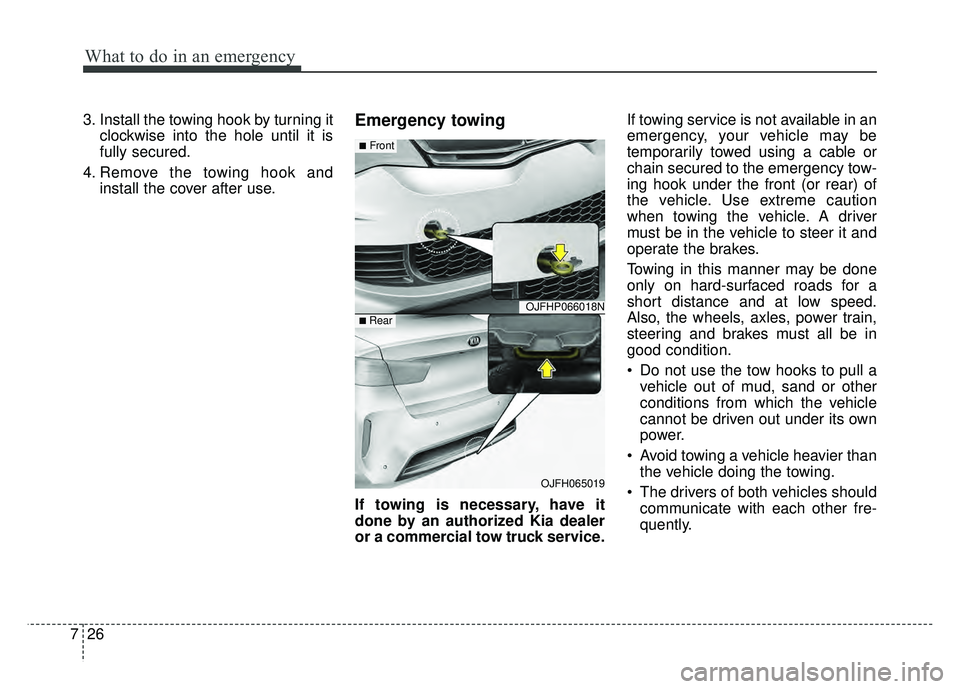
4. Remove the towing hook and install the cover after use.Emergency towing
If towing is necessary, have it
done by an authorized Kia dealer
or a commercial tow truck service. If towing service is not available in an
emergency, your vehicle may be
temporarily towed using a cable or
chain secured to the emergency tow-
ing hook under the front (or rear) of
the vehicle. Use extreme caution
when towing the vehicle. A driver
must be in the vehicle to steer it and
operate the brakes.
Towing in this manner may be done
only on hard-surfaced roads for a
short distance and at low speed.
Also, the wheels, axles, power train,
steering and brakes must all be in
good condition.
Do not use the tow hooks to pull a
vehicle out of mud, sand or other
conditions from which the vehicle
cannot be driven out under its own
power.
Avoid towing a vehicle heavier than the vehicle doing the towing.
The drivers of both vehicles should communicate with each other fre-
quently.
OJFHP066018N
OJFH065019
■Front
■ Rear


