Page 326 of 604
Audio system
555
Bluetooth®Wireless Technology Audio Commands
Commands available during
Bluetooth®Wireless
Technology audio streaming from mobile phone opera-
tion Command Operation.
CommandFunction
PlayPlays the currently paused song.
PausePauses the current song.
Page 327 of 604
![KIA OPTIMA PHEV 2017 Owners Manual Audio system
56
5
Setup Mode
Press the [SETUP] button to display
the Setup screen.
You can select and control options
related to [Display], [Sound],
[Clock/Calendar], [Phone] and
[System] .
With the D](/manual-img/2/54972/w960_54972-326.png "KIA OPTIMA PHEV 2017 Owners Manual Audio system
56
5
Setup Mode
Press the [SETUP] button to display
the Setup screen.
You can select and control options
related to [Display], [Sound],
[Clock/Calendar], [Phone] and
[System] .
With the D")
Audio system
56
5
Setup Mode
Press the [SETUP] button to display
the Setup screen.
You can select and control options
related to [Display], [Sound],
[Clock/Calendar], [Phone] and
[System] .
With the Display Button
Press the [SETUP] button �Select
[Display]
You can select and control options
related to [Brightness], [Mode Pop
up] and [Media Display].
Adjusting the Brightness
Use the [Left/Right] b uttons to adjust
the screen brightness or set the
Brightness on Automatic, Day or Night
mode.
Press the [Default] button to reset.
Automatic : Adjusts the brightness automatically.
Day : Always maintains the bright- ness on high.
Night : Always maintains the bright- ness on low. Mode Pop up
This feature is used to display the
Mode Pop up screen when entering
radio and media modes.
When this feature is turned on,
pressing the [RADIO]
or [MEDIA]
button will display the Mode Pop up
screen.
✽ ✽ NOTICE
The media Mode Pop up screen can
be displayed only when two or more
media modes have been connected.
Page 331 of 604
![KIA OPTIMA PHEV 2017 Owners Manual Audio system
60
5
With the Phone Button
Press the [SETUP] button �Select
[Phone]
You can select and control options
related to [Pair Phone], [Paired
Phone List], [Contacts Download],
[Auto Download],](/manual-img/2/54972/w960_54972-330.png "KIA OPTIMA PHEV 2017 Owners Manual Audio system
60
5
With the Phone Button
Press the [SETUP] button �Select
[Phone]
You can select and control options
related to [Pair Phone], [Paired
Phone List], [Contacts Download],
[Auto Download],")
Audio system
60
5
With the Phone Button
Press the [SETUP] button �Select
[Phone]
You can select and control options
related to [Pair Phone], [Paired
Phone List], [Contacts Download],
[Auto Download], [Outgoing Volume]
and [Bluetooth System Off].
Pairing a New Device
Bluetooth®Wireless Technology
devices can be paired with the audio
system.
For more information, refer to the
“Pairing through Phone Setup” section
within
Bluetooth®Wireless Technology. Viewing Paired Phone List
This feature is used to view mobile
phones that have been paired with
the audio system. Upon selecting a
paired phone, the setup menu is dis-
played.
For more information, refer to the
“Setting
Bluetooth®Wireless Technology
Connection” section within
Bluetooth®
Wireless Technology.
(1) Moves to the previous screen
(2) Connect/Disconnect Phone : Connect/ disconnects currently
selected phone
(3) Delete : Deletes the currently selected phone
(4) Change priority : Sets currently selected phone to highest con-
nection priority
Page 332 of 604
Audio system
561
✽
✽NOTICE - Before
Downloading
Contacts
• Only contacts within connected phones can be downloaded. Also
check to see that your mobile
phone supports the download fea-
ture.
• To learn more about whether your mobile phone supports contact
downloads, refer to your mobile
phone user’s manual.
• The contacts for only the connect- ed phone can be downloaded.
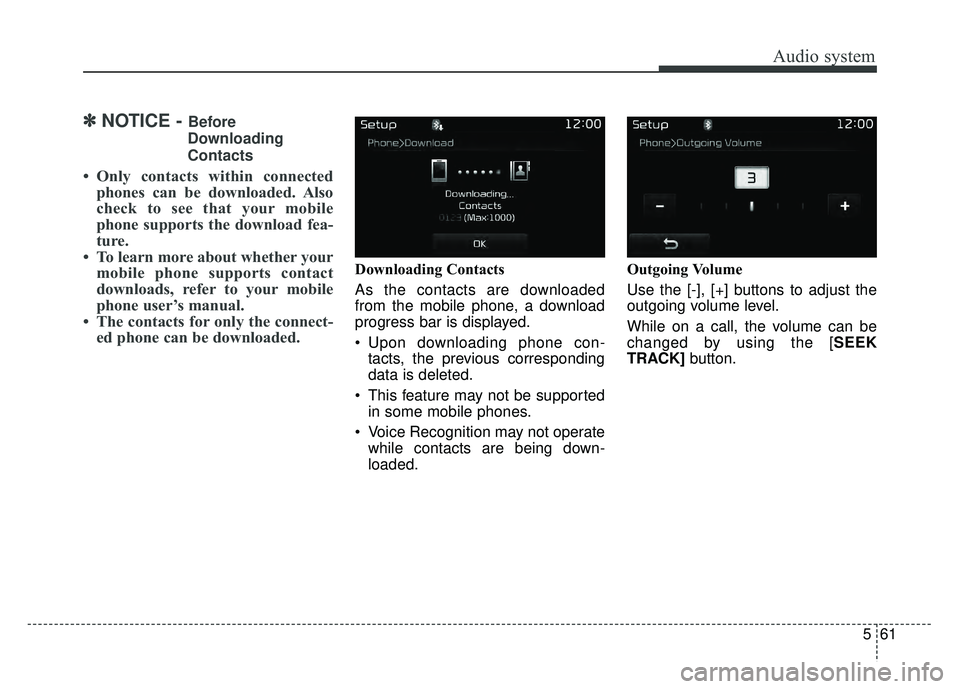
Downloading Contacts
As the contacts are downloaded
from the mobile phone, a download
progress bar is displayed.
Upon downloading phone con-
tacts, the previous corresponding
data is deleted.
This feature may not be supported in some mobile phones.
Voice Recognition may not operate while contacts are being down-
loaded. Outgoing Volume
Use the [-], [+] buttons to adjust the
outgoing volume level.
While on a call, the volume can be
changed by using the [SEEK
TRACK]
button.
Page 333 of 604
Audio system
62
5 Turning Bluetooth System Off
Once
Bluetooth®Wireless Technology
is turned off,
Bluetooth®Wireless
Technology related features will not
be supported within the audio sys-
tem.
To turn
Bluetooth®Wireless
Technology back on, go to [SETUP]
� [Phone] and press “Yes”.
With the System Button
Press the [SETUP] button �Select
[System]
You can select and control options
related to [Memory Information],
[Prompt Feedback] and [Language].
Memory Information
This feature displays information
related to system memory.
Using : Displays capacity currentlyin use
Capacity : Displays total capacity
Page 534 of 604

865
Maintenance
✽
✽NOTICE
The electronic system may not func-
tion correctly even when the engine
compartment and internal fuse
box’s individual fuses are not dis-
connected. In such case the cause of
the problem may be disconnection
of the main fuse (BFT type), which is
located inside the positive battery
terminal (+) cap.
Since the main fuse is designed more
intricately than other parts, have the
vehicle checked by an authorized
Kia dealer.
✽ ✽NOTICE- Random wiring pro-
hibited when retrofitting equip-
ment
Use of random wiring in the vehicle
might cause danger due to failure
and damage of the vehicle’s per-
formance.
Using random wires especially when
retrofitting AVN or theft alarm sys-
tem, remote engine control, car
phone or radio might damage the
vehicle or cause fire.
✽ ✽ NOTICE- Remodeling
Prohibited
Do not try remodeling the vehicle in
any way. It is illegal, and may affect
the vehicle’s performance, durabili-
ty, and safety. Warranty is also not
provided for problems caused by
remodeling.
Be aware of safety problems caused
by remodeling the vehicle with
unauthorized electrical
devices(lamp, black box, electrical
equipment, diagnostic device, com-
munication device, etc.). It might
cause malfunction of the vehicle,
wiring damage, battery discharge,
connector damage, or fire. the vehi-
cle or cause fire.
CAUTION
Visually inspect the battery capto ensure it is securely closed.If the battery cap is not securelyclosed, moisture may enter thesystem and damage the electri-cal components.
Page 591 of 604
Index
2I
Active ECO system. . . . . . . . . . . . . . . . . . . . . . . . . . . . 6-75ECO (Active ECO) mode. . . . . . . . . . . . . . . . . . . . . 6-75
A/V Mode . . . . . . . . . . . . . . . . . . . . . . . . . . . . . . . . . . . 4-\
72
Advanced smart cruise control system . . . . . . . . . . . . . 6-56 Speed setting . . . . . . . . . . . . . . . . . . . . . . . . . . . . . . 6-57
Vehicle to vehicle distance setting . . . . . . . . . . . . . . 6-62
To adjust the sensitivity of Smart Cruise Control . . 6-66
To convert to cruise control mode . . . . . . . . . . . . . . 6-67
Limitations of the system . . . . . . . . . . . . . . . . . . . . . 6-68
AFLS (Adaptive Front Lighting System) . . . . . . . . . . 4-106
Air bag warning label . . . . . . . . . . . . . . . . . . . . . . . . . . 3-70
Air bag warning light . . . . . . . . . . . . . . . . . . . . . . . . . . 3-46
Air bags. . . . . . . . . . . . . . . . . . . . . . . . . . . . . . . . . . . . \
. 3-43 Operation . . . . . . . . . . . . . . . . . . . . . . . . . . . . . . . . . 3-44
Air bag warning light . . . . . . . . . . . . . . . . . . . . . . . . 3-46
SRS components and functions . . . . . . . . . . . . . . . . 3-47
Occupant Detection System . . . . . . . . . . . . . . . . . . . 3-50
Driver's and passenger's front air bag . . . . . . . . . . . 3-58
Side air bag. . . . . . . . . . . . . . . . . . . . . . . . . . . . . . . . 3-61
Curtain air bag . . . . . . . . . . . . . . . . . . . . . . . . . . . . . 3-63
Inflation conditions . . . . . . . . . . . . . . . . . . . . . . . . . 3-65
Non-inflation conditions . . . . . . . . . . . . . . . . . . . . . 3-67
SRS Care . . . . . . . . . . . . . . . . . . . . . . . . . . . . . . . . . 3-69
Air bag warning label. . . . . . . . . . . . . . . . . . . . . . . . 3-70
Air cleaner . . . . . . . . . . . . . . . . . . . . . . . . . . . . . . . . . . 8-34\
Filter replacement. . . . . . . . . . . . . . . . . . . . . . . . . . . 8-34 Air Conditioning refrigerant label . . . . . . . . . . . . . . . 4-128
Air conditioning system lubricants. . . . . . . . . . . . . . . . . 9-5
Air ventilation seat . . . . . . . . . . . . . . . . . . . . . . . . . . . 4-137
Anti-lock brake system (ABS) . . . . . . . . . . . . . . . . . . . 6-32
Appearance care . . . . . . . . . . . . . . . . . . . . . . . . . . . . . . 8-94
Exterior care . . . . . . . . . . . . . . . . . . . . . . . . . . . . . . . 8-94
Interior care . . . . . . . . . . . . . . . . . . . . . . . . . . . . . . . 8-99
Armed stage . . . . . . . . . . . . . . . . . . . . . . . . . . . . . . . . . 4-10
ASCC/LDWS Mode . . . . . . . . . . . . . . . . . . . . . . . . . . 4-72
AUDIO (With Touch Screen) . . . . . . . . . . . . . . . . . . . . 5-8 Feature of Your Audio . . . . . . . . . . . . . . . . . . . . . . . . 5-9
Radio Mode . . . . . . . . . . . . . . . . . . . . . . . . . . . . . . . 5-20
SiriusXM Radio Mode . . . . . . . . . . . . . . . . . . . . . . 5-23
Media Mode . . . . . . . . . . . . . . . . . . . . . . . . . . . . . . . 5-25
Phone Mode . . . . . . . . . . . . . . . . . . . . . . . . . . . . . . . 5-40
Voice Recognition Mode . . . . . . . . . . . . . . . . . . . . . 5-48
Setup Mode . . . . . . . . . . . . . . . . . . . . . . . . . . . . . . . 5-56
Audio system . . . . . . . . . . . . . . . . . . . . . . . . . . . . . . . . . 5-2 Antenna . . . . . . . . . . . . . . . . . . . . . . . . . . . . . . . . . . . 5-\
2
Steering wheel audio controls . . . . . . . . . . . . . . . . . . 5-3
AUX, USB port . . . . . . . . . . . . . . . . . . . . . . . . . . . . . 5-4
How vehicle radio works . . . . . . . . . . . . . . . . . . . . . . 5-5
Auto defogging system . . . . . . . . . . . . . . . . . . . . . . . . 4-131
AUTO HOLD . . . . . . . . . . . . . . . . . . . . . . . . . . . . . . . . 6-28
Auto light . . . . . . . . . . . . . . . . . . . . . . . . . . . . . . . . . . 4-10\
1
Automatic climate control system . . . . . . . . . . . . . . . 4-115 Automatic heating and air conditioning. . . . . . . . . 4-116
Climate control air filter . . . . . . . . . . . . . . . . . . . . 4-127
A