2017 KIA OPTIMA Driver door
[x] Cancel search: Driver doorPage 399 of 629
![KIA OPTIMA 2017 Owners Manual Driving your vehicle
42
6
AUTO HOLD conditions not met.
Close door, hood, and fasten seatbelt
When you press the [AUTO HOLD]
switch, if the driver’s door, engine
hood are not closed or the driver’](/manual-img/2/40406/w960_40406-398.png "KIA OPTIMA 2017 Owners Manual Driving your vehicle
42
6
AUTO HOLD conditions not met.
Close door, hood, and fasten seatbelt
When you press the [AUTO HOLD]
switch, if the driver’s door, engine
hood are not closed or the driver’")
Driving your vehicle
42
6
AUTO HOLD conditions not met.
Close door, hood, and fasten seatbelt
When you press the [AUTO HOLD]
switch, if the driver’s door, engine
hood are not closed or the driver’s
seat belt is unfastened, a warning
will sound and a message will
appear on the LCD display. At this
moment, press the [AUTO HOLD]
button after closing the driver’s door,
engine hood and fastening the seat
belt.
Anti-lock brake system (ABS)
ABS (or ESC) will not prevent acci-
dents due to improper or dangerous
driving maneuvers. Even though
vehicle control is improved during
emergency braking, always maintain
a safe distance between you and
objects ahead. Vehicle speeds
should always be reduced during
extreme road conditions. The vehicle
should be driven at reduced speeds
in the following circumstances:
When driving on rough, gravel or
snow-covered roads
When driving on roads where the road surface is pitted or has differ-
ent surface heights.
Driving in these conditions increases
the stopping distance for your vehicle. The ABS continuously senses the
speed of the wheels. If the wheels
are going to lock, the ABS system
repeatedly modulates the hydraulic
brake pressure to the wheels.
When you apply your brakes under
conditions which may lock the
wheels, you may hear a “tik-tik’’
sound from the brakes, or feel a cor-
responding sensation in the brake
pedal. This is normal and it means
your ABS is active.
In order to obtain the maximum benefit
from your ABS in an emergency situa-
tion, do not attempt to modulate your
brake pressure and do not try to pump
your brakes. Press your brake pedal as
hard as possible or as hard as the sit-
uation allows the ABS to control the
force being delivered to the brakes.
✽ ✽
NOTICE
A click sound may be heard in the
engine compartment when the vehi-
cle begins to move after the engine is
started. These conditions are normal
and indicate that the anti-lock brake
system is functioning properly.
OJF055124L
JF CAN (ENG) 6.qxp 2016-09-21 11:25 Page 42
Page 426 of 629
669
Driving your vehicle
To temporarily accelerate with thecruise control on:
If you want to speed up temporarily
when the cruise control is on,
depress the accelerator pedal.
Increased speed will not interfere
with cruise control operation or
change the set speed.
To return to the set speed, take your
foot off the accelerator.
If you move the lever down (to SET-)
at increased speed, the cruising
speed will be set again.
✽ ✽ NOTICE
Be careful when accelerating tem-
porarily, because the speed is not reg-
ulated automatically at this time even
if there is a vehicle in front of you.
ASCC will be temporarily can-
celed when:
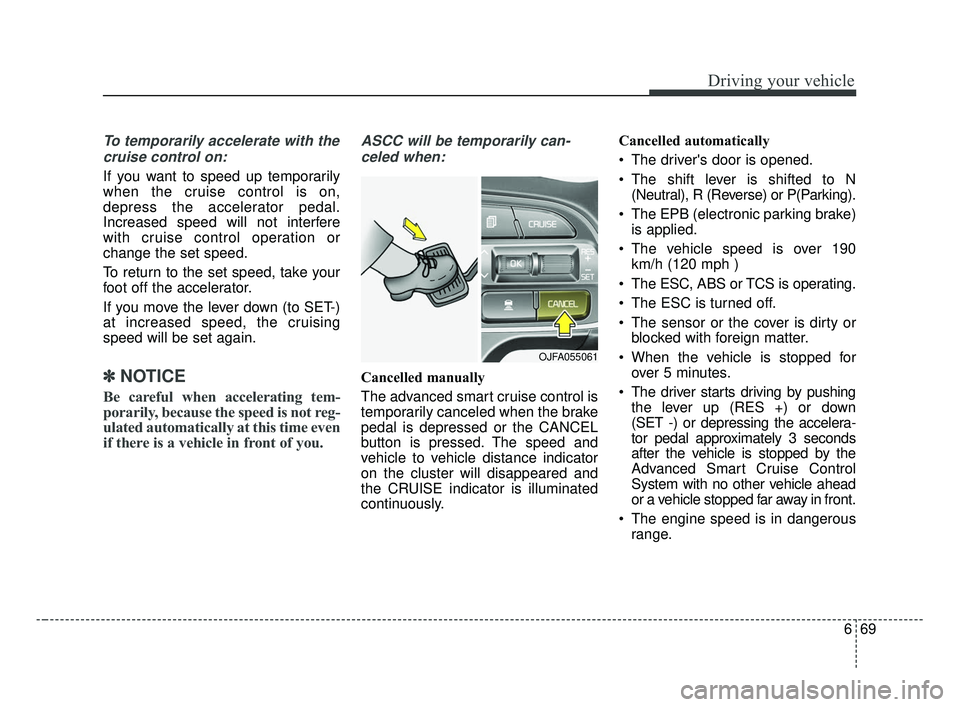
Cancelled manually
The advanced smart cruise control is
temporarily canceled when the brake
pedal is depressed or the CANCEL
button is pressed. The speed and
vehicle to vehicle distance indicator
on the cluster will disappeared and
the CRUISE indicator is illuminated
continuously. Cancelled automatically
The driver's door is opened.
The shift lever is shifted to N
(Neutral), R (Reverse) or P(Parking).
The EPB (electronic parking brake) is applied.
The vehicle speed is over 190 km/h (120 mph )
The ESC, ABS or TCS is operating.
The ESC is turned off.
The sensor or the cover is dirty or blocked with foreign matter.
When the vehicle is stopped for over 5 minutes.
The driver starts driving by pushing the lever up (RES +) or down
(SET -) or depressing the accelera-
tor pedal approximately 3 seconds
after the vehicle is stopped by the
Advanced Smart Cruise Control
System with no other vehicle ahead
or a vehicle stopped far away in front.
The engine speed is in dangerous range.
OJFA055061
JF CAN (ENG) 6.qxp 2016-09-21 11:26 Page 69
Page 464 of 629

6107
Driving your vehicle
VEHICLE LOAD LIMIT
OJFA055268/OJFA055271/OJFA055269/OJFA055272/OJFA055270/OJFA055273
Tire and loading information label
The label located on the driver's door sill gives the original tire size, cold tire pressures recom-
mended for your vehicle, the number of people that can be in your vehicle and vehicle capacity
weight.
JF CAN (ENG) 6.qxp 2016-09-21 11:28 Page 107
Page 468 of 629

6111
Driving your vehicle
Certification label
The certification label is located on
the driver's door sill at the center pillar.
This label shows the maximum allow-
able weight of the fully loaded vehi-
cle. This is called the GVWR (Gross
Vehicle Weight Rating). The GVWR
includes the weight of the vehicle, all
occupants, fuel and cargo.
This label also tells you the maxi-
mum weight that can be supported
by the front and rear axles, called
Gross Axle Weight Rating (GAWR).
To find out the actual loads on your
front and rear axles, you need to go to
a weigh station and weigh your vehi-
cle. Your dealer can help you with this.
Be sure to spread out your load equal-
ly on both sides of the centerline.The label will help you decide how
much cargo and installed equipment
your vehicle can carry.
If you carry items inside your vehicle
- like suitcases, tools, packages, or
anything else - they are moving as
fast as the vehicle. If you have to stop
or turn quickly, or if there is a crash,
the items will keep going and can
cause an injury if they strike the driv-
er or a passenger.
✽ ✽
NOTICE
Overloading your vehicle may cause
damage. Repairs would not be cov-
ered by your warranty. Do not over-
load your vehicle.
WARNING -Over loading
Never exceed the GVWR for
your vehicle, the GAWR for
either the front or rear axle and
vehicle capacity weight.
Exceeding these ratings can
affect your vehicle’s handling
and braking ability.
WARNING - Over loading
Do not overload your vehicle.
Overloading your vehicle can
cause heat buildup in your vehi-
cle's tires and possible tire fail-
ure, increased stopping dis-
tances and poor vehicle han-
dling--all of which may result in
a crash.
JF CAN (ENG) 6.qxp 2016-09-21 11:29 Page 111
Page 469 of 629

This chapter will guide you in the
proper loading of your vehicle and/or
trailer, to keep your loaded vehicle
weight within its design rating capa-
bility, with or without a trailer.
Properly loading your vehicle will
provide maximum return of the vehi-
cle design performance. Before load-
ing your vehicle, familiarize yourself
with the following terms for determin-
ing your vehicle's weight ratings, with
or without a trailer, from the vehicle's
specifications and the compliance
label:Base curb weight
This is the weight of the vehicle
including a full tank of fuel and all
standard equipment. It does not
include passengers, cargo, or option-
al equipment.
Vehicle curb weight
This is the weight of your new vehicle
when you picked it up from your deal-
er plus any aftermarket equipment.
Cargo weight
This figure includes all weight added
to the Base Curb Weight, including
cargo and optional equipment.
GAW (Gross axle weight)
This is the total weight placed on
each axle (front and rear) - including
vehicle curb weight and all payload.GAWR (Gross axle weight rating)
This is the maximum allowable
weight that can be carried by a single
axle (front or rear). These numbers
are shown on the compliance label.
The total load on each axle must
never exceed its GAWR.
GVW (Gross vehicle weight)
This is the Base Curb Weight plus
actual Cargo Weight plus passen-
gers.
GVWR (Gross vehicle weight rating)
This is the maximum allowable
weight of the fully loaded vehicle
(including all options, equipment,
passengers and cargo). The GVWR
is shown on the certification label
located on the driver’s door sill.
VEHICLE WEIGHT
6 112
Driving your vehicle
JF CAN (ENG) 6.qxp 2016-09-21 11:29 Page 112
Page 571 of 629

Maintenance
68
8
Fuse NameFuse ratingCircuit Protected
MODULE 710AAround View Unit, Front Air Ventilation Seat Control Module, Front Seat Warmer Control Module, Rear Seat
Warmer Control Module
MODULE 510A
A/C Control Module, Electro Chromic Mirror, Crash Pad Switch, Head Lamp LH/RH, Auto Head Lamp
Leveling Device Module, A/V & Navigation Head Unit, Fuel Lid & Trunk Open Switch, Shift Lever Indicator,
Driver IMS Module, Driver IMS Module, Front Air Ventilation Seat Control Module, Front Seat Warmer
Control Module, Rear Seat Warmer Control Module
MODULE 610ABCM, Smart Key Control Module
A/CON10AA/C Control Module, E/R Junction Block (Blower Relay)
START10A[W/O Smart Key & IMMO.] ICM Relay Box (Burglar Alarm Relay)
[With Smart Key / IMMO.] Transaxle Range Switch, PCM (G4KH/G4KJ)
A/BAG15ASRS Control Module, Passenger Occupant Detection
MODULE 310ABCM, ATM Shift Lever, Stop Lamp Switch, DBL Unit, Keyboard, A/C Control Module
MODULE 410AConsole Switch, Blind Spot Detection Radar LH/RH, Smart Cruise Control Unit, AEB Module, Lane Keeping
Assist Module
INTERIOR LAMP10ATrunk Room Lamp, Ignition Key Ill. & Door Warning Switch, Glove Box Lamp, Driver/Passenger Smart Key
Outside Handle, Front Vanity Lamp Switch LH/RH, Overhead Console Lamp, Center Room Lamp, Center
Personal Lamp, Rear Personal Lamp LH/RH, Driver/Passenger Scuff Lamp
MDPS10AMDPS Unit (Column/Rack), Steering Angle Sensor
IG125APCB Block (Fuse - TCU 2, ABS 3, ECU 3, VACUUM PUMP 2)
MODULE 910AImmobilizer Module, Smart Key Control Module
Instrument panel (Driver’s side fuse panel)
JF CAN (ENG) 8.qxp 2016-09-23 10:24 Page 68
Page 572 of 629

869
Maintenance
Fuse NameFuse ratingCircuit Protected
WASHER15AMultifunction Switch (Wiper Low & Washer Switch)
MODULE 810AA/C Control Module, Driver/Passenger Door Module
CLUSTER10AInstrument Cluster (IG1)
MULTI MEDIA15AAudio, A/V & Navigation Head Unit, Keyboard
HEATED
STEERING15ABCM (Steering Wheel Heated)
MODULE 110AConsole Switch, Key Solenoid, Driver/Passenger Door Module
DR LOCK20ADoor Lock Relay, Door Unlock Relay
SMART KEY15ASmart Key Control Module
A/BAG IND10AInstrument Cluster (Air Bag IND. Power)
TRUNK10ATrunk Lid Relay, Fuel Filler & Trunk Open Switch, Trunk Lid Motor, ICM Relay Box (Fuel Filler Open Relay)
SUNROOF 220ASunroof Control Unit (Roller)
MEMORY 110AInstrument Cluster, A/C Control Module, Data Link Connector, BCM, Wireless Charger, Driver IMS Module,
Rain Sensor, ICM Relay Box (Outside Mirror Folding/Unfolding Mirror Relay), Security Indicator, Auto Light
& Photo Sensor, Driver/Passenger Door Module, Electro Chromic Mirror
S/HEATER RR25ARear Seat Warmer Control Module
SUNROOF 120ASunroof Control Unit (Glass)
JF CAN (ENG) 8.qxp 2016-09-23 10:24 Page 69
Page 576 of 629

873
Maintenance
Fuse NameFuse ratingCircuit Protected
FUSE
B+440ASmart Junction Block (Leak Current Autocut Device Fuse - INTERIOR LAMP, MEMORY1, MULTI
MEDIA, Fuse - DOOR LOCK, MODULE1, SMART KEY, BRAKE SWITCH)
E-CVVT 140AE-CVVT Relay
VACUUMPUMP 120AVacuum Pump
DEICER20ADeicer Relay
AMS10ABattery Sensor
E-CVVT 220APCM
A/CON10AA/C Control Module
E-CVVT 320APCM
HEATED
MIRROR10AA/C Control Module, Driver/Passenger Power Outside Mirror, ECM
WIPER 210ABCM, PCM/ECM
H/LAMP HI20AHead Lamp HI Relay
JF CAN (ENG) 8.qxp 2016-09-23 10:24 Page 73