Page 426 of 629
669
Driving your vehicle
To temporarily accelerate with thecruise control on:
If you want to speed up temporarily
when the cruise control is on,
depress the accelerator pedal.
Increased speed will not interfere
with cruise control operation or
change the set speed.
To return to the set speed, take your
foot off the accelerator.
If you move the lever down (to SET-)
at increased speed, the cruising
speed will be set again.
✽ ✽ NOTICE
Be careful when accelerating tem-
porarily, because the speed is not reg-
ulated automatically at this time even
if there is a vehicle in front of you.
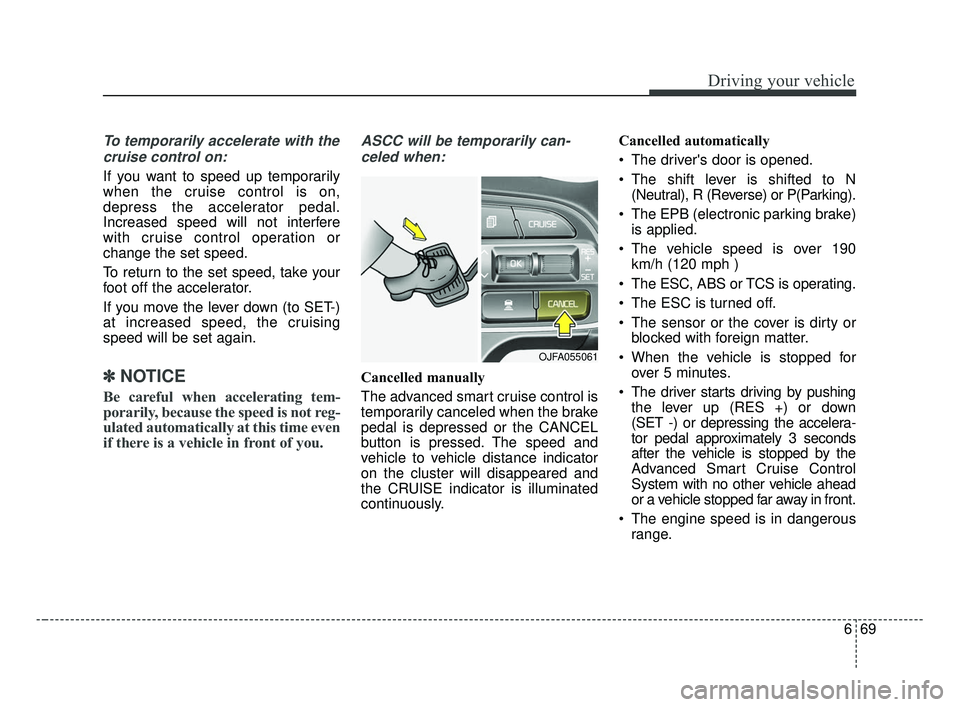
ASCC will be temporarily can-
celed when:
Cancelled manually
The advanced smart cruise control is
temporarily canceled when the brake
pedal is depressed or the CANCEL
button is pressed. The speed and
vehicle to vehicle distance indicator
on the cluster will disappeared and
the CRUISE indicator is illuminated
continuously. Cancelled automatically
The driver's door is opened.
The shift lever is shifted to N
(Neutral), R (Reverse) or P(Parking).
The EPB (electronic parking brake) is applied.
The vehicle speed is over 190 km/h (120 mph )
The ESC, ABS or TCS is operating.
The ESC is turned off.
The sensor or the cover is dirty or blocked with foreign matter.
When the vehicle is stopped for over 5 minutes.
The driver starts driving by pushing the lever up (RES +) or down
(SET -) or depressing the accelera-
tor pedal approximately 3 seconds
after the vehicle is stopped by the
Advanced Smart Cruise Control
System with no other vehicle ahead
or a vehicle stopped far away in front.
The engine speed is in dangerous range.
OJFA055061
JF CAN (ENG) 6.qxp 2016-09-21 11:26 Page 69
Page 427 of 629

Driving your vehicle
70
6
The ASCC system has malfunc-
tioned.
The accelerator pedal is continu- ously depressed for long time.
Pull over on steep uphill
When activating the AEB (Autonomous Emergency Braking)
Each of these actions will cancel the
ASCC operation. (The set speed
and vehicle-to-vehicle distance on
the LCD display will go off.)
If the ASCC is cancelled automati-
cally, the ASCC will not resume
even though the RES+ or SET-
lever is moved. Also, the EPB (elec-
tronic parking brake) will be applied
when the vehicle is stopped.
If the ASCC is cancelled by a reason
not mentioned, have the system
checked by an authorized Kia dealer.
✽ ✽ NOTICE
If the system is automatically can-
celled, the warning chime will sound
and a message will appear for a few
seconds.
You must adjust the vehicle speed by
depressing the accelerator or brake
pedal according to the road condi-
tion ahead and driving condition.
Always check the road conditions.
Do not rely on the warning chime.
To resume cruise control set
speed:
If any method other than the CRUISE
button was used to cancel cruising
speed and the system is still activat-
ed, the cruising speed will automati-
cally resume when you move the lever
up/down (to RES+ or SET-).
If you move the lever up (to RES+),
the speed will resume to the recently
set speed. It will not resume if the
vehicle speed has dropped below
approximately 30 km/h (20 mph).
OJF055235L
OJF055044
JF CAN (ENG) 6.qxp 2016-09-21 11:26 Page 70
Page 428 of 629
671
Driving your vehicle
To turn cruise control off:
Press the CRUISE button. (the
CRUISE indicator in the instrument
cluster will go off).
WARNING - FollowingDistance
To avoid collisions, always be aware of the selected speed
and vehicle to vehicle dis-
tance settings when activat-
ing your smart cruise control
system.
Always maintain sufficient braking distance and deceler-
ate your vehicle by applying
the brakes if necessary.CAUTION
When pushing the lever up forresetting, the speed mightsharply increase or decrease tothe speed set just before it wascancelled. Be sure to checkroad conditions and operateonly when you can check thespeed set before.
OJF055042
JF CAN (ENG) 6.qxp 2016-09-21 11:26 Page 71
Page 429 of 629

Driving your vehicle
72
6
Vehicle to vehicle distance
setting (ASCC)
To set vehicle to vehicle distance:
This function allows you to program
the vehicle to maintain relative dis-
tance to the vehicle ahead without
depressing the accelerator pedal or
brake pedal. The vehicle to vehicle distance will
automatically activate when the
ASCC is on.
Select the appropriate distance
according to road conditions and
vehicle speed.
Each time the button is pressed, the
vehicle to vehicle distance changes
as follows:
For example, if you drive at 90 km/h
(56 mph), the distance is maintained
as follows;
Distance 4 - approximately 52.5 m
(172 feet )
Distance 3 - approximately 40 m (130 feet )
Distance 2 - approximately 32.5 m (106 feet )
Distance 1 - approximately 25 m (82 feet )
✽ ✽NOTICE
The advanced smart cruise control
system remembers the last vehicle to
vehicle distance which the driver
used in the vehicle with AEB.
OJF055046
Distance 4 Distance 3 Distance 2
Distance 1
JF CAN (ENG) 6.qxp 2016-09-21 11:27 Page 72
Page 432 of 629
675
Driving your vehicle
Radar to detect distance to thevehicle ahead
The sensor detects distance to the
vehicle ahead.
If the sensor is covered with dirt or
other foreign matter, the vehicle to
vehicle distance control may not
operate correctly.
Always keep the sensor clean. Radar check message
If the radar or cover is dirty or
obscured with foreign matter such as
snow, this message will appear and it
will disappear after for a while. In this
case, the system may not function
temporarily, but it does not indicate a
malfunction of the Advanced Smart
Cruise Control System. Clean the
radar or cover by using a soft cloth
and it will operate normally.ASCC (Advanced Smart Cruise
Control) malfunction message
The message will appear when the
vehicle to vehicle distance control
system is not functioning normally.
Take your vehicle to an authorized
Kia dealer and have the system
checked.
OJFA055221
OJF055188L
OJF055237L
JF CAN (ENG) 6.qxp 2016-09-21 11:27 Page 75
Page 433 of 629

Driving your vehicle
76
6
Always keep the sensor and
bumper clean.
Use only a genuine Kia sensor cover for your vehicle.
Do not install accessories around the sensor and do not replace the
bumper by yourself. It may interfere
with the sensor performance.
Impact damage to the sensor or sensor area may cause the sensor
to move slightly off position and
result in the ASCC not operating
correctly without any warning or
indicator from the cluster. If this
occurs, have your vehicle checked
by an authorized Kia dealer as
soon as possible.To adjust the sensitivity of
Advanced Smart Cruise Control
The sensitivity of vehicle speed when
following the front vehicle to maintain
the set distance can be adjusted. Go
to the User Settings Mode (Driving
Assist) and select SCC (Smart
Cruise Control). You may select one
of the three stages you prefer.
Slow:
Vehicle speed following the front
vehicle to maintain the set distance
is slower than normal speed. Normal:
Vehicle speed following the front
vehicle to maintain the set distance
is normal
Fast: Vehicle speed following the front
vehicle to maintain the set distance
is faster than normal speed.
✽ ✽ NOTICE
The system remembers the last
selected mode.
CAUTION - Sensor
Damage
To prevent sensor cover dam-age from occurring, wash thecar with a soft cloth.
OJF055101L
JF CAN (ENG) 6.qxp 2016-09-21 11:27 Page 76
Page 434 of 629

677
Driving your vehicle
To convert to cruise control
mode:
The driver may choose to only use
the cruise control mode (speed con-
trol function) by doing as follows:1.Turn the ASCC on (the cruise indi-
cator light will be on but the system
will not be activated).
2.Push the distance to distance switch for more than 2 seconds.
3.Choose between "Smart cruise control (SCC) mode" and "Cruise
control (CC) mode".
4.Speed setting is equal to the advanced smart cruise control
operation method. However, when
it is turned off by the CRUISE
switch or the CRUISE switch is
operated after the engine is
restarted, it automatically returns
to the advanced smart cruise con-
trol system.
When using the cruise control mode,
you must manually assess the dis-
tance to other vehicles as the system
will not automatically brake to slow
down for other vehicles.
Limitations of the system
The ASCC may have limits to its abil-
ity to detect distance to the vehicle
ahead due to road and traffic condi-
tions.
OJF055238L
OJF055239L
OJF055025
JF CAN (ENG) 6.qxp 2016-09-21 11:27 Page 77
Page 571 of 629

Maintenance
68
8
Fuse NameFuse ratingCircuit Protected
MODULE 710AAround View Unit, Front Air Ventilation Seat Control Module, Front Seat Warmer Control Module, Rear Seat
Warmer Control Module
MODULE 510A
A/C Control Module, Electro Chromic Mirror, Crash Pad Switch, Head Lamp LH/RH, Auto Head Lamp
Leveling Device Module, A/V & Navigation Head Unit, Fuel Lid & Trunk Open Switch, Shift Lever Indicator,
Driver IMS Module, Driver IMS Module, Front Air Ventilation Seat Control Module, Front Seat Warmer
Control Module, Rear Seat Warmer Control Module
MODULE 610ABCM, Smart Key Control Module
A/CON10AA/C Control Module, E/R Junction Block (Blower Relay)
START10A[W/O Smart Key & IMMO.] ICM Relay Box (Burglar Alarm Relay)
[With Smart Key / IMMO.] Transaxle Range Switch, PCM (G4KH/G4KJ)
A/BAG15ASRS Control Module, Passenger Occupant Detection
MODULE 310ABCM, ATM Shift Lever, Stop Lamp Switch, DBL Unit, Keyboard, A/C Control Module
MODULE 410AConsole Switch, Blind Spot Detection Radar LH/RH, Smart Cruise Control Unit, AEB Module, Lane Keeping
Assist Module
INTERIOR LAMP10ATrunk Room Lamp, Ignition Key Ill. & Door Warning Switch, Glove Box Lamp, Driver/Passenger Smart Key
Outside Handle, Front Vanity Lamp Switch LH/RH, Overhead Console Lamp, Center Room Lamp, Center
Personal Lamp, Rear Personal Lamp LH/RH, Driver/Passenger Scuff Lamp
MDPS10AMDPS Unit (Column/Rack), Steering Angle Sensor
IG125APCB Block (Fuse - TCU 2, ABS 3, ECU 3, VACUUM PUMP 2)
MODULE 910AImmobilizer Module, Smart Key Control Module
Instrument panel (Driver’s side fuse panel)
JF CAN (ENG) 8.qxp 2016-09-23 10:24 Page 68

