Page 313 of 629
Audio system
70
5 SEEK
Press the [SEEK TRACK]
button to
play the previous/next frequency.
TUNE
Turn the TUNE knob to select the
desired frequency.
Selecting Presets/Saving Presets
Press the [Preset] button to display
the broadcast information for the fre-
quency saved to each button.
Press the [1] ~ [6] buttons to play the
desired preset.
While listening to a frequency you
want to save as a preset, press and
hold one of the [1] ~ [6] preset but-
tons to save the current frequency to
the selected preset.A.Store(Auto Store)
Press the [A.Store] button to auto-
matically save receivable frequen-
cies to Preset buttons.
Scan
Press the [SCAN]
button to preview
frequencies with superior reception
for 5 seconds each.
Press and hold the [SCAN] button to
preview presets for 5 seconds each.
Once scan is complete, the previous
frequency will be restored. While
Scan is operating, pressing [SCAN]
button will cancel the scanning.
JF CAN (ENG) 5 (Audio).qxp 2016-09-21 11:22 Page 70
Page 316 of 629
![KIA OPTIMA 2017 Owners Manual Audio system
573
SEEK
Press the [SEEK TRACK]button to
play the previous/next channel.
❈ If the “Category” icon is displayed,
channels are changed within the
current category.
Tu n e
Turn the TUN](/manual-img/2/40406/w960_40406-315.png "KIA OPTIMA 2017 Owners Manual Audio system
573
SEEK
Press the [SEEK TRACK]button to
play the previous/next channel.
❈ If the “Category” icon is displayed,
channels are changed within the
current category.
Tu n e
Turn the TUN")
Audio system
573
SEEK
Press the [SEEK TRACK]button to
play the previous/next channel.
❈ If the “Category” icon is displayed,
channels are changed within the
current category.
Tu n e
Turn the TUNE knob to select the
desired channel.
SCAN
Press the [SCAN] button to scan all
channels with superior reception for
5 seconds each.
Once scan is complete, the previous-
ly played channel will be restored.
During Scan, pressing the [SCAN]
button again will cancel the scan
operation and restore the previously
played channel.
If the “Category” icon is displayed,
channels are changed within the cur-
rent category. Searching Categories
Select the category by using the
[CAT/FOLDER]
button and press the
TUNE knob to select.
Channels for the selected category
are played.
✽ ✽ Troubleshooting
1. Antenna Error
If this message is displayed, the
antenna or antenna cable is bro-
ken or unplugged. Please consult
with your Kia dealership.
2. No Signal If this message is displayed, it
means that the antenna is covered
and that the SiriusXM Satellite
Radio signal is not available.
Ensure the antenna is uncovered
and has a clear view of the sky.
Selecting Presets/Saving Presets
Press the [Preset] button to display
the broadcast information for the
channel saved to each button.
Press the [1] ~ [6] buttons to play the
desired preset.
While listening to a channel you want
to save as a preset, press and hold
one of the [1] ~ [6] preset buttons to
save the current channel to the
selected preset.
JF CAN (ENG) 5 (Audio).qxp 2016-09-21 11:22 Page 73
Page 349 of 629
Audio system
106
5 Media Display
This feature is used to change the
information displayed within USB
and MP3 CD modes.
Folder File : Displays file name and
folder name.
Album Artist Song : Displays album name/ a r tist name/ song name.
With the Sound Button
Press the [SETUP] button �Select
[Sound]
You can select and control options
related to [Sound Settings], [Speed
Dependent Vol.], [Voice Recognition
Vol.] and [Touch Screen Beep].
Sound Settings
Use the [Up/Down/Left/Right] but-
tons to adjust the Fader/Balance set-
tings.
Use the [Left/Right] buttons to adjust
the Bass/Middle/Treble settings.
Press the [Default] button to reset.
JF CAN (ENG) 5 (Audio).qxp 2016-09-21 11:22 Page 106
Page 350 of 629
Audio system
5107
SDVC (Speed Dependent Volume
Control)
The volume level is controlled auto-
matically according to the vehicle
speed. SDVC can be set by selecting
from On/Off.Voice Recognition Volume
Use the [-], [+] buttons to adjust the
Voice Recognition volume.
Touch Screen Beep
This feature is used to turn the touch
screen beep on/off.
JF CAN (ENG) 5 (Audio).qxp 2016-09-21 11:22 Page 107
Page 351 of 629
Audio system
108
5
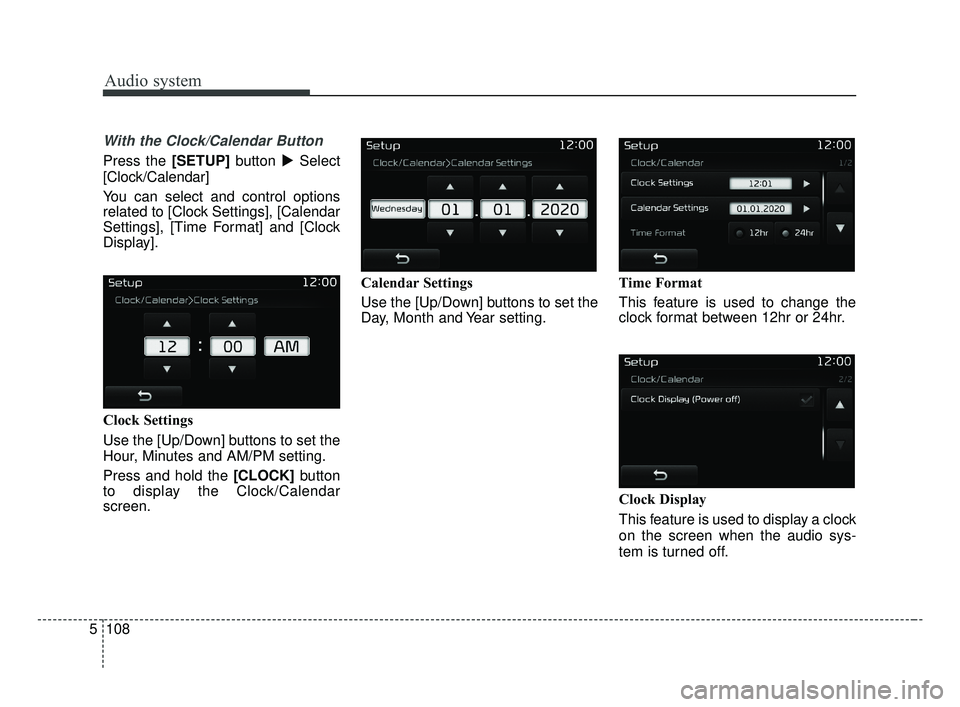
With the Clock/Calendar Button
Press the [SETUP] button �Select
[Clock/Calendar]
You can select and control options
related to [Clock Settings], [Calendar
Settings], [Time Format] and [Clock
Display].
Clock Settings
Use the [Up/Down] buttons to set the
Hour, Minutes and AM/PM setting.
Press and hold the [CLOCK] button
to display the Clock/Calendar
screen. Calendar Settings
Use the [Up/Down] buttons to set the
Day, Month and Year setting.
Time Format
This feature is used to change the
clock format between 12hr or 24hr.
Clock Display
This feature is used to display a clock
on the screen when the audio sys-
tem is turned off.
JF CAN (ENG) 5 (Audio).qxp 2016-09-21 11:22 Page 108
Page 353 of 629
Audio system
110
5
✽ ✽
NOTICE - Before
Downloading
Contacts
• Only contacts within connected phones can be downloaded. Also
check to see that your mobile
phone supports the download fea-
ture.
• To learn more about whether your mobile phone supports contact
downloads, refer to your mobile
phone user’s manual.
• The contacts for only the connect- ed phone can be downloaded.
Downloading Contacts
As the contacts are downloaded
from the mobile phone, a download
progress bar is displayed.
Upon downloading phone con-
tacts, the previous corresponding
data is deleted.
This feature may not be supported in some mobile phones.
Voice Recognition may not operate while contacts are being down-
loaded. Outgoing Volume
Use the [-], [+] buttons to adjust the
outgoing volume level.
While on a call, the volume can be
changed by using the [
SEEK
TRACK] button.
JF CAN (ENG) 5 (Audio).qxp 2016-09-21 11:22 Page 110
![KIA OPTIMA 2017 Owners Manual Audio system
70
5 SEEK
Press the [SEEK TRACK]
button to
play the previous/next frequency.
TUNE
Turn the TUNE knob to select the
desired frequency.
Selecting Presets/Saving Presets
Press the [Preset] b](/manual-img/2/40406/w960_40406-312.png "KIA OPTIMA 2017 Owners Manual Audio system
70
5 SEEK
Press the [SEEK TRACK]
button to
play the previous/next frequency.
TUNE
Turn the TUNE knob to select the
desired frequency.
Selecting Presets/Saving Presets
Press the [Preset] b")