Page 413 of 629

Driving your vehicle
56
6
Sensor to detect the distance
from the vehicle in front
(front radar)
The sensor is to maintain a certain
distance from the vehicle in front.
However, the smudged sensor lens
with foreign substances, such as
snow and rain, adversely affects the
sensing performance. It may even
temporarily cancel the AEB. Always
keep the sensor lens clean.
Warning message and warning
light
When the sensor is covered or the
sensor lens is dirty with foreign sub-
stances, such as snow or rain, the
AEB operation may temporarily stop.
In this case, a warning message will
appear to notify the driver.
This is not a malfunction with the
AEB. To operate the AEB again,
remove the foreign substances.
✽ ✽ NOTICE
• Do not install any accessories, such
as a license plate bracket or
bumper sticker near the sensor
area. Do not replace the bumper
by yourself. Doing so may adverse-
ly affect the sensing performance.
• Always keep the sensor/bumper area clean.
• Use only a soft cloth to wash the vehicle. Also, do not spray highly
pressurized water on the sensor
installed on the bumper.
• Be careful not to apply unneces- sary force on the frontal sensor
area. When the sensor moves out
of the correct position due to
external force, the system may not
operate correctly even without the
warning light or message. In this
case, we recommend you to have
the vehicle inspected by an
authorized Kia dealer.
• Use only the genuine Kia sensor cover. Do not arbitrarily apply
paint on the sensor cover.
OJFA055221
OJF055187L
JF CAN (ENG) 6.qxp 2016-09-21 11:26 Page 56
Page 414 of 629

657
Driving your vehicle
System malfunction
When the AEB is not working prop-erly, the AEB warning light ( ) will
illuminate and the warning mes-
sage will appear for a few seconds.
After the message disappears, the
master warning light ( ) will illu-
minate. In this case, we recommend
you to have the vehicle inspected by
an authorized Kia dealer. The AEB warning message may
appear along with the illumination
of the ESC warning light. The AEB may unnecessarily pro-
duce warning messages and warn-
ing alarms. Due to the sensing lim-
itation, the AEB may not produce
warning messages or warning
alarm at all.
When there is a malfunction with the AEB, the braking control does
not operate upon detecting a colli-
sion risk even with other braking
systems normally operating.
The AEB operates only for the vehicle / pedestrian in front, while
driving forward. It does not operate
for any animals or vehicles in the
opposite direction.
The AEB can not recognize cross- traffic or parked vehicles present-
ing a side-profile.
OJF055181L
OJF055079L
■Type A
■Type B
WARNING
The AEB is only a supplemental
system for the driver’s conven-
ience.
The driver still maintains
responsibility to control the
vehicle. Do not solely depend
on the AEB system. Rather,
maintain a safe braking dis-
tance, and, if necessary,
depress the brake pedal to
lower the driving speed.
JF CAN (ENG) 6.qxp 2016-09-21 11:26 Page 57
Page 419 of 629

Driving your vehicle
62
6
The cruise control system allows you
to program the vehicle to maintain a
constant speed without depressing
the accelerator pedal.
This system is designed to function
above approximately 30 km/h (20
mph).
If the cruise control is left on,
(CRUISE indicator light in the instru-
ment cluster illuminated) the cruise
control can be switched on acciden-
tally. Keep the cruise control system
off (CRUISE indicator light OFF)
when the cruise control is not in use,
to avoid inadvertently setting a speed. Use the cruise control system only
when traveling on open highways in
good weather.
Do not use the cruise control when
driving in heavy or varying traffic, or
on slippery (rainy, icy or snow-cov-
ered) or winding roads or over 6%
up-hill or down-hill roads.
✽ ✽
NOTICE
• During normal cruise control oper-
ation, when the SET switch is acti-
vated or reactivated after applying
the brakes, the cruise control will
energize after approximately 3 sec-
onds. This delay is normal.
• To activate cruise control, depress the brake pedal at least once after
turning the ignition switch to the
ON position or starting the engine.
This is to check if the brake switch
which is important part to cancel
cruise control is in normal condi-
tion.
CRUISE CONTROL SYSTEM
WARNING - Misuse of
Cruise Control
Do not use cruise control if the
traffic situation does not allow
you to drive safely at a constant
speed and with sufficient dis-
tance to the vehicle in front.
OJF055037
JF CAN (ENG) 6.qxp 2016-09-21 11:26 Page 62
Page 433 of 629

Driving your vehicle
76
6
Always keep the sensor and
bumper clean.
Use only a genuine Kia sensor cover for your vehicle.
Do not install accessories around the sensor and do not replace the
bumper by yourself. It may interfere
with the sensor performance.
Impact damage to the sensor or sensor area may cause the sensor
to move slightly off position and
result in the ASCC not operating
correctly without any warning or
indicator from the cluster. If this
occurs, have your vehicle checked
by an authorized Kia dealer as
soon as possible.To adjust the sensitivity of
Advanced Smart Cruise Control
The sensitivity of vehicle speed when
following the front vehicle to maintain
the set distance can be adjusted. Go
to the User Settings Mode (Driving
Assist) and select SCC (Smart
Cruise Control). You may select one
of the three stages you prefer.
Slow:
Vehicle speed following the front
vehicle to maintain the set distance
is slower than normal speed. Normal:
Vehicle speed following the front
vehicle to maintain the set distance
is normal
Fast: Vehicle speed following the front
vehicle to maintain the set distance
is faster than normal speed.
✽ ✽ NOTICE
The system remembers the last
selected mode.
CAUTION - Sensor
Damage
To prevent sensor cover dam-age from occurring, wash thecar with a soft cloth.
OJF055101L
JF CAN (ENG) 6.qxp 2016-09-21 11:27 Page 76
Page 444 of 629

687
Driving your vehicle
BSD (Blind Spot Detection) /
LCA (Lane Change Assist)
Operating conditions
The indicator on the switch will illumi-
nate when the Blind Spot Detection
System (BSD) switch is pressed with
the Engine Start/Stop Button ON.
If vehicle speed exceeds 30 km/h
(18.6 mph), the system will activate.
If you press the switch again, the
switch indicator and system will be
turned off.
If the vehicle is turned off, the system
will remember the last settings upon
restart.When the system is not used turn the
system off by turning off the switch.
When the system is turned on the
warning light will illuminate for 3 sec-
onds on the outside rearview mirror.
Warning type
The system will activate when:
1. The system is on.
2. Vehicle speed is above 30 km/h
(18.6 mph).
3. Other vehicles are detected in the rear side.
WARNING
The Blind Spot Detection
System with Lane Change
Assist and Rear Cross Traffic
Alert is not a substitute for
proper and safe lane changing
procedures. Always drive safely
and use caution when changing
lanes. The Blind Spot Detection
System may not detect every
object alongside the vehicle.
OJF055098
JF CAN (ENG) 6.qxp 2016-09-21 11:28 Page 87
Page 445 of 629

Driving your vehicle
88
6
If a vehicle is detected within the
boundary of the system, a warning
light will illuminate on the outside
rearview mirror.
If the detected vehicle is not in
detecting range, the warning will turn
off. The second stage alarm will activate
when:
1.The first stage alert is on
2.The turn signal is on to change a
lane
When the second stage alert is acti-
vated, a warning light will blink on the
outside rearview mirror and an alarm
will sound.
If you move the turn signal switch to
the original position, the second
stage alert will be deactivated. - The second stage alarm may be
deactivated.
To activate the alarm: Go to the User Settings Mode →
Sound and select "BSD" on the
LCD display.
To deactivate the alarm: Go to the User Settings Mode →
Sound and deselect "BSD" on the
LCD display.✽ ✽
NOTICE
The alarm function helps alert the
driver. Deactivate this function only
when it is necessary
OUM054029
2nd stage
OUM054028
1st stage
JF CAN (ENG) 6.qxp 2016-09-21 11:28 Page 88
Page 446 of 629
689
Driving your vehicle
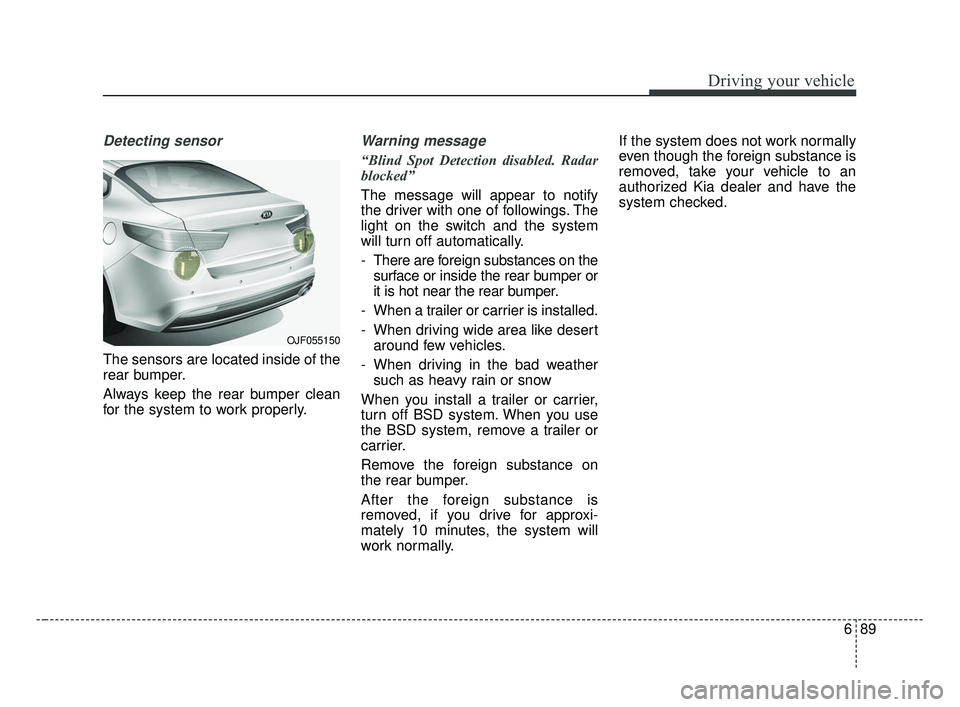
Detecting sensor
The sensors are located inside of the
rear bumper.
Always keep the rear bumper clean
for the system to work properly.
Warning message
“Blind Spot Detection disabled. Radar
blocked”
The message will appear to notify
the driver with one of followings. The
light on the switch and the system
will turn off automatically.
- There are foreign substances on thesurface or inside the rear bumper or
it is hot near the rear bumper.
- When a trailer or carrier is installed.
- When driving wide area like desert around few vehicles.
- When driving in the bad weather such as heavy rain or snow
When you install a trailer or carrier,
turn off BSD system. When you use
the BSD system, remove a trailer or
carrier.
Remove the foreign substance on
the rear bumper.
After the foreign substance is
removed, if you drive for approxi-
mately 10 minutes, the system will
work normally. If the system does not work normally
even though the foreign substance is
removed, take your vehicle to an
authorized Kia dealer and have the
system checked.
OJF055150
JF CAN (ENG) 6.qxp 2016-09-21 11:28 Page 89
Page 447 of 629
Driving your vehicle
90
6
If the system does not work properly,
a warning message will appear and
the light on the switch will turn off.
The system will turn off automatical-
ly.
Have your vehicle inspected by an
authorized Kia dealer.
RCTA (Rear Cross Traffic Alert)
When your vehicle moves backwards
from a parking position, the sensor
detects approaching vehicles to the
left or right side direction and gives
information to the driver.
Operating conditions
Select RCTA (Rear Cross Traffic
Alert) in "User Settings" under
"Driving Assist" on the instrument
cluster. The system will turn on and
standby to activate.
Select RCTA again, to turn the sys- tem off.
If the vehicle is turned off, the RCTA system will remember the
last settings upon restart. Always
turn the RCTA system off when not
in use.
OJF055247L
OYP054026KOJFA055279
JF CAN (ENG) 6.qxp 2016-09-21 11:28 Page 90
