Page 277 of 604

Audio system
65
FM radio station
FM broadcasts are transmitted at
high frequencies and do not bend to
follow the earth's surface. Because
of this, FM broadcasts generally
begin to fade within short distances
from the station. Also, FM signals are
easily affected by buildings, moun-
tains, and obstructions. This can lead
to undesirable or unpleasant listen-
ing conditions which might lead you
to believe a problem exists with your
radio. The following conditions are
normal and do not indicate radio
trouble: Fading - As your vehicle moves
away from the radio station, the
signal will weaken and sound will
begin to fade. When this occurs,
we suggest that you select another
station with a stronger signal.
Flutter/Static - Weak FM signals or large obstructions between the
transmitter and your radio can dis-
turb the signal causing static or
fluttering noises to occur. Reducing
the treble level may lessen this
effect until the disturbance clears. Station Swapping - As an FM sig-
nal weakens, another more power-
ful signal near the same frequency
may begin to play. This is because
your radio is designed to lock onto
the clearest signal. If this occurs,
select another station with a
stronger signal.
Multi-Path Cancellation - Radio sig- nals being received from several
directions can cause distortion or
fluttering. This can be caused by a
direct and reflected signal from the
same station, or by signals from
two stations with close frequencies.
If this occurs, select another station
until the condition has passed.
¢¢¢
JBM004
OJF045310L
OJF045311L
Page 278 of 604
Audio system
57
Using a cellular phone or a two-way radio
When a cellular phone is used inside
the vehicle, noise may be produced
from the audio system. This does not
mean that something is wrong with
the audio equipment. In such a case,
try to operate mobile devices as far
from the audio equipment as possible.
When using a communication sys-
tem such as a cellular phone or a
radio set inside the vehicle, a sepa-
rate external antenna must be fitted.
When a cellular phone or a radio set
is used with an internal antenna
alone, it may interfere with the vehi-
cle's electrical system and adversely
affect safe operation of the vehicle.
WARNING- Cell phone use
Do not use a cellular phone
while driving. Stop at a safe
location to use a cellular phone.
Page 280 of 604

Audio system
59
Features of Your Audio
Head unit
❈The actual features in the vehicle
may differ from the illustration.
(1) EJECT
Ejects the disc.
(2) RADIO
Changes to FM/AM/SiriusXM mode.
Each time the button is pressed, the mode is changed in the order
of FM1
➟FM2 ➟AM ➟SAT1 ➟
SAT2 ➟SAT3. (3)
MEDIA
Changes to CD/USB(iPod
®)/AUX
/My Music/Bluetooth®Audio mode.
Each time the button is pressed, the mode is changed in the order
of CD, USB(iPod
®), AUX, My
Music, BT (Bluetooth®) Audio.
(4) PHONE
Changes to Phone mode.
When a phone is not connected, the connection screen is displayed. (5)
SEEK TRACK
When pressed briefly - Radio mode : plays previous/nextfrequency.
- Media (CD/USB/iPod
®/My Music)
modes : changes the track,
Song(file)
When pressed and held - Radio mode : continuouslychanges the frequency. Upon
release, plays the current fre-
quency.
- Media(CD/USB/iPod
®/My Music)
modes : rewinds or fast forwards
the track or file
- During a Handsfree call, controls the call volume.
(6) POWER/VOL knob
Power knob : Press to turn power on/off.
Volume knob : Turn left/right to con- trol volume.
Page 281 of 604
Audio system
10
5 (7)
DISP
(8) SCAN
Radio mode : previews all receiv- able broadcasts for 5 seconds
each
Media (CD/USB/My Music) modes : previews each song (file) for 10
seconds each. (9)
SETUP
Changes to Setup mode.
(10) CLOCK
When pressed briefly : Display time screen
When pressed and held : Move to the time setting mode
(11) CAT/FOLDER
SiriusXM RADIO : Category Search
MP3 CD/USB mode : Search Folder
(12) TUNE knob
Radio mode : turn to change broadcast frequencies.
Media (CD/USB/iPod
®/My Music)
modes : turn to search Tracks/
chan nels/files.
Page 291 of 604
Audio system
20
5
Radio Mode
Radio Mode Display Controls
(1) Mode Display
Displays current operating mode.
(2) Frequency
Displays the current frequency.
(3) Preset
Displays current preset number [1] ~
[6].
(4) Preset Display
Displays preset buttons.
(5) A.Store
Automatically saves frequencies with
superior reception to Preset buttons.With the Radio Mode Button
Pressing the [RADIO] button will
change the operating mode in order
of FM1
➟ FM2 ➟ AM ➟ SAT1 ➟ SAT2
➟ SAT3
If [Mode Pop up] is turned on within
[SETUP] �[Display], then pressing
the [RADIO] button will display the
Radio Mode Pop up screen.
Turn the TUNE knob to move the
focus. Press the knob to select.
Page 293 of 604

Audio system
22
5
SiriusXM®Satellite Radio infor-
mation
Satellite Radio channels:
Enjoy SiriusXM Satellite Radio with a 3-
month trial subscription to the Sirius
Select package. You’ll get over 140
channels, including commercial-free
music, plus all your favorite sports,
exclusive talk, entertainment, and a
selection of premium programming. For
more information and a complete list
of SiriusXM channels, visit sir-
iusxm.com in the United States, sir-
iusxm.ca in Canada, or call Sir iusXM
at 1-888-539-7474.
Satellite Radio reception factors:
To receive the satellite signal, your
vehicle has been equipped with a
satellite radio antenna located on the
roof of your vehicle. The vehicle roof
provides the best location for an
unobstructed, open view of the sky, a
requirement of a satellite radio sys-
tem. Like AM/FM, there are several
factors that can affect satellite radio
reception performance:
Antenna obstructions: For optimal reception performance, keep the
antenna clear of snow and ice
build-up and keep luggage and other material as far away from the
antenna as possible.
Terrain: Hills, mountains, tall build- ings, bridges, tunnels, freeway
overpasses, parking garages,
dense tree foliage and thunder-
storms can interfere with your
reception.
SiriusXM Satellite Radio service:
SiriusXM is a subscription-based
satellite radio service that broad-
casts music, sports, news and enter-
tainment programming to radio
receivers, which are available for
installation in motor vehicles or facto-
ry installed, as well as for the home,
portable and wireless devices, and
through an Internet connection on a
personal computer.
Vehicles that are equipped with a
factory installed Sir iusXMSatellite
Radio system include:
Hardware and an introductory trial subscription term, which begins on
the date of sale or lease of the vehicle.
For a small upgrade fee, access to SiriusXM m usic channels, and other
select channels over the Internet
using any computer connected to
the Internet (U.S. customers only). For information on extended sub-
scription terms, contact SiriusXM at
1-888-539-7474.
NOTE:
SiriusXM services require a sub-
scription sold separately, or as a
package, by Sirius XM Radio Inc.
If you decide to continue service
after your trial, the subscription
plan you choose will automatical-
ly renew thereafter and you will be
charged according to your chosen
payment method at then-current
rates. Fees and taxes apply. To
cancel you must call SiriusXM at
1-866-635-2349. See SiriusXM
Customer Agreement for com-
plete terms at www.siriusxm.com.
SiriusXM U.S. satellite and data
services are available only in the
48 contiguous states, DC and
Puerto Rico (with coverage limita-
tions). SiriusXM satellite service is
also available in Canada; see
www.siriusxm.ca. All fees and pro-
gramming subject to change.
Sirius, XM and all related marks
and logos are trademarks of Sirius
XM Radio Inc.
Page 294 of 604
Audio system
523
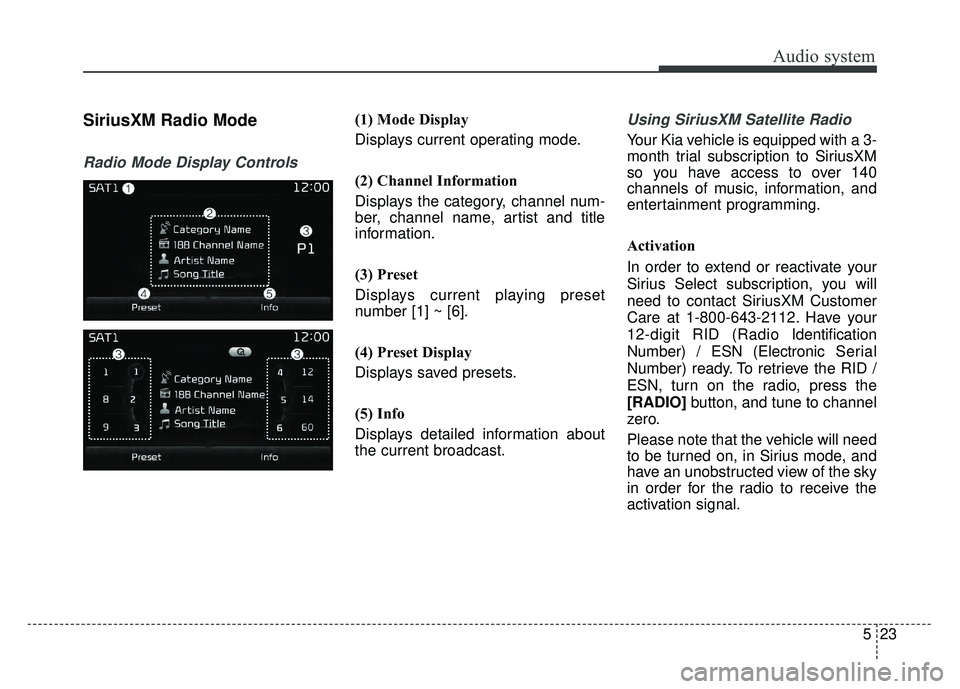
SiriusXM Radio Mode
Radio Mode Display Controls
(1) Mode Display
Displays current operating mode.
(2) Channel Information
Displays the category, channel num-
ber, channel name, artist and title
information.
(3) Preset
Displays current playing preset
number [1] ~ [6].
(4) Preset Display
Displays saved presets.
(5) Info
Displays detailed information about
the current broadcast.Using SiriusXM Satellite Radio
Your Kia vehicle is equipped with a 3-
month trial subscription to SiriusXM
so you have access to over 140
channels of music, information, and
entertainment programming.
Activation
In order to extend or reactivate your
Sirius Select subscription, you will
need to contact SiriusXM Customer
Care at 1-800-643-2112. Have your
12-digit RID (Radio Identification
Number) / ESN (Electronic Serial
Number) ready. To retrieve the RID /
ESN, turn on the radio, press the
[RADIO]button, and tune to channel
zero.
Please note that the vehicle will need
to be turned on, in Sirius mode, and
have an unobstructed view of the sky
in order for the radio to receive the
activation signal.
Page 295 of 604
![KIA OPTIMA HYBRID 2017 Owners Manual Audio system
24
5 SEEK
Press the [SEEK TRACK]
button to
play the previous/next channel.
❈ If the “Category” icon is displayed,
channels are changed within the
current category.
Tu n e
Turn the T](/manual-img/2/54992/w960_54992-294.png "KIA OPTIMA HYBRID 2017 Owners Manual Audio system
24
5 SEEK
Press the [SEEK TRACK]
button to
play the previous/next channel.
❈ If the “Category” icon is displayed,
channels are changed within the
current category.
Tu n e
Turn the T")
Audio system
24
5 SEEK
Press the [SEEK TRACK]
button to
play the previous/next channel.
❈ If the “Category” icon is displayed,
channels are changed within the
current category.
Tu n e
Turn the TUNE knob to select the
desired channel.
SCAN
Press the [SCAN] button to scan all
channels with superior reception for
5 seconds each.
Once scan is complete, the previous-
ly played channel will be restored.
During Scan, pressing the [SCAN]
button again will cancel the scan
operation and restore the previously
played channel.
If the “Category” icon is displayed,
channels are changed within the cur-
rent category. Searching Categories
Select the category by using the
[CAT/FOLDER]
button and press the
TUNE knob to select.
Channels for the selected category
are played.
✽ ✽ Troubleshooting
1. Antenna Error
If this message is displayed, the
antenna or antenna cable is bro-
ken or unplugged. Please consult
with your Kia dealership.
2. No Signal If this message is displayed, it
means that the antenna is covered
and that the SiriusXM Satellite
Radio signal is not available.
Ensure the antenna is uncovered
and has a clear view of the sky.
Selecting Presets/Saving Presets
Press the [Preset] button to display
the broadcast information for the
channel saved to each button.
Press the [1] ~ [6] buttons to play the
desired preset.
While listening to a channel you want
to save as a preset, press and hold
one of the [1] ~ [6] preset buttons to
save the current channel to the
selected preset.


![KIA OPTIMA HYBRID 2017 Owners Manual Audio system
20
5
Radio Mode
Radio Mode Display Controls
(1) Mode Display
Displays current operating mode.
(2) Frequency
Displays the current frequency.
(3) Preset
Displays current preset number [1] ~](/manual-img/2/54992/w960_54992-290.png "KIA OPTIMA HYBRID 2017 Owners Manual Audio system
20
5
Radio Mode
Radio Mode Display Controls
(1) Mode Display
Displays current operating mode.
(2) Frequency
Displays the current frequency.
(3) Preset
Displays current preset number [1] ~")