Page 119 of 542
Features of your vehicle
4
4-39
Make sure to refuel your vehicle
according to the "Fuel requirements"
suggested in chapter 1.
If the fuel filler cap requires replace-
ment, use only a genuine Kia cap or
the equivalent specified for your vehi-
cle. An incorrect fuel filler cap can
result in a serious malfunction of the
fuel system or emission control sys-
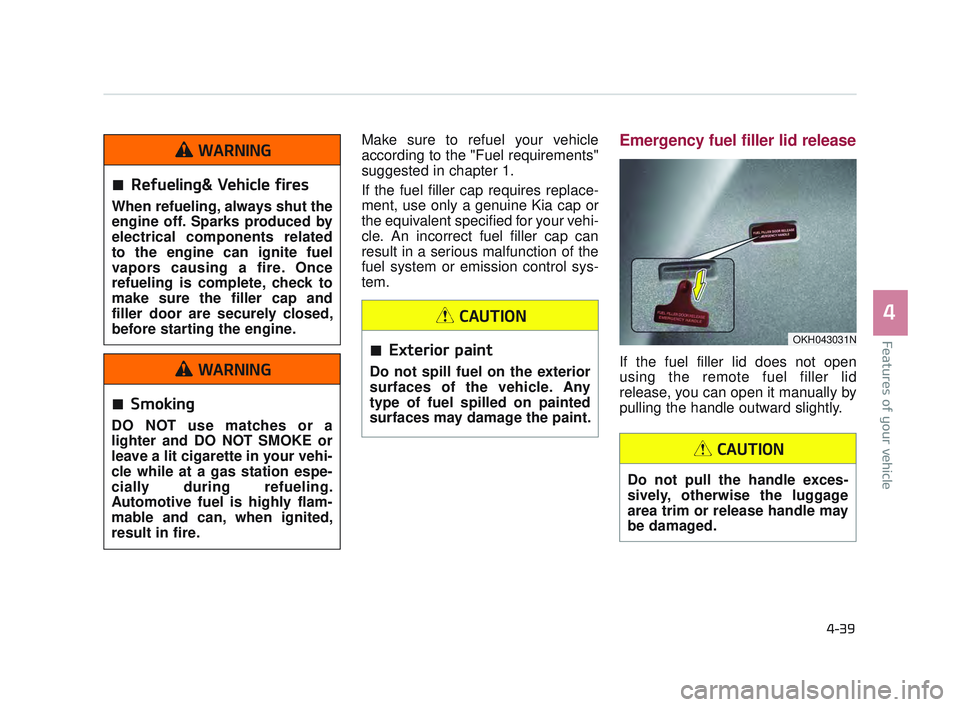
tem.Emergency fuel filler lid release
If the fuel filler lid does not open
using the remote fuel filler lid
release, you can open it manually by
pulling the handle outward slightly.
OKH043031N
Refueling& Vehicle fires
When refueling, always shut the
engine off. Sparks produced by
electrical components related
to the engine can ignite fuel
vapors causing a fire. Once
refueling is complete, check to
make sure the filler cap and
filler door are securely closed,
before starting the engine.
WARNING
Smoking
DO NOT use matches or a
lighter and DO NOT SMOKE or
leave a lit cigarette in your vehi-
cle while at a gas station espe-
cially during refueling.
Automotive fuel is highly flam-
mable and can, when ignited,
result in fire.
WARNING
Exterior paint
Do not spill fuel on the exterior
surfaces of the vehicle. Any
type of fuel spilled on painted
surfaces may damage the paint.
CAUTION
Do not pull the handle exces-
sively, otherwise the luggage
area trim or release handle may
be damaged.
CAUTION
KH USA 4:2015 12/2/2016 10:23 AM Page 39
Page 121 of 542

Features of your vehicle
4
4-41
Sliding the sunroof
When the sunshade is closed
If you pull the sunroof control lever
backward to the second detent posi-
tion, the sunshade will slide all the
way open, then the sunroof glass will
slide all the way open. To stop the
sunroof movement at any point, pull
or push the sunroof control lever
momentarily.
When the sunshade is opened
If you pull the sunroof control lever
backward, the sunroof glass will slide
all the way open. To stop the sunroof
movement at any point, pull or push
the sunroof control lever momentarily.
OKH043501N
Sunroof operation
When closing the sunroof, make
sure there are no body parts in
the movement range of the slid-
ing roof. Parts of the body could
become trapped or crushed.
WARNING
In order to prevent accidental
operation of the sunroof, espe-
cially by a child, do not let a
child operate the sunroof.
WARNING
Do not sit on the top of the vehi-
cle. It may cause vehicle dam-
age.
WARNING
KH USA 4:2015 12/2/2016 10:23 AM Page 41
Page 126 of 542
Features of your vehicle
4-46
Heated steering wheel
(if equipped)
When the Engine Start/Stop Button
is in the ON position, press the heat-
ed steering wheel button to warm the
steering wheel. The indicator on the
button will illuminate.
To turn the heated steering wheel off,
press the button once again. The
indicator on the button will turn off
and notify you on the LCD display.
OKH043043N
Steering wheel adjustment
Never adjust the angle and
height of the steering wheel
while driving. You may lose
steering control.
WARNING
Steering Wheel Damage
Do not install any grip to oper-
ate the steering wheel. This
causes damage to the heated
steering wheel system.
CAUTION
Heated Steering Wheel
If the steering wheel becomes
too warm, turn the system off.
The heated steering wheel may
cause burns even at low tem-
peratures, especially if used for
long periods of time.
WARNING
KH USA 4:2015 12/2/2016 10:24 AM Page 46
Page 136 of 542

Features of your vehicle
4-56
The transceiver has been tested and
complies with FCC and Industry
Canada rules. Changes or modifica-
tions not expressly approved by the
party responsible for compliance
could void the user's authority to
operate the device.
NVS
®and Z-NAV™ are registered
trademarks. Nav®are of Gentex
Corporation, Zeeland, Michigan.
HomeLink
®is a registered trade-
mark owned by Johnson Controls
Technology Company, Holland,
Michigan.
Electric chromic mirror (ECM) with
HomeLink® system, compass andUVO (for U.S.A, if equipped)
Your vehicle may be equipped with a
Gentex Automatic-Dimming Mirror
with a Z-Nav™ Electronic Compass
Display and an Integrated HomeLink
®
Wireless Control System. During
nighttime driving, this feature will
automatically detect and reduce
rearview mirror glare while the com-
pass indicates the direction the vehi-
cle is pointed. The HomeLink
®
Universal Transceiver allows you to
activate your garage door(s), electric
gate, home lighting, etc. (1) (i)Information
(2) UVO Button
(Google Local Search)
(3) RSA(Roadside Assistance)
(4) Compass control button & Dimming ON/OFF button
(5) Status indicator LED
(6) Channel 1 button
(7) Channel 2 button
(8) Channel 3 button
(9) Compass display
(10) Rear light sensor
OKH045933N
KH USA 4:2015 12/2/2016 10:24 AM Page 56
Page 143 of 542

Features of your vehicle
4
4-63
Erasing HomeLink®buttons
Individual buttons cannot be erased.
However, to erase all three pro-
grammed buttons:
1. Press and hold the two outerHomeLink
®buttons until the indi-
cator light begins to flash after 10
seconds.
2. Release both buttons. Do not hold for longer than 20 seconds.
The Integrated HomeLink
®Wireless
Control System is now in the training
(learn) mode and can be programmed
at any time following the appropriate
steps in the Programming chapters
above.
NVS
®is a registered trademark and
Z-Nav™ is a trademark of the Gentex
Corporation, Zeeland, Michigan.
HomeLink
®is a registered trade-
mark owned by Johnson Controls,
Incorporated, Milwaukee, Wisconsin.
FCC ID: NZLTLMHL4
IC: 4112A-TLMHL4
INFORMATION
This device complies with Part 15 of
the FCC Rules.
Operation is subject to the following
three conditions:
1. This device may not cause harm- ful interference, and
2. This device must accept any inter- ference received, including inter-
ference that may cause undesired
operation.
3. The transceiver has been tested and complies with FCC and
Industry Canada rules. Changes
or modifications not expressly
approved by the party responsible
for compliance could void the
user’s authority to operate the
device.
Outside rearview mirror
Be sure to adjust mirror angles before
driving.
Your vehicle is equipped with both
left-hand and right-hand outside
rearview mirrors. The mirrors can be
adjusted remotely with the remote
switch. The mirror heads can be fold-
ed to prevent damage during an auto-
matic car wash or when passing
through a narrow street.
The right outside rearview mirror is
convex. Objects seen in the mirror
are closer than they appear.
Use your interior rearview mirror or
direct observation to determine the
actual distance of following vehicles
when changing lanes.
i
KH USA 4:2015 12/2/2016 10:24 AM Page 63
Page 192 of 542

Features of your vehicle
4-112
ECO Indicator Light
This indicator light illuminates :
When the Active ECO system isactivated by pressing the DRIVE
mode button.
The ECO indicator (green) will illu- minate to show that the Active
ECO is operating.
❈ For more detailed information,
refer to “Drive Mode Integrated
Control System" in chapter 5.
Immobilizer Indicator
Light (With Smart Key)
This indicator light illuminates for up
to 30 seconds:
When the vehicle detects the smart key in the vehicle properly
while the Engine Start/Stop Button
is ACC or ON.
- At this time, you can start theengine.
- The indicator light goes off after starting the engine.
This indicator light blinks for a few
seconds:
When the smart key is not in the vehicle.
- At this time, you can not start theengine.Distracted driving
Driving while distracted can
result in a loss of vehicle con-
trol that may lead to an acci-
dent, severe personal injury,
and death. The driver’s primary
responsibility is in the safe and
legal operation of a vehicle, and
use of any handheld devices,
other equipment, or vehicle sys-
tems which take the driver’s
eyes, attention and focus away
from the safe operation of a
vehicle or which are not permis-
sible by law should never be
used during operation of the
vehicle.
WARNING
KH USA 4:2015 12/2/2016 10:27 AM Page 112
Page 203 of 542
This system is a supplementaryfunction only. It is the responsibility
of the driver to always check the
area behind the vehicle before and
while backing up.
Always keep the camera lens clean. If the lens is covered with
foreign matter, the camera may not
operate normally.
Features of your vehicle
4
4-123
Backing up & using camera
Never rely solely on the rear
view camera when backing. You
must always use methods of
viewing the area behind you
including looking over both
shoulders as well as continu-
ously checking all three rear
view mirrors. Due to the difficul-
ty of ensuring that the area
behind you remains clear,
always back slowly and stop
immediately if you even suspect
that a person, and especially a
child, might be behind you.
WARNING
KH USA 4:2015 12/2/2016 10:27 AM Page 123
Page 204 of 542

Features of your vehicle
4-124
The Parking Guide System is not a
substitute for proper and safe park-
ing procedures. The Parking Guide
System may not detect every object
surrounding the vehicle. Always drive
safely and use caution when parking.
The Parking Guide System (PGS)
will activate when the back-up light is
ON with the Engine Start/Stop
Button ON and the shift lever in the R
(Reverse) position.
✽NOTICE
The park guide system is not a safe-
ty device. It only serves to assist the
driver in in parking the vehicle. It is
the responsibility of the driver to
always check the area around the
vehicle when parking the vehicle.
Parking guide system (PGS)
display
1.Changing rear view angle
(Top/Normal)
Changes the view angle of the rear
camera.
2. Parking guide line
According to steering angle, the
parking guide line displays to help
parking.
PARKING GUIDE SYSTEM (IF EQUIPPED)
OKH045175N
OKH045174N
■Type A
■Type B
OKH045263N
OKH043304N
KH USA 4:2015 12/2/2016 10:28 AM Page 124

