2017 KIA FORTE light
[x] Cancel search: lightPage 75 of 595

• Checking the amount of air conditioner
refrigerant and compressor lubricant . . . . . . . . . . 4-123
• Air conditioning refrigerant label . . . . . . . . . . . . . . 4-123
Automatic climate control system. . . . . . . . . . . . 4-124
• Automatic heating and air conditioning . . . . . . . . . 4-125
• Manual heating and air conditioning . . . . . . . . . . . 4-126
• System operation . . . . . . . . . . . . . . . . . . . . . . . . . . . . 4-132
Windshield defrosting and defogging . . . . . . . . . 4-134
• Manual climate control system . . . . . . . . . . . . . . . . 4-134
• Automatic climate control system . . . . . . . . . . . . . . 4-135
• Defogging logic. . . . . . . . . . . . . . . . . . . . . . . . . . . . . . 4-136
Clean air . . . . . . . . . . . . . . . . . . . . . . . . . . . . . . . . 4-138
Storage compartment. . . . . . . . . . . . . . . . . . . . . . 4-139
• Center console storage . . . . . . . . . . . . . . . . . . . . . . . 4-139
• Glove box . . . . . . . . . . . . . . . . . . . . . . . . . . . . . . . . . . 4-139
• Sunglass holder . . . . . . . . . . . . . . . . . . . . . . . . . . . . . 4-140
• Luggage tray (5 Door). . . . . . . . . . . . . . . . . . . . . . . . 4-140
Interior features . . . . . . . . . . . . . . . . . . . . . . . . . . 4-141
• Cigarette lighter. . . . . . . . . . . . . . . . . . . . . . . . . . . . . 4-141
• Ashtray . . . . . . . . . . . . . . . . . . . . . . . . . . . . . . . . . . . . 4-141
• Cup holder . . . . . . . . . . . . . . . . . . . . . . . . . . . . . . . . . 4-142
• Sliding armrest . . . . . . . . . . . . . . . . . . . . . . . . . . . . . 4-142
• Sunvisor . . . . . . . . . . . . . . . . . . . . . . . . . . . . . . . . . . . 4-143
• Seat warmer . . . . . . . . . . . . . . . . . . . . . . . . . . . . . . . . 4-143
• Climate control seat . . . . . . . . . . . . . . . . . . . . . . . . . 4-145• Power outlet . . . . . . . . . . . . . . . . . . . . . . . . . . . . . . . . 4-146
• LCD monitor (Clock) . . . . . . . . . . . . . . . . . . . . . . . . 4-147
• Coat hook . . . . . . . . . . . . . . . . . . . . . . . . . . . . . . . . . . 4-148
• Floor mat anchor(s). . . . . . . . . . . . . . . . . . . . . . . . . . 4-148
• Luggage net (Holder) . . . . . . . . . . . . . . . . . . . . . . . . 4-149
• Covering shelf (5 Door). . . . . . . . . . . . . . . . . . . . . . . 4-150
• Navigation system . . . . . . . . . . . . . . . . . . . . . . . . . . . 4-151
Audio system . . . . . . . . . . . . . . . . . . . . . . . . . . . . . 4-152
• Glass antenna . . . . . . . . . . . . . . . . . . . . . . . . . . . . . . . 4-152
• Steering wheel audio controls . . . . . . . . . . . . . . . . . 4-153
• AUX, USB and iPod
®port . . . . . . . . . . . . . . . . . . . . 4-1544
Page 78 of 595

Features of your vehicle
6 4
With a smart key, you can lock or
unlock a door and even start the
engine without inserting the key.
The functions of the buttons on a
smart key are similar to the remote
keyless entry. (Refer to the “Remote
keyless entry” in this chapter.)
Smart key functions
Carrying the smart key, you may lock
and unlock the vehicle doors. Also,
you may start the engine. Refer to
the following, for more details.
Locking
Pressing the button of the front out-
side door handles with all doors
closed and any door unlocked, locks
all the doors. The hazard warning
lights will blink and the chime will
sound once to indicate that all doors
are locked. The button will only oper-
ate when the smart key is within
0.7~1 m (28~40 in.) from the outside
door handle. If you want to make
sure that a door has locked or not,
you should check the door lock but-
ton inside the vehicle or pull the out-
side door handle.
SMART KEY (IF EQUIPPED)
OYDDCO2007
OYDDCO2008
Page 79 of 595

47
Features of your vehicle
Even though you press the button,
the doors will not lock and the chime
will sound for 3 seconds if any of the
following occurs:
• The smart key is in the vehicle.
• The ignition switch is in the ACC or
ON position.
• Any door except the trunk/liftgate is
opened.Unlocking
Pressing the button of the driver's
outside door handle with all doors
closed and locked, unlocks the dri-
ver's door. The hazard warning lights
will blink and the chime will sound
twice to indicate that the driver's door
is unlocked.
Pressing the button in the front pas-
senger's outside door handle with all
doors closed and locked, unlocks all
the doors. The hazard warning lights
will blink and the chime will sound
twice to indicate that all doors are
unlocked. The button will only oper-
ate when the smart key is within
0.7~1 m (28~40 in.) from the outside
door handle.
Start-up
You can start the engine without
inserting the key. For detailed infor-
mation refer to “Starting the engine
with a smart key” in section 5.
Smart key precautions
• If you lose your smart key, you will
not be able to start the engine. Tow
the vehicle, if necessary, and con-
tact an authorized Kia dealer.
• A maximum of 2 smart keys can be
registered to a single vehicle. If
you lose a smart key, you should
immediately take the vehicle and
key to your authorized Kia dealer
to protect it from potential theft.
• The smart key will not work if any
of following occurs:
- The smart key is close to a radio
transmitter such as a radio sta-
tion or an airport which can inter-
fere with normal operation of the
smart key.
- The smart key near a mobile two-
way radio system or a cellular
phone.
- Another vehicle’s smart key is being
operated close to your vehicle.
When the smart key does not work
correctly, open and close the door
with the mechanical key. If you
have a problem with the smart key,
contact an authorized Kia dealer.
Page 81 of 595

49
Features of your vehicle
REMOTE KEYLESS ENTRY (IF EQUIPPED)
Remote keyless entry system
operationsLock (1)
All doors are locked if the lock button
is pressed. If all doors (and trunk/lift-
gate) are closed, the hazard warning
lights will blink once to indicate that
all doors (and trunk/liftgate) are
locked.
Also, if the lock button is pressed
once more within 4 seconds, the
hazard warning lights will blink and
the chime will sound once to confirm
that the door is locked.
However, if any door remains open,
the hazard warning lights (and/or the
chime) will not operate. But if all
doors are closed after the lock button
is pressed, the hazard warning lights
will blink once.
Unlock (2)
The driver's door is unlocked if the
unlock button is pressed once. The
hazard warning lights will blink (for
smart key, the chime also sounds)
twice to indicate that the driver's door
is unlocked.
All doors are unlocked if the unlock
button is pressed once more within 4
seconds. The hazard warning lights
will blink (for smart key, the chime
also sounds) twice again to indicate
that all doors are unlocked. After
pressing this button, the doors will
lock automatically unless you open
any door within 30 seconds.
✽NOTICE
If the keyless entry system is inoper-
ative due to exposure to water or liq-
uids, it will not be covered by your
manufacturer's vehicle warranty.
OYDDCO2004
■Type B
■Type A
OYDDCO2003
Page 82 of 595

Features of your vehicle
10 4
Trunk/liftgate open (3)
(if equipped)
The trunk/liftgate is opened if the but-
ton is pressed for more than 1 sec-
ond.
Once the trunk/liftgate is opened and
then closed, the trunk/liftgate will lock
automatically.
Alarm (4)
The horn sounds and the hazard
warning lights blink for about 30 sec-
onds if this button is pressed for
more than 0.5 seconds. To stop the
horn and lights, press any button on
the transmitter.
Transmitter precautions
The transmitter (or smart key) will not
work if any of following occurs:
• The ignition key is in the ignition
switch.
• You exceed the operating distance
limit (about 30 m [90 feet]).
• The battery in the transmitter (or
smart key) is weak.
• Other vehicles or objects may be
blocking the signal.
• The weather is extremely cold.
• The transmitter (or smart key) is
close to a radio transmitter such as
a radio station or an airport which
can interfere with normal operation
of the transmitter.
When the transmitter (or smart key)
does not work properly, open and
close the door with the ignition key. If
you have a problem with the trans-
mitter (or smart key), contact an
authorized Kia dealer.• If the transmitter is in close proxim-
ity to your cell phone or smart
phone, the signal from the trans-
mitter could be blocked by normal
operation of your cell phone or
smart phone. This is especially
important when the phone is active
such as making call, receiving
calls, text messaging, and/or send-
ing/receiving emails. Avoid placing
the transmitter and your cell phone
or smart phone in the same pants
or jacket pocket and maintain ade-
quate distance between the two
devices.
Page 84 of 595
Features of your vehicle
12 4
• The transmitter or smart key is
designed to give you years of trou-
ble-free use, however it can mal-
function if exposed to moisture or
static electricity. If you are unsure
how to use or replace the battery,
contact an authorized Kia dealer.
• Using the wrong battery can cause
the transmitter or smart key to mal-
function. Be sure to use the correct
battery.
• An inappropriately dis-
posed battery can be
harmful to the environment
and human health. Dispose
the battery according to
your local law(s) or regula-
tion.Immobilizer system
Your vehicle may be equipped with
an electronic engine immobilizer sys-
tem to reduce the risk of unautho-
rized vehicle use.
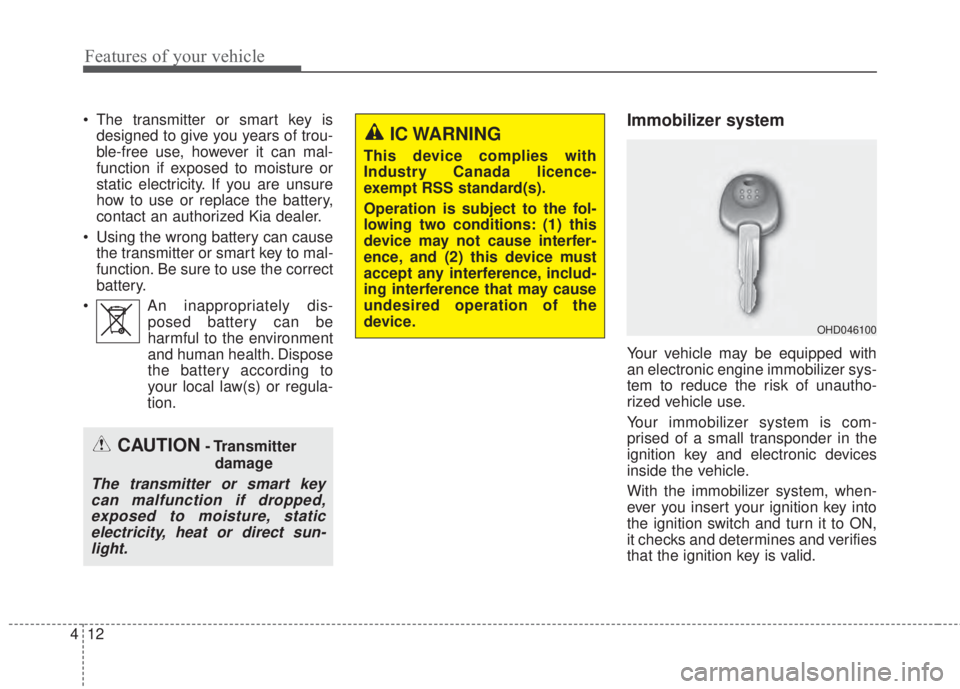
Your immobilizer system is com-
prised of a small transponder in the
ignition key and electronic devices
inside the vehicle.
With the immobilizer system, when-
ever you insert your ignition key into
the ignition switch and turn it to ON,
it checks and determines and verifies
that the ignition key is valid.
OHD046100
CAUTION- Transmitter
damage
The transmitter or smart key
can malfunction if dropped,
exposed to moisture, static
electricity, heat or direct sun-
light.
IC WARNING
This device complies with
Industry Canada licence-
exempt RSS standard(s).
Operation is subject to the fol-
lowing two conditions: (1) this
device may not cause interfer-
ence, and (2) this device must
accept any interference, includ-
ing interference that may cause
undesired operation of the
device.
Page 87 of 595

415
Features of your vehicle
This system is designed to provide
protection from unauthorized entry
into the vehicle. This system is oper-
ated in three stages: the first is the
“Armed” stage, the second is the
“Theft-alarm” stage, and the third is
the “Disarmed” stage. If triggered,
the system provides an audible
alarm with blinking of the hazard
warning lights.
Armed stage
Park the vehicle and stop the engine.
Arm the system as described below.
1. Remove the ignition key from the
ignition switch and exit the vehicle.2. Make sure that all doors (and
trunk/liftgate) and engine hood are
closed and latched.
3. • Lock the doors by depressing the
door lock button on the transmit-
ter (or smart key).
After completion of the steps
above, the hazard warning lights
will blink once to indicate that the
system is armed.
If any door, trunk/liftgate or
engine hood remains open, the
hazard warning lights won’t
operate and theft-alarm will not
arm. After this, if all doors,
trunk/liftgate and engine hood
are closed, the hazard warning
lights blink once.
• Lock the doors by pressing the
button of the front outside door
handles with the smart key in
your possession.
After completion of the steps
above, the hazard warning lights
will blink once to indicate that the
system is armed.If any door remains open, the
hazard warning lights won’t oper-
ate and theft-alarm will not arm.
Close the door and try again to
lock the doors.
If trunk/liftgate or engine hood
remains open, the hazard warn-
ing lights won’t operate and theft-
alarm will not arm. Close the
trunk/liftgate or engine hood. The
hazard warning lights blink once
and theft-alarm arms.
The theft-alarm system can be acti-
vated by an authorized Kia dealer.
If you want this feature, consult an
authorized Kia dealer.
Do not arm the system until all
passengers have left the vehicle. If
the system is armed while a pas-
senger(s) remains in the vehicle,
the alarm may be activated when
the remaining passenger(s)
leaves the vehicle. If any door (or
trunk/liftgate) or engine hood is
opened within 30 seconds after
the system enters the armed
stage, the system will be disarmed
to prevent unnecessary alarm.
THEFT-ALARM SYSTEM (IF EQUIPPED)
Armed
stage
Theft-alarm
stageDisarmed
stage
Page 88 of 595

Features of your vehicle
16 4
Theft-alarm stage
The alarm will be activated if any of
the following occurs while the system
is armed.
• A front or rear door is opened without
using the mechanical key or trans-
mitter (or smart key).
• The trunk/liftgate is opened without
using the mechanical key or trans-
mitter (or smart key).
• The engine hood is opened.
The horn will sound and the hazard
warning lights will blink continuously
for approximately 27 seconds
(2times). To turn off the system,
unlock the doors with the transmitter
(or smart key).
Disarmed stage
The system will be disarmed when:
Transmitter
- The door unlock button is pressed.
- The engine is started. (within 3
seconds)
- The ignition switch is in the “ON”
position for 30 seconds or more.
Smart key
- The door unlock button is pressed.
- The button of the front outside door
is pressed while carrying the smart
key.
- The engine is started. (within 3
seconds)
After the doors are unlocked, the
hazard warning lights will blink twice
to indicate that the system is dis-
armed.
After pressing the unlock button, if
any door (or trunk/liftgate) is not
opened within 30 seconds, the sys-
tem will be rearmed.• Avoid trying to start the engine
while the alarm is activated. The
vehicle starting motor is disabled
during the theft-alarm stage.
If the system is not disarmed with
the transmitter, insert the key into
the ignition switch, turn the ignition
switch to the ON position and wait
for 30 seconds. Then the system
will be disarmed.
• If you lose your keys, consult your
authorized Kia dealer.
• If the system is not disarmed with
the transmitter, insert the key into
the ignition switch and start the
engine. Then the system will be
disarmed.
• If you lose your keys, consult your
authorized Kia dealer.