Page 148 of 595

Features of your vehicle
76 4
Turn on FUSE SWITCH (if equipped)
• This warning message illuminates
if the fuse switch under the steer-
ing wheel is OFF.
• It means that you should turn the
fuse switch on.
❈For more details, refer to “Fuses” in
chapter 7.
Engine has overheated
This warning message illuminates
when the engine coolant tempera-
ture is above 120°C (248°F). This
means that the engine is overheated
and may be damaged.
If your vehicle is overheated, refer to
“Overheating” in chapter 6.Shift to P (for smart key system and
automatic transaxle)
• This warning message illuminates if
you try to turn off the engine without
the shift lever in P (Park) position.
• At this time, the Engine Start/Stop
Button turns to the ACC position (If
you press the Engine Start/Stop
Button once more, it will turn to the
ON position).
Low Key Battery
(for smart key system)
• This warning message illuminates
if the battery of the smart key is
discharged when the Engine
Start/Stop Button changes to the
OFF position.Press START button while turn steer-
ing (for smart key system)
• This warning message illuminates
if the steering wheel does not
unlock normally when the Engine
Start/Stop Button is pressed.
• It means that you should press the
Engine Start/Stop Button while
turning the steering wheel right
and left.
Steering wheel unlocked
(for smart key system)
• This warning message illuminates
if the steering wheel does not lock
when the Engine Start/Stop Button
changes to the OFF position.
Page 149 of 595

477
Features of your vehicle
Check Steering Wheel Lock System
(for smart key system)
• This warning message illuminates
if the steering wheel does not lock
normally when the Engine
Start/Stop Button changes to the
OFF position.
Press brake pedal to start engine
(for smart key system and automatic
transaxle)
• This warning message illuminates
if the Engine Start/Stop Button
changes to the ACC position twice
by pressing the button repeatedly
without depressing the brake pedal.
• It means that you should depress
the brake pedal to start the engine.Press clutch pedal to start engine (for
smart key system and manual transaxle)
• This warning message illuminates if
the Engine Start/Stop Button
changes to the ACC position twice
by pressing the button repeatedly
without depressing the clutch pedal.
• It means that you should depress
the clutch pedal to start the engine.
Key not in vehicle (for smart key system)
• This warning message illuminates
if the smart key is not in the vehicle
when you press the Engine
Start/Stop Button.
• It means that you should always
have the smart key with you.Key not detected (for smart key system)
• This warning message illuminates
if the smart key is not detected
when you press the Engine
Start/Stop Button.
Press START button again
(for smart key system)
• This warning message illuminates
if you can not operate the Engine
Start/Stop Button when there is a
problem with the Engine Start/Stop
Button system.
• It means that you could start the
engine by pressing the Engine
Start/ Stop Button once more.
• If the warning illuminates each
time you press the Engine
Start/Stop Button, we recommend
that you have the vehicle inspected
by an authorized Kia dealer.
Page 150 of 595

Features of your vehicle
78 4
Press START button with smart key
(for smart key system)
• This warning message illuminates
if you press the Engine Start/Stop
Button while the warning message
“Key not detected” is illuminating.
• At this time, the immobilizer indica-
tor light blinks.
Check fuse “BRAKE SWITCH”
(for smart key system and automatic
transaxle/transmission)
• This warning message illuminates
if the brake switch fuse is discon-
nected.
• It means that you should replace
the fuse with a new one. If that is
not possible, you can start the
engine by pressing the Engine
Start/Stop Button for 10 seconds in
the ACC position.Shift to P or N to start engine
(for smart key system and automatic
transaxle)
• This warning message illuminates
if you try to start the engine with
the shift lever not in the P (Park) or
N (Neutral) position.
✽NOTICE
You can start the engine with the
shift lever in the N (Neutral) position.
But, for your safety, we recommend
that you start the engine with the
shift lever in the P (Park) position.
Low Washer Fluid (if equipped)
• This warning message illuminates
on the service reminder mode if
the washer fluid level in the reser-
voir is nearly empty.
• It means that you should refill the
washer fluid.
Low Fuel
• This warning message illuminates
if the fuel tank is nearly empty.
- When the low fuel level warning
light is illuminates.
Add fuel as soon as possible.
Page 165 of 595
493
Features of your vehicle
• Sensing distance in backing up is
approximately 120 cm (47 in) when
you are driving less than 10 km/h
(6.21 mph).
• Sensing distance in moving for-
ward is approximately 60 cm
(23.62 in) when you are driving
less than 10 km/h (6.21 mph).
• When more than two objects are
sensed at the same time, the clos-
est one will be recognized first.
• If you move the shift lever to the R
position with the engine start/stop
button in the ON position and the
parking assist system in OFF, the
parking assist system will operate
automatically. But it will turn off
automatically, when the vehicle
speed exceeds than 20 km/h
(12.4 mph)✽NOTICE
The parking assist system may not
operate if it’s distance from the object
is already less than approximately 25
cm (9.84 in) when the system is ON.
Page 171 of 595

499
Features of your vehicle
Battery saver function
• The purpose of this feature is to
prevent the battery from being dis-
charged. The system automatically
turns off the parking lights when
the driver removes the ignition key
and opens the driver-side door.
• With this feature, the parking lights
will turn off automatically if the driv-
er parks on the side of the road at
night.
If necessary, to keep the lights on
when the ignition key is removed,
perform the following:
1) Open the driver-side door.
2) Turn the parking lights OFF and
ON again using the light switch
on the steering column.
Headlight escort function
(if equipped)
The headlights (and/or taillights) will
remain on for approximately 20 min-
utes after the ignition key is removed
or turned to the ACC or LOCK posi-
tion. However, if the driver’s door is
opened and closed, the headlights
are turned off after 30 seconds.
The headlights can be turned off by
pressing the lock button on the trans-
mitter (or smart key) twice or turning
off the light switch from the headlight
or Auto light position.If the driver gets out of the vehicle
through other doors (except driver's
door), the battery saver function
does not operate and the headlight
escort function does not turn off
automatically. Therefore, It causes
the battery to be discharged. In this
case, make sure to turn off the lamp
before getting out of the vehicle.
If the headlights are not working
properly have your vehicle inspected
by an authorized Kia dealer.
Don't attempt to inspect or replace
the wiring yourself to prevent mal-
function.
LIGHTING
Page 180 of 595
Features of your vehicle
108 4
Do not use the interior lights for
extended periods when the engine is
not running.
It may cause battery discharge.Automatic turn off function
(if equipped)
The interior lights automatically turn
off approximately 20 minutes after
the ignition switch is turned off.
If your vehicle is equipped with the
theft alarm system, the interior lights
automatically turn off approximately
3 seconds after the system is in
armed stage.
Map lamp (if equipped)
Push the lens (1) to turn the map lamp
on or off. This light produces a spot
beam for convenient use as a map
lamp at night or as a personal lamp for
the driver and front passenger.
INTERIOR LIGHT
WARNING - Interior light
Do not use the interior lights
when driving in the dark. The
glare from the interior lights
may obstruct your view and
cause an accident.
OYDM046385
OYDM046384
■Ty p e B
■Ty p e A
Page 189 of 595
4 117
Features of your vehicle
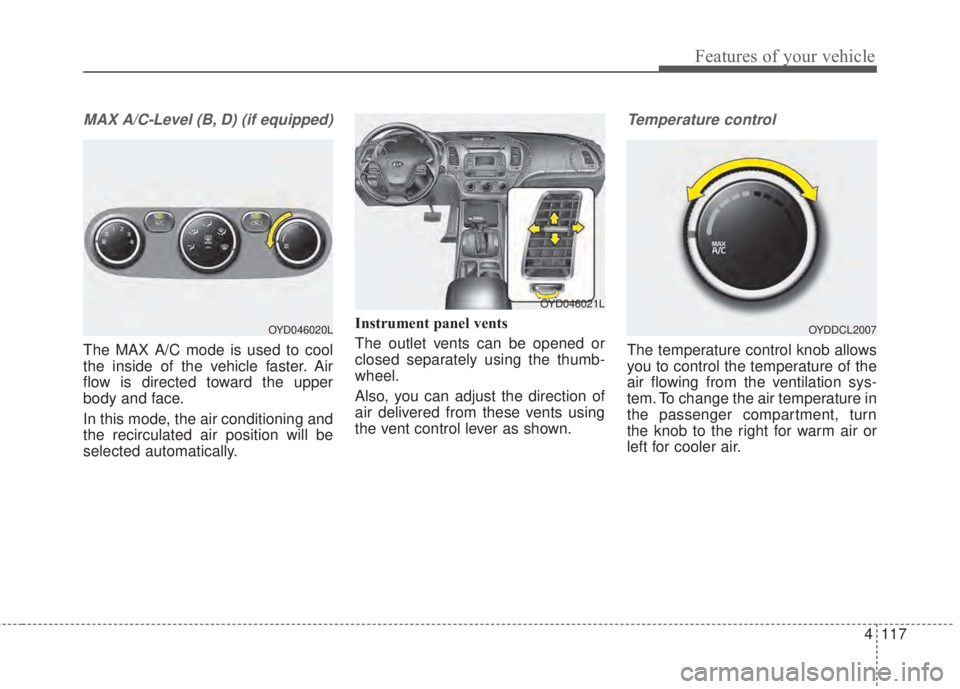
MAX A/C-Level (B, D) (if equipped)
The MAX A/C mode is used to cool
the inside of the vehicle faster. Air
flow is directed toward the upper
body and face.
In this mode, the air conditioning and
the recirculated air position will be
selected automatically.Instrument panel vents
The outlet vents can be opened or
closed separately using the thumb-
wheel.
Also, you can adjust the direction of
air delivered from these vents using
the vent control lever as shown.
Temperature control
The temperature control knob allows
you to control the temperature of the
air flowing from the ventilation sys-
tem. To change the air temperature in
the passenger compartment, turn
the knob to the right for warm air or
left for cooler air.
OYD046020LOYDDCL2007
OYD046021L
Page 196 of 595
Features of your vehicle
124 4
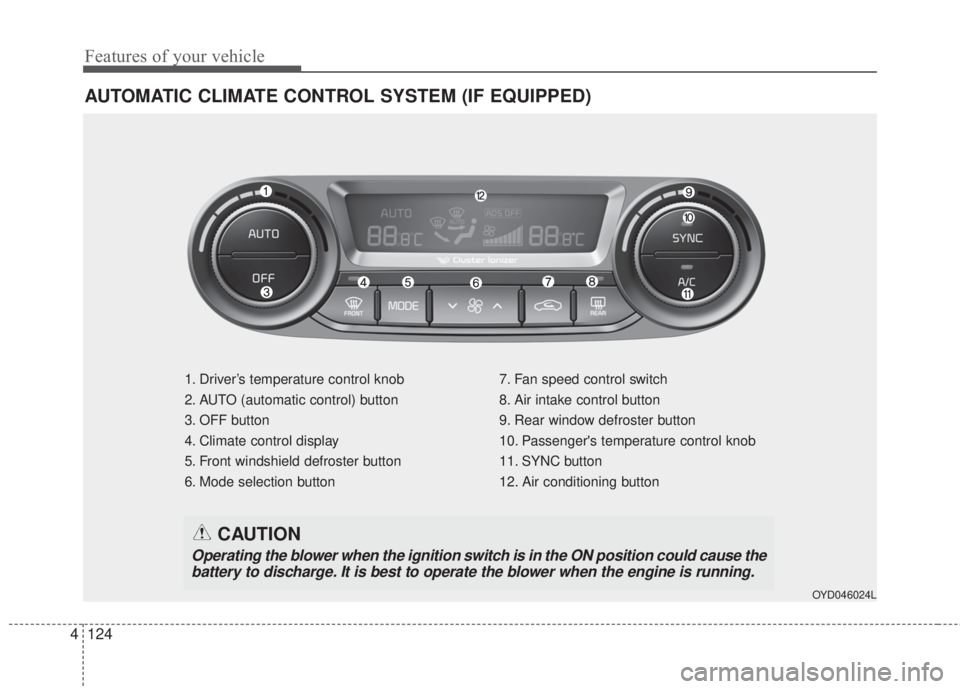
AUTOMATIC CLIMATE CONTROL SYSTEM (IF EQUIPPED)
1. Driver’s temperature control knob
2. AUTO (automatic control) button
3. OFF button
4. Climate control display
5. Front windshield defroster button
6. Mode selection button7. Fan speed control switch
8. Air intake control button
9. Rear window defroster button
10. Passenger's temperature control knob
11. SYNC button
12. Air conditioning button
OYD046024L
CAUTION
Operating the blower when the ignition switch is in the ON position could cause the
battery to discharge. It is best to operate the blower when the engine is running.