2017 JEEP WRANGLER lock
[x] Cancel search: lockPage 391 of 527
8. Close A/C Air Filter access doors and secure retainingtabs.
9. Rotate the glove compartment door back into position.
Refer to the “Maintenance Plan” for the proper mainte-
nance intervals.
Body Lubrication
Locks and all body pivot points, including such items as
seat tracks, door hinge pivot points and rollers, liftgate,
tailgate, decklid, sliding doors and hood hinges, should be
lubricated periodically with a lithium based grease, such as
MOPAR Spray White Lube to assure quiet, easy operation
and to protect against rust and wear. Prior to the applica-
tion of any lubricant, the parts concerned should be wiped
clean to remove dust and grit; after lubricating excess oil
and grease should be removed. Particular attention should
also be given to hood latching components to ensure
proper function. When performing other underhood ser-
vices, the hood latch, release mechanism and safety catch
should be cleaned and lubricated.
The external lock cylinders should be lubricated twice a
year, preferably in the Fall and Spring. Apply a small
amount of a high quality lubricant, such as MOPAR Lock
Cylinder Lubricant directly into the lock cylinder.
Windshield Wiper Blades
Clean the rubber edges of the wiper blades and the
windshield periodically with a sponge or soft cloth and a
mild nonabrasive cleaner. This will remove accumulations
of salt or road film.
Operation of the wipers on dry glass for long periods may
cause deterioration of the wiper blades. Always use washer
fluid when using the wipers to remove salt or dirt from a
dry windshield.
Avoid using the wiper blades to remove frost or ice from
the windshield. Keep the blade rubber out of contact with
petroleum products such as engine oil, gasoline, etc.
NOTE: Life expectancy of wiper blades varies depending
on geographical area and frequency of use. Poor perfor-
mance of blades may be present with chattering, marks,
water lines or wet spots. If any of these conditions are
present, clean the wiper blades or replace as necessary.
8
SERVICING AND MAINTENANCE 389
Page 392 of 527

The wiper blades and wiper arms should be inspected
periodically, not just when wiper performance problems
are experienced. This inspection should include the follow-
ing points:
•Wear Or Uneven Edges
• Foreign Material
• Hardening Or Cracking
• Deformation Or Fatigue
If a wiper blade or wiper arm is damaged, replace the
affected wiper arm or blade with a new unit. Do not
attempt to repair a wiper arm or blade that is damaged.
Wiper Blade Removal/Installation
CAUTION!
Do not allow the wiper arm to spring back against the
glass without the wiper blade in place or the glass may
be damaged.
1. Lift the wiper arm to raise the wiper blade off of the glass, until the wiper arm is in the full up position. 2. To disengage the wiper blade from the wiper arm, press
the release tab on the wiper blade and while holding the
wiper arm with one hand, slide the wiper blade down
towards the base of the wiper arm.
Wiper Blade With Release Tab In Locked Position
1 — Wiper Blade
2—WiperArm
3 — Release Tab
390 SERVICING AND MAINTENANCE
Page 393 of 527
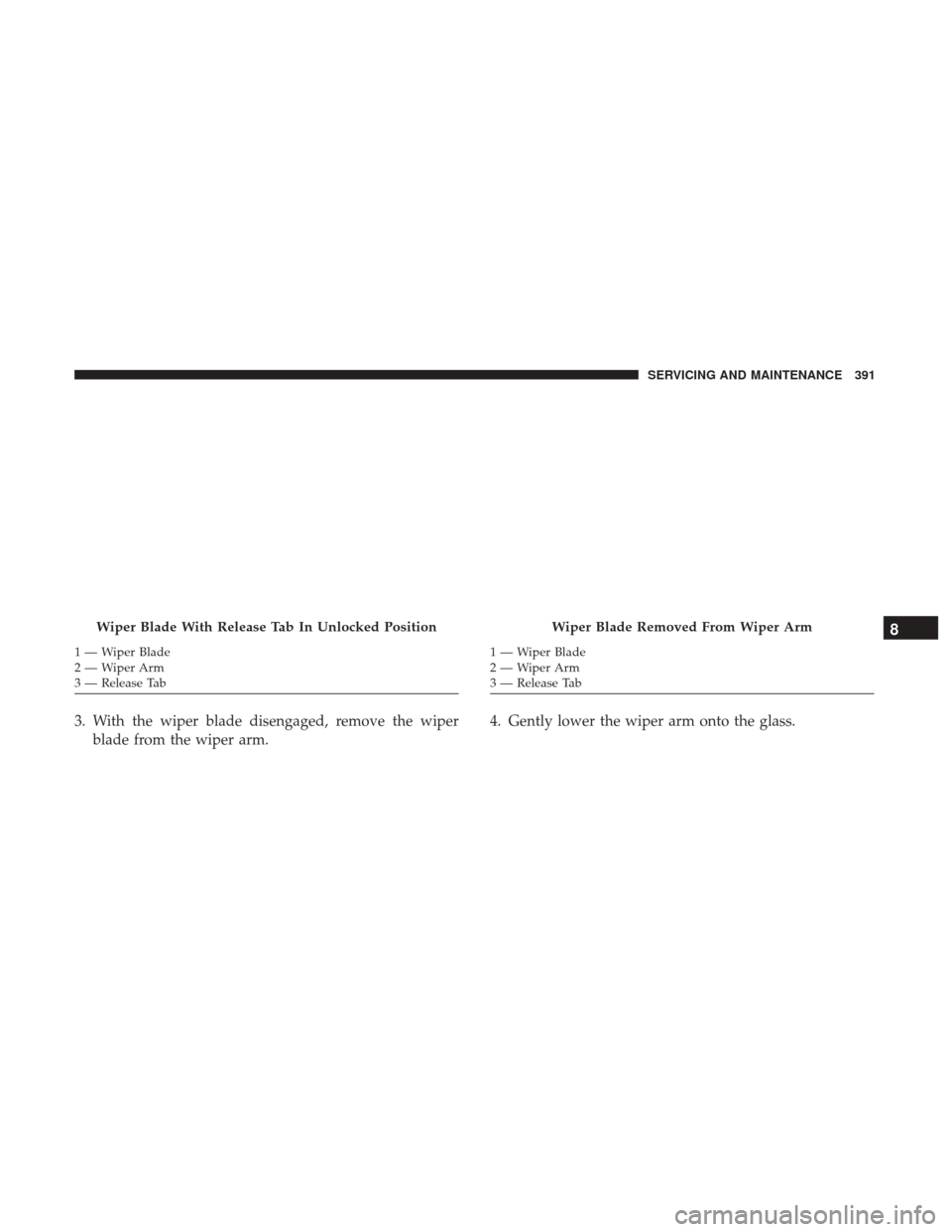
3. With the wiper blade disengaged, remove the wiperblade from the wiper arm. 4. Gently lower the wiper arm onto the glass.
Wiper Blade With Release Tab In Unlocked Position
1—WiperBlade
2—WiperArm
3 — Release Tab
Wiper Blade Removed From Wiper Arm
1 — Wiper Blade
2—WiperArm
3 — Release Tab
8
SERVICING AND MAINTENANCE 391
Page 438 of 527

VEHICLE IDENTIFICATION NUMBER
The Vehicle Identification Number (VIN) is found on the
left front corner of the instrument panel pad, visible from
outside of the vehicle through the windshield. This number
also appears underbody, on the right side of the frame rail
near the center of the vehicle, as well as on the Automobile
Information Disclosure Label affixed to a window on your
vehicle. Save this label for a convenient record of your
vehicle identification number and optional equipment.
The VIN is also stamped on either right or left hand side of
the engine block.NOTE:
It is illegal to remove or alter the VIN plate.BRAKE SYSTEM
Your vehicle is equipped with dual hydraulic brake sys-
tems. If either of the two hydraulic systems loses normal
capability, the remaining system will still function. How-
ever, there will be some loss of overall braking effective-
ness. You may notice increased pedal travel during appli-
cation, greater pedal force required to slow or stop, and
potential activation of the “Brake System Warning Light.”
In the event power assist is lost for any reason (i.e.,
repeated brake applications with the engine off) the brakes
will still function. However, the effort required to brake the
vehicle will be much greater than that required with the
power system operating.
WHEEL AND TIRE TORQUE SPECIFICATIONS
Proper lug nut/bolt torque is very important to ensure that
the wheel is properly mounted to the vehicle. Any time a
wheel has been removed and reinstalled on the vehicle, the
lug nuts/bolts should be torqued using a properly cali-
brated torque wrench.
Vehicle Identification Number
436 TECHNICAL SPECIFICATIONS
Page 451 of 527

RADIO 130
Operating Instructions — Radio Mode
NOTE:The ignition switch must be in the ON/RUN or
ACC position to operate the radio.
Power Switch/Volume Control (Rotary)
Push the ON/VOLUME control knob to turn on the radio.
Push the ON/VOLUME control knob a second time to turn
off the radio.
Electronic Volume Control
The electronic volume control turns continuously (360
degrees) in either direction, without stopping. Turning the
ON/VOLUME control knob to the right increases the
volume, and to the left decreases it.
When the audio system is turned on, the sound will be set
at the same volume level as last played.
SEEK Buttons
Push and release the SEEK buttons to search for the next
listenable station in AM/FM mode. Push the right switch
to seek up and the left switch to seek down. The radio will
remain tuned to the new station until you make another
selection. Holding either button will bypass stations with-
out stopping, until you release it.
Clock Setting Procedure
1. Push and hold the TIME button until the hours blink.
2. Adjust the hours by turning the right side TUNE/ SCROLL control knob.
3. After adjusting the hours, push the right side TUNE/ SCROLL control knob to set the minutes. The minutes
will begin to blink.
Radio 130
10
MULTIMEDIA 449
Page 452 of 527

4. Adjust the minutes using the right side TUNE/SCROLLcontrol knob. Push the TUNE/SCROLL control knob to
save time change.
5. To exit, push any button/knob, or wait five seconds.
RW/FF
Pushing the RW (Rewind) or FF (Fast Forward) buttons
causes the tuner to search for the next frequency in the
direction of the arrows. This feature operates in either AM
or FM frequencies.
TUNE Control
Turn the rotary TUNE/SCROLL control knob clockwise to
increase or counterclockwise to decrease the frequency.
Setting The Tone, Balance And Fade
Push the rotary TUNE/SCROLL control knob and BASS
will display. Turn the TUNE/SCROLL control knob to the
right or left to increase or decrease the bass tones.
Push the rotary TUNE/SCROLL control knob a second
time and MID will display. Turn the TUNE/SCROLL
control knob to the right or left to increase or decrease the
mid-range tones. Push the rotary TUNE/SCROLL control knob a third time
and TREBLE will display. Turn the TUNE/SCROLL control
knob to the right or left to increase or decrease the treble
tones.
Push the rotary TUNE/SCROLL control knob a fourth time
and BALANCE will display. Turn the TUNE/SCROLL
control knob to the right or left to adjust the sound level
from the right or left side speakers.
Push the rotary TUNE/SCROLL control knob a fifth time
and FADE will display. Turn the TUNE/SCROLL control
knob to the left or right to adjust the sound level between
the front and rear speakers.
Push the rotary TUNE/SCROLL control knob again to exit
setting tone, balance, and fade.AM/FM Button
Push the buttons to select either AM or FM mode.
SET/RND Button — To Set The Pushbutton Memory
When you are receiving a station that you wish to commit
to pushbutton memory, push the SET/RND button. The
symbol SET 1 will now show in the display window. Select
the button (1 to 6) you wish to lock onto this station and
push and release that button. If a button is not selected
450 MULTIMEDIA
Page 459 of 527

Clock Setting Procedure
1. Push and hold the TIME button until the hours blink.
2. Adjust the hours by turning the right side TUNE/SCROLL control knob.
3. After adjusting the hours, push the right side TUNE/ SCROLL control knob to set the minutes. The minutes
will begin to blink.
4. Adjust the minutes using the right side TUNE/SCROLL control knob. Push the TUNE/SCROLL control knob to
save time change.
5. To exit, push any button/knob, or wait five seconds.
INFO Button
Push the INFO button for an RDS station (one with call
letters displayed). The radio will return a Radio Text
message broadcast from an FM station (FM mode only).
RW/FF
Pushing the RW (Rewind) or FF (Fast Forward) buttons
causes the tuner to search for the next frequency in the
direction of the arrows. This feature operates in either AM
or FM frequencies.
TUNE Control
Turn the rotary TUNE/SCROLL control knob clockwise to
increase or counterclockwise to decrease the frequency.
Setting The Tone, Balance And Fade
Push the rotary TUNE/SCROLL control knob and BASS
will display. Turn the TUNE/SCROLL control knob to the
right or left to increase or decrease the bass tones.
Push the rotary TUNE/SCROLL control knob a second
time and MID will display. Turn the TUNE/SCROLL
control knob to the right or left to increase or decrease the
mid-range tones.
Push the rotary TUNE/SCROLL control knob a third time
and TREBLE will display. Turn the TUNE/SCROLL control
knob to the right or left to increase or decrease the treble
tones.
Push the rotary TUNE/SCROLL control knob a fourth time
and BALANCE will display. Turn the TUNE/SCROLL
control knob to the right or left to adjust the sound level
from the right or left side speakers.
10
MULTIMEDIA 457
Page 461 of 527

Program Type16-Digit Character
Display
Talk Talk
Top 40 Top 40
Weather Weather
By pushing the SEEK button when the Music Type icon is
displayed, the radio will be tuned to the next frequency
station with the same selected Music Type name. The
Music Type function only operates when in the FM mode.
If a preset button is activated while in the Music Type
(Program Type) mode, the Music Type mode will be exited
and the radio will tune to the preset station.
SETUP Button
Pushing the SETUP button allows you to select between
the following items:
• Set Clock — Pushing the SELECT button will allow you
to set the clock. Adjust the hours by turning the TUNE/
SCROLL control knob. After adjusting the hours, push
the TUNE/SCROLL control knob to set the minutes. The
minutes will begin to blink. Adjust the minutes using the
right side TUNE/SCROLL control knob. Push the
TUNE/SCROLL control knob to save time change.
AM/FM Button
Push the buttons to select either AM or FM mode.
SET/RND Button — To Set The Pushbutton Memory
When you are receiving a station that you wish to commit
to pushbutton memory, push the SET/RND button. The
symbol SET 1 will now show in the display window. Select
the button (1 to 6) you wish to lock onto this station and
push and release that button. If a button is not selected
within five seconds after pushing the SET/RND button,
the station will continue to play but will not be stored into
pushbutton memory.
You may add a second station to each pushbutton by
repeating the above procedure with this exception: Push
the SET/RND button twice and SET 2 will show in the
display window. Each button can be set for SET 1 and SET
2 in both AM and FM. This allows a total of 12 AM and 12
FM stations to be stored into pushbutton memory. The
stations stored in SET 2 memory can be selected by
pushing the pushbutton twice.
Every time a preset button is used, a corresponding button
number will display.
10
MULTIMEDIA 459