2017 JEEP RENEGADE warning
[x] Cancel search: warningPage 452 of 516

Setting NameSelectable Options
Forward Collision
Warning-Plus (FCW+) — If Equipped Near
Medium Far
NOTE: The Front Collision Warning (FCW+) feature can be set to Far, or set to Near. The default status of FCW+ is
the Far setting. This means the system will warn you of a possible collision with the vehicle in front of you when you
are farther away. This gives you the most reaction time. To change the setting for a more dynamic driving experience,
select the Near setting. This warns you of a possible collision when you are much closer to the vehicle in front of
you.
Forward Collision
Warning-Plus (FCW+) Ac- tive Braking — IfEquipped Off
Only Warning Warning + Active Braking
NOTE: The FCW+ system includes Advanced Brake Assist (ABA). When this feature is selected, it will apply the
brakes to slow your vehicle in case of potential forward collision. The ABA applies additional brake pressure when
the driver requests insufficient brake pressure to avoid a potential frontal collision. The ABA system becomes active at
5 mph (8 km/h).
ParkSense — If Equipped Sound Only Sounds And Display
NOTE: The ParkSense system will scan for objects behind the vehicle when the transmission gear selector is in RE-
VERSE and the vehicle speed is less than 11 mph (18 km/h). It will provide an alert (audible and/or visual) to indi-
cate the proximity to other objects. The system can be enabled with Sound Only, or Sound and Display.
450 MULTIMEDIA
Page 453 of 516

Setting NameSelectable Options
Rear ParkSense Volume — If Equipped Low
Medium High
NOTE: Rear Park Assist chime volume settings can be selected from the instrument cluster display or Uconnect Sys-
tem (if equipped). The chime volume settings include “LOW,” “MEDIUM,” and “HIGH.” The factory default volume
setting is MEDIUM.
Front ParkSense Volume — If Equipped Low
Medium High
NOTE: Front Park Assist chime volume settings can be selected from the instrument cluster display or Uconnect Sys-
tem (if equipped). The chime volume settings include “LOW,” “MEDIUM,” and “HIGH.” The factory default volume
setting is MEDIUM.
Rear ParkSense BrakingAssist — If Equipped On
Off
NOTE: When this feature is selected, the park assist system will detect objects located behind the vehicle and utilize
autonomous braking to stop the vehicle.
LaneSense Warning — If Equipped Early
Medium Late
NOTE: When this feature is selected, it sets the distance at which the steering wheel will provide feedback for poten-
tial lane departures.
10
MULTIMEDIA 451
Page 466 of 516
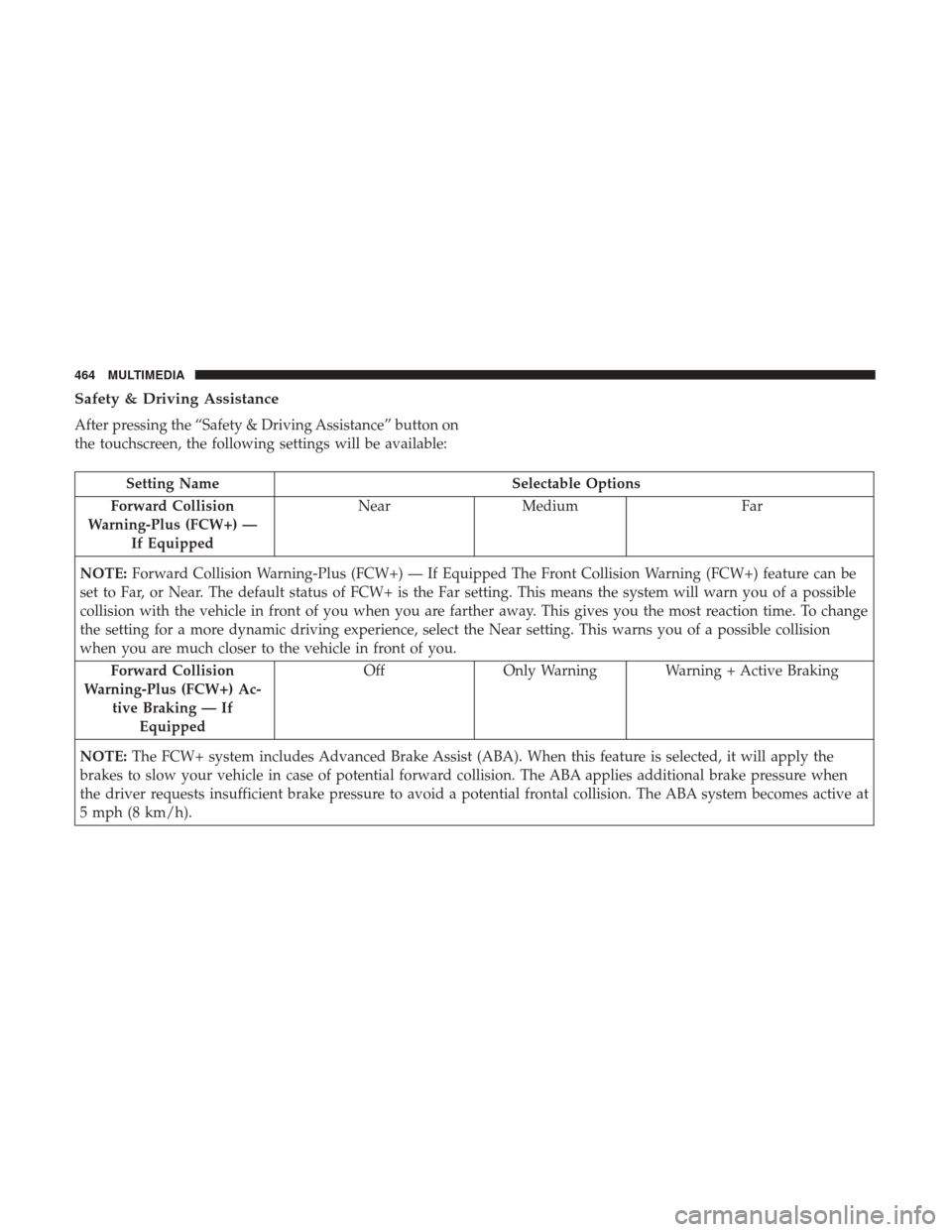
Safety & Driving Assistance
After pressing the “Safety & Driving Assistance” button on
the touchscreen, the following settings will be available:
Setting NameSelectable Options
Forward Collision
Warning-Plus (FCW+) — If Equipped Near
Medium Far
NOTE: Forward Collision Warning-Plus (FCW+) — If Equipped The Front Collision Warning (FCW+) feature can be
set to Far, or Near. The default status of FCW+ is the Far setting. This means the system will warn you of a possible
collision with the vehicle in front of you when you are farther away. This gives you the most reaction time. To change
the setting for a more dynamic driving experience, select the Near setting. This warns you of a possible collision
when you are much closer to the vehicle in front of you.
Forward Collision
Warning-Plus (FCW+) Ac- tive Braking — IfEquipped Off
Only Warning Warning + Active Braking
NOTE: The FCW+ system includes Advanced Brake Assist (ABA). When this feature is selected, it will apply the
brakes to slow your vehicle in case of potential forward collision. The ABA applies additional brake pressure when
the driver requests insufficient brake pressure to avoid a potential frontal collision. The ABA system becomes active at
5 mph (8 km/h).
464 MULTIMEDIA
Page 467 of 516

Setting NameSelectable Options
LaneSense Warning — If Equipped Early
Med Late
NOTE: When this feature is selected, it sets the distance at which the steering wheel will provide feedback for poten-
tial lane departures. The LDW sensitivity can be set to provide either an “early,” “medium,” or “late” warning zone
start point.
LaneSense Strength — If Equipped Low
Med High
NOTE: When this feature is selected, it sets the strength of the steering wheel feedback for potential lane departures.
The amount of directional torque the steering system can apply to the steering wheel to correct for vehicle lane de-
parture can be set at “Low,” “Med” or “High.”
ParkSense — If Equipped Sound OnlySound & Display
NOTE: The ParkSense system will scan for objects behind the vehicle when the transmission gear selector is in RE-
VERSE and the vehicle speed is less than 11 mph (18 km/h). It will provide an alert (audible and/or visual) to indi-
cate the proximity to other objects. The system can be enabled with Sound Only, or Sound and Display.
10
MULTIMEDIA 465
Page 487 of 516

Uconnect Access* (6.5/6.5 NAV)
WARNING!
Some Uconnect Access services, including 9-1-1 and
assist will NOT work without an operable 1X (voice/
data) or 3G (data) network connection.
NOTE: Your vehicle may be transmitting data as autho-
rized by the subscriber.
An included trial and/or subscription is required to take
advantage of the Uconnect Access services in the next section of this guide. To register with Uconnect Access,
push the MORE button below the 6.5-inch touchscreen to
get started. Detailed registration instructions can be found
on the next page.
*Uconnect Access is available only on equipped vehicles
purchased within the continental United States, Alaska and
Hawaii. Services can only be used where coverage is
available; see coverage map for details.
9-1-1 Call
Security Alarm Notification
Remote Door Lock/Unlock
Stolen Vehicle Assistance
Remote Vehicle Start**
Remote Horn and Lights
Yelp Search
Voice Texting
Roadside Assistance Call
3G Wi-Fi Hotspot***
**If vehicle is equipped.
***Extra charges apply.
Uconnect 6.5 NAV Navigation
10
MULTIMEDIA 485
Page 498 of 516

Canadian residents with hearing difficulties that require
assistance can use the special needs relay service offered by
Bell Canada. For TTY teletypewriter users, dial 711 and for
Voice callers, dial 1-800-855-0511 to connect with a Bell
Relay Service operator.
Service Contract
You may have purchased a service contract for a vehicle to
help protect you from the high cost of unexpected repairs
after the manufacturer’s New Vehicle Limited Warranty
expires. The manufacturer stands behind only the manu-
facturer’s service contracts. If you purchased a manufac-
turer’s service contract, you will receive Plan Provisions
and an Owner Identification Card in the mail within three
weeks of the vehicle delivery date. If you have any
questions about the service contract, call the manufactur-
er’s Service Contract National Customer Hotline at 1-800-
521-9922 (Canadian residents, call (800) 465-2001 English /
(800) 387-9983 French).
The manufacturer will not stand behind any service con-
tract that is not the manufacturer’s service contract. It is not
responsible for any service contract other than the manu-
facturer’s service contract. If you purchased a service
contract that is not a manufacturer’s service contract, and
you require service after the manufacturer’s New VehicleLimited Warranty expires, please refer to the contract
documents, and contact the person listed in those docu-
ments.
We appreciate that you have made a major investment
when you purchased the vehicle. An authorized dealer has
also made a major investment in facilities, tools, and
training to assure that you are absolutely delighted with
the ownership experience. You will be pleased with their
sincere efforts to resolve any warranty issues or related
concerns.
WARNING!
Engine exhaust (internal combustion engines only),
some of its constituents, and certain vehicle compo-
nents contain, or emit, chemicals known to the State of
California to cause cancer and birth defects, or other
reproductive harm. In addition, certain fluids con-
tained in vehicles and certain products of component
wear contain, or emit, chemicals known to the State of
California to cause cancer and birth defects, or other
reproductive harm.
496 CUSTOMER ASSISTANCE
Page 502 of 516

About Your Brakes........................ .433
Adding Engine Coolant (Antifreeze) .............395
Adding Fuel ............................. .291
Adding Washer Fluid ....................... .385
Additives, Fuel ........................... .436
Adjust Forward ................................40
Rearward ...............................40
AirBag ................................ .216
Air Bag Operation ....................... .218
Driver Knee Air Bag ..................... .219
Enhanced Accident Response ................372
Event Data Recorder (EDR) .................372
If A Deployment Occurs ....................223
Knee Impact Bolsters ..................... .218
Maintaining Your Air Bag System .............226
Redundant Air Bag Warning Light ............216
Side Air Bags .......................... .219
Transporting Pets ....................... .243
Air Bag Light ......................... .135, 245
Air Bag Maintenance ....................... .226
Air Cleaner, Engine (Engine Air Cleaner Filter) ......388
Air Conditioner Maintenance ..................389
Air Conditioning Filter ....................81, 390
Air Conditioning, Operating Tips ................80Air Conditioning Refrigerant
...............389, 390
Air Conditioning System ...................79, 389
Air Pressure, Tires ......................... .412
Alarm Arm The System ..........................28
Disarm The System ........................29
Alarm (Security Alarm) ................28, 138, 163
Alarm System (Security Alarm) .................28
Alterations/Modifications, Vehicle ................7
Antifreeze (Engine Coolant) ................394, 438
Disposal .............................. .397
Anti-Lock Brake System (ABS) .................168
Anti-Lock Warning Light ..............145, 149, 156
Arming
System (Security Alarm) ................28
Assist, Hill Start .......................... .170
Audio Systems (Radio) ...................... .443
Auto Down Power Windows ...................84
Automatic Headlights ........................53
Automatic High Beams .......................54
Automatic Temperature Control (ATC) ............79
Automatic Transmission ...............263, 400, 401
Adding Fluid ....................... .401, 440
Autostick ............................. .266
Fluid And Filter Changes ...................401
Fluid Change .......................... .401
500 INDEX
Page 503 of 516

Fluid Level Check....................... .401
Fluid Type ......................... .400, 440
Special Additives ........................ .401
Auto Up Power Windows .....................84
Auxiliary Electrical Outlet (Power Outlet) .........111
Auxiliary Power Outlet ......................111
Axle Fluid .............................. .440
Axle Lubrication .......................... .440
Battery .............................. .140, 385
Charging System Light ....................140
Belts, Seat ............................... .244
Blind Spot Monitoring ...................... .180
Body Mechanism Lubrication ..................390
B-Pillar Location .......................... .407
Brake Assist System ........................ .169
Brake Control System, Electronic ................169
Brake Fluid .............................. .440
Brakes ................................. .398
Brake System ......................... .398, 433
Anti-Lock (ABS) ........................ .433
Fluid Check ........................... .440
Master Cylinder ........................ .398
Warning Light .......................... .136
Brightness, Interior Lights .....................56 Bulbs, Light
............................. .247
Camera, Rear ............................ .285
Capacities, Fluid .......................... .438
Caps, Filler Oil (Engine) ..................... .382, 387, 388
Radiator (Coolant Pressure) .................396
Carbon Monoxide Warning ................244, 438
Car Washes .............................. .427
Cellular Phone ........................... .477
Certification Label ......................... .294
Changing A Flat Tire .....................350, 402
Check Engine Light (Malfunction Indicator Light). . . .165
Checking Your Vehicle For Safety ...............243
Checks,
Safety............................ .243
Child Restraint ........................... .227
Child Restraints Booster Seats ........................... .231
Child Restraints ........................ .227
Child Seat Installation .....................240
How To Stow An Unused ALR Seat Belt ........238
Infants And Child Restraints ................229
LATCH Positions ........................ .233
Locating The LATCH Anchorages .............236
Lower Anchors And Tethers For Children .......233
12
INDEX 501