Page 515 of 633

CAUTION!
•Mixing of engine coolant (antifreeze) other than
specified Organic Additive Technology (OAT) en-
gine coolant (antifreeze), may result in engine dam-
age and may decrease corrosion protection. Organic
Additive Technology (OAT) engine coolant is differ-
ent and should not be mixed with Hybrid Organic
Additive Technology (HOAT) engine coolant (anti-
freeze) or any “globally compatible” coolant (anti-
freeze). If a non-OAT engine coolant (antifreeze) is
introduced into the cooling system in an emergency,
the cooling system will need to be drained, flushed,
(Continued)
CAUTION! (Continued)
and refilled with fresh OAT coolant (conforming to
MS.90032), by an authorized dealer as soon as pos-
sible.
• Do not use water alone or alcohol-based engine
coolant (antifreeze) products. Do not use additional
rust inhibitors or antirust products, as they may not
be compatible with the radiator engine coolant and
may plug the radiator.
• This vehicle has not been designed for use with
propylene glycol-based engine coolant (antifreeze).
Use of propylene glycol-based engine coolant (anti-
freeze) is not recommended.
9
TECHNICAL SPECIFICATIONS 513
Page 522 of 633

change settings (i.e., 30, 60, 90), push the center of the
control knob one or more times to select or change a setting
(i.e., ON, OFF).
Your Uconnect system may also have screen off and back
buttons located below the Uconnect system.
Push the screen off button to turn off the Uconnect touch-
screen. Push the screen off button a second time to turn the
touchscreen on.
Push the back button to exit out of a menu or certain option
on the Uconnect system.
Buttons On The Touchscreen
Buttons on the touchscreen are accessible on the Uconnect
display.
Customer Programmable Features — Uconnect 5.0
Personal Settings
Push the MORE button on the faceplate to display the
menu setting screen. In this mode the Uconnect system
allows you to access programmable features that may be
equipped such as Display, Voice, Clock & Date, Safety &
Assistance, Lights, Doors & Locks, Auto-On Comfort,Engine Off Options, Compass Settings, Audio, Phone/
Bluetooth, Sirius Setup, Restore Settings, Clear Personal
Data, and System Information.
NOTE:
Only one touchscreen area may be selected at a
time.
When making a selection, press the button on the touch-
screen to enter the desired mode. Once in the desired
mode, press and release the preferred setting and make
your selection. Once the setting is complete, either press
the Back Arrow/Done button on the touchscreen or the
Back button on the faceplate to return to the previous menu
or press the “X” button on the touchscreen to close out of
the settings screen. Pressing the “Up” or “Down” Arrow
buttons on the right side of the screen will allow you to
toggle up or down through the available settings.
NOTE: All settings should be changed with the ignition in
the RUN position.
520 MULTIMEDIA
Page 530 of 633
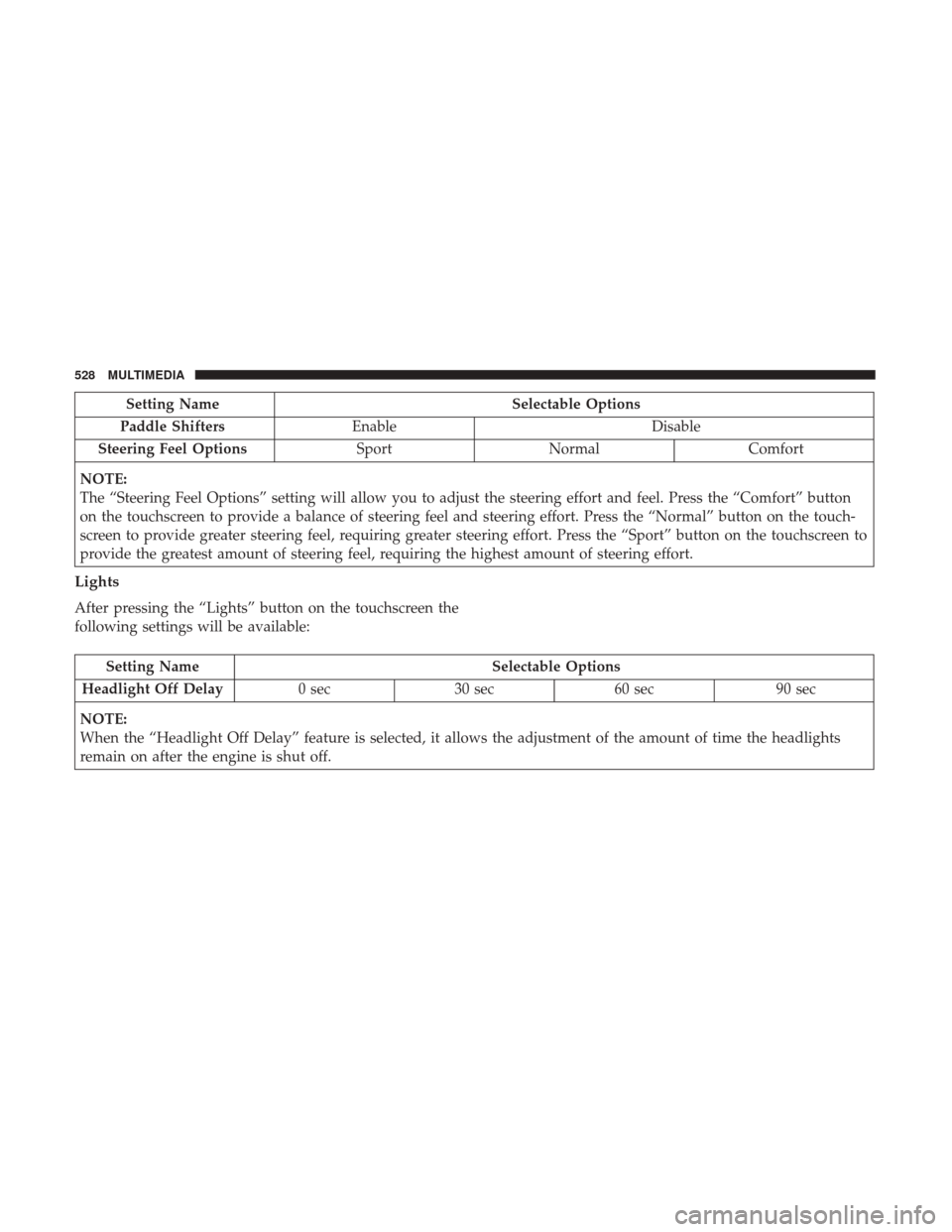
Setting NameSelectable Options
Paddle Shifters Enable Disable
Steering Feel Options SportNormal Comfort
NOTE:
The “Steering Feel Options” setting will allow you to adjust the steering effort and feel. Press the “Comfort” button
on the touchscreen to provide a balance of steering feel and steering effort. Press the “Normal” button on the touch-
screen to provide greater steering feel, requiring greater steering effort. Press the “Sport” button on the touchscreen to
provide the greatest amount of steering feel, requiring the highest amount of steering effort.
Lights
After pressing the “Lights” button on the touchscreen the
following settings will be available:
Setting Name Selectable Options
Headlight Off Delay 0 sec30 sec 60 sec 90 sec
NOTE:
When the “Headlight Off Delay” feature is selected, it allows the adjustment of the amount of time the headlights
remain on after the engine is shut off.
528 MULTIMEDIA
Page 535 of 633
Engine Off Options
After pressing the “Engine Off Options” button on the
touchscreen the following settings will be available:
Setting NameSelectable Options
Engine Off Power Delay — IfEquipped 0 sec
45 sec 5 min10 min
NOTE:
When the “Engine Off Power Delay” feature is selected, the power window switches, radio, Uconnect phone system
(if equipped), DVD video system (if equipped), power sunroof (if equipped), and power outlets will remain active for
up to 10 minutes after the ignition is cycled to OFF. Opening either front door will cancel this feature. Headlight Off Delay 0 sec30 sec 60 sec 90 sec
NOTE:
When the “Headlight Off Delay” feature is selected, it allows the adjustment of the amount of time the headlights
remain on after the engine is shut off. Easy Exit Seat — If Equipped
NOTE:
When the “Easy Exit Seat” feature is selected, it provides automatic driver seat positioning to enhance driver mobility
when entering and exiting the vehicle.
10
MULTIMEDIA 533
Page 545 of 633

System Information
After pressing the “System Information” button on the
touchscreen, the following settings will be available:
Setting NameSelectable Options
System Information System Software Information Screen
NOTE:
When this feature is selected, a “System Information” screen will appear, displaying the system software version.
Customer Programmable Features — Uconnect 8.4
Settings
Press the “Apps” button, then press the “Settings”
button on the touchscreen to display the menu setting
screen. In this mode the Uconnect system allows you to
access programmable features that may be equipped
such as Display, Units, Voice, Clock, Safety & Driving
Assistance, Lights, Doors & Locks, Auto-On Comfort,
Engine Off Options, Audio, Phone/Bluetooth, SiriusXM
Setup, Restore Settings, Clear Personal Data, and Sys-
tem Information.
NOTE:
• Only one touchscreen area may be selected at a time. •
Depending on the vehicles options, feature settings may
vary.
When making a selection, press the button on the touch-
screen to enter the desired mode. Once in the desired
mode, press and release the preferred setting “option” until
a check-mark appears next to the setting, showing that
setting has been selected. Once the setting is complete,
either press the “Back” Arrow button on the touchscreen to
return to the previous menu, or press the “X” button on the
touchscreen to close out of the settings screen. Pressing the
“Up” or “Down” Arrow button on the right side of the
screen will allow you to toggle up or down through the
available settings.
10
MULTIMEDIA 543
Page 555 of 633
Lights
After pressing the “Lights” button on the touchscreen the
following settings will be available.
Setting NameSelectable Options
Headlight Off Delay 0 sec30 sec 60 sec 90 sec
NOTE:
When the “Headlight Off Delay” feature is selected, it allows the adjustment of the amount of time the headlights
remain on after the engine is shut off. Headlight Illumi-
nated On Approach 0 sec
30 sec 60 sec 90 sec
Headlights With Wipers — IfEquipped
Auto Dim High Beams— IfEquipped
NOTE:
When the “Auto Dim High Beams” feature is selected, the high beam headlights will activate/deactivate automati-
cally under certain conditions. Daytime Running Lights — If
10
MULTIMEDIA 553
Page 558 of 633
Auto Comfort Systems — If Equipped
After pressing the “Auto-On Comfort & Remote Start”
button on the touchscreen, the following settings will be
available:
Setting NameSelectable Options
Auto-On Driver Heated/
Ventilated Seat & Steering Wheel With Vehicle Start — If Equipped Off
Remote Start All Starts
NOTE:
When this feature is selected the driver ’s heated seat and heated steering wheel will automatically turn ON when
temperatures are below 40° F (4.4° C). When temperatures are above 80° F (26.7° C) the driver vented seat will turn
ON.
Engine Off Options
After pressing the “Engine Off Options” button on the
touchscreen, the following settings will be available:
Setting Name Selectable Options
Easy Exit Seat
Engine Off Power Delay0 sec 45 sec 5 min10 min
Headlight Off Delay 0 sec30 sec 60 sec 90 sec
556 MULTIMEDIA
Page 588 of 633

•Other compression formats such as AAC, MP3 Pro, Ogg
Vorbis, and ATRAC3 will not play. The Blu-ray player
will automatically skip the file and begin playing the
next available file.
• If you are creating your own files, the recommended
fixed bit rate for MP3 files is between 96 and 192Kbps
and the recommended fixed bit rate for WMA files is
between 64 and 192Kbps. Variable bit rates are also
supported. For both formats, the recommended sample
rate is either 44.1kHz or 48kHz.
• To change the current file, use the remote control’s or
Blu-ray Disc player ’s �button to advance to the next
file, or the �button to return to the start of the current
or previous file.
Disc Errors
If the Blu-ray Disc player is unable to read the disc, a �Disc
Error� message is displayed on the rear screen and Radio
displays. A dirty, damaged, or incompatible disc format are
all potential causes for a �Disc Error�message.
If a disc has a damaged track which results in audible or
visible errors that persists for two seconds, the Blu-ray Disc
player will attempt to continue playing the disc by skip-
ping forward one to three seconds at a time. If the end of the disc is reached, the Blu-ray Disc player will return to
the beginning of the disc and attempt to play the start of
the first track.
The Blu-ray Disc player may shut down during extremely
hot conditions, such as when the vehicle’s interior tem-
perature is above 120° F (48.9° C). When this occurs, the
player will display
�High Temp�and will shut off the Rear
Seat displays until a safe temperature is reached. This
shutdown is necessary to protect the optics of the Blu-ray
Disc player.
Product Agreement
This product incorporates copyright protection technology
that is protected by U.S. patents and other intellectual
property rights. Use of this copyright protection technol-
ogy must be authorized by Macrovision, and is intended
for home or other limited viewing uses otherwise autho-
rized by Macrovision. Reverse engineering or disassembly
is prohibited.
Dolby Digital and MLP Lossless Manufactured un-
der license from Dolby Laboratories. �Dolby�,�MLP Loss-
less�, and the double-D symbol are trademarks of Dolby
Laboratories. Confidential unpublished works. Copyright
1992-1997 Dolby Laboratories. All right reserved.
586 MULTIMEDIA