Page 192 of 744
3-105
Convenient features of your vehicle
3
Trip computer
The trip computer is a microcomput-
er-controlled driver information sys-
tem that displays information related
to driving.
Information
Some driving information stored in
the trip computer (i.e. average vehicle
speed) is reset when the battery is dis-
connected
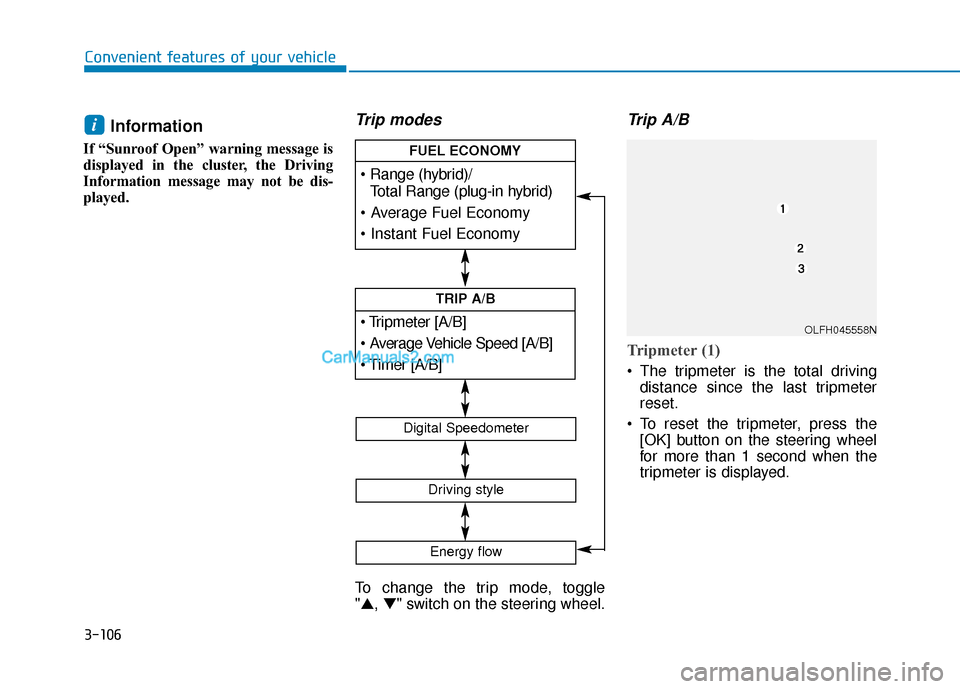
One time driving informationmode
Hybrid
At the end of each driving cycle, the
Driving Info message is displayed.
This display shows the trip distance
(1), the average fuel economy (2), and
the remaining vehicle range (3).
This information is displayed for a few
seconds when you turn off the vehicle,
and then goes off automatically. The
information is calculated for each driving
cycle.
If the estimated remaining vehicle range
is below 1 mile (1.6 km), the range will
display as "- - -" and a "Low Fuel" warn-
ing message will be displayed.
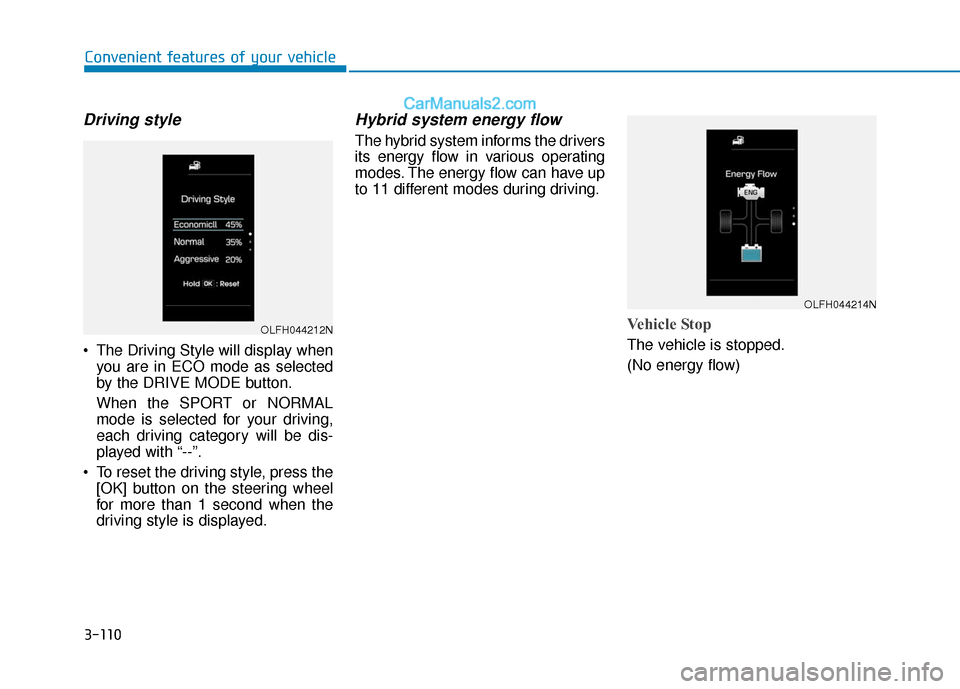
Plug-in hybrid
At the end of each driving cycle, the
Driving Info message is displayed.
This display shows the trip distance
(1), the average speed (2), the
remaining vehicle range (3), and the
charging status (4).
This information is displayed for a
few seconds when you turn off the
vehicle, and then goes off automati-
cally. The information is calculated
for each driving cycle.
If the estimated remaining vehicle
range is below 1 mile (1.6 km), the
range will display as "- - -" and a
"Low Fuel" warning message will be
displayed.
i
OLF044419N
OLFP045190N/OLFP045560N
Page 193 of 744
3-106
Convenient features of your vehicle
Information
If “Sunroof Open” warning message is
displayed in the cluster, the Driving
Information message may not be dis-
played.
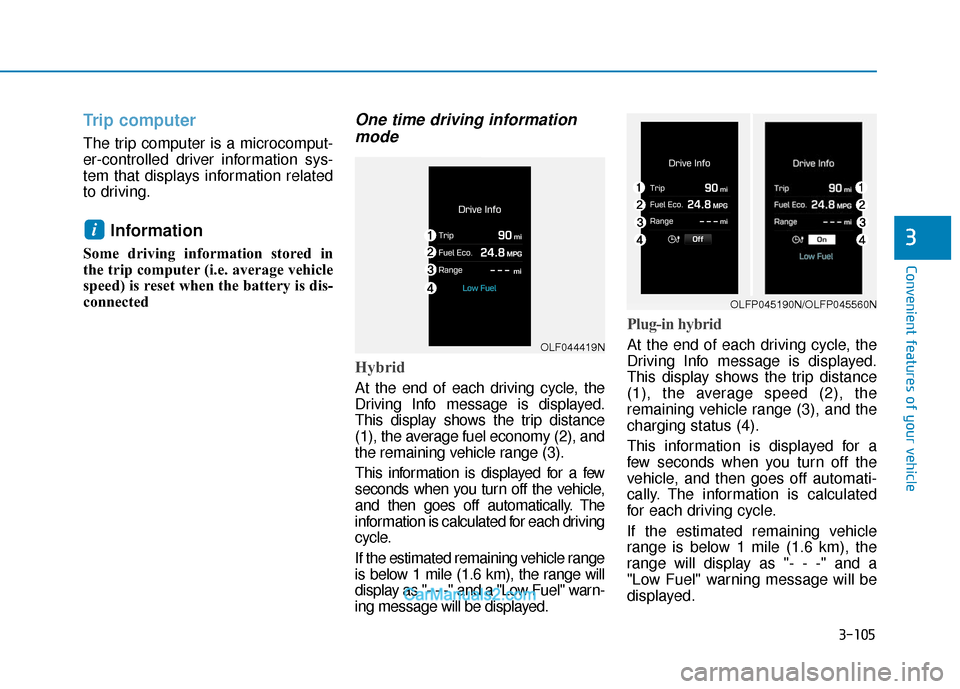
Trip modes
To change the trip mode, toggle
"▲, ▼" switch on the steering wheel.
Trip A/B
Tripmeter (1)
The tripmeter is the total driving
distance since the last tripmeter
reset.
To reset the tripmeter, press the [OK] button on the steering wheel
for more than 1 second when the
tripmeter is displayed.
i
[A/B]
TRIP A/B
Total Range (plug-in hybrid)
FUEL ECONOMY
Digital Speedometer
Driving style
Energy flow
OLFH045558N
Page 194 of 744

3-107
Convenient features of your vehicle
3
Average Vehicle Speed (2)
The average vehicle speed is cal-culated by the total driving dis-
tance and driving time since the
last average vehicle speed reset.
To reset the average vehicle speed, press the [OK] button on the steer-
ing wheel for more than 1 second
when the average vehicle speed is
displayed.
Information
• The average vehicle speed is not dis- played, when the vehicle drives
shorter than 0.19 miles (300 meters)
or less than 10 seconds after turning
ON the Engine Start/Stop button.
• The average vehicle speed will con- tinue to be calculated and will start
to decrease if the vehicle is stopped
while the engine is still running (for
example, when the vehicle is in traf-
fic or stopped at a stop light.)
Timer (3)
The timer is the total driving timesince the last timer reset.
To reset the timer , press the [OK]
button on the steering wheel for
more than 1 second when the timer
is displayed.
Information
The timer will continue to be counted
while the engine is still running (for
example, when the vehicle is in traffic
or stopped at a stop light.)
Fuel economy
Range/Total Range (1)
The range is the estimated distance
the vehicle can be driven with the
remaining fuel in the fuel tank.
If the estimated distance is below
1 mi. (1 km), the trip computer will
display “---” as the range.
i
i
OLFH045437N
■ Hybrid
Page 195 of 744
3-108
Convenient features of your vehicle
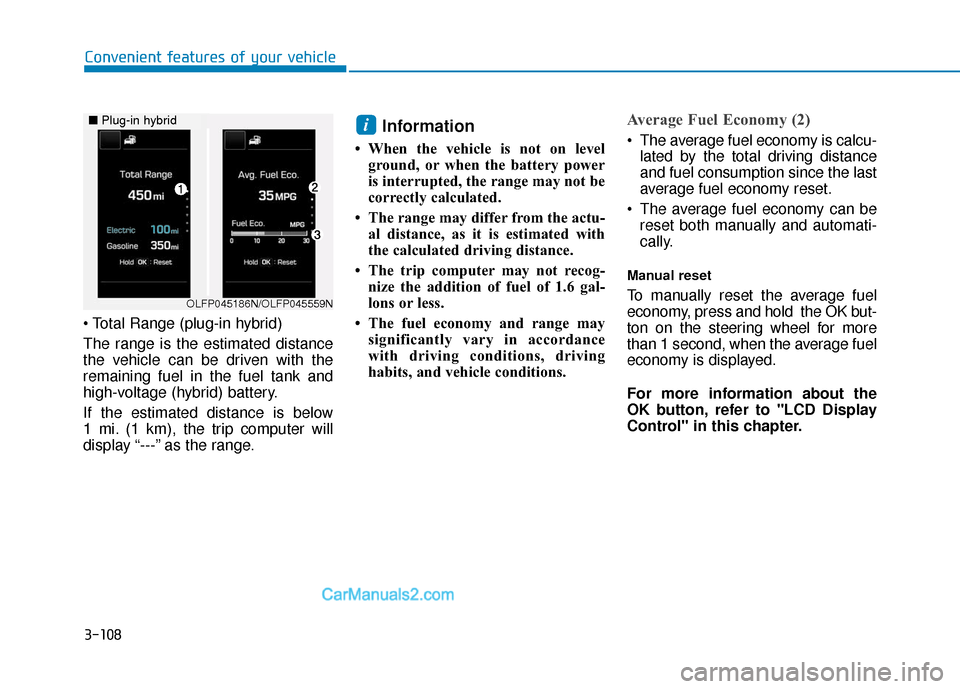
The range is the estimated distance
the vehicle can be driven with the
remaining fuel in the fuel tank and
high-voltage (hybrid) battery.
If the estimated distance is below
1 mi. (1 km), the trip computer will
display “---” as the range.
Information
• When the vehicle is not on level ground, or when the battery power
is interrupted, the range may not be
correctly calculated.
• The range may differ from the actu- al distance, as it is estimated with
the calculated driving distance.
• The trip computer may not recog- nize the addition of fuel of 1.6 gal-
lons or less.
• The fuel economy and range may significantly vary in accordance
with driving conditions, driving
habits, and vehicle conditions.
Average Fuel Economy (2)
The average fuel economy is calcu-lated by the total driving distance
and fuel consumption since the last
average fuel economy reset.
The average fuel economy can be reset both manually and automati-
cally.
Manual reset
To manually reset the average fuel
economy, press and hold the OK but-
ton on the steering wheel for more
than 1 second, when the average fuel
economy is displayed.
For more information about the
OK button, refer to "LCD Display
Control" in this chapter.
i
OLFP045186N/OLFP045559N
■ Plug-in hybrid
Page 196 of 744

3-109
Convenient features of your vehicle
3
Automatic reset
To automatically reset the average fuel
economy after refueling, select the
“After Refueling” feature in the User
Settings Mode on the LCD display
(Refer to "LCD Display" in this
chapter).
If the “After Refueling” feature is
selected, the average fuel economy
will be cleared to zero (---), when driv-
ing speed exceeds 1 mph (1km/h),
after refueling more than 1.6 gallons
(6 liters).
Information
The vehicle must be driven for a min-
imum of 0.19 mile (0.3 km) since the
last ignition key cycle before the aver-
age fuel economy is recalculated.
Automatic reset at every fueling event
is the default condition for MPG reset,
it comes that way from the factory. In
settings you can disable/enable it.
Instant Fuel Economy (3)
This mode displays the instanta-
neous fuel economy while driving
when the vehicle speed is greater
than 6.2 mph (10 km/h).
Digital Speedometer
This message shows the speed of
the vehicle (km/h, MPH).i
OLFH045440N
Page 197 of 744
3-110
Convenient features of your vehicle
Driving style
The Driving Style will display whenyou are in ECO mode as selected
by the DRIVE MODE button.
When the SPORT or NORMAL
mode is selected for your driving,
each driving category will be dis-
played with “--”.
To reset the driving style, press the [OK] button on the steering wheel
for more than 1 second when the
driving style is displayed.
Hybrid system energy flow
The hybrid system informs the drivers
its energy flow in various operating
modes. The energy flow can have up
to 11 different modes during driving.
Vehicle Stop
The vehicle is stopped.
(No energy flow)
OLFH044212N
OLFH044214N
Page 229 of 744
3-142
Convenient features of your vehicle
Temperature conversion
If the battery has been discharged or
disconnected, the temperature mode
display will reset to Centigrade.
You can switch the temperature mode
between Centigrade to Fahrenheit as
follows;
- Automatic climate control system
While pressing the OFF button,
press the AUTO button for 3 seconds
or more. The display will change from
Centigrade to Fahrenheit, or from
Fahrenheit to Centigrade.
- “User setting mode” in the cluster :You can change the temperature
unit in the “Other features -
Temperature unit”
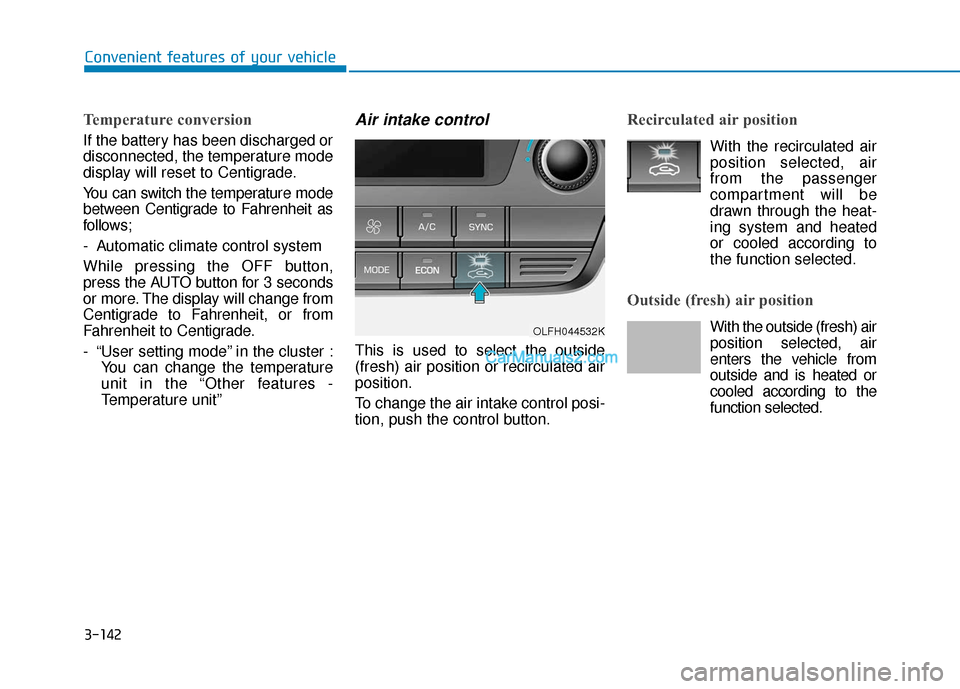
Air intake control
This is used to select the outside
(fresh) air position or recirculated air
position.
To change the air intake control posi-
tion, push the control button.
Recirculated air position
With the recirculated airposition selected, air
from the passenger
compartment will be
drawn through the heat-
ing system and heated
or cooled according to
the function selected.
Outside (fresh) air position
With the outside (fresh) air position selected, air
enters the vehicle from
outside and is heated or
cooled according to the
function selected.OLFH044532K
Page 240 of 744
3-153
Convenient features of your vehicle
3
C
CL
LI
IM
M A
AT
TE
E
C
C O
O N
NT
TR
R O
O L
L
A
A D
DD
DI
IT
T I
IO
O N
NA
AL
L
F
F E
E A
A T
TU
U R
RE
ES
S
(
( I
IF
F
E
E Q
Q U
UI
IP
P P
PE
ED
D )
)
Automatic Ventilation
(if equipped)
When the ignition is ON or when the
engine is running and the outside
temperature is below 59°F (15°C),
the automatic ventilation feature will
activate if the recirculated air intake
position is selected for more than 5
munutes. In this condition the air
intake position will automatically
switch to the outside (fresh) air intake
position.
To cancel or reset the Automatic
Ventilation
When the air conditioning system is
on, select Face Level mode and
while pressing the A/C button, press
the recirculated air position button
five times within three seconds.
Sunroof Inside Air
Recirculation (if equipped)
When the heater or air conditioning
system is on with the sunroof
opened, the outside (fresh) air posi-
tion will be automatically selected. At
this time, if you press the recirculated
air position button, the recirculated
air position will be selected but will
change back to the outside (fresh) air
position after 3 minutes.
When the sunroof is closed, the air
intake position will return to the orig-
inal position that was selected.