Page 16 of 563

I
IN
N S
ST
T R
R U
U M
M E
EN
N T
T
P
P A
A N
N E
EL
L
O
O V
VE
ER
R V
V I
IE
E W
W
1-5
Your vehicle at a glance
1
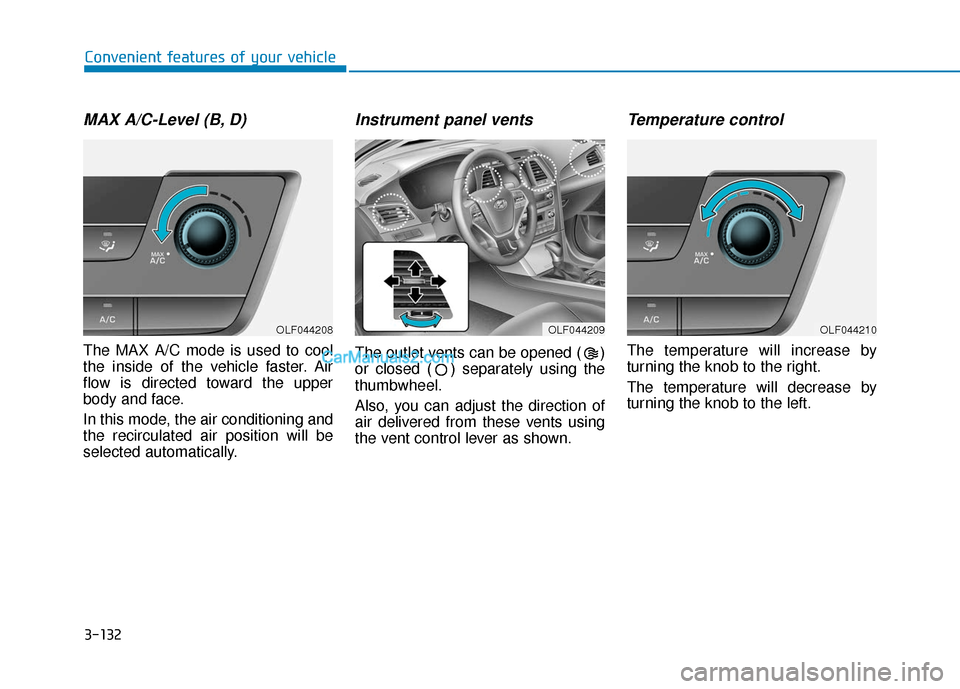
The actual shape may differ from the illustration. 1. Light control/Turn signals ..............3-109
2. Steering wheel audio controls*/
Bluetooth®wireless technology
hands-free controls* ..........................4-3
3. Instrument cluster ..........................3-63
4. Horn ................................................3-24
5. Driver’s front air bag........................2-47
6. Wiper/Washer................................3-122
7. Cruise controls* ..............................5-50
8. Engine Start/Stop button/ Key ignition switch ............................5-6
9. Automatic transmission/
Dual clutch
transmission shifter ....................5-14, 5-18
10. Drive mode integrated control system ..........................................5-48
11. Rear parking assist system ........3-124
12. EPB (Electronic Parking Brake)* ..5-31
13. AUTO HOLD ................................5-37
14. Audio system/Navigation system ....4-4
15. Digital Clock ................................3-160
16.Climate control system ....3-129, 3-139
17. Power outlet ................................3-158
18. AUX, USB and iPod
®port ..............4-2
19. Passenger’s front air bag ..............2-47
20. Glove box ....................................3-155
* : if equipped
OLF014004N
Page 88 of 563
Convenient features of your vehicle
3
Interior features.................................................3-157
Cup Holder ......................................................................3-\
157
Sunvisor ........................................................................\
...3-158
Power Outlet ..................................................................3-158
Clock ........................................................................\
.........3-160
Clothes Hanger ..............................................................3-161
Floor Mat Anchor(s).....................................................3-162
Side Curtain ....................................................................3-16\
3
Luggage Net Holder .....................................................3-163
3
Page 216 of 563
3-131
Convenient features of your vehicle
3
Mode selection
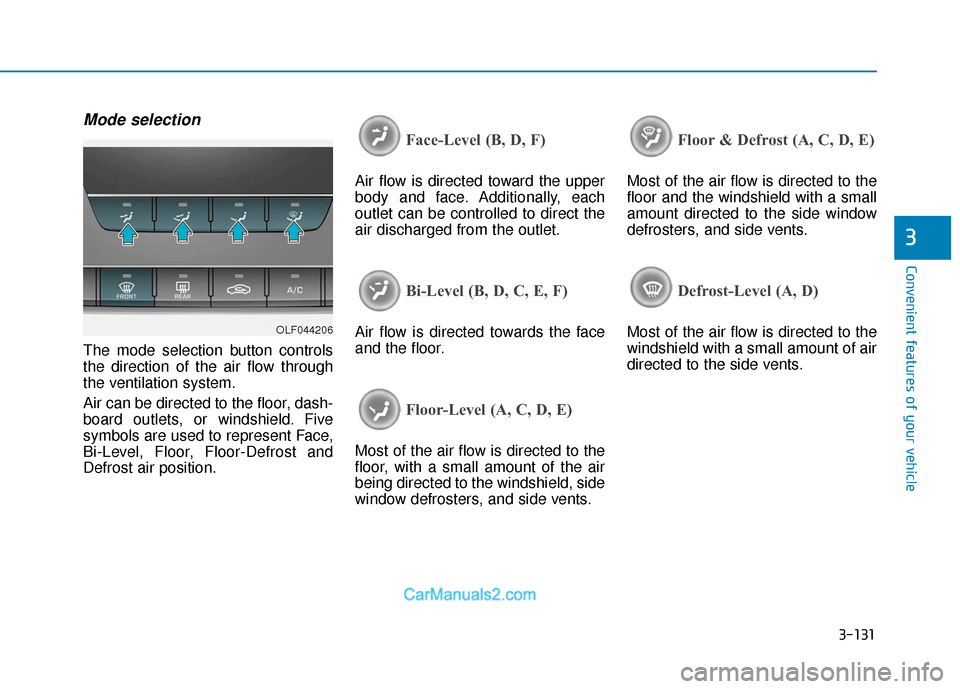
The mode selection button controls
the direction of the air flow through
the ventilation system.
Air can be directed to the floor, dash-
board outlets, or windshield. Five
symbols are used to represent Face,
Bi-Level, Floor, Floor-Defrost and
Defrost air position.
Face-Level (B, D, F)
Air flow is directed toward the upper
body and face. Additionally, each
outlet can be controlled to direct the
air discharged from the outlet.
Bi-Level (B, D, C, E, F)
Air flow is directed towards the face
and the floor.
Floor-Level (A, C, D, E)
Most of the air flow is directed to the
floor, with a small amount of the air
being directed to the windshield, side
window defrosters, and side vents.
Floor & Defrost (A, C, D, E)
Most of the air flow is directed to the
floor and the windshield with a small
amount directed to the side window
defrosters, and side vents.
Defrost-Level (A, D)
Most of the air flow is directed to the
windshield with a small amount of air
directed to the side vents.OLF044206
Page 217 of 563
3-132
Convenient features of your vehicle
MAX A/C-Level (B, D)
The MAX A/C mode is used to cool
the inside of the vehicle faster. Air
flow is directed toward the upper
body and face.
In this mode, the air conditioning and
the recirculated air position will be
selected automatically.
Instrument panel vents
The outlet vents can be opened ( )
or closed ( ) separately using the
thumbwheel.
Also, you can adjust the direction of
air delivered from these vents using
the vent control lever as shown.
Temperature control
The temperature will increase by
turning the knob to the right.
The temperature will decrease by
turning the knob to the left.
OLF044208OLF044209OLF044210
Page 228 of 563
3-143
Convenient features of your vehicle
3
The air flow outlet direction is cycled
as follows:
Face-Level (B, D, F)
Air flow is directed toward the upper
body and face. Additionally, each
outlet can be controlled to direct the
air discharged from the outlet.
Bi-Level (B, C, D, E, F)
Air flow is directed towards the face
and the floor.
Floor & Defrost (A, C, D, E)
Most of the air flow is directed to the
floor and the windshield with a small
amount directed to the side window
defrosters.
Floor-Level (A, C, D, E)
Most of the air flow is directed to the
floor, with a small amount of the air
being directed to the windshield and
side window defrosters.
Defrost-Level (A)
Most of the air flow is directed to the
windshield with a small amount of air
directed to the side window
defrosters.
OLF044221
■Type BOLF044220
■Type A
Page 229 of 563
3-144
Convenient features of your vehicle
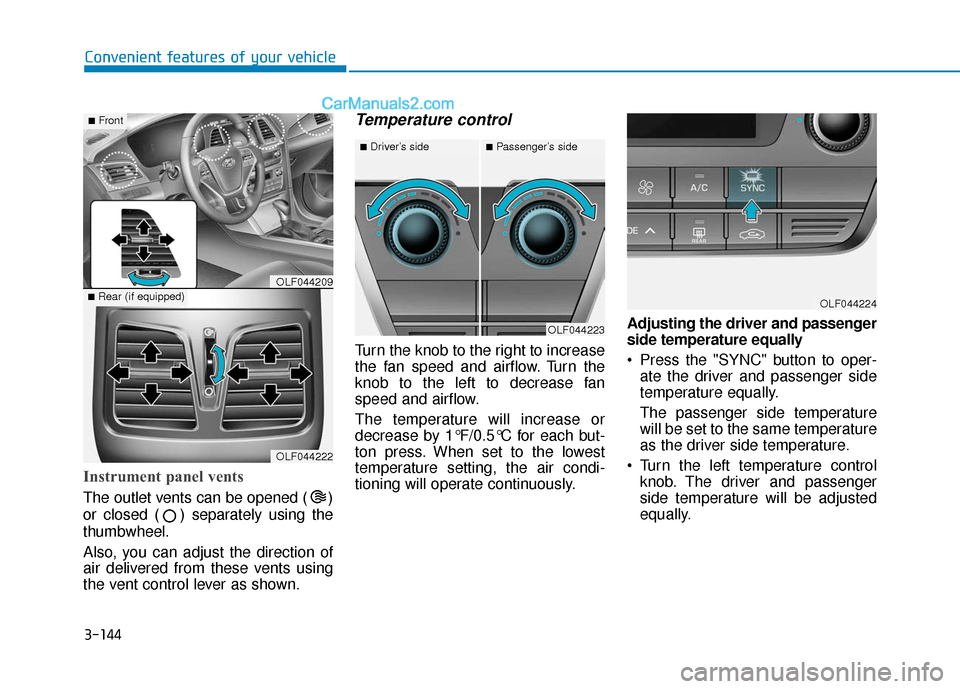
Instrument panel vents
The outlet vents can be opened ( )
or closed ( ) separately using the
thumbwheel.
Also, you can adjust the direction of
air delivered from these vents using
the vent control lever as shown.
Temperature control
Turn the knob to the right to increase
the fan speed and airflow. Turn the
knob to the left to decrease fan
speed and airflow.
The temperature will increase or
decrease by 1°F/0.5°C for each but-
ton press. When set to the lowest
temperature setting, the air condi-
tioning will operate continuously.Adjusting the driver and passenger
side temperature equally
Press the "SYNC" button to oper-
ate the driver and passenger side
temperature equally.
The passenger side temperature
will be set to the same temperature
as the driver side temperature.
Turn the left temperature control knob. The driver and passenger
side temperature will be adjusted
equally.
OLF044222
■Rear (if equipped)OLF044209
■Front
OLF044223
■Driver’s side■Passenger’s side
OLF044224
Page 243 of 563
3-158
Convenient features of your vehicle
Sunvisor
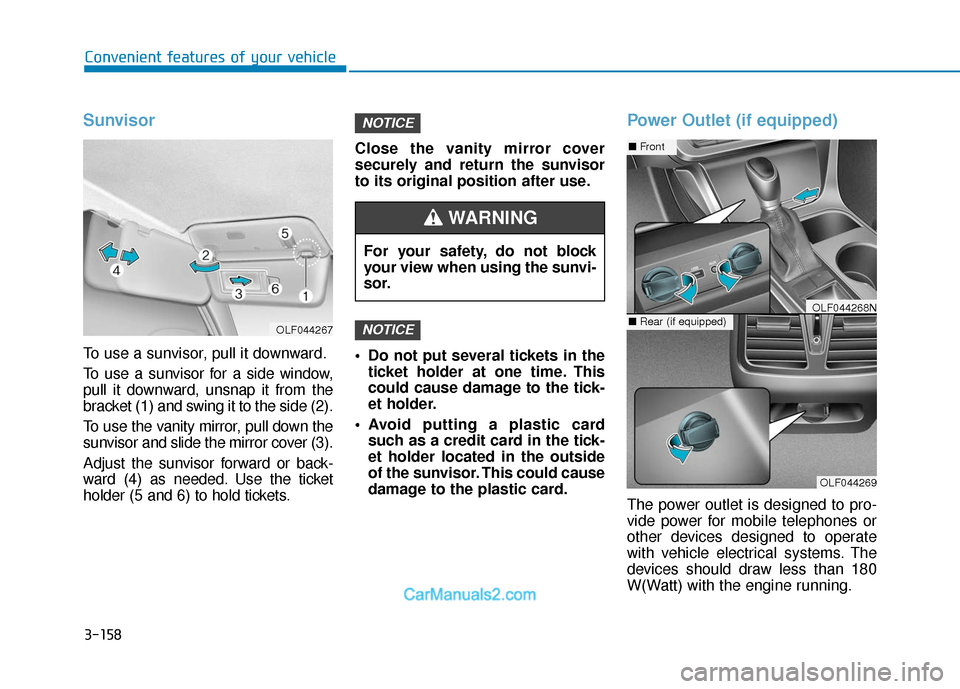
To use a sunvisor, pull it downward.
To use a sunvisor for a side window,
pull it downward, unsnap it from the
bracket (1) and swing it to the side (2).
To use the vanity mirror, pull down the
sunvisor and slide the mirror cover (3).
Adjust the sunvisor forward or back-
ward (4) as needed. Use the ticket
holder (5 and 6) to hold tickets.Close the vanity mirror cover
securely and return the sunvisor
to its original position after use.
Do not put several tickets in the
ticket holder at one time. This
could cause damage to the tick-
et holder.
Avoid putting a plastic card such as a credit card in the tick-
et holder located in the outside
of the sunvisor. This could cause
damage to the plastic card.
Power Outlet (if equipped)
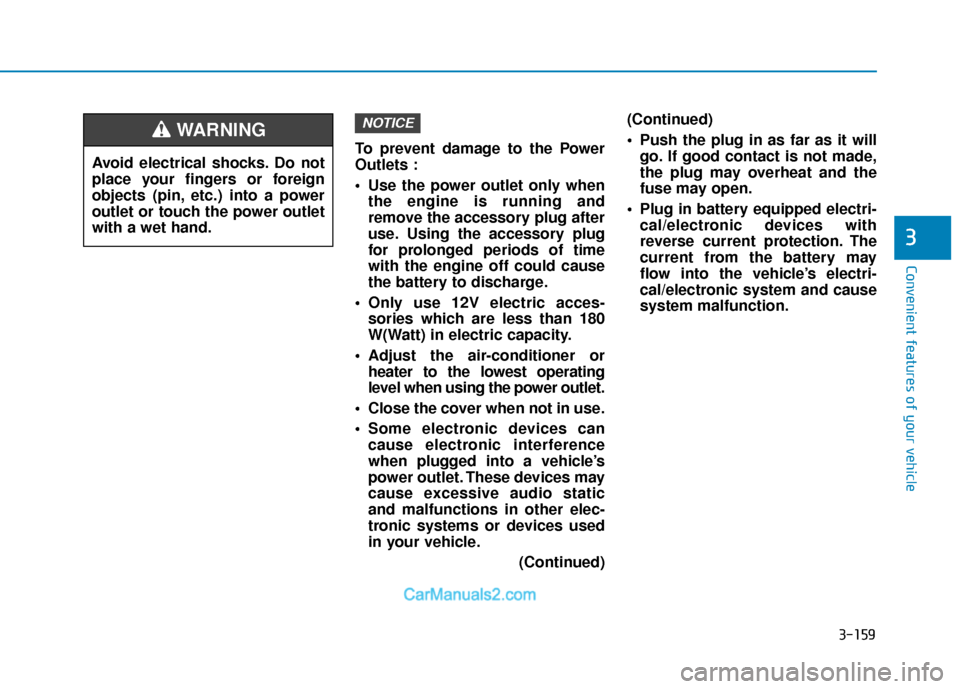
The power outlet is designed to pro-
vide power for mobile telephones or
other devices designed to operate
with vehicle electrical systems. The
devices should draw less than 180
W(Watt) with the engine running.
NOTICE
NOTICE
OLF044267
For your safety, do not block
your view when using the sunvi-
sor.
WARNING
OLF044269
■ Front
■Rear (if equipped)OLF044268N
Page 244 of 563
3-159
Convenient features of your vehicle
3
To prevent damage to the Power
Outlets :
Use the power outlet only whenthe engine is running and
remove the accessory plug after
use. Using the accessory plug
for prolonged periods of time
with the engine off could cause
the battery to discharge.
Only use 12V electric acces- sories which are less than 180
W(Watt) in electric capacity.
Adjust the air-conditioner or heater to the lowest operating
level when using the power outlet.
Close the cover when not in use.
Some electronic devices can cause electronic interference
when plugged into a vehicle’s
power outlet. These devices may
cause excessive audio static
and malfunctions in other elec-
tronic systems or devices used
in your vehicle.
(Continued)(Continued)
Push the plug in as far as it will
go. If good contact is not made,
the plug may overheat and the
fuse may open.
Plug in battery equipped electri- cal/electronic devices with
reverse current protection. The
current from the battery may
flow into the vehicle’s electri-
cal/electronic system and cause
system malfunction.
NOTICE
Avoid electrical shocks. Do not
place your fingers or foreign
objects (pin, etc.) into a power
outlet or touch the power outlet
with a wet hand.
WARNING