Page 173 of 563
3-88
Convenient features of your vehicle
Steering wheel aligning is com-pleted
If the steering wheel aligning is com-
pleted after "Align steering wheel"
warning message is displayed, this
message is displayed for 2 seconds.
Door / Hood / Trunk Open
It means that any door, hood, or
trunk is open.
Sunroof Open
This warning message illuminates if
you turn off the engine when the sun-
roof is open.OLF044154L
OLF044136OLF054446
Before driving the vehicle, you
should confirm that the door
/hood/trunk is fully closed.
Also, check there is no door/
hood/trunk open warning light
or message displayed on the
instrument cluster.
CAUTION
Page 236 of 563

3-151
Convenient features of your vehicle
3
W
WI
IN
N D
DS
SH
H I
IE
E L
LD
D
D
D E
EF
FR
R O
O S
ST
T I
IN
N G
G
A
A N
N D
D
D
D E
EF
FO
O G
GG
GI
IN
N G
G
For maximum defrosting, set the
temperature control to the extreme
right/hot position and the fan speed
control to the highest speed.
If warm air to the floor is desired while defrosting or defogging, set the
mode to the floor-defrost position.
Before driving, clear all snow and ice from the windshield, rear win-
dow, side view mirrors, and all side
windows.
Clear all snow and ice from the hood and air inlet in the cowl grill to
improve heater and defroster effi-
ciency and to reduce the probability
of fogging up the inside of the wind-
shield.
If the engine temperature is still
cold after starting, then a brief
engine warm up period may be
required for the vented air flow to
become warm or hot.Manual Climate Control System
To defog inside windshield
1. Select any fan speed except “0” position.
2. Select desired temperature.
3. Select the or position.
4. The outside (fresh) air will be select- ed automatically. Additionally, the air
conditioning will automatically oper-
ate if the mode is selected to the position.
If the air conditioning and outside
(fresh) air position are not selected
automatically, press the correspon-
ding button manually.
NOTICE
Windshield heating
Do not use the or posi-
tion during cooling operation in
extremely humid weather. The
difference between the temper-
ature of the outside air and that
of the windshield could cause
the outer surface of the wind-
shield to fog up, causing loss of
visibility could cause an acci-
dent resulting in serious injury
or death. In this case, set the
mode selection knob or button
to the position and fan
speed control knob or button to
a lower speed.
WARNING
OLF044231
Page 257 of 563
4-9
Multimedia System
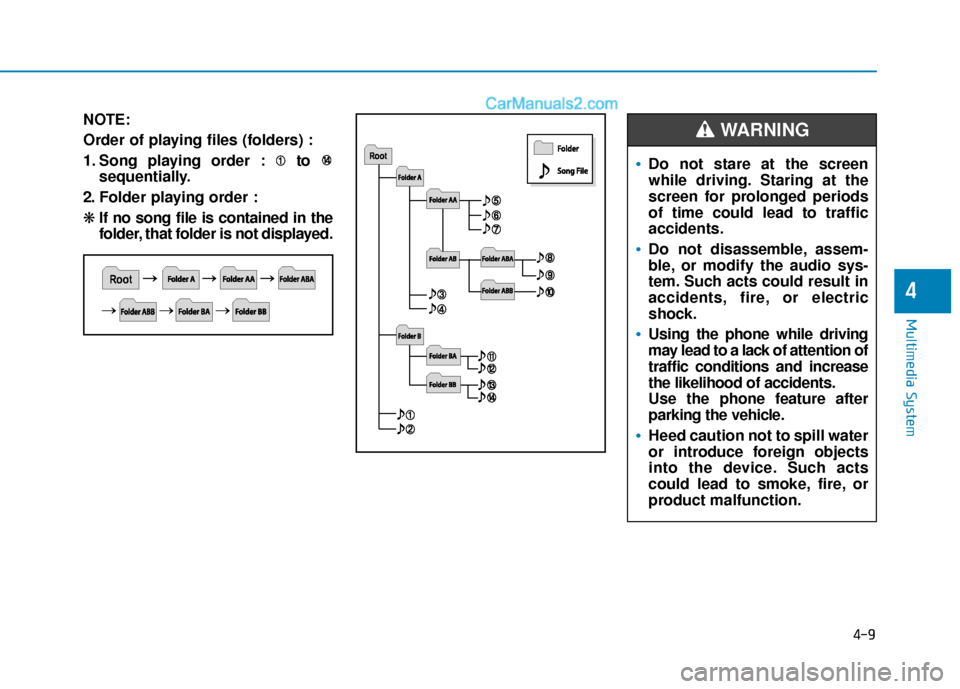
NOTE:
Order of playing files (folders) :
1. Song playing order : to sequentially.
2. Folder playing order :
❋ If no song file is contained in the
folder, that folder is not displayed.
4
Do not stare at the screen
while driving. Staring at the
screen for prolonged periods
of time could lead to traffic
accidents.
Do not disassemble, assem-
ble, or modify the audio sys-
tem. Such acts could result in
accidents, fire, or electric
shock.
Using the phone while driving
may lead to a lack of attention of
traffic conditions and increase
the likelihood of accidents.
Use the phone feature after
parking the vehicle.
Heed caution not to spill water
or introduce foreign objects
into the device. Such acts
could lead to smoke, fire, or
product malfunction.
WARNING
Page 312 of 563

5-4
Driving your vehicle
Before Entering the Vehicle
• Be sure all windows, outside mir-ror(s), and outside lights are clean
and unobstructed.
Remove frost, snow, or ice.
Visually check the tires for uneven wear and damage.
Check under the vehicle for any sign of leaks.
Be sure there are no obstacles behind you if you intend to back up.
Before Starting
Make sure the hood, the trunk, andthe doors are securely closed and
locked.
Adjust the position of the seat and steering wheel.
Adjust the inside and outside rearview mirrors.
Verify all the lights work.
Fasten your seatbelt. Check that all passengers have fastened their
seatbelts.
Check the gauges and indicators in the instrument panel and the mes-
sages on the instrument display
when the ignition switch is in the
ON position.
Check that any items you are car- rying are stored properly or fas-
tened down securely.
CALIFORNIA PROPOSITION 65
WARNING
Engine exhaust and a wide vari-
ety of automobile components
including components found in
the interior furnishings in a
vehicle, contain or emit harmful
chemicals known to the State of
California to cause cancer and
birth defects and reproductive
harm. In addition, certain fluids
contained in vehicles and cer-
tain products of components
contain or emit chemicals
known to the State of California
to cause cancer and birth
defects or other reproductive
harm.WARNING
B B
E
EF
FO
O R
RE
E
D
D R
RI
IV
V I
IN
N G
G
Page 340 of 563

5-32
Driving your vehicle
Releasing the parking brake
To release the EPB (Electronic
Parking Brake), press the EPB
switch in the following condition:
Place the Engine Start/Stop buttonin the ON position.
Depress the brake pedal.
Make sure the Parking Brake
Warning Light goes off.
To release EPB (Electronic Parking
Brake) automatically:
Shift lever in P (Park) With the engine running depress
the brake pedal and shift out of P
(Park) to R (Reverse) or D (Drive).
Shift lever in N (Neutral) With the engine running depress
the brake pedal and shift out of N
(Neutral) to R (Reverse) or D
(Drive).
Satisfy the following conditions 1. Start the engine.
2. Fasten the driver’s seat belt.
3. Close the driver’s door, engine hood and trunk.
4. Depress the accelerator pedal while the shift lever is in D
(Drive) or Manual shift mode. The Parking Brake Warning Light
should be turned off when the EPB is
released.
If the Parking Brake Warning Light is
still on even though the EPB has
been released, have your vehicle
checked by an authorized HYUNDAI
dealer.
Information
• For your safety, you can engage the
EPB even though the Engine Stop/
Start button is in the OFF position,
but you cannot release it.
• For your safety, depress the brake pedal and release the parking brake
manually with the EPB switch when
you drive downhill or when backing
up the vehicle.
i
OLF054017N
Page 346 of 563

5-38
Driving your vehicle
To release:
Press the accelerator pedal with the
shift lever in D (Drive) or Manual shift
mode, the Auto Hold will be released
automatically and the vehicle will
start to move. The indicator changes
from green to white.
To cancel:
1. Depress the brake pedal.
2. Press the [AUTO HOLD] switch.The AUTO HOLD indicator will
turn off.
Information
• The Auto Hold does not operatewhen:
- The driver 's seat belt is unbuckled
and the driver's door is opened
- The engine hood is opened
- The shift lever is in P (Park)
- The EPB is applied
• For your safety, the Auto Hold auto- matically switches to EPB when:
- The driver 's seat belt is unbuckled
and the driver's door is opened
- The engine hood is opened with the shift lever in D (Drive), N (Neutral)
- The vehicle is in a standstill for more than 10 minutes
- The vehicle is standing on a steep slope
- The vehicle moved several times (Continued)
i
To prevent, unexpected and
sudden vehicle movement,
ALWAYS press your foot on the
brake pedal to cancel the Auto
Hold before you:
- Drive downhill.
- Park the vehicle.
WARNING
OLF054020N
L
L
L
L
i
i
i
i
g
g
g
g
h
h
h
h
t
t
t
t
o
o
o
o
f
f
f
f
f
f
f
f
Page 347 of 563
5-39
Driving your vehicle
5
(Continued)In these cases, the Parking Brake
Warning Light comes on, the AUTO
HOLD indicator changes from
green to white, and warning sounds
and a message will appear to inform
you that EPB has been automatical-
ly engaged. Before driving again,
depress the brake pedal, check the
surrounding area near your vehicle
and release the parking brake man-
ually with the EPB switch.
• If AUTO HOLD indicator changes to yellow, the Auto Hold is not work
properly. Take your vehicle to an
authorized HYUNDAI dealer and
have the system checked.
• If there is a malfunction with the driver 's door or hood detection sys-
tem, the Auto Hold may not work
properly. Take your vehicle to an
authorized HYUNDAI dealer and
have the system checked.Warning messages
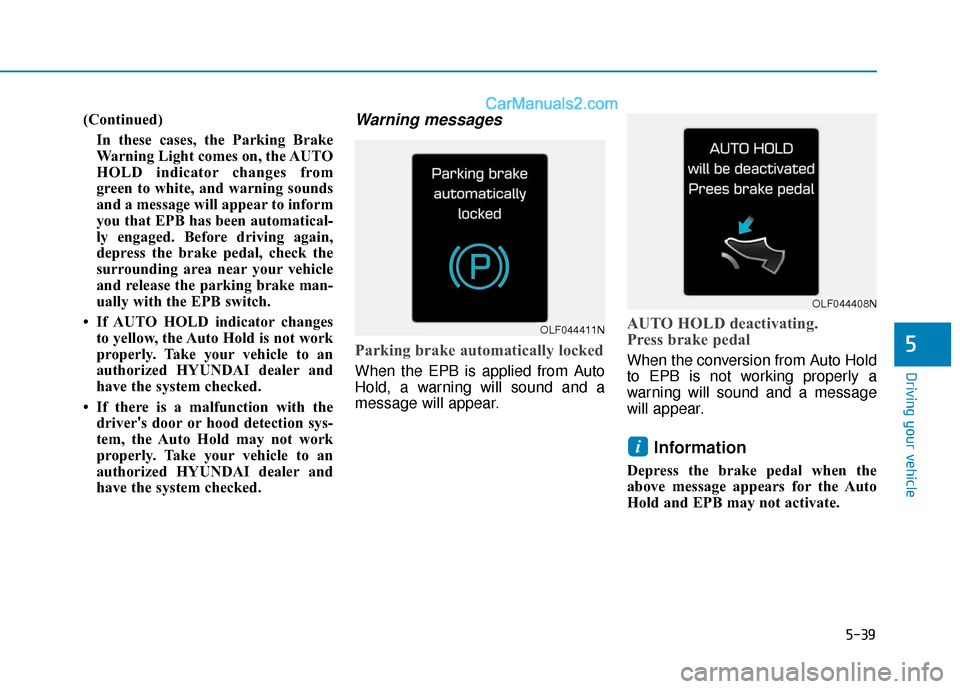
Parking brake automatically locked
When the EPB is applied from Auto
Hold, a warning will sound and a
message will appear.
AUTO HOLD deactivating.
Press brake pedal
When the conversion from Auto Hold
to EPB is not working properly a
warning will sound and a message
will appear.
Information
Depress the brake pedal when the
above message appears for the Auto
Hold and EPB may not activate.
i
OLF044411N
OLF044408N
Page 348 of 563
![Hyundai Sonata 2017 Owners Manual 5-40
Driving your vehicle
Press brake pedal to deactivate
AUTO HOLD
If you did not apply the brake pedal
when you release the Auto Hold by
pressing the [AUTO HOLD] switch, a
warning will sound and a m](/manual-img/35/16780/w960_16780-347.png "Hyundai Sonata 2017 Owners Manual 5-40
Driving your vehicle
Press brake pedal to deactivate
AUTO HOLD
If you did not apply the brake pedal
when you release the Auto Hold by
pressing the [AUTO HOLD] switch, a
warning will sound and a m")
5-40
Driving your vehicle
Press brake pedal to deactivate
AUTO HOLD
If you did not apply the brake pedal
when you release the Auto Hold by
pressing the [AUTO HOLD] switch, a
warning will sound and a message
will appear.
AUTO HOLD conditions not met.
Close door, hood and fasten seatbelt
When you press the [AUTO HOLD]
switch, if the driver's door and engine
hood are not closed or the driver's
seat belt is not fastened, a warning
will sound and a message will
appear on the LCD display. In that
time, press the [AUTO HOLD] button
after closing the driver's door, engine
hood and fastening the seat belt.
Anti-lock Brake System (ABS)
OLF044407NOLF046409N
An Anti-Lock Braking System
(ABS) or an Electronic Stability
Control (ESC) system will not
prevent accidents due to
improper or dangerous driving
maneuvers. Even though vehi-
cle control is improved during
emergency braking, always
maintain a safe distance
between you and objects ahead
of you. Vehicle speeds should
always be reduced during
extreme road conditions. The
braking distance for cars
equipped with ABS or ESC may
be longer than for those without
these systems in the following
road conditions.(Continued)
WARNING