Page 18 of 24
MULTIMEDIA
SANTA FE SPORT
33 32
HYUNDAI
NAVIGATION
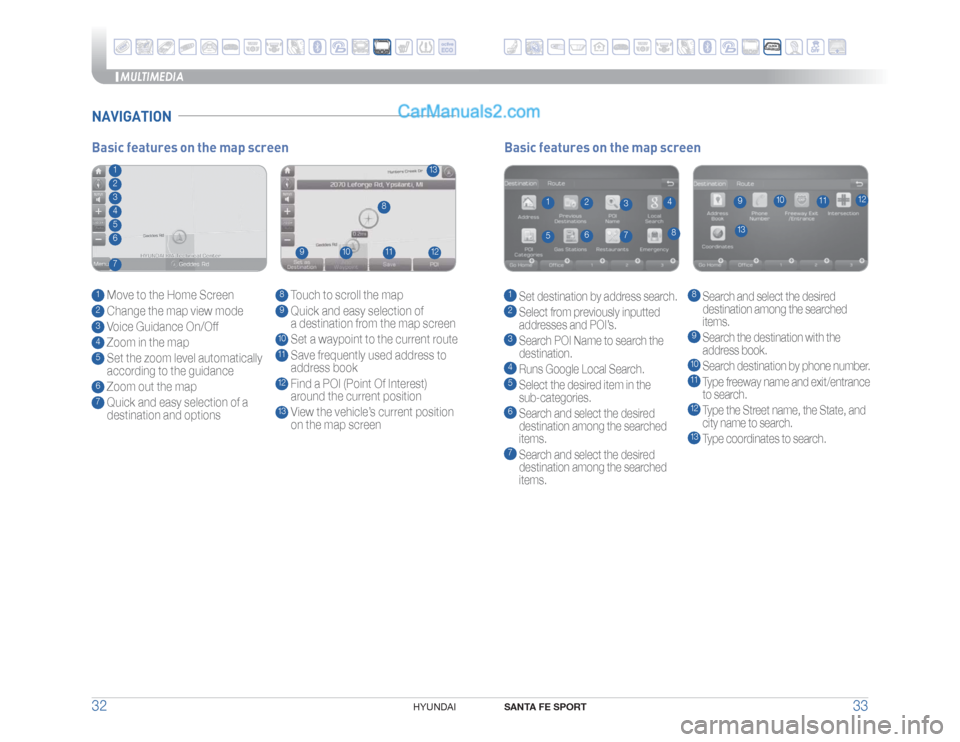
Basic features on the map screen1 Set destination by address search.2 Select from previously inputted
addresses and POI’s.3 Search POI Name to search the
destination.4 Runs Google Local Search.5 Select the desired item in the
sub-categories.6 Search and select the desired
destination among the searched
items.7 Search and select the desired
destination among the searched
items.
8 Search and select the desired
destination among the searched
items.9
Search the destination with the
address book.10 Search destination by phone number.11 Type freeway name and exit/entrance
to search.12 Type the Street name, the State, and
city name to search.13 Type coordinates to search.
1
13
8
9
10
11
12
2
3
4
5
6
7
Basic features on the map screen1 Move to the Home Screen2 Change the map view mode3 Voice Guidance On/Off4 Zoom in the map5 Set the zoom level automatically
according to the guidance6 Zoom out the map7 Quick and easy selection of a
destination and options
8 Touch to scroll the map9 Quick and easy selection of
a destination from the map screen10 Set a waypoint to the current route11 Save frequently used address to
address book12 Find a POI (Point Of Interest)
around the current position13 View the vehicle’s current position
on the map screen
1
13
8
9
10
11
12
234567
Page 19 of 24
MULTIMEDIA
SANTA FE SPORT
35 34
HYUNDAI
CAR SETUP1. Press the SETUP button on the radio.
���5PVDI�UIF�i$POOFDUJWJUZw�JDPO�PO�TDSFFO�
���4FMFDU�i0Ow�GPS�"OESPJE�"VUP�
4. Connect your Android phone to the vehicle USB port. Agree to the
�����OPUJGJDBUJPO�BOE�EJTDMBJNFST�PO�ZPVS�QIPOF�UIFO�UIF�i"OESPJE�"VUPw��
icon will appear confirming the setup.
For more detailed information on how to operate Android Auto,
please refer to your navigation manual.
For additional Android Auto support, please refer to the Android Auto
Support Website
https://support.google.com/androidauto/
Android Auto, Google Play, Android, and other marks are trademarks
of Google Inc.
ANDROID AUTO ™REQUIREMENTS:
- Micro USB cable
- OS Android™ 5.0 or higher
- Compatible Android Phone
- Data and wireless plan for applicable features
BEFORE YOU BEGIN:
- Android Auto features may operate differently than on your phone.
- Message and data charges may apply when using Android Auto.
- Android Auto relies on the performance of your phone. If you
experience performance issues:
- Close all apps and then restart them or
- Disconnect and then reconnect your phone
- Using the micro USB cable that was provided with your phone is
recommended.
- When Android Auto is active, your in-vehicle voice recognition
system is disabled and you will be using talk to Google™ to make
your requests.
PHONE SETUP Turn on Bluetooth
® on your phone and connect the micro USB cable to
your phone and the USB port on the vehicle.
Phone will prompt you to download the Android Auto app and update
other needed apps (i.e. Google Maps™, Google Play Music™, Google
Now™).
/05&�
Vehicle must be parked.
- Location mode setting should be set to High accuracy.
- Car and phone setup should be completed in one sitting. If phone
setup needs to be resumed, recommend to Force Stop the Android
Auto app on the Phone then reopen the app and accept the
Disclaimer notifications.
ANDROID AUTO SUPPORThttps://support.google.com/androidauto/
Page 21 of 24
FEATURES AND CONTROLS
SANTA FE SPORT
39 38
HYUNDAI
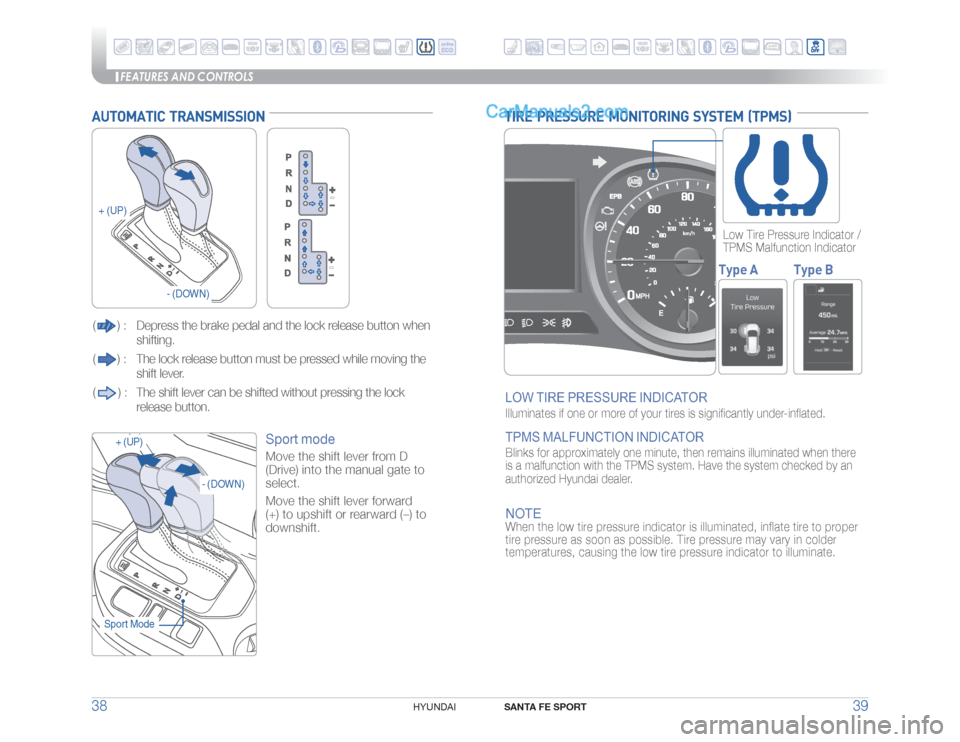
TIRE PRESSURE MONITORING SYSTEM (TPMS)LOW TIRE PRESSURE INDICATOR Illuminates if one or more of your tires is significantly under-inflated. TPMS MALFUNCTION INDICATOR Blinks for approximately one minute, then remains illuminated when there
is a malfunction with the TPMS system. Have the system checked by an
authorized Hyundai dealer.NOTEWhen the low tire pressure indicator is illuminated, inflate tire to proper
tire pressure as soon as possible. Tire pressure may vary in colder
temperatures, causing the low tire pressure indicator to illuminate.
Low Tire Pressure Indicator /
TPMS Malfunction IndicatorType A Type B
AUTOMATIC TRANSMISSION(
) : Depress the brake pedal and the lock release button
when
shifting.
() : The lock release button must be pressed while moving the
shift lever.
() : The shift lever can be shifted without pressing the lock
release button.
Sport mode Move the shift lever from D
(Drive) into the manual gate to
select.
Move the shift lever forward
(+) to upshift or rearward (–) to
downshift.
+ (UP)
+ (UP)
- (DOWN)
- (DOWN)
Sport Mode
Page 22 of 24

FEATURES AND CONTROLS
SANTA FE SPORT
41 40
HYUNDAI
To improve your fuel efficiency:t�%SJWF�TNPPUIMZ�BOE�BDDFMFSBUF�BU�B�NPEFSBUF�SBUF���
t�"WPJE�IFBWZ�BDDFMFSBUJPO�
t�.BJOUBJO�TUFBEZ�DSVJTJOH�TQFFE�
t�"EKVTU�UIF�WFIJDMF�TQFFE�UP�UIF�USBGmD�DPOEJUJPO�BOE�BWPJE�TQFFE�
changes.
t�"WPJE�VOOFDFTTBSZ�CSBLJOH�
t�,FFQ�UIF�UJSFT�JOnBUFE�UP�UIF�SFDPNNFOEFE�UJSF�QSFTTVSF��
t�%PO�U�JEMF�UIF�FOHJOF�MPOHFS�UIBO�OFDFTTBSZ��
ELECTRONIC STABILITY CONTROL (ESC)
The ESC system is an electronic
system designed to help the driver
maintain vehicle control under
adverse conditions.Press
to turn ESC on/off.
NOTEIt is recommended to always have
the ESC system ON.
DRIVE MODE INTEGRATED CONTROL SYSTEM
You can select the drive mode
according to your preference or the
road condition.
The system initializes to the NORMAL
mode (except ECO mode) after the
engine has been
turned off and on.Each time you press the button, the
drive mode is changed as follows :
Sport mode focuses on engaging driving dynamics by adjusting the
steering feel along with the responsiveness of the engine and
transmission. Sport mode Normal mode is not displayed on the
instrument cluster.
Eco mode system helps to improve fuel efficiency. When the Eco mode
system is activated, the vehicle acceleration, gear shift points and air
conditioning performance will be reduced to conserve the fuel
consumption. ECO modeNormal
ECO Sport
ELECTRIC PARKING BRAKE (EPB)
or
Stop the vehicle then pull
the EPB switch.
Applying
Move shift lever from P to R, N or D
while depressing the brake pedal.
Releasing
Press the EPB switch while
depressing the brake pedal.
NOTE:
If necessary, emergency braking is possible by pulling and holding the
EPB switch.
AUTO HOLDTo cancel the AUTO HOLD operation, press the AUTO HOLD switch again.The Auto Hold feature assists in steep hill areas.
It holds the brake until the accelerator pedal is
pressed.
1.
Press the AUTO HOLD switch.
WHITE
2.
Stop the vehicle by pressing the
brake pedal. The brakes will remain
engaged even if the brake pedal is
released.
GREEN
3.
The brakes will release when the
accelerator pedal is pressed with
transmission in D, R or manual mode.
WHITE