2017 Hyundai Santa Fe Sport turn signal
[x] Cancel search: turn signalPage 300 of 614
![Hyundai Santa Fe Sport 2017 Owners Manual 4203
Features of your vehicle
Seek
Press the [SEEK TRACK]button to
play the previous/next channel.
If the “Category” icon is displayed,
channels are changed within the cur-
rent category.
Tu n e
T](/manual-img/35/16751/w960_16751-299.png "Hyundai Santa Fe Sport 2017 Owners Manual 4203
Features of your vehicle
Seek
Press the [SEEK TRACK]button to
play the previous/next channel.
If the “Category” icon is displayed,
channels are changed within the cur-
rent category.
Tu n e
T")
4203
Features of your vehicle
Seek
Press the [SEEK TRACK]button to
play the previous/next channel.
If the “Category” icon is displayed,
channels are changed within the cur-
rent category.
Tu n e
Turn the TUNE knob to select the
desired channel.
Scan
Press the [SCAN] button to scan all
channels with superior reception for
10 seconds each.
Once scan is complete, the previous-
ly played channel will be restored.
During Scan, pressing the [SCAN]
button again will cancel the scan
operation and restore the previously
played channel.
If the “Category” icon is displayed,
channels are changed within the cur-
rent category. Searching Categories
Select the category by using the
[CAT/FOLDER]
button and press the
TUNE knob to select.
Channels for the selected category
are played.
✽ ✽
Troubleshooting
1. Antenna Error
If this message is displayed, the
antenna or antenna cable is broken
or unplugged. Please consult with
your Hyundai dealership.
2. No Signal
If this message is displayed, it means
that the antenna is covered and that
the SiriusXM Satellite Radio signal is
not available. Ensure the antenna is
uncovered and has a clear view of the
sky.
Selecting Presets/Saving Presets
Press the [Preset] button to display
the broadcast information for the
channel saved to each button.
Press the [1] ~ [6] buttons to play the
desired preset.
While listening to a channel you want
to save as a preset, press and hold
one of the [1] ~ [6] preset buttons to
save the current channel to the
selected preset.
Page 429 of 614
Driving your vehicle
88
5
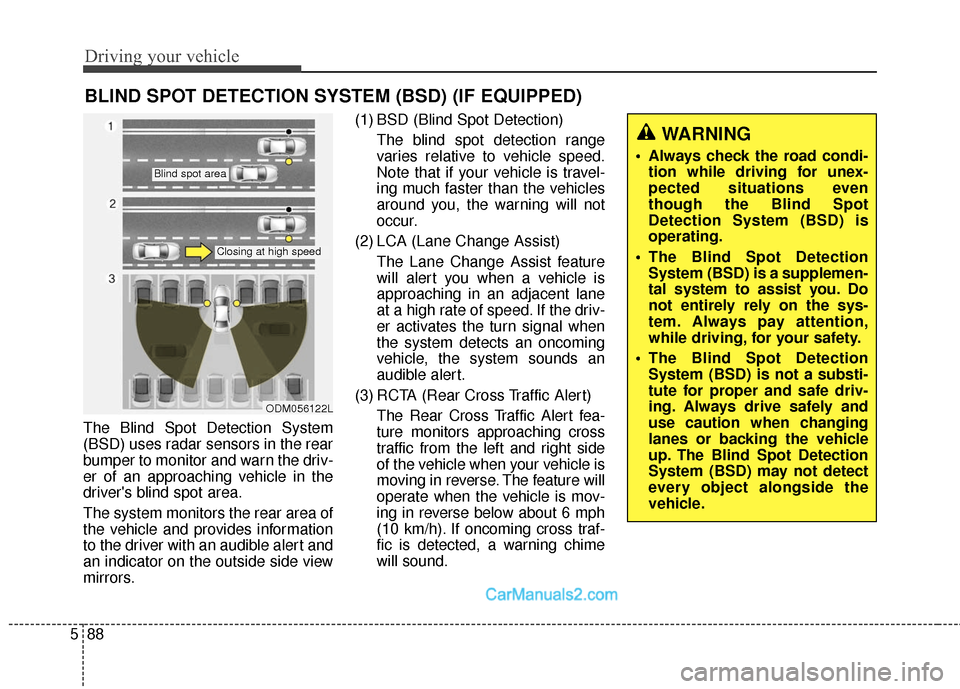
The Blind Spot Detection System
(BSD) uses radar sensors in the rear
bumper to monitor and warn the driv-
er of an approaching vehicle in the
driver's blind spot area.
The system monitors the rear area of
the vehicle and provides information
to the driver with an audible alert and
an indicator on the outside side view
mirrors. (1) BSD (Blind Spot Detection)
The blind spot detection range
varies relative to vehicle speed.
Note that if your vehicle is travel-
ing much faster than the vehicles
around you, the warning will not
occur.
(2) LCA (Lane Change Assist) The Lane Change Assist feature
will alert you when a vehicle is
approaching in an adjacent lane
at a high rate of speed. If the driv-
er activates the turn signal when
the system detects an oncoming
vehicle, the system sounds an
audible alert.
(3) RCTA (Rear Cross Traffic Alert) The Rear Cross Traffic Alert fea-
ture monitors approaching cross
traffic from the left and right side
of the vehicle when your vehicle is
moving in reverse. The feature will
operate when the vehicle is mov-
ing in reverse below about 6 mph
(10 km/h). If oncoming cross traf-
fic is detected, a warning chime
will sound.
BLIND SPOT DETECTION SYSTEM (BSD) (IF EQUIPPED)
WARNING
Always check the road condi-tion while driving for unex-
pected situations even
though the Blind Spot
Detection System (BSD) is
operating.
The Blind Spot Detection System (BSD) is a supplemen-
tal system to assist you. Do
not entirely rely on the sys-
tem. Always pay attention,
while driving, for your safety.
The Blind Spot Detection System (BSD) is not a substi-
tute for proper and safe driv-
ing. Always drive safely and
use caution when changing
lanes or backing the vehicle
up. The Blind Spot Detection
System (BSD) may not detect
every object alongside the
vehicle.
ODM056122L
Blind spot area
Closing at high speed
Page 431 of 614
Driving your vehicle
90
5
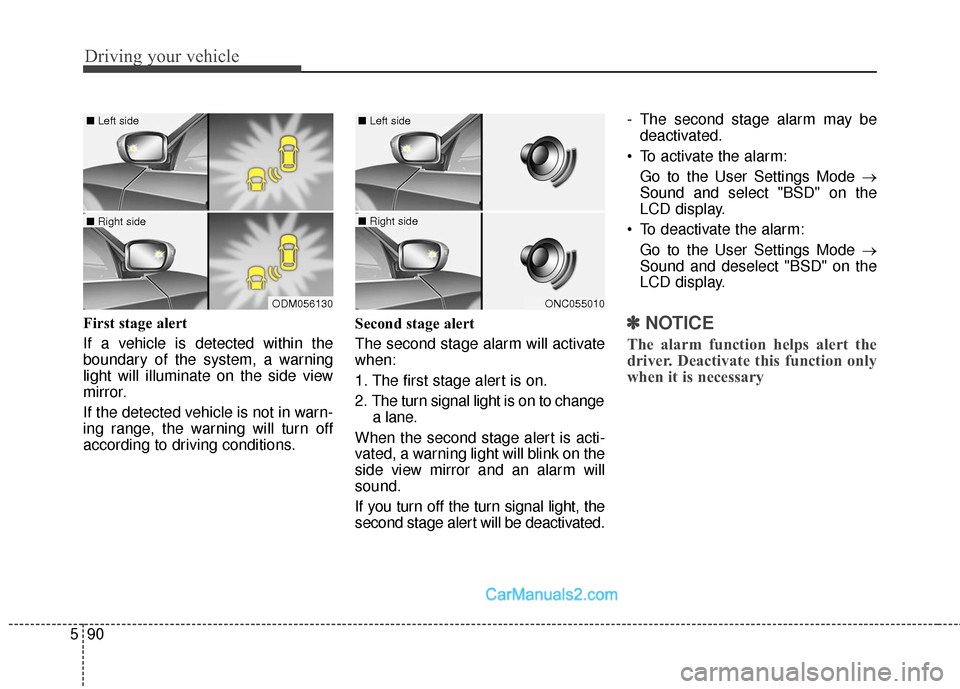
First stage alert
If a vehicle is detected within the
boundary of the system, a warning
light will illuminate on the side view
mirror.
If the detected vehicle is not in warn-
ing range, the warning will turn off
according to driving conditions. Second stage alert
The second stage alarm will activate
when:
1. The first stage alert is on.
2. The turn signal light is on to change
a lane.
When the second stage alert is acti-
vated, a warning light will blink on the
side view mirror and an alarm will
sound.
If you turn off the turn signal light, the
second stage alert will be deactivated. - The second stage alarm may be
deactivated.
To activate the alarm: Go to the User Settings Mode →
Sound and select "BSD" on the
LCD display.
To deactivate the alarm: Go to the User Settings Mode →
Sound and deselect "BSD" on the
LCD display.✽ ✽
NOTICE
The alarm function helps alert the
driver. Deactivate this function only
when it is necessary
ODM056130
■ Left side
■ Right side
ONC055010
■ Left side
■ Right side
Page 439 of 614
Driving your vehicle
98
5
Warning indicator
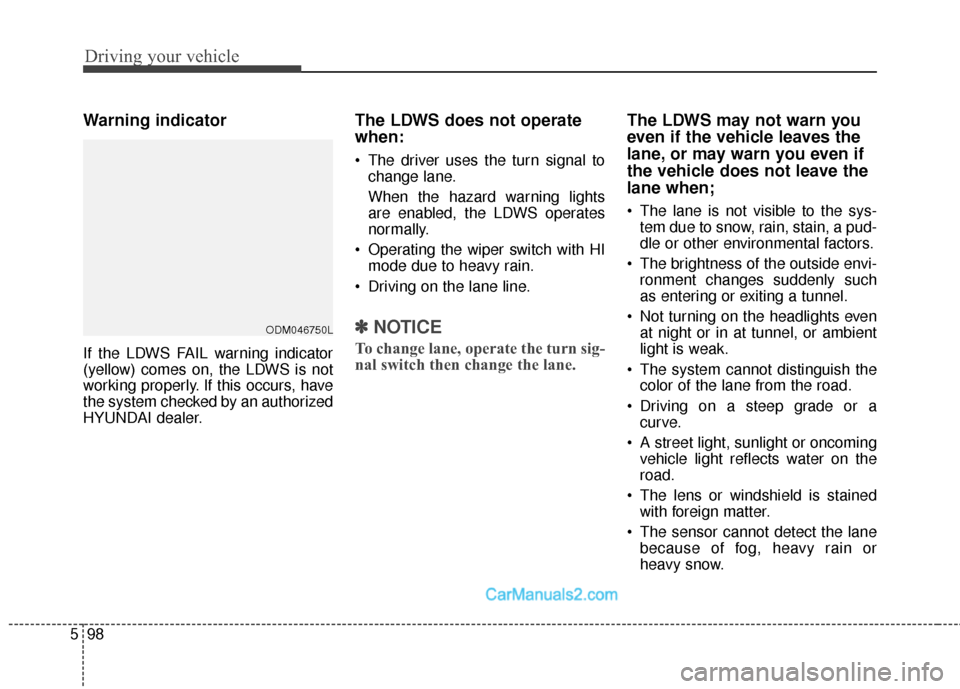
If the LDWS FAIL warning indicator
(yellow) comes on, the LDWS is not
working properly. If this occurs, have
the system checked by an authorized
HYUNDAI dealer.
The LDWS does not operate
when:
The driver uses the turn signal to
change lane.
When the hazard warning lights
are enabled, the LDWS operates
normally.
Operating the wiper switch with HI mode due to heavy rain.
Driving on the lane line.
✽ ✽ NOTICE
To change lane, operate the turn sig-
nal switch then change the lane.
The LDWS may not warn you
even if the vehicle leaves the
lane, or may warn you even if
the vehicle does not leave the
lane when;
The lane is not visible to the sys-
tem due to snow, rain, stain, a pud-
dle or other environmental factors.
The brightness of the outside envi- ronment changes suddenly such
as entering or exiting a tunnel.
Not turning on the headlights even at night or in at tunnel, or ambient
light is weak.
The system cannot distinguish the color of the lane from the road.
Driving on a steep grade or a curve.
A street light, sunlight or oncoming vehicle light reflects water on the
road.
The lens or windshield is stained with foreign matter.
The sensor cannot detect the lane because of fog, heavy rain or
heavy snow.
ODM046750L
Page 457 of 614
Driving your vehicle
116
5
Driving with a trailer
Towing a trailer requires a certain
amount of experience. Before setting
out for the open road, you must get to
know your trailer. Acquaint yourself
with the feel of handling and braking
with the added weight of the trailer.
And always keep in mind that the
vehicle you are driving is now a good
deal longer and not nearly so respon-
sive as your vehicle is by itself.
Before you start, check the trailer
hitch and platform, safety chains,
electrical connector(s), lights, tires
and mirror adjustment. If the trailer
has electric brakes, start your vehicle
and trailer moving and then apply the
trailer brake controller by hand to be
sure the brakes are working. This lets
you check your electrical connection
at the same time.
During your trip, check occasionally
to be sure that the load is secure,
and that the lights and any trailer
brakes are still working.
Following distance
Stay at least twice as far behind the
vehicle ahead as you would when
driving your vehicle without a trailer.
This can help you avoid situations
that require heavy braking and sud-
den turns.
Passing
You’ll need more passing distance
up ahead when you’re towing a trail-
er. And, because of the increased
vehicle length, you’ll need to go
much farther beyond the passed
vehicle before you can return to your
lane. Due to the added load to the
engine when going uphill the vehicle
may also take longer to pass than it
would on flat ground.
Backing up
Hold the bottom of the steering wheel
with one hand. Then, to move the trail-
er to the left, just move your hand to
the left. To move the trailer to the right,
move your hand to the right. Always
back up slowly and, if possible, have
someone guide you.
Making turns
When you’re turning with a trailer,
make wider turns than normal. Do
this so your trailer won’t strike soft
shoulders, curbs, road signs, trees,
or other objects near the edge of the
road. Avoid jerky or sudden maneu-
vers. Signal well in advance before
turning or lane changes.
Page 458 of 614
5117
Driving your vehicle
Turn signals when towing a trailer
When you tow a trailer, your vehicle
has to have a different turn signal
flasher and extra wiring. The green
arrows on your instrument panel will
flash whenever you signal a turn or
lane change. Properly connected,
the trailer lights will also flash to alert
other drivers you’re about to turn,
change lanes, or stop.
When towing a trailer, the green
arrows on your instrument panel will
flash for turns even if the bulbs on the
trailer are burned out. Thus, you may
think drivers behind you are seeing
your signals when, in fact, they are
not. It’s important to check occasion-
ally to be sure the trailer bulbs are still
working. You must also check the
lights every time you disconnect and
then reconnect the wires.
Do not connect a trailer lighting sys-
tem directly to your vehicle’s lighting
system. Use only an approved trailer
wiring harness.
An authorized HYUNDAI dealer can
assist you in installing the wiring har-
ness.
Driving on grades
Reduce speed and shift to a lower
gear before you start down a long or
steep downgrade. If you don’t shift
down, you might have to use your
brakes so much that they would get
hot and no longer operate efficiently.
On a long uphill grade, shift down
and reduce your speed to around 45
mph (70 km/h) to reduce the possi-
bility of engine and transaxle over-
heating.
Operating your vehicle in D (Drive)
when towing a trailer will minimize
heat build up and extend the life of
your transaxle.WARNING
Failure to use an approved trail-
er wiring harness could result
in damage to the vehicle electri-
cal system and/or personal
injury.
Page 471 of 614
What to do in an emergency
26
ROAD WARNING
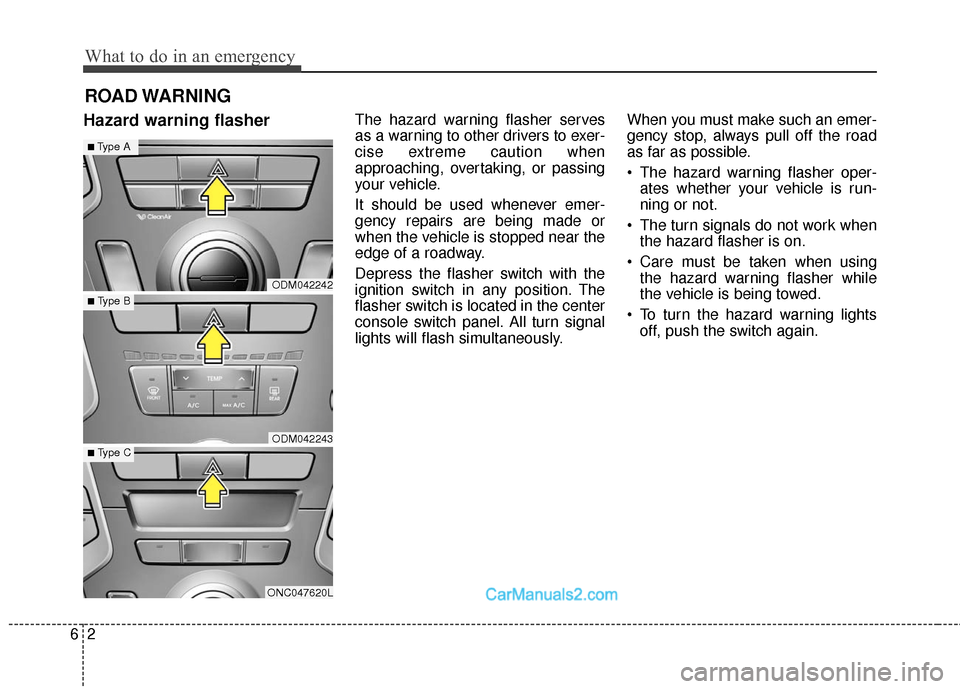
Hazard warning flasherThe hazard warning flasher serves
as a warning to other drivers to exer-
cise extreme caution when
approaching, overtaking, or passing
your vehicle.
It should be used whenever emer-
gency repairs are being made or
when the vehicle is stopped near the
edge of a roadway.
Depress the flasher switch with the
ignition switch in any position. The
flasher switch is located in the center
console switch panel. All turn signal
lights will flash simultaneously.When you must make such an emer-
gency stop, always pull off the road
as far as possible.
• The hazard warning flasher oper-
ates whether your vehicle is run-
ning or not.
The turn signals do not work when the hazard flasher is on.
Care must be taken when using the hazard warning flasher while
the vehicle is being towed.
To turn the hazard warning lights off, push the switch again.
ODM042242
ODM042243
ONC047620L
■Type A
■ Type B
■ Type C
Page 499 of 614

Fuses . . . . . . . . . . . . . . . . . . . . . . . . . . . . . . . . . . . . \
7-60
. . . . . . . . . . . . . . . . . . . 7-64
Light bulbs . . . . . . . . . . . . . . . . . . . . . . . . . . . . . . . 7-72
Front position lamp, Front turn signal lamp, Front fog lamp bulb and Daytime running
lamp replacement . . . . . . . . . . . . . . . . . . . . . . . . . . . 7-73
. . . . . . . . . . . . . . . . 7-76
. . . . . . . 7-76
. . . . . . . . . . 7-79
. . . . . . . . . . . . 7-80
Appearance care . . . . . . . . . . . . . . . . . . . . . . . . . . . 7-82
. . . . . . . . . . . . . . . . . . . . . . . . . . . . . . . . 7-82
. . . . . . . . . . . . . . . . . . . . . . . . . . . . . . . . . 7-87
Emission control system . . . . . . . . . . . . . . . . . . . . 7-89
. . . . . . . . . . . . . . 7-89
. . . . . . . . . . . . . . . . 7-90
California perchlorate notice . . . . . . . . . . . . . . . . 7-93
7