Page 234 of 569
4131
Features of your vehicle
✽
✽NOTICE
If there is heavy accumulation of
snow or ice on the windshield,
defrost the windshield for about 10
minutes, or until the snow and/or ice
is removed before using the wind-
shield wipers to ensure proper oper-
ation.
✽ ✽NOTICE
• When you operate the wipers, if
your vehicle has a problem in any
part of the wiper operation sys-
tem, the wiper may operate in the
LO mode regardless of the wiper
switch position. In this case, have
your vehicle checked by an
authorized HYUNDAI dealer as
soon as possible.
• When the ignition key is removed, the wiper blade sometimes may
move slightly for reducing the
deterioration of the windshield
wipers.
Windshield washers
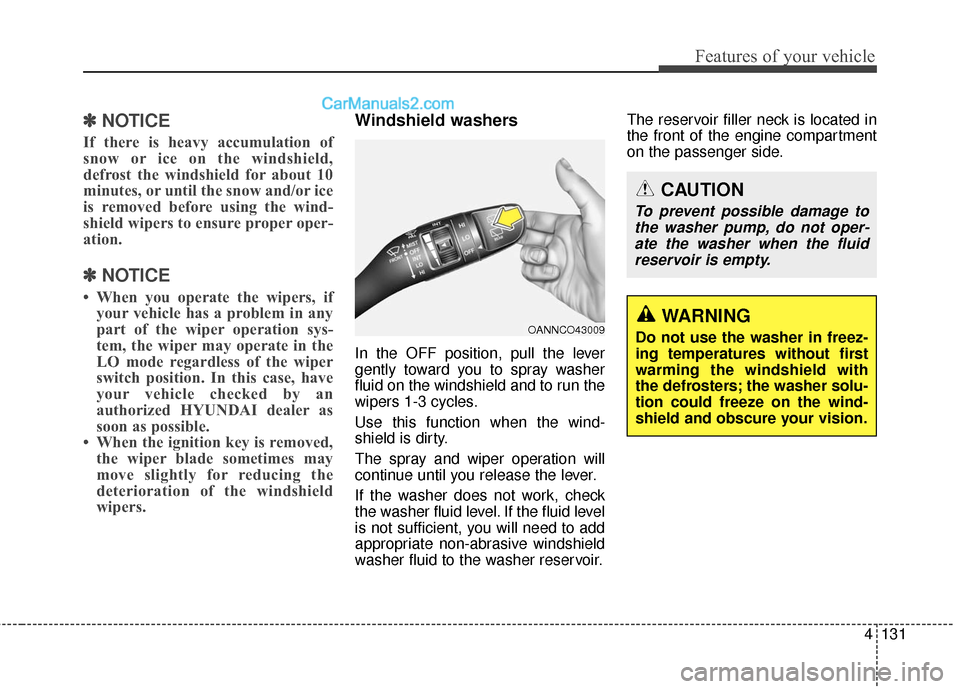
In the OFF position, pull the lever
gently toward you to spray washer
fluid on the windshield and to run the
wipers 1-3 cycles.
Use this function when the wind-
shield is dirty.
The spray and wiper operation will
continue until you release the lever.
If the washer does not work, check
the washer fluid level. If the fluid level
is not sufficient, you will need to add
appropriate non-abrasive windshield
washer fluid to the washer reservoir. The reservoir filler neck is located in
the front of the engine compartment
on the passenger side.
OANNCO43009
CAUTION
To prevent possible damage to
the washer pump, do not oper-ate the washer when the fluidreservoir is empty.
WARNING
Do not use the washer in freez-
ing temperatures without first
warming the windshield with
the defrosters; the washer solu-
tion could freeze on the wind-
shield and obscure your vision.
Page 236 of 569
4133
Features of your vehicle
Automatic turn off function
(if equipped)
The interior lights automatically turn
off approximately 20 minutes after
the ignition switch is turned off.
If your vehicle is equipped with the
theft alarm system, the interior lights
automatically turn off approximately
5 seconds after the system is in the
armed stage.
Map lamp
INTERIOR LIGHT
CAUTION
Do not use the interior lights forextended periods when theengine is not running.
It may cause battery discharge.
WARNING
Do not use the interior lights
when driving in the dark.
Accidents could happen
because the view may be
obscured by interior lights.
ODM045258
ONC045604
■ Type A
■Type BODM045259
ONC044082
■Type C
■Type D
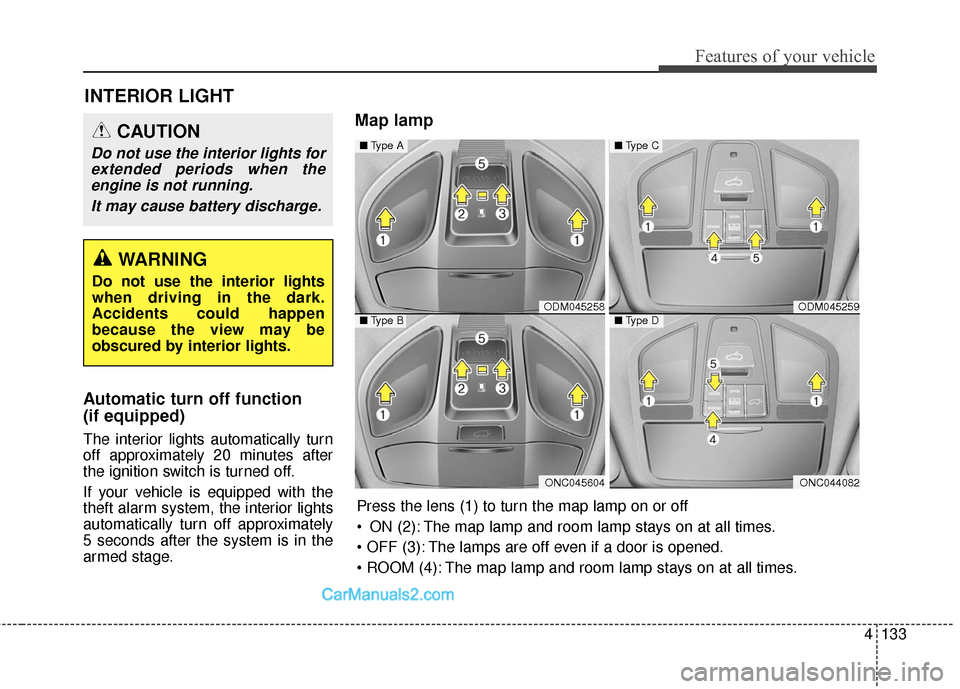
Press the lens (1) to turn the map lamp on or off
ON (2): The map lamp and room lamp stays on at all times.
The lamps are off even if a door is opened.
The map lamp and room lamp stays on at all times.
Page 237 of 569
Features of your vehicle
134
4
DOOR (5):
- The map lamp and room lampcomes on for approximately 30
seconds when doors are unlocked
with a transmitter or smart key as
long as the doors are not opened.
- When the ignition switch is in the ACC or LOCK/OFF position, if
any door is opened, the map
lamp and room lamp will stay on
for approximately 20 minutes. If
the door is closed, the lamps will
go out in 30 seconds.
- The map lamp and room lamp will go out immediately if the ignition
switch is changed to the ON posi-
tion with all doors closed.
- When the ignition switch is in the ON position, if any door is opened,
the map lamp and room lamp will
stay on continuously. If the door is
closed, the lamps will go out
immediately.
✽ ✽ NOTICE
When the lamp is turned on by
pressing the lens (1), the lamp does
not turn off even if the switch is in
the OFF position (3).
Room lamp
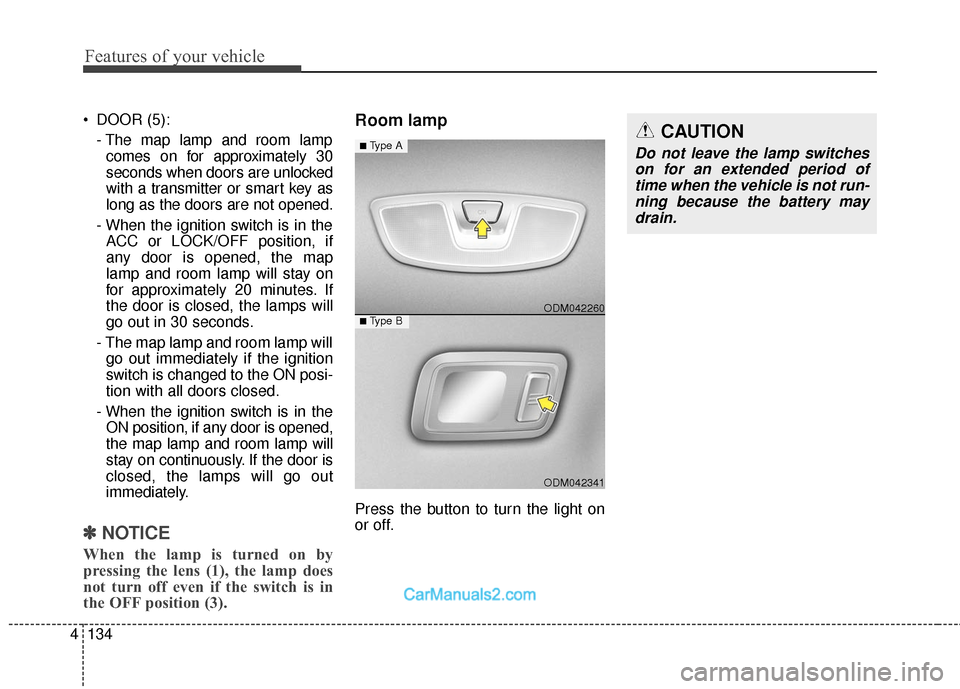
Press the button to turn the light on
or off.
ODM042341
■Type B ODM042260
■Type ACAUTION
Do not leave the lamp switches
on for an extended period oftime when the vehicle is not run-ning because the battery maydrain.
Page 240 of 569
4137
Features of your vehicle
✽
✽NOTICE
If you want to defrost and defog the
front windshield, refer to
“Windshield defrosting and defog-
ging” in this section.
Rear window defroster
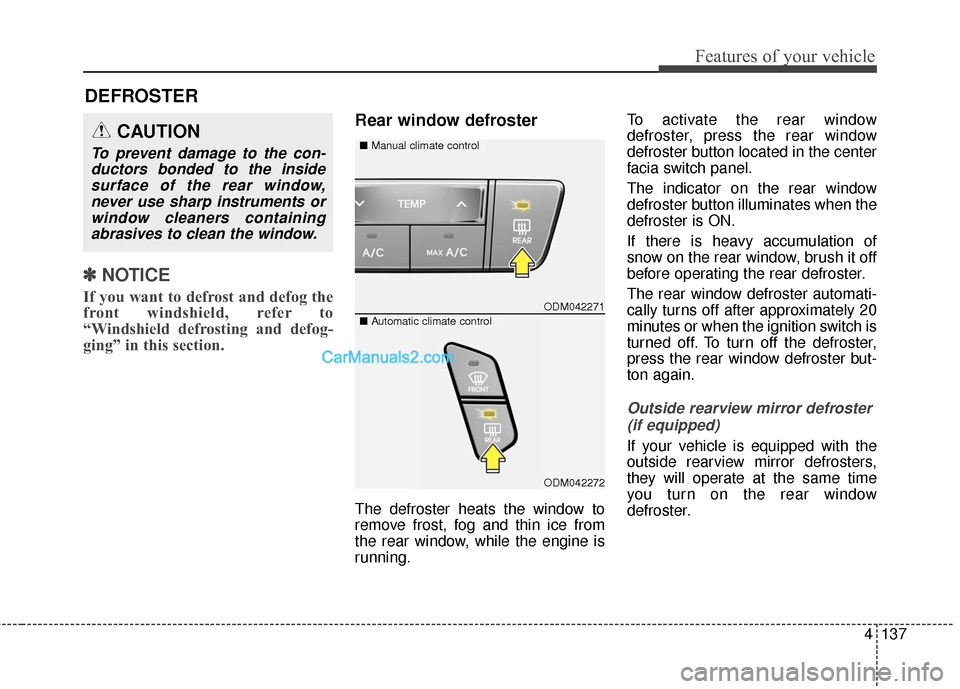
The defroster heats the window to
remove frost, fog and thin ice from
the rear window, while the engine is
running. To activate the rear window
defroster, press the rear window
defroster button located in the center
facia switch panel.
The indicator on the rear window
defroster button illuminates when the
defroster is ON.
If there is heavy accumulation of
snow on the rear window, brush it off
before operating the rear defroster.
The rear window defroster automati-
cally turns off after approximately 20
minutes or when the ignition switch is
turned off. To turn off the defroster,
press the rear window defroster but-
ton again.
Outside rearview mirror defroster
(if equipped)
If your vehicle is equipped with the
outside rearview mirror defrosters,
they will operate at the same time
you turn on the rear window
defroster.
DEFROSTER
ODM042271
■ Manual climate controlCAUTION
To prevent damage to the con-
ductors bonded to the insidesurface of the rear window,never use sharp instruments orwindow cleaners containingabrasives to clean the window.
■ Automatic climate control
ODM042272
Page 286 of 569
4183
Features of your vehicle
(Continued) Turn on the car ignition before using this device. Do not oper-ate the audio system for longperiods of time with the ignitionturned off as such operationsmay lead to battery discharge.
Do not subject the device to severe shock or impact. Directpressure onto the front side ofthe monitor may cause dam-age to the LCD or touchscreen.
When cleaning the device, make sure to turn off thedevice and use a dry andsmooth cloth. Never usetough materials, chemicalcloths, or solvents (alcohol,benzene, thinners, etc.) assuch materials may damagethe device panel or causecolor/quality deterioration.
(Continued)CAUTION
Operating the device whiledriving could lead to accidentsdue to a lack of attention toexternal surroundings. Firstpark the vehicle before operat-ing the device.
Adjust the volume to levels that allow the driver to hear soundsfrom outside of the vehicle.Driving in a state where exter-nal sounds cannot be heardmay lead to accidents.
Pay attention to the volume set- ting when turning the deviceon. A sudden output of extremevolume upon turning thedevice on could lead to hearingimpairment. (Adjust the volumeto a suitable levels before turn-ing off the device.)
(Continued)
(Continued)
Please refrain from use if thescreen is blank or no sound
can be heard as these signs
may indicate product malfunc-
tion. Continued use in such
conditions could lead to acci-
dents(fires, electric shock) or
product malfunctions.
Do not touch the antenna dur- ing thunder or lightening as
such acts may lead to light-
ning induced electric shock.
Do not stop or park in park- ing-restricted areas to operate
the product. Such acts could
lead to traffic accidents.
Use the system with the vehi- cle ignition turned on.
Prolonged use with the igni-
tion turned off could result in
battery discharge.
Page 297 of 569
55
Driving your vehicle
Before starting
Close and lock all doors.
Position the seat so that all con-trols are easily reached.
Adjust the inside and side view mir- rors.
Be sure that all lights work.
Check all gauges.
Check the operation of warning lights when the ignition switch is
turned to the ON position.
Release the parking brake and make sure the brake warning light
goes out.
For safe operation, be sure you are
familiar with your vehicle and its
equipment.WARNING- Driving under
the influence of alcohol or
drugs
Drinking and driving is danger-
ous. Drunk driving is the num-
ber one contributor to the high-
way death toll each year. Even a
small amount of alcohol will
affect your reflexes, percep-
tions and judgement. Driving
while under the influence of
drugs is as dangerous or more
dangerous than driving drunk.
You are much more likely to
have a serious accident if you
drink or take drugs and drive.
If you are drinking or taking
drugs, do not drive. Do not ride
with a driver who has been
drinking or taking drugs.
Choose a designated driver or
call a cab.WARNING
All passengers must be proper-
ly belted whenever the vehicle
is moving. Refer to "Seat belts"
in section 3 for more informa-
tion on their proper use.
WARNING
Always check the surrounding
areas near your vehicle for peo-
ple, especially children, before
putting a vehicle into D (Drive)
or R (Reverse).
Page 299 of 569
57
Driving your vehicle
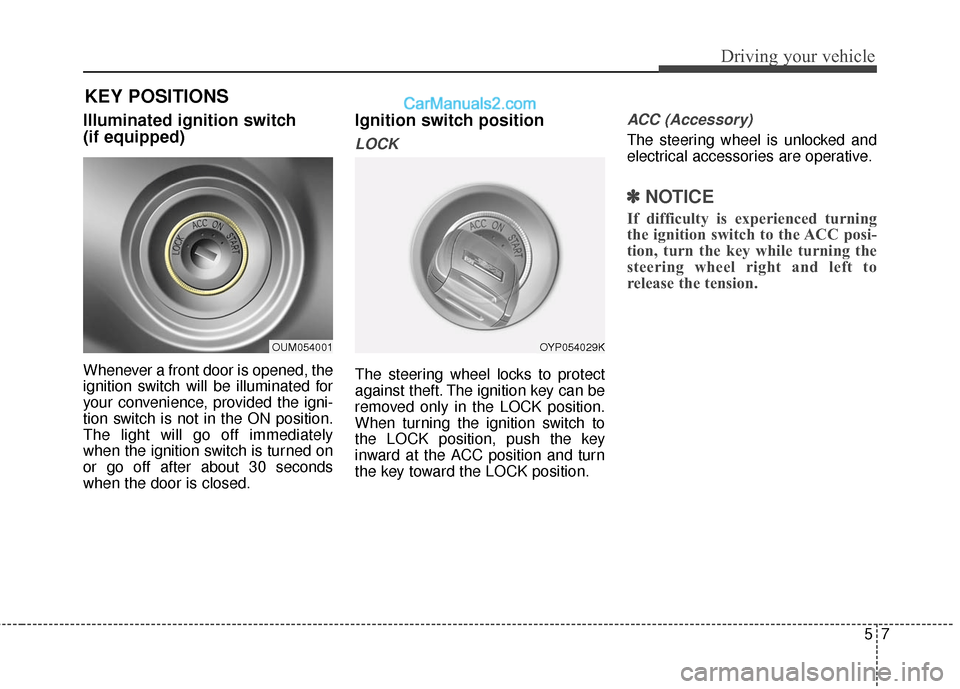
Illuminated ignition switch
(if equipped)
Whenever a front door is opened, the
ignition switch will be illuminated for
your convenience, provided the igni-
tion switch is not in the ON position.
The light will go off immediately
when the ignition switch is turned on
or go off after about 30 seconds
when the door is closed.
Ignition switch position
LOCK
The steering wheel locks to protect
against theft. The ignition key can be
removed only in the LOCK position.
When turning the ignition switch to
the LOCK position, push the key
inward at the ACC position and turn
the key toward the LOCK position.
ACC (Accessory)
The steering wheel is unlocked and
electrical accessories are operative.
✽ ✽NOTICE
If difficulty is experienced turning
the ignition switch to the ACC posi-
tion, turn the key while turning the
steering wheel right and left to
release the tension.
OUM054001OYP054029K
KEY POSITIONS
Page 300 of 569
Driving your vehicle
85
ON
The warning lights can be checked
before the engine is started. This is
the normal running position after the
engine is started.
Do not leave the ignition switch ON ifthe engine is not running to preventbattery discharge.
START
Turn the ignition switch to the START
position to start the engine. The
engine will crank until you release
the key; then it returns to the ON
position. The brake warning light can
be checked in this position.
WARNING - Ignition key
Never turn the ignition switch to LOCK or ACC while the
vehicle is moving. This would
result in loss of directional
control and braking function,
which could cause an acci-
dent.
The anti-theft steering column lock is not a substitute for the
parking brake. Before leaving
the driver’s seat, always make
sure the shift lever is engaged
in P (Park), set the parking
brake fully and shut the
engine off. Unexpected and
sudden vehicle movement
may occur if these precau-
tions are not taken.
(Continued)(Continued)
Never reach for the ignitionswitch, or any other controls
through the steering wheel
while the vehicle is in motion.
The presence of your hand or
arm in this area could cause a
loss of vehicle control, an
accident and serious bodily
injury or death.
Do not place any movable objects around the driver’s
seat as they may move while
driving, interfere with the driv-
er and lead to an accident.