2017 Hyundai Santa Fe cruise control
[x] Cancel search: cruise controlPage 373 of 569

581
Driving your vehicle
In traffic situation
In traffic, your vehicle will stop if thevehicle ahead of you stops. Also, if
the vehicle ahead of you starts mov-
ing, your vehicle will start as well.
However, if the vehicle stops for more
than 3 seconds, you must depress
the accelerator pedal or push up the
toggle switch (RES+) to start driving.
If you push the advanced smart cruise control toggle switch (RES+
or SET-) while Auto Hold and
advanced smart cruise control is
operating (The green AUTO HOLD
indicator), Auto Hold will be
released regardless of accelerator
pedal operation and the vehicle will
start to move.
Sensor to detect distance to
the vehicle ahead
The Smart Cruise Control uses a
sensor to detect distance to the vehi-
cle ahead.
If the sensor is covered with dirt or
other foreign matter, the vehicle to
vehicle distance control may not
operate correctly.
Always keep the area in front of the
sensor clean.
ONC056014
ODM056064L
CAUTION
If the vehicle ahead (vehiclespeed: less than 20 mph(30km/h)) disappears to the nextlane, the warning chime willsound and a message willappear. Adjust your vehiclespeed for vehicles or objectsthat can suddenly appear infront of you by depressing thebrake pedal.
Always pay attention to the roadcondition ahead.
ODM056065LODM056065L/OAN056065N
■ Type A■Type B
Page 374 of 569

Driving your vehicle
82
5
Sensor warning message
If the sensor or cover is dirty or
obscured with foreign matter such as
snow, this message will appear.
In this case, the system may not
function temporarily, but it does not
indicate a malfunction of the Smart
Cruise Control System.
Clean the sensor or cover by using a
soft cloth.
SCC (Smart Cruise Control)
malfunction message
The message will appear when the
vehicle to vehicle distance control
system is not functioning normally.
Take your vehicle to an authorized
HYUNDAI dealer and have the sys-
tem checked.
ODM056095L
ODM046662L
CAUTION
Do not install accessories around the sensor and do notreplace the bumper by your-self. It may interfere with thesensor performance.
Always keep the sensor and bumper clean.
To prevent sensor cover dam- age from occurring, wash thecar with a soft cloth.
Do not paint the sensor cover. Do not damage the sensor or sensor area by a strongimpact. If the sensor movesslightly off position, the SmartCruise Control System will notoperate correctly. If thisoccurs, have the systemchecked by an authorizedHYUNDAI dealer.
Use only a genuine HYUNDAI sensor cover for your vehicle.
Page 375 of 569
583
Driving your vehicle
Limitations of the system
The Smart Cruise Control System
may have limits to its ability to detect
distance to the vehicle ahead due to
road and traffic conditions.
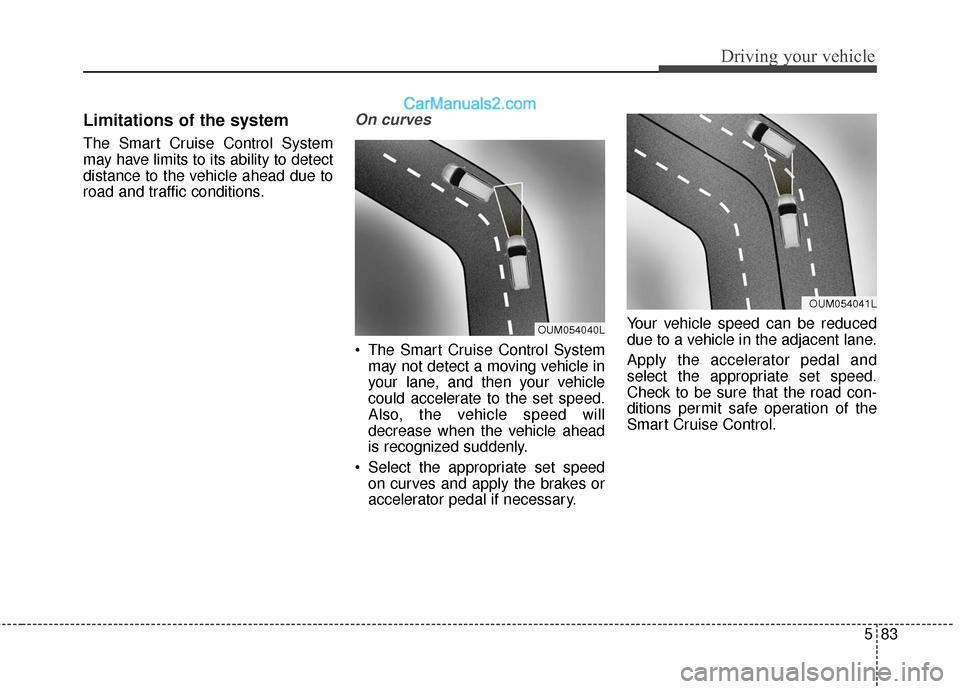
On curves
The Smart Cruise Control Systemmay not detect a moving vehicle in
your lane, and then your vehicle
could accelerate to the set speed.
Also, the vehicle speed will
decrease when the vehicle ahead
is recognized suddenly.
Select the appropriate set speed on curves and apply the brakes or
accelerator pedal if necessary. Your vehicle speed can be reduced
due to a vehicle in the adjacent lane.
Apply the accelerator pedal and
select the appropriate set speed.
Check to be sure that the road con-
ditions permit safe operation of the
Smart Cruise Control.
OUM054040L
OUM054041L
Page 376 of 569

Driving your vehicle
84
5
On inclines
During uphill or downhill driving,
the Smart Cruise Control System
may not detect a moving vehicle in
your lane, and cause your vehicle
to accelerate to the set speed.
Also, the vehicle speed will rapidly
decrease when the vehicle ahead
is recognized suddenly.
Select the appropriate set speed on inclines and apply the brake or
accelerator pedal if necessary.
Lane changing
A vehicle which moves into yourlane from an adjacent lane cannot
be recognized by the sensor until it
is in the sensor's detection range.
The sensor may not detect imme- diately when a vehicle cuts in sud-
denly. Always pay attention to the
traffic, road and driving conditions.
If a slower vehicle moves into your lane, your speed may decrease to
maintain the distance to the vehicle
ahead.
If a faster vehicle which moves into your lane, your vehicle will acceler-
ate to the set speed.
Vehicle recognition
Some vehicles in your lane cannot
be recognized by the sensor:
- Narrow vehicles such as motorcy-cles or bicycles
- Vehicles offset to one side
- Slow-moving vehicles or sudden- decelerating vehicles
- Stopped vehicles
- Vehicles with small rear profile such as trailers with no loads
ODM055052OUM054043LOUM054045L
Page 378 of 569
Driving your vehicle
86
5
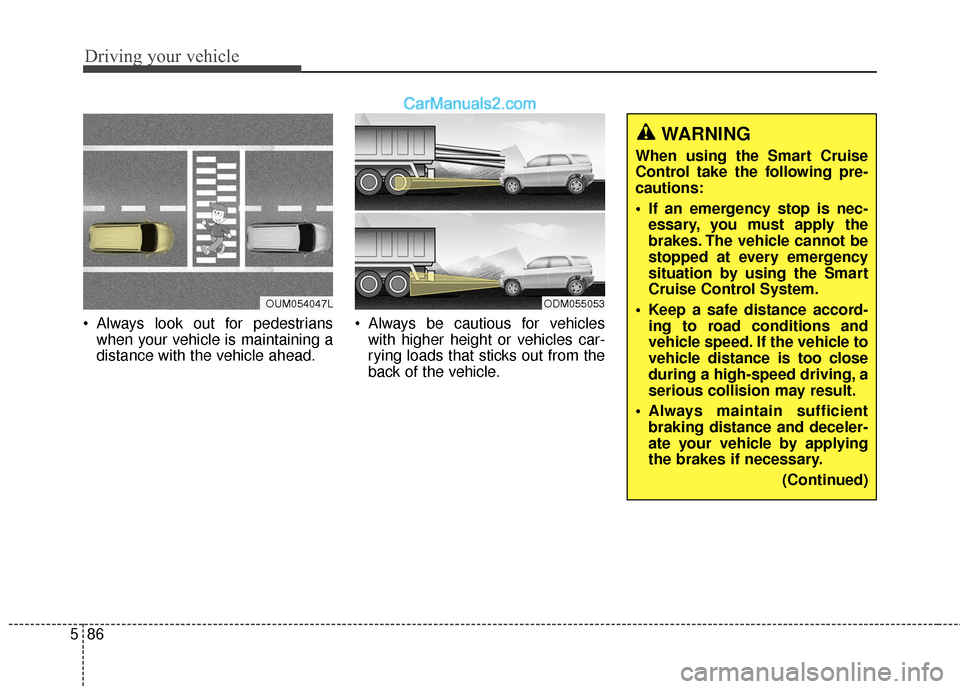
Always look out for pedestrians
when your vehicle is maintaining a
distance with the vehicle ahead. Always be cautious for vehicles
with higher height or vehicles car-
rying loads that sticks out from the
back of the vehicle.
OUM054047LODM055053
WARNING
When using the Smart Cruise
Control take the following pre-
cautions:
If an emergency stop is nec-essary, you must apply the
brakes. The vehicle cannot be
stopped at every emergency
situation by using the Smart
Cruise Control System.
Keep a safe distance accord- ing to road conditions and
vehicle speed. If the vehicle to
vehicle distance is too close
during a high-speed driving, a
serious collision may result.
Always maintain sufficient braking distance and deceler-
ate your vehicle by applying
the brakes if necessary.
(Continued)
Page 379 of 569
587
Driving your vehicle
This device complies with Part 15
of the FCC rules.
Operation is subject to the following
three conditions:
1. This device may not cause harm-ful interference, and
2. This device must accept any inter- ference received, including inter-
ference that may cause undesired
operation.
3. Changes or modifications not expressly approved by the party
responsible for compliance could
void the user’s authority to operate
the device.(Continued)
The Smart Cruise ControlSystem cannot recognize a
stopped vehicle, pedestrians
or an oncoming vehicle.
Always look ahead cautiously
to prevent unexpected and
sudden situations from occur-
ring.
Vehicles moving in front of you with a frequent lane
change may cause a delay in
the system's reaction or may
cause the system to react to a
vehicle actually in an adjacent
lane. Always drive cautiously
to prevent unexpected and
sudden situations from occur-
ring.
Always be aware of the select- ed speed and vehicle to vehi-
cle distance.
(Continued)(Continued)
The Smart Cruise ControlSystem may not recognize
complex driving situations so
always pay attention to driv-
ing conditions and control
your vehicle speed.
CAUTION
The Smart Cruise ControlSystem may not operate tem-porarily due to:
Electrical interference Modifying the suspension Differences of tire abrasion or tire pressure
Installing different type of tires
Page 560 of 569

Index
2I
AC inverter .................................................................4-169
Active ECO system ....................................................5-100
Adaptive Front Lighting System (AFLS)...................4-129
Advanced smart cruise control system .........................5-72
Air bag - advanced supplemental restraint system.......3-53Additional safety precautions....................................3-80
Air bag warning label................................................3-82
Air bag warning light ................................................3-56
Curtain air bag...........................................................3-72
Driver's and passenger's front air bag .......................3-66
How does the air bag system operate .......................3-54
Main components of occupant classification system ....................................................................3-61\
Occupant classification system .................................3-60
Side air bag................................................................3-71
SRS Care ...................................................................3-79
SRS components and functions ................................3-57
Air cleaner ....................................................................7-38\
Air conditioning system .................................................8-6
All Wheel Drive (AWD) ..............................................5-22
Antenna .......................................................................4\
-177
Anti-lock Brake System (ABS) ....................................5-44
Appearance care ...........................................................7-87 Exterior care ..............................................................7-87
Interior care ...............................................................7-93 Audio system ..............................................................4-177
Antenna ...................................................................4-177\
Audio / Video / Navigation system (AVN) .............4-178
Caring for CDs ........................................................4-181
How vehicle audio works........................................4-179
Steering wheel audio control...................................4-177
Auto hold ......................................................................5-\
41
Automatic climate control system ..............................4-149
Automatic emergency braking (AEB) ..........................5-56
Automatic transaxle ......................................................5-15
Aux, USB and iPod
®port...........................................4-172
Battery.................................................................\
..........7-45
Before driving .................................................................5-4
Blind spot detection system (BSD) ..............................5-88
Blind spot mirror ..........................................................4-71
Brake fluid ....................................................................7-35\
Brake system............................................................\
.....5-31 Anti-lock Brake System (ABS) ................................5-44
Auto hold...................................................................5-41
Downhill Brake Control (DBC) ................................5-51
Electronic parking brake (EPB) ................................5-35
Electronic Stability Control (ESC) ...........................5-46
Emergency braking ...................................................5-40
Good braking practices .............................................5-54
A
B
Page 561 of 569
I3
Index
Hill-start Assist Control (HAC) ................................5-53
In the event of brake failure ......................................5-32
Parking brake ............................................................5-33
Power brakes .............................................................5-15
Vehicle Stability Management (VSM) ......................5-50
Bulb wattage ...................................................................8-3
California perchlorate notice ........................................7-98
Cargo security screen .................................................4-173
Center console storage................................................4-162
Central door lock switch...............................................4-23
Certification label .......................................................5-126
Changing tires ...............................................................6-18
Child restraint system ...................................................3-43 Securing a child restraint seat with child seat lower anchor system ..............................................3-51
Tether Anchor system................................................3-49
Using a child restraint system ...................................3-45
Child-protector rear door lock ......................................4-25
Cigarette lighter ..........................................................4-165
Climate control air filter ...............................................7-40
Clothes hanger ............................................................4-170
Consumer information ..................................................8-11
Cruise control system ...................................................5-67
Cup holder ..................................................................4-165
Curtain air bag ..............................................................3-72 Defroster .....................................................................4-1\
37
Front wiper deicer ...................................................4-138
Rear window defroster ............................................4-137
Dimensions .....................................................................8-2\
Door locks..............................................................\
.......4-21 Child-protector rear door lock ..................................4-25
Impact sensing door unlock system ..........................4-25
Operating door locks from inside the vehicle ...........4-23
Operating door locks from outside the vehicle .........4-21
Downhill Brake Control (DBC) ...................................5-51
Drive mode integrated control system .........................5-29
Driver assist system ....................................................4-113 Multi-view Camera System.....................................4-118
Rear parking assist system ......................................4-113
Rear View Camera ..................................................4-117
Driver position memory system ...................................3-16
Driver's and passenger's front air bag ..........................3-66
Driving conditions ......................................................5-103 Driving at night .......................................................5-106
Driving in flooded areas..........................................5-107
Driving in the rain ...................................................5-106
Driving off-road ......................................................5-107
Hazardous driving conditions .................................5-103
Highway driving......................................................5-107
Reducing the risk of a rollover ...............................5-103
C
D