Page 229 of 456
4151
Features of your vehicle
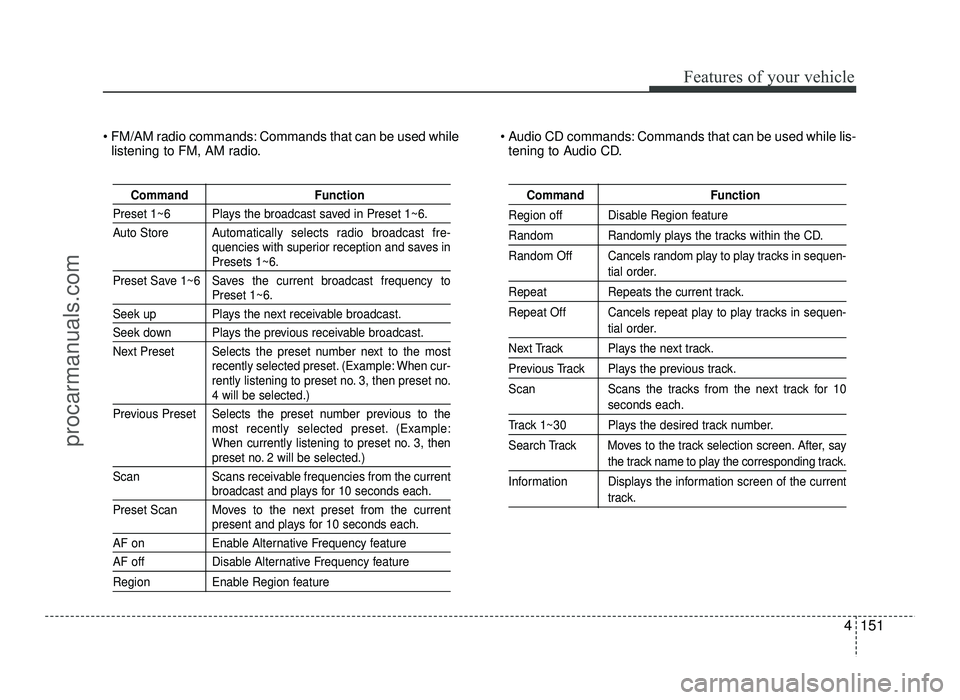
FM/AM radio commands: Commands that can be used whilelistening to FM, AM radio. Audio CD commands: Commands that can be used while lis-
tening to Audio CD.
Command Function
Preset 1~6 Plays the broadcast saved in Preset 1~6.
Auto Store A utomatically selects radio broadcast fre-
quencies with superior reception and saves in
Presets 1~6.
Preset Save 1~6 Saves the current broadcast frequency to
Preset 1~6.
Seek up Plays the next receivable broadcast.
Seek down Plays the previous receivable broadcast.
Next Preset Selects the preset number next to the most recently selected preset. (Example: When cur-
rently listening to preset no. 3, then preset no.
4 will be selected.)
Previous Preset Selects the preset number previous to the most recently selected preset. (Example:
When currently listening to preset no. 3, then
preset no. 2 will be selected.)
Scan Scans receivable frequencies from the current
broadcast and plays for 10 seconds each.
Preset Scan Moves to the next preset from the current
present and plays for 10 seconds each.
AF on Enable Alternative Frequency feature
AF off Disable Alternative Frequency feature
Region Enable Region feature
Command Function
Region off Disable Region feature
Random Randomly plays the tracks within the CD.
Random Off Cancels random play to play tracks in sequen-
tial order.
Repeat Repeats the current track.
Repeat Off Cancels repeat play to play tracks in sequen-
tial order.
Next Track Plays the next track.
Previous Track Plays the previous track.
Scan Scans the tracks from the next track for 10
seconds each.
Track 1~30 Plays the desired track number.
Search Track Moves to the track selection screen. After, say
the track name to play the corresponding track.
Information Displays the information screen of the current
track.
procarmanuals.com
Page 272 of 456
541
Driving your vehicle
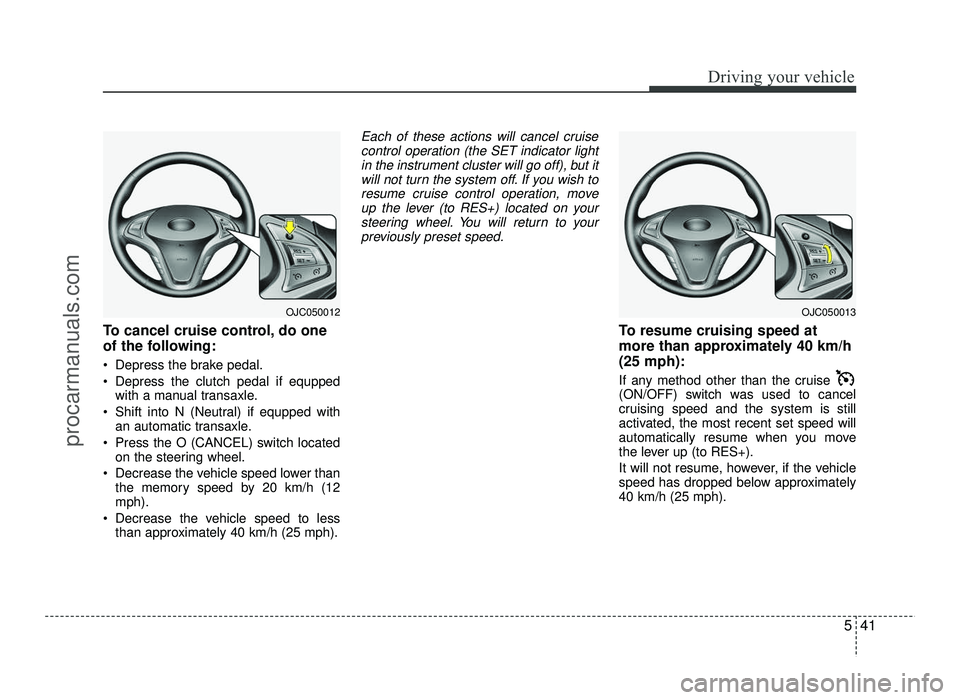
To cancel cruise control, do one
of the following:
Depress the brake pedal.
Depress the clutch pedal if equppedwith a manual transaxle.
Shift into N (Neutral) if equpped with an automatic transaxle.
Press the O (CANCEL) switch located on the steering wheel.
Decrease the vehicle speed lower than the memory speed by 20 km/h (12 mph).
Decrease the vehicle speed to less than approximately 40 km/h (25 mph).
Each of these actions will cancel cruise
control operation (the SET indicator light
in the instrument cluster will go off), but itwill not turn the system off. If you wish toresume cruise control operation, move
up the lever (to RES+) located on your steering wheel. You will return to your
previously preset speed.
To resume cruising speed at
more than approximately 40 km/h(25 mph):
If any method other than the cruise
(ON/OFF) switch was used to cancel
cruising speed and the system is still
activated, the most recent set speed will
automatically resume when you move
the lever up (to RES+).
It will not resume, however, if the vehicle
speed has dropped below approximately40 km/h (25 mph).
OJC050013OJC050012
procarmanuals.com
Page 274 of 456
543
Driving your vehicle
You can set the speed limit when you do
not want to drive over a specific speed.
If you drive over the preset speed limit,
the warning system operates (set speed
limit will blink and chime will sound) until
the vehicle speed returns within thespeed limit.
✽✽NOTICE
While speed limit control is in opera-
tion, the cruise control system cannot be
activated.
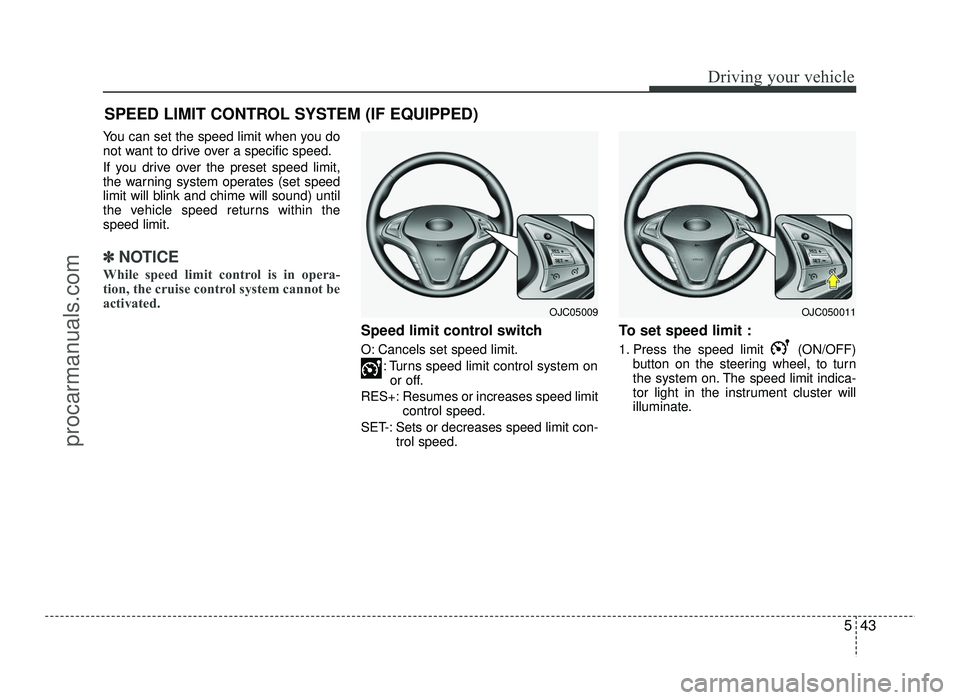
Speed limit control switch
O: Cancels set speed limit. : Turns speed limit control system onor off.
RES+: Resumes or increases speed limit control speed.
SET-: Sets or decreases speed limit con- trol speed. To set speed limit :
1. Press the speed limit (ON/OFF)
button on the steering wheel, to turn
the system on. The speed limit indica-
tor light in the instrument cluster will
illuminate.
SPEED LIMIT CONTROL SYSTEM (IF EQUIPPED)
OJC050011OJC05009
procarmanuals.com
Page 275 of 456
Driving your vehicle
44
5
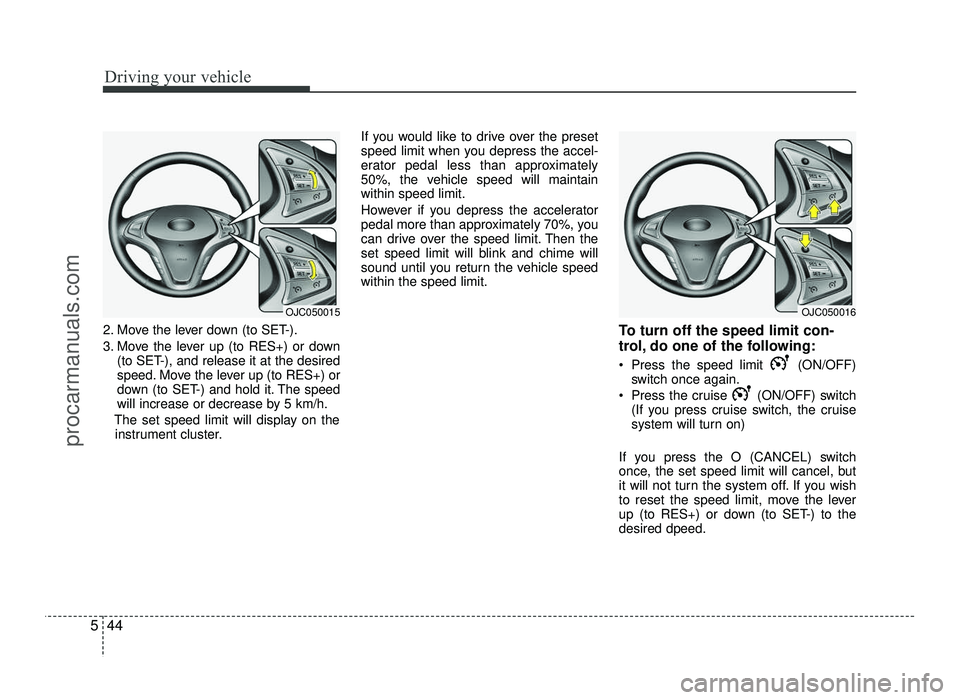
2. Move the lever down (to SET-).
3. Move the lever up (to RES+) or down
(to SET-), and release it at the desired
speed. Move the lever up (to RES+) or
down (to SET-) and hold it. The speed
will increase or decrease by 5 km/h.
The set speed limit will display on the instrument cluster. If you would like to drive over the preset
speed limit when you depress the accel-
erator pedal less than approximately
50%, the vehicle speed will maintainwithin speed limit.
However if you depress the accelerator
pedal more than approximately 70%, you
can drive over the speed limit. Then the
set speed limit will blink and chime will
sound until you return the vehicle speedwithin the speed limit.
To turn off the speed limit con-
trol, do one of the following:
Press the speed limit (ON/OFF)switch once again.
Press the cruise (ON/OFF) switch (If you press cruise switch, the cruise
system will turn on)
If you press the O (CANCEL) switch
once, the set speed limit will cancel, but
it will not turn the system off. If you wish
to reset the speed limit, move the lever
up (to RES+) or down (to SET-) to thedesired dpeed.
OJC050016OJC050015
procarmanuals.com
Page 390 of 456
751
Maintenance
Reset items
Items should be reset after the battery
has been discharged or the battery hasbeen disconnected.
Auto up/down window (See section 4)
Sunroof (See section 4)
Trip computer (See section 4)
Climate control system (See section 4)
Clock (See section 4)
Audio (See section 4)
WARNING
Before performing maintenance or recharging the battery, turn off all
accessories and stop the engine.
The negative battery cable must be removed first and installed last
when the battery is disconnected.
procarmanuals.com
Page 395 of 456
Maintenance
56
7
Wheel alignment and tire balance
The wheels on your vehicle were aligned and balanced carefully at the
factory to give you the longest tire life
and best overall performance.
In most cases, you will not need to
have your wheels aligned again.
However, if you notice unusual tire
wear or your vehicle pulling one way
or the other, the alignment may needto be reset.
If you notice your vehicle vibrating
when driving on a smooth road, your
wheels may need to be rebalanced. Tire replacement
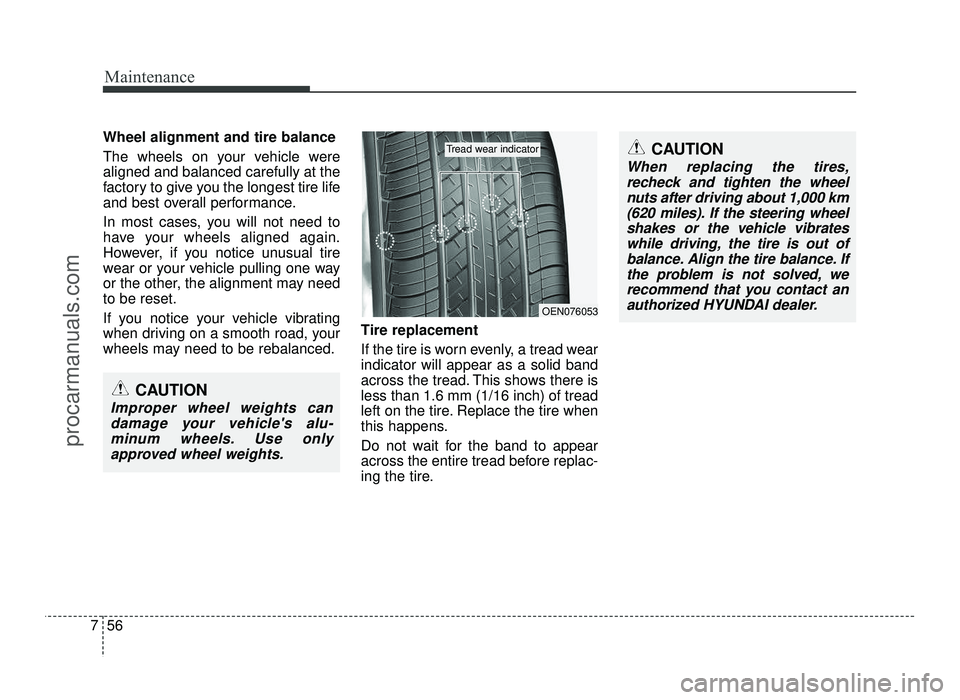
If the tire is worn evenly, a tread wear indicator will appear as a solid band
across the tread. This shows there isless than 1.6 mm (1/16 inch) of tread
left on the tire. Replace the tire when
this happens.
Do not wait for the band to appear
across the entire tread before replac-
ing the tire.
OEN076053
Tread wear indicator
CAUTION
Improper wheel weights can
damage your vehicle's alu-minum wheels. Use onlyapproved wheel weights.
CAUTION
When replacing the tires, recheck and tighten the wheelnuts after driving about 1,000 km(620 miles). If the steering wheelshakes or the vehicle vibrates while driving, the tire is out ofbalance. Align the tire balance. Ifthe problem is not solved, werecommend that you contact an authorized HYUNDAI dealer.
procarmanuals.com
Page 404 of 456
765
Maintenance
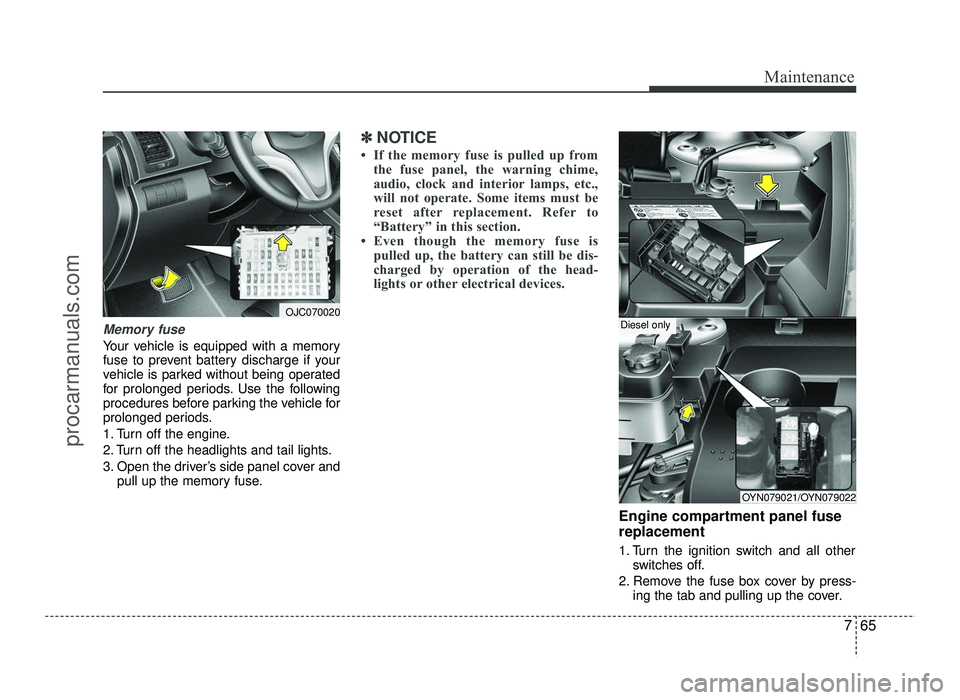
Memory fuse
Your vehicle is equipped with a memory
fuse to prevent battery discharge if your
vehicle is parked without being operated
for prolonged periods. Use the following
procedures before parking the vehicle for
prolonged periods.
1. Turn off the engine.
2. Turn off the headlights and tail lights.
3. Open the driver’s side panel cover andpull up the memory fuse.
✽✽ NOTICE
If the memory fuse is pulled up from the fuse panel, the warning chime,
audio, clock and interior lamps, etc.,
will not operate. Some items must be
reset after replacement. Refer to
“Battery” in this section.
Even though the memory fuse is pulled up, the battery can still be dis-
charged by operation of the head-
lights or other electrical devices.
Engine compartment panel fuse replacement
1. Turn the ignition switch and all other switches off.
2. Remove the fuse box cover by press- ing the tab and pulling up the cover.
OJC070020
OYN079021/OYN079022
Diesel only
procarmanuals.com
Page:
< prev 1-8 9-16 17-24