Page 167 of 553

3-65
Convenient features of your vehicle
3
Low Pressure (if equipped)
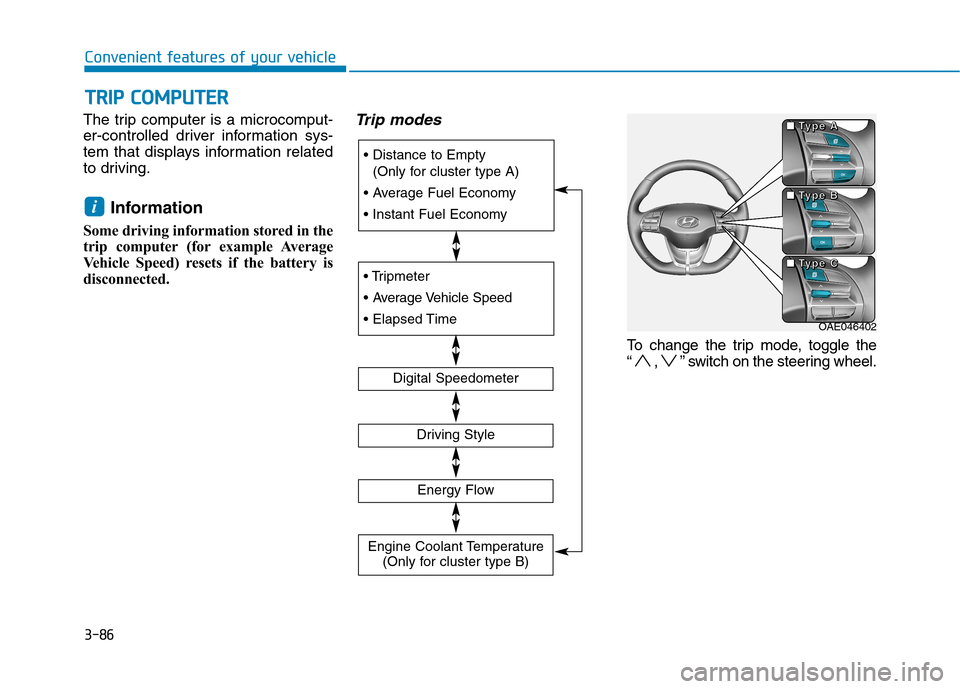
This warning message is displayed if
the tire pressure is low. The corre-
sponding tire on the vehicle will beilluminated.
For more details, refer to "Tire Pressure Monitoring System
(TPMS)" in chapter 6.
Turn on "FUSE SWITCH"
This warning message is displayed if
the fuse switch located on the fuse
box under the steering wheel is OFF.
You should turn the fuse switch on.
For more details, refer to “Fuses”
in chapter 7.
Low Washer Fluid (if equipped)
This warning message is displayed
if the washer fluid level in the reser-
voir is nearly empty.
Have the washer fluid reservoir refilled.
Low Fuel
This warning message is displayed ifthe fuel tank is almost out of fuel.
When this message is displayed, the
low fuel level warning light in thecluster will come on.
It is recommended to look for the nearest fueling station and refuel as
soon as possible.
Add fuel as soon as possible.
Engine has overheated
This warning message is displayed
when the engine coolant tempera-
ture is above 120°C (248°F). This
means that the engine is overheated
and may be damaged.
If your vehicle is overheated, refer
to "Overheating" in chapter 6.
Lights Mode
■Type B
■
Type A
OAE046114L/OAE046115LOLFH044149L
Page 188 of 553
3-86
Convenient features of your vehicleT
T RR IIPP CC OO MM PPUU TTEERR
The trip computer is a microcomput-
er-controlled driver information sys-
tem that displays information related
to driving.
Information
Some driving information stored in the
trip computer (for example Average
Vehicle Speed) resets if the battery is
disconnected.Trip modes
To change the trip mode, toggle the
“ , ” switch on the steering wheel.
i
(Only for cluster type A)
Digital Speedometer
Driving Style
Energy Flow
Engine Coolant Temperature (Only for cluster type B)
OAE046402
■
■■■TTTTyyyyppppeeee AAAA
■■■■TTTTyyyyppppeeee BBBB
■■■■TTTTyyyyppppeeee CCCC
Page 189 of 553
3-87
Convenient features of your vehicle
3
Distance to empty/Average fuel economy/
Instant fuel economy
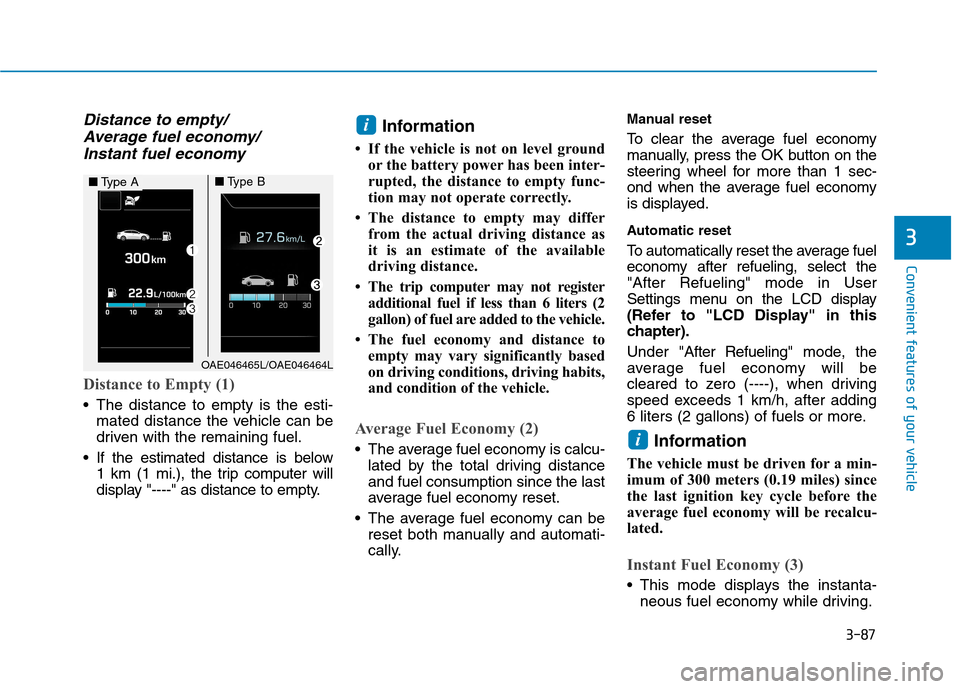
Distance to Empty (1)
The distance to empty is the esti- mated distance the vehicle can be
driven with the remaining fuel.
If the estimated distance is below 1 km (1 mi.), the trip computer will
display "----" as distance to empty. Information
If the vehicle is not on level ground or the battery power has been inter-
rupted, the distance to empty func-
tion may not operate correctly.
The distance to empty may differ from the actual driving distance as
it is an estimate of the available
driving distance.
The trip computer may not register additional fuel if less than 6 liters (2
gallon) of fuel are added to the vehicle.
The fuel economy and distance to empty may vary significantly based
on driving conditions, driving habits,
and condition of the vehicle.
Average Fuel Economy (2)
The average fuel economy is calcu-lated by the total driving distance and fuel consumption since the last
average fuel economy reset.
The average fuel economy can be reset both manually and automati-
cally. Manual reset
To clear the average fuel economy
manually, press the OK button on the
steering wheel for more than 1 sec-
ond when the average fuel economy
is displayed.
Automatic reset
To automatically reset the average fuel
economy after refueling, select the"After Refueling" mode in User
Settings menu on the LCD display
(Refer to "LCD Display" in this
chapter). Under "
After Refueling" mode, the
average fuel economy will be
cleared to zero (----), when driving
speed exceeds 1 km/h, after adding
6 liters (2 gallons) of fuels or more.
Information
The vehicle must be driven for a min-
imum of 300 meters (0.19 miles) since
the last ignition key cycle before the
average fuel economy will be recalcu-
lated.
Instant Fuel Economy (3)
This mode displays the instanta- neous fuel economy while driving.
i
i
OAE046465L/OAE046464L
■Type A■Type B
Page 190 of 553
3-88
Convenient features of your vehicle
Tripmeter/Average vehicle speed/Elapsed time
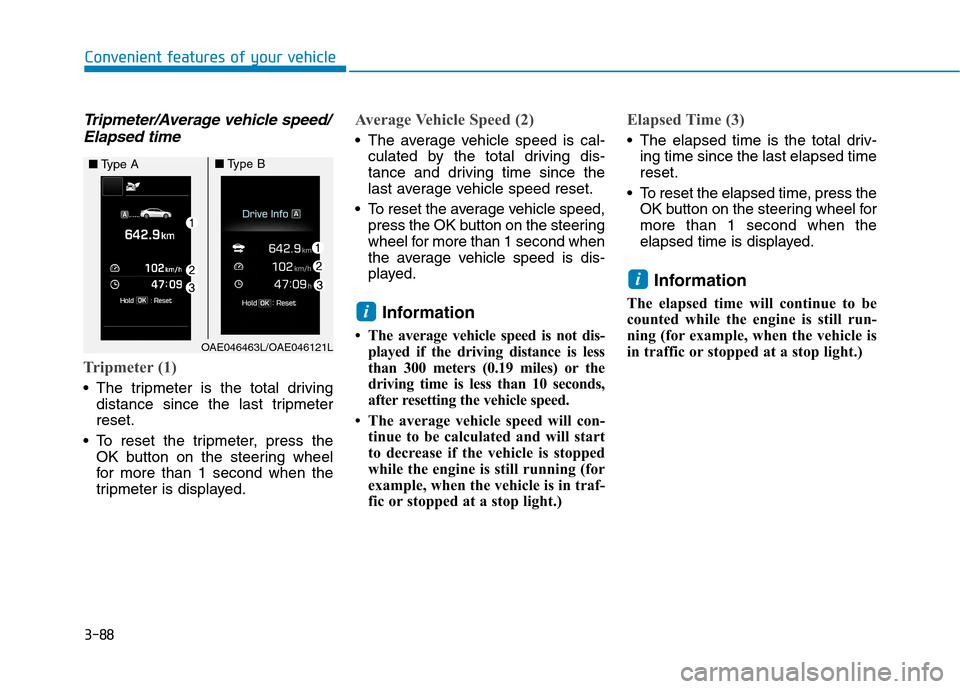
Tripmeter (1)
The tripmeter is the total driving distance since the last tripmeter reset.
To reset the tripmeter, press the OK button on the steering wheel
for more than 1 second when the
tripmeter is displayed.
Average Vehicle Speed (2)
The average vehicle speed is cal-culated by the total driving dis-
tance and driving time since the
last average vehicle speed reset.
To reset the average vehicle speed, press the OK button on the steering
wheel for more than 1 second when
the average vehicle speed is dis-
played.
Information
The average vehicle speed is not dis- played if the driving distance is less
than 300 meters (0.19 miles) or the
driving time is less than 10 seconds,
after resetting the vehicle speed.
The average vehicle speed will con- tinue to be calculated and will start
to decrease if the vehicle is stopped
while the engine is still running (for
example, when the vehicle is in traf-
fic or stopped at a stop light.)
Elapsed Time (3)
The elapsed time is the total driv-ing time since the last elapsed time reset.
To reset the elapsed time, press the OK button on the steering wheel formore than 1 second when the
elapsed time is displayed.
Information
The elapsed time will continue to be
counted while the engine is still run-
ning (for example, when the vehicle is
in traffic or stopped at a stop light.)
i
i
OAE046463L/OAE046121L
■ Type A■Type B
Page 242 of 553
Multimedia System
Multimedia system .................................................4-2Aux, USB and iPod ®®
port ................................................4-2
Antenna ...............................................................................4-2
Steering wheel audio control .........................................4-3
Bluetooth®®Wireless Technology hands-free ..........4-4
Audio / Video / Navigation system (AVN) ..................4-5
How vehicle radio works .................................................4-5
Audio (Without touch screen) .............................4-8 Feature of your audio......................................................4-9Radio .................................................................................4-16
Media..................................................................................4-18
Phone .................................................................................4-32
Setup ..................................................................................4-40
Declaration of conformity ..................................4-42 CE for EU ..........................................................................4-42
NCC for Taiwan ................................................................4-43
4
Page 244 of 553
4-3
Multimedia System
4
Before entering a place with a lowheight clearance or a car wash,
remove the antenna by rotating it
counterclockwise. If not, the
antenna may be damaged.
When reinstalling your antenna, it is important that it is fullytightened and adjusted to the
upright position to ensure prop-er reception.
Shark fin antenna (Type B)
The shark fin antenna receives
transmitted data. (for example:
AM/FM, DAB, GPS/ GNSS)
Do not clean the inside of therear window glass with a cleaner
or use a scraper to remove for-
eign deposits as this may cause
damage to the antenna elements.
Avoid adding metallic coatings such as Ni, Cd, and so on. Thesecan degrade the receiving AM
and FM broadcast signals.
Steering wheel audio control (if equipped)
The steering wheel audio control
switches are installed for your con-
venience.
OAE046437
OAE046474L
NOTICE
NOTICE
■Type A
■Type B
■Type C
OAE046321L
Page 254 of 553

4-13
Multimedia System
4
Multimedia System
Steering wheel remote control
❈The actual features in the may dif-
fer from the illustration.
(1) MUTE
Press to mute audio output. (2) MODE
Press the button to change the mode in the following order: Radio ➟ Media.
Press and hold the button to turn off. (with Type B, Type C)
(3) VOLUME
Press to adjust the volume. (4)
UP/DOWN
Press the button in radio mode to search Presets.
Press and hold the button in radio mode to search frequencies.
Press the button in media mode to change the current song.
Press and hold the button in media mode to quick search through
songs.
(5) CALL
Pressing the button
- If not in Bluetooth ®
Handsfree
mode or receiving a phone call.
First press: Display Dial Number screen.
Second press: Automatically dis-
play the most recently Dialed
Call number.
Third press: Dial the phone num- ber entered.
- Press in the Incoming Call notifi- cation screen to accept the phone call.
- Press in Bluetooth ®
Handsfree
mode to switch to the waiting call. Pressing and holding the button
- If not in Bluetooth ®
Handsfree
mode or receiving a phone call,the most recently Dialed Call
number is dialed.
- Press in Bluetooth ®
Handsfree
mode to transfer the call to your
cell phone.
- Press in cell phone mode to switch to Bluetooth ®
Handsfree
mode.
(6) END
Press in Bluetooth ®
Handsfree
mode to end the phone call.
Press in the incoming call screen to reject the call.
Page 275 of 553
4-34
Multimedia System
Some Bluetooth®
devices are sub-
ject to intermittent Bluetooth ®
con-
nection failures. In this case, use
the following method.
1) Turn the Bluetooth ®
function off
on your Bluetooth ®
device ➟
Turn it on and try again.
2) Delete the paired device from both the audio system and Bluetooth ®
device, then pair
again.
3) Power down your Bluetooth ®
device ➟Turn it on and try
again.
4) Completely remove the battery from your Bluetooth ®
device;
reinsert it, reboot, and attemptconnection.
5) Restart the vehicle and reat- tempt connection.Pairing a Bluetooth®device
Information on pairing Bluetooth ®
devices
Pairing refers to the process of pairing Bluetooth ®
cell phones or
devices with the system prior to
connection. This is a necessary
procedure for Bluetooth ®
connec-
tion and usage.
Up to five devices can be paired.
Pairing Bluetooth ®
device is not
allowed while vehicle is moving.
Pairing the first Bluetooth ®
device
Select the [PHONE]button on the
audio system or the [CALL]button
on the steering wheel remote control ➟ Search for the vehicle from the
Bluetooth ®
device, and pair ➟Enter
the passkey on the Bluetooth ®
device or approve passkey ➟
Bluetooth ®
pairing completed.
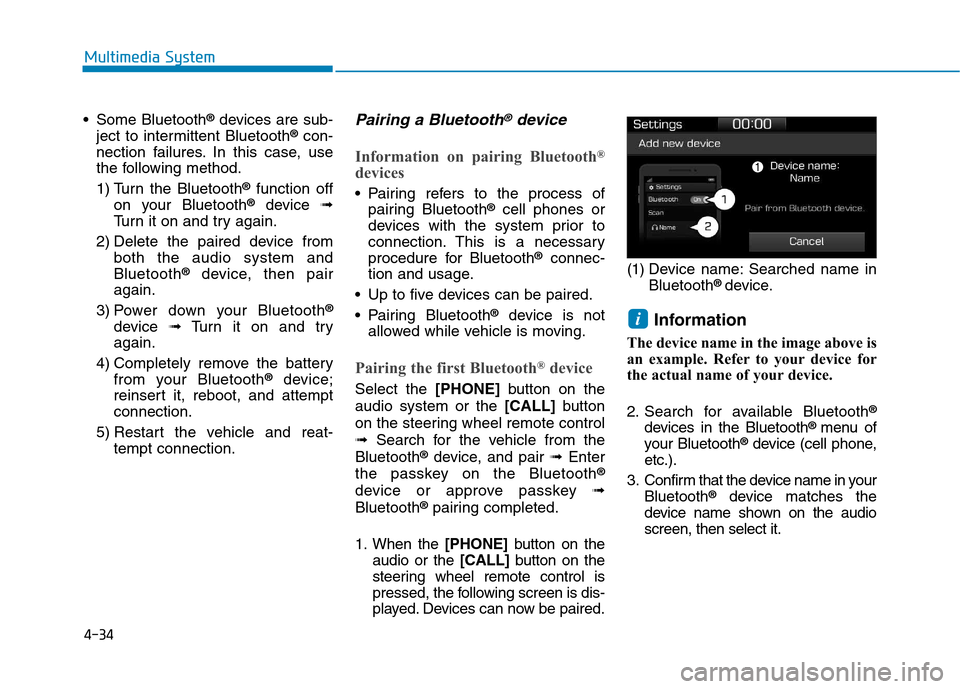
1. When the [PHONE]button on the
audio or the [CALL]button on the
steering wheel remote control is
pressed, the following screen is dis-
played. Devices can now be paired. (1) Device name: Searched name in
Bluetooth ®
device.
Information
The device name in the image above is
an example. Refer to your device for
the actual name of your device.
2. Search for available Bluetooth ®
devices in the Bluetooth ®
menu of
your Bluetooth ®
device (cell phone,
etc.).
3. Confirm that the device name in your Bluetooth ®
device matches the
device name shown on the audio screen, then select it.
i