Page 178 of 553
3-76
Convenient features of your vehicle
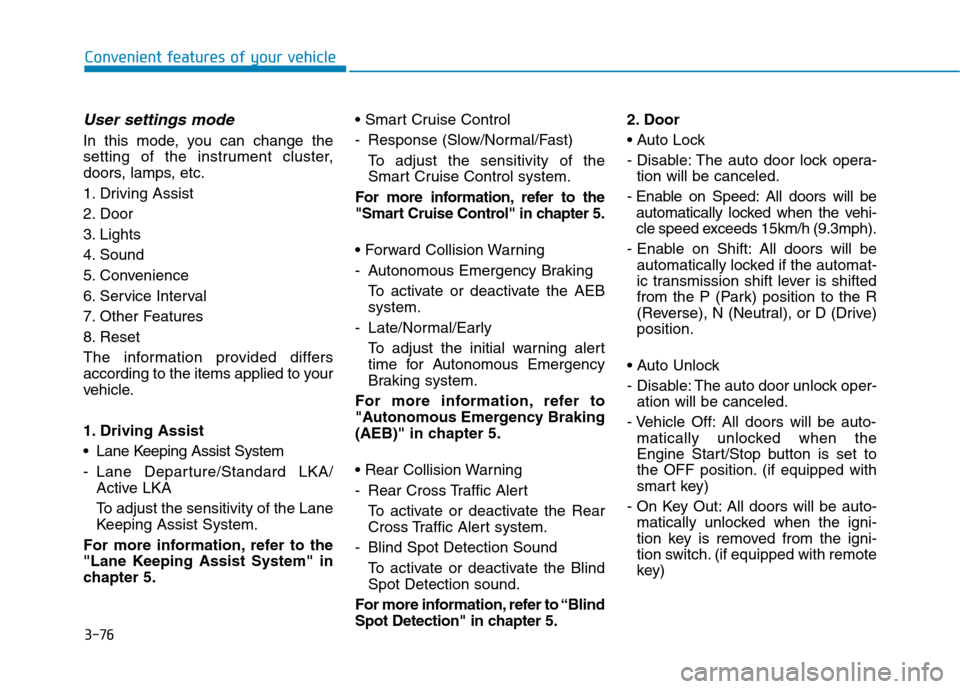
User settings mode
In this mode, you can change the
setting of the instrument cluster,
doors, lamps, etc.
1. Driving Assist
2. Door
3. Lights
4. Sound
5. Convenience
6. Service Interval
7. Other Features
8. Reset
The information provided differs
according to the items applied to your
vehicle.
1. Driving Assist
Lane Keeping Assist System
- Lane Departure/Standard LKA/Active LKA
To adjust the sensitivity of the Lane
Keeping Assist System.
For more information, refer to the
"Lane Keeping Assist System" in
chapter 5.
- Response (Slow/Normal/Fast)
To adjust the sensitivity of the
Smart Cruise Control system.
For more information, refer to the
"Smart Cruise Control" in chapter 5.
- Autonomous Emergency Braking To activate or deactivate the AEB system.
- Late/Normal/Early To adjust the initial warning alert
time for Autonomous Emergency
Braking system.
For more information, refer to
"Autonomous Emergency Braking
(AEB)" in chapter 5.
- Rear Cross Traffic Alert
To activate or deactivate the Rear
Cross Traffic Alert system.
- Blind Spot Detection Sound To activate or deactivate the BlindSpot Detection sound.
For more information, refer to “Blind
Spot Detection" in chapter 5. 2. Door
- Disable: The auto door lock opera-
tion will be canceled.
- Enable on Speed: All doors will be automatically locked when the vehi-
cle speed exceeds 15km/h (9.3mph).
- Enable on Shift: All doors will be automatically locked if the automat-
ic transmission shift lever is shifted
from the P (Park) position to the R
(Reverse), N (Neutral), or D (Drive)position.
- Disable: The auto door unlock oper- ation will be canceled.
- Vehicle Off: All doors will be auto- matically unlocked when the
Engine Start/Stop button is set to
the OFF position. (if equipped with
smart key)
- On Key Out: All doors will be auto- matically unlocked when the igni-
tion key is removed from the igni-
tion switch. (if equipped with remote
key)
Page 179 of 553
3-77
Convenient features of your vehicle
3
- On Shift to P: All doors will be auto-matically unlocked if the automatic
transmission shift lever is shifted to
the P (Park) position.
To activate or deactivate the horn
feedback.
If the horn feedback is activated,
after locking the door by pressing the
lock button on the remote key, and
pressing it again within 4 seconds,
the horn feedback sound will operateonce to indicate that all doors are
locked.
3. Lights
- Off: The one touch turn signal func- tion will be deactivated.
- 3, 5, 7 Flashes: The turn signal indi- cator will blink 3, 5, or 7 times when
the turn signal lever is moved slightly.
For more information, refer to
"Light" in this chapter.
To activate or deactivate the head-
lamp delay function.
For more information, refer to
"Light" in this chapter
4. Sound
- Level 1~3
To adjust the Park Assist System
volume.
5. Convenience
- Off: The seat easy access function is deactivated.
- Normal/Extended: When you turn off the engine, the driver's seat will
automatically move rearward short
(Normal) or long (Extended) for you
to enter or exit the vehicle more
comfortably.
For more information, refer to
"Driver Position Memory System"
in this chapter.
To activate or deactivate the wireless charging system in the front seat.
For more information, refer to
"Wireless Charging System" in
this chapter.
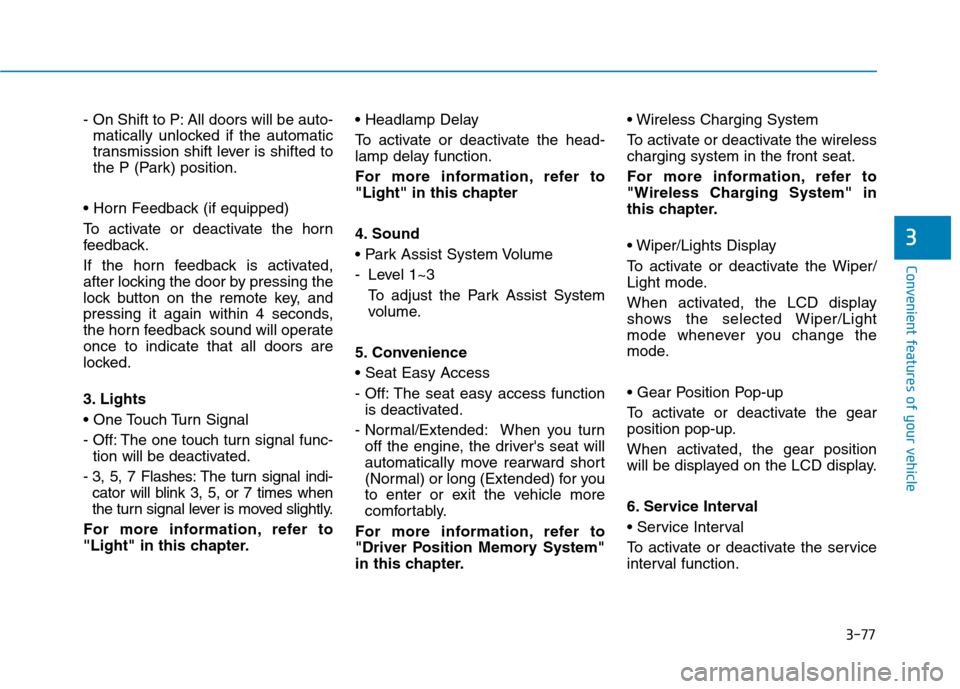
To activate or deactivate the Wiper/
Light mode.
When activated, the LCD display
shows the selected Wiper/Light
mode whenever you change the
mode.
To activate or deactivate the gear
position pop-up.
When activated, the gear position
will be displayed on the LCD display.
6. Service Interval
To activate or deactivate the service
interval function.
Page 186 of 553
3-84
Convenient features of your vehicle
3. Lights
- Off: The one touch turn signal func-tion will be deactivated.
- 3, 5, 7 Flashes: The turn signal indi- cator will blink 3, 5, or 7 times when
the turn signal lever is moved slightly.
For more information, refer to
"Light" in this chapter.
To activate or deactivate the head-
lamp delay function.
For more information, refer to
"Light" in this chapter 4. Sound
- Softer/Louder
To adjust the Park Assist System
volume.
5. Convenience
- Off: The seat easy access function is deactivated.
- Normal/Extended: When you turn off the engine, the driver's seat will
automatically move rearward short
(Normal) or long (Extended) for you
to enter or exit the vehicle more
comfortably.
For more information, refer to
"Driver Position Memory System"
in this chapter.
To activate or deactivate the wireless charging system in the front seat.
For more information, refer to
"Wireless Charging System" in
this chapter.
To activate or deactivate the Wiper/
Light mode.
When activated, the LCD display
shows the selected Wiper/Light
mode whenever you changed the
mode.
To activate or deactivate the gear
position pop-up.
When activated, the gear position
will be displayed on the LCD display.
6. Service Interval
To activate or deactivate the service
interval function.
If the service interval menu is acti-
vated, you may adjust the time and
distance.
Information
To use the service interval menu, con-
sult an authorized HYUNDAI dealer.
i
Page 196 of 553
3-94
Convenient features of your vehicle
The lever will return to the OFF posi-
tion when released or when the turnis completed.
If an indicator stays on and does not
flash or if it flashes abnormally, one of
the turn signal bulbs may be burnedout and will require replacement.
One-touch turn signal function
To activate an one-touch turn signal
function, move the turn signal lever
slightly and then release it. The lane
change signals will blink 3, 5 or 7
times.
You can activate/deactivate the One
Touch Turn Signal function or choose
the number of blinking (3, 5, or 7)from the User Settings Mode on the
LCD display.For more details, refer
to "LCD Display" in this chapter.
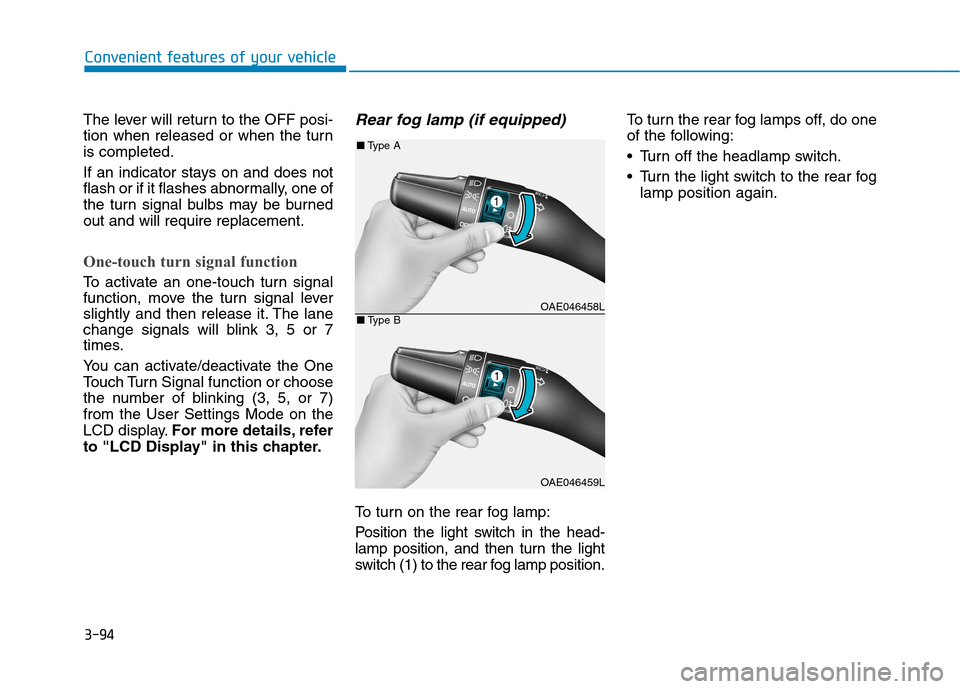
Rear fog lamp (if equipped)
To turn on the rear fog lamp:
Position the light switch in the head-
lamp position, and then turn the light
switch (1) to the rear fog lamp position. To turn the rear fog lamps off, do one
of the following:
• Turn off the headlamp switch.
Turn the light switch to the rear fog
lamp position again.
OAE046458L
OAE046459L
■Type A
■Type B
Page 225 of 553
3-123
Convenient features of your vehicle
3
Information
When using the air conditioning sys- tem, monitor the temperature gauge
closely while driving up hills or in
heavy traffic when outside tempera-
tures are high. Air conditioning sys-
tem operation may cause engine
overheating. Continue to use the
blower fan but turn the air condi-
tioning system off if the temperature
gauge indicates engine overheating.
When opening the windows in humid weather air conditioning
may create water droplets inside the
vehicle. Since excessive water
droplets may cause damage to elec-
trical equipment, air conditioning
should only be used with the win-
dows closed.Air conditioning system operation
tips
If the vehicle has been parked indirect sunlight during hot weather,
open the windows for a short time
to let the hot air inside the vehicle
escape.
Use air conditioning to reduce humidity and moisture inside the
vehicle on rainy or humid days.
During air conditioning system operation, you may occasionallynotice a slight change in enginespeed as the air conditioning com-
pressor cycles. This is a normal
system operation characteristic.
Use the air conditioning system every month only for a few minutes
to ensure maximum system per-
formance.
When using the air conditioning system, you may notice clear water
dripping (or even puddling) on the
ground under the passenger side
of the vehicle. This is a normal sys-
tem operation characteristic. Operating the air conditioning sys-
tem in the recirculated air position
provides maximum cooling, how-
ever, continual operation in this
mode may cause the air inside the
vehicle to become stale.
During cooling operation, you may occasionally notice a misty air flow
because of rapid cooling and
humid air intake. This is a normal
system operation characteristic.
i
Page 226 of 553
3-124
Convenient features of your vehicle
System maintenance
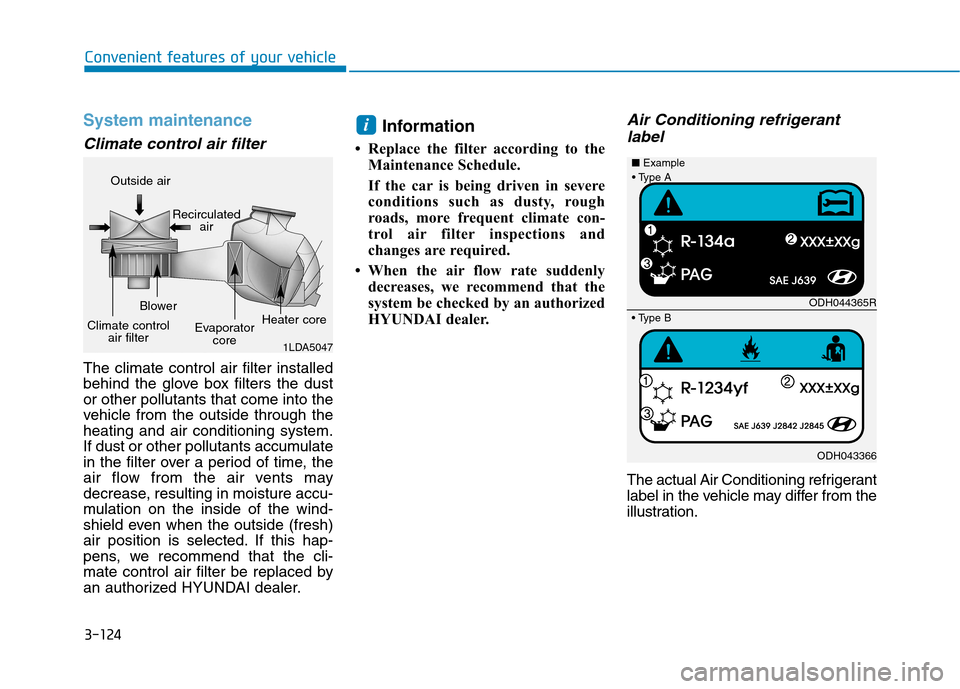
Climate control air filter
The climate control air filter installed
behind the glove box filters the dustor other pollutants that come into the
vehicle from the outside through theheating and air conditioning system.
If dust or other pollutants accumulate
in the filter over a period of time, the
air flow from the air vents may
decrease, resulting in moisture accu-
mulation on the inside of the wind-
shield even when the outside (fresh)
air position is selected. If this hap-
pens, we recommend that the cli-
mate control air filter be replaced by
an authorized HYUNDAI dealer.Information
Replace the filter according to the Maintenance Schedule.
If the car is being driven in severe
conditions such as dusty, rough
roads, more frequent climate con-
trol air filter inspections and
changes are required.
When the air flow rate suddenly decreases, we recommend that the
system be checked by an authorized
HYUNDAI dealer.
Air Conditioning refrigerant
label
The actual Air Conditioning refrigerant
label in the vehicle may differ from the
illustration.
i
1LDA5047
Outside air
Recirculatedair
Climate control air filter Blower
Evaporatorcore Heater core
ODH044365R
ODH043366
■
Example
Page 250 of 553
4-9
Multimedia System
4
Feature of Your Audio
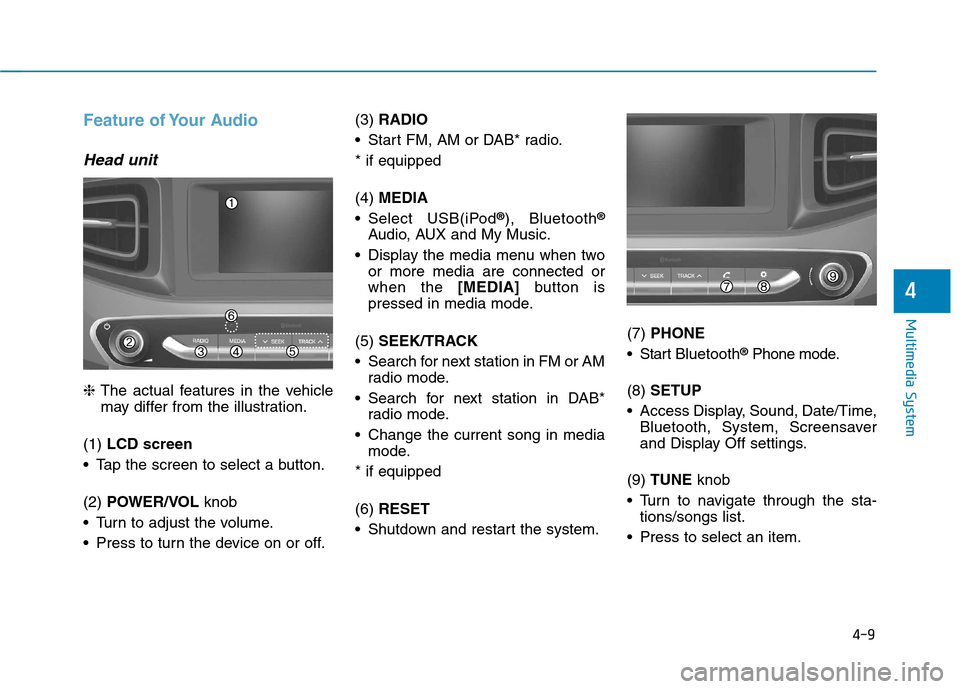
Head unit
❈The actual features in the vehicle
may differ from the illustration.
(1) LCD screen
Tap the screen to select a button. (2) POWER/VOL knob
Turn to adjust the volume.
Press to turn the device on or off. (3)
RADIO
Start FM, AM or DAB* radio.* if equipped (4) MEDIA
Select USB(iPod ®
), Bluetooth ®
Audio, AUX and My Music.
Display the media menu when two or more media are connected or when the [MEDIA]button is
pressed in media mode.
(5) SEEK/TRACK
Search for next station in FM or AM radio mode.
Search for next station in DAB* radio mode.
Change the current song in media mode.
* if equipped (6) RESET
Shutdown and restart the system. (7)
PHONE
Start Bluetooth ®
Phone mode.
(8) SETUP
Access Display, Sound, Date/Time, Bluetooth, System, Screensaver
and Display Off settings.
(9) TUNE knob
Turn to navigate through the sta- tions/songs list.
Press to select an item.
Page 252 of 553
4-11
Multimedia System
4
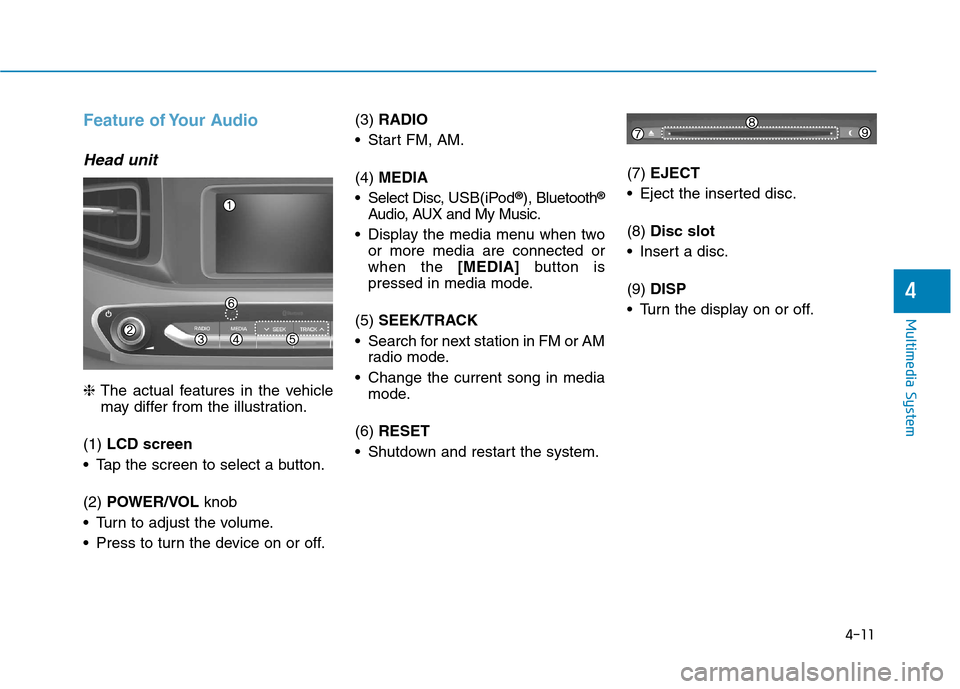
Feature of Your Audio
Head unit
❈The actual features in the vehicle
may differ from the illustration.
(1) LCD screen
Tap the screen to select a button. (2) POWER/VOL knob
Turn to adjust the volume.
Press to turn the device on or off. (3)
RADIO
Start FM, AM. (4) MEDIA
Select Disc, USB(iPod®
), Bluetooth ®
Audio, AUX and My Music.
Display the media menu when two or more media are connected or when the [MEDIA]button is
pressed in media mode.
(5) SEEK/TRACK
Search for next station in FM or AM radio mode.
Change the current song in media mode.
(6) RESET
Shutdown and restart the system. (7)
EJECT
Eject the inserted disc. (8) Disc slot
Insert a disc.(9) DISP
Turn the display on or off.