2017 Hyundai Ioniq Electric key
[x] Cancel search: keyPage 70 of 582
H63
How to Start the Vehicle
1.Holding the smart key, sit in the dri-ver's seat.
2.Fasten the seat belt before starting the vehicle.
3.Make sure to engage the parking brake.
4.Turn OFF all electrical devices.
5.Make sure to depress and hold the brake pedal.
6.While depressing the brake pedal, shift to P (Park).
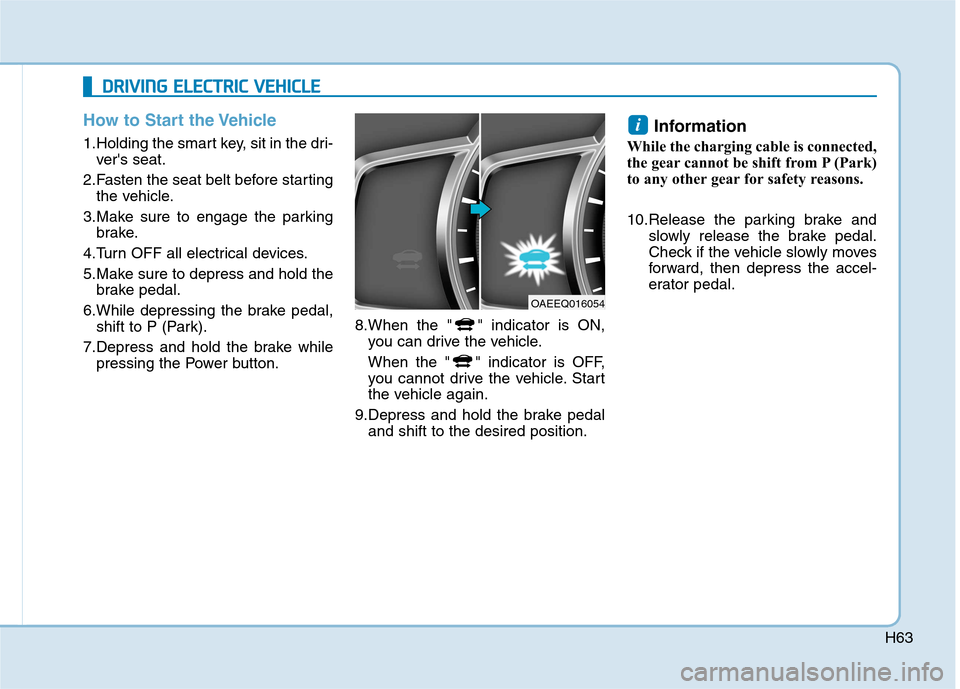
7.Depress and hold the brake while pressing the Power button. 8.When the " " indicator is ON,
you can drive the vehicle.
When the " " indicator is OFF,
you cannot drive the vehicle. Start
the vehicle again.
9.Depress and hold the brake pedal and shift to the desired position. Information
While the charging cable is connected,
the gear cannot be shift from P (Park)
to any other gear for safety reasons.
10.Release the parking brake and slowly release the brake pedal.
Check if the vehicle slowly moves
forward, then depress the accel-
erator pedal.
i
DDRRIIVV IINN GG EE LLEE CCTT RR IICC VV EEHH IICC LLEE
OAEEQ016054
Page 152 of 582
2-54
Safety system of your vehicle
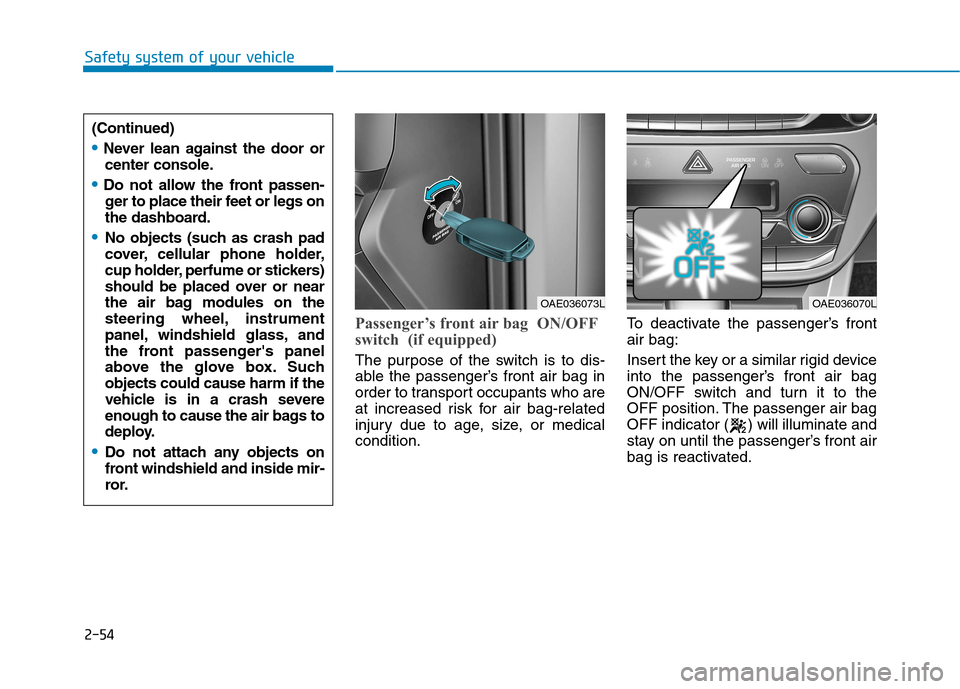
Passenger’s front air bag ON/OFF
switch (if equipped)
The purpose of the switch is to dis-
able the passenger’s front air bag in
order to transport occupants who are
at increased risk for air bag-related
injury due to age, size, or medicalcondition.To deactivate the passenger’s frontair bag:
Insert the key or a similar rigid device
into the passenger’s front air bag
ON/OFF switch and turn it to the
OFF position. The passenger air bag
OFF indicator ( ) will illuminate and
stay on until the passenger’s front air
bag is reactivated.
OAE036073LOAE036070L
(Continued)
Never lean against the door or
center console.
Do not allow the front passen-ger to place their feet or legs on
the dashboard.
No objects (such as crash pad
cover, cellular phone holder,
cup holder, perfume or stickers)
should be placed over or near
the air bag modules on the
steering wheel, instrument
panel, windshield glass, and
the front passenger's panel
above the glove box. Suchobjects could cause harm if the
vehicle is in a crash severe
enough to cause the air bags to
deploy.
Do not attach any objects on
front windshield and inside mir-
ror.
Page 153 of 582
2-55
Safety system of your vehicle
2
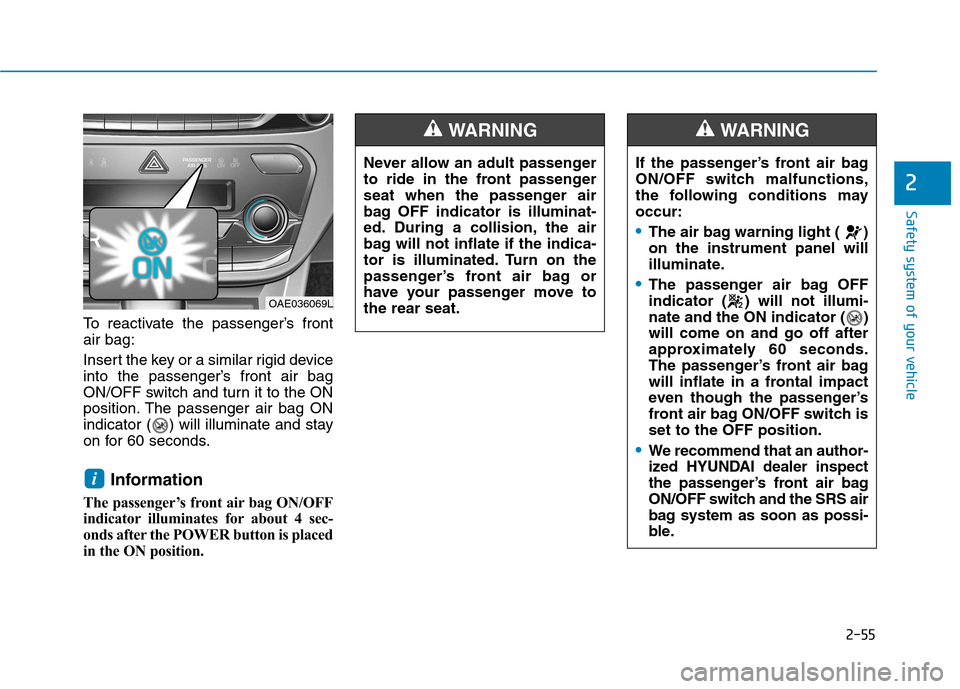
To reactivate the passenger’s front air bag:
Insert the key or a similar rigid device
into the passenger’s front air bag
ON/OFF switch and turn it to the ON
position. The passenger air bag ON
indicator ( ) will illuminate and stay
on for 60 seconds.Information
The passenger’s front air bag ON/OFF
indicator illuminates for about 4 sec-
onds after the POWER button is placed
in the ON position.
i
Never allow an adult passenger
to ride in the front passenger
seat when the passenger air
bag OFF indicator is illuminat-
ed. During a collision, the air
bag will not inflate if the indica-
tor is illuminated. Turn on the
passenger’s front air bag or
have your passenger move tothe rear seat.
WARNING
If the passenger’s front air bag
ON/OFF switch malfunctions,
the following conditions mayoccur:
The air bag warning light ( ) on the instrument panel will
illuminate.
The passenger air bag OFF
indicator ( ) will not illumi-
nate and the ON indicator ( )will come on and go off after
approximately 60 seconds.
The passenger’s front air bag
will inflate in a frontal impact
even though the passenger’s
front air bag ON/OFF switch isset to the OFF position.
We recommend that an author-
ized HYUNDAI dealer inspect
the passenger’s front air bag
ON/OFF switch and the SRS air
bag system as soon as possi-
ble.
WARNING
OAE036069L
Page 170 of 582
Convenient features of your vehicle
Accessing your vehicle .........................................3-3Smart key ............................................................................3-3
Immobilizer system ..........................................................3-7
Door locks ...............................................................3-8 Operating door locks from outside the vehicle .......3-8
Operating door locks from inside the vehicle ..........3-9
Auto door lock/unlock features ................................3-11
Child-protector rear door locks ..................................3-11
Theft-alarm system.............................................3-12
Driver position memory system ........................3-13 Storing memory positions .............................................3-13
Easy access function ....................................................3-14
Steering wheel......................................................3-15 Electric power steering (EPS) ......................................3-15
Tilt steering / Telescope steering...............................3-16
Heated steering wheel .................................................3-16
Horn ....................................................................................3-17
Mirrors ...................................................................3-17 Inside rearview mirror....................................................3-17
Outside rearview mirror ................................................3-19
Windows ................................................................3-22 Power windows ..............................................................3-22 Sunroof..................................................................3-28
Sunroof opening and closing .......................................3-28
Sliding the sunroof .........................................................3-28
Tilting the sunroof ..........................................................3-29
Sunshade ...........................................................................3-30
Resetting the sunroof ....................................................3-30
Exterior features .................................................3-31 Hood ...................................................................................3-31
Tailgate...............................................................................3-33
Instrument cluster................................................3-35 Instrument cluster control ............................................3-36
Gauges and meters .........................................................3-37
Warning and indicator lights ........................................3-42
LCD display messages ..................................................3-52
LCD Display ..........................................................3-65 LCD display control.........................................................3-65
LCD modes .....................................................................3-66
Trip computer .......................................................3-73
3
Page 172 of 582
3-3
Convenient features of your vehicle
Smart key
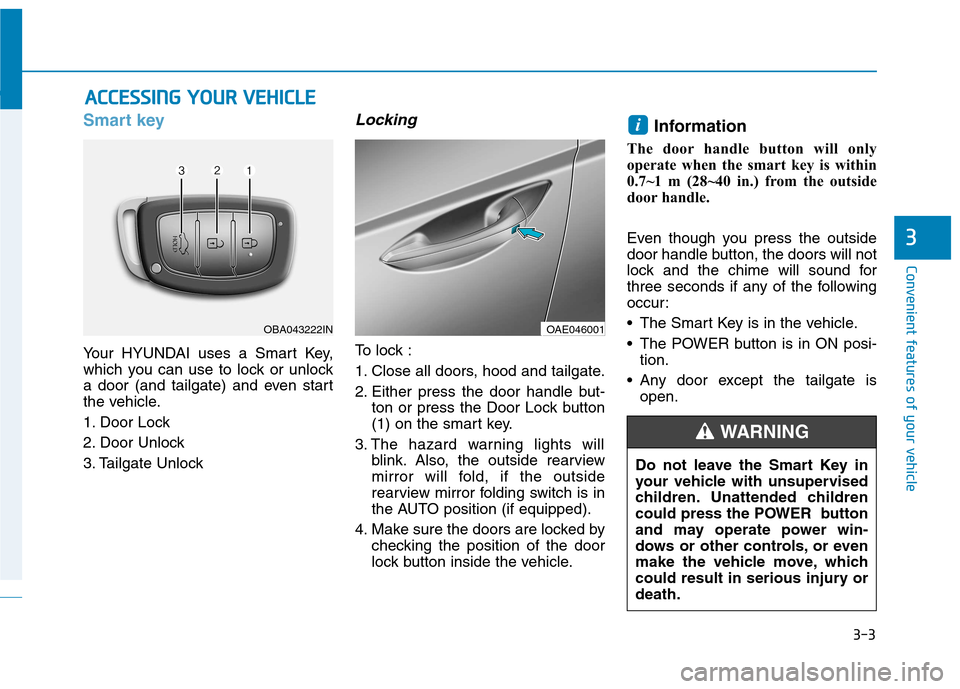
Your HYUNDAI uses a Smart Key,
which you can use to lock or unlock
a door (and tailgate) and even start
the vehicle.
1. Door Lock
2. Door Unlock
3. Tailgate Unlock
Locking
To lock :
1. Close all doors, hood and tailgate.
2. Either press the door handle but-ton or press the Door Lock button
(1) on the smart key.
3. The hazard warning lights will blink. Also, the outside rearview
mirror will fold, if the outside
rearview mirror folding switch is in
the AUTO position (if equipped).
4. Make sure the doors are locked by checking the position of the door
lock button inside the vehicle. Information
The door handle button will only
operate when the smart key is within
0.7~1 m (28~40 in.) from the outside
door handle.
Even though you press the outside
door handle button, the doors will not
lock and the chime will sound for
three seconds if any of the following
occur:
• The Smart Key is in the vehicle.
The POWER button is in ON posi- tion.
Any door except the tailgate is open.
i
AACCCCEE SSSSIINN GG YY OO UURR VV EEHH IICC LLEE
3
OBA043222INOAE046001
Do not leave the Smart Key in
your vehicle with unsupervised
children. Unattended children
could press the POWER button
and may operate power win-
dows or other controls, or even
make the vehicle move, which
could result in serious injury ordeath.
WARNING
Page 173 of 582
3-4
Unlocking
To unlock:
1. Carry the Smart Key.
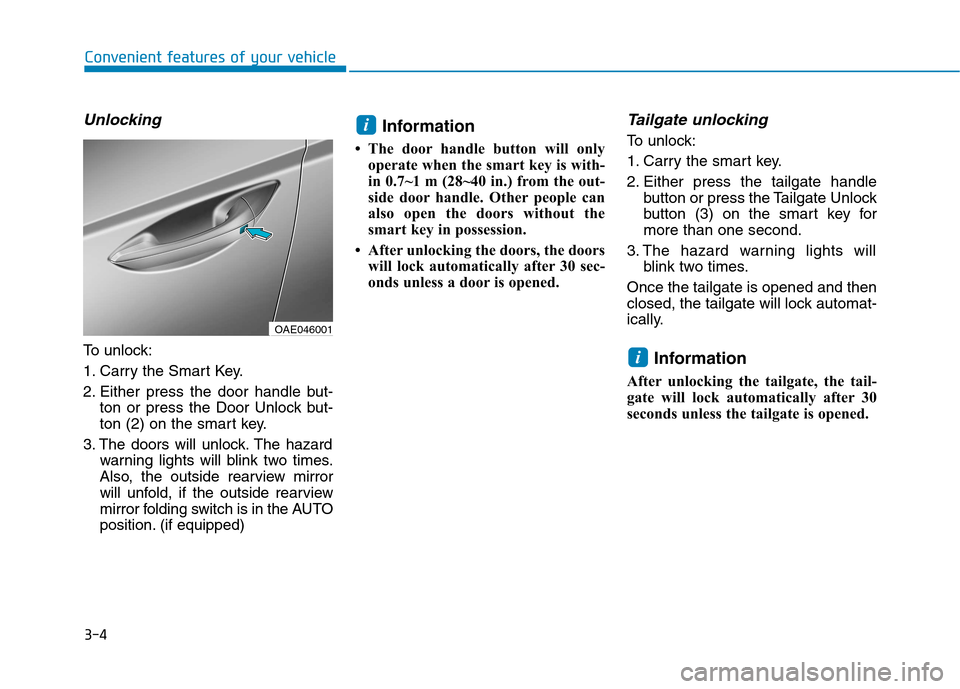
2. Either press the door handle but-ton or press the Door Unlock but-
ton (2) on the smart key.
3. The doors will unlock. The hazard warning lights will blink two times.
Also, the outside rearview mirror
will unfold, if the outside rearview
mirror folding switch is in the AUTO
position. (if equipped) Information
The door handle button will only operate when the smart key is with-
in 0.7~1 m (28~40 in.) from the out-
side door handle. Other people can
also open the doors without the
smart key in possession.
After unlocking the doors, the doors will lock automatically after 30 sec-
onds unless a door is opened.
Tailgate unlocking
To unlock:
1. Carry the smart key.
2. Either press the tailgate handle button or press the Tailgate Unlock
button (3) on the smart key formore than one second.
3. The hazard warning lights will blink two times.
Once the tailgate is opened and then
closed, the tailgate will lock automat-
ically.
Information
After unlocking the tailgate, the tail-
gate will lock automatically after 30
seconds unless the tailgate is opened.
i
i
Convenient features of your vehicle
OAE046001
Page 174 of 582
3-5
Convenient features of your vehicle
Start-up
You can start the vehicle without
inserting the key.For detailed infor-
mation, refer to the POWER button
in chapter 5.
To prevent damaging the smart
key:
• Keep the smart key away from water or any liquid and fire. If the
inside of the smart key getsdamp (due to drinks or moisture),
or is heated, internal circuit may
malfunction, excluding the car
from the warranty.
Avoid dropping or throwing the smart key.
Protect the smart key from extreme temperatures.
Mechanical key
If the Smart Key does not operate
normally, you can lock or unlock the
door by using the mechanical key.
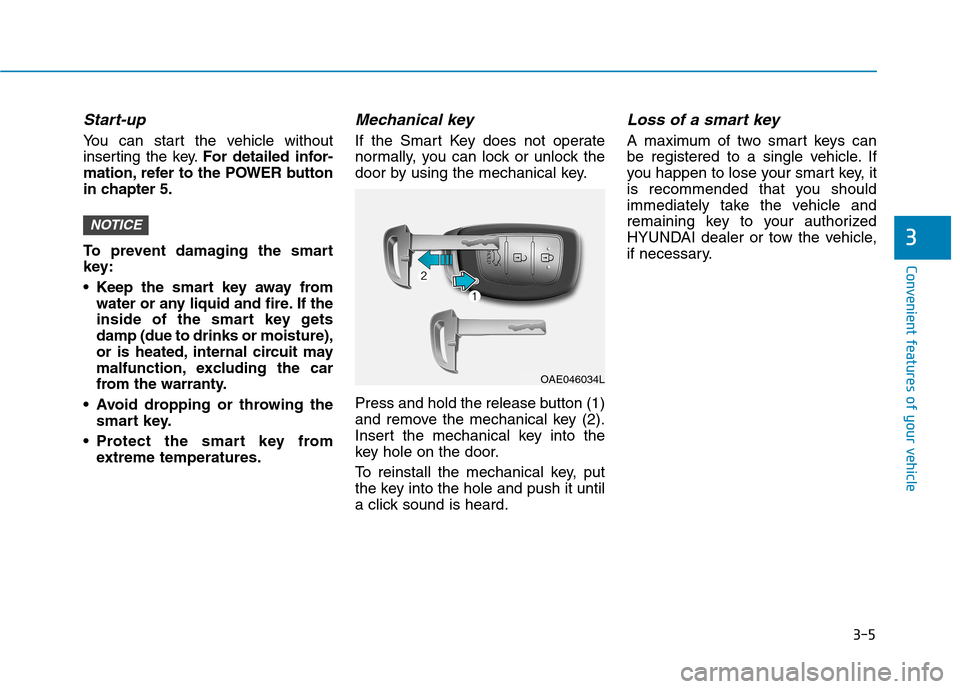
Press and hold the release button (1)
and remove the mechanical key (2).
Insert the mechanical key into the
key hole on the door.
To reinstall the mechanical key, put
the key into the hole and push it until
a click sound is heard.
Loss of a smart key
A maximum of two smart keys can
be registered to a single vehicle. If
you happen to lose your smart key, it
is recommended that you should
immediately take the vehicle and
remaining key to your authorized
HYUNDAI dealer or tow the vehicle,
if necessary.
NOTICE3
OAE046034L
Page 175 of 582
3-6
Convenient features of your vehicle
Smart key precautions
The smart key will not work if any of
the following occur:
The smart key is close to a radiotransmitter such as a radio station
or an airport which can interfere
with normal operation of the trans-
mitter.
The smart key is near a mobile two way radio system or a cellular
phone.
Another vehicle’s smart key is being operated close to your vehi-
cle.
When the smart key does not work
correctly, open and close the door
with the mechanical key. If you have
a problem with the smart key, it is
recommended that you contact an
authorized HYUNDAI dealer.
If the smart key is in close proximity
to your mobile phone, the signal
could be blocked by your mobile
phones normal operational signals.
This is especially important when the
phone is active such as making and
receiving calls, text messaging,
and/or sending/receiving emails. Avoid placing the smart key and yourmobile phone in the same pants or
jacket pocket and always try to main-
tain an adequate distance between
the two devices.
Information
Changes or modifications not express-
ly approved by the party responsible
for compliance could void the user’s
authority to operate the equipment. If
the keyless entry system is inoperative
due to changes or modifications not
expressly approved by the party
responsible for compliance, it will not
be covered by your manufacturer’s
vehicle warranty.
Keep the smart key away from
electromagnetic materials that
blocks electromagnetic waves to
the key surface.
Battery replacement
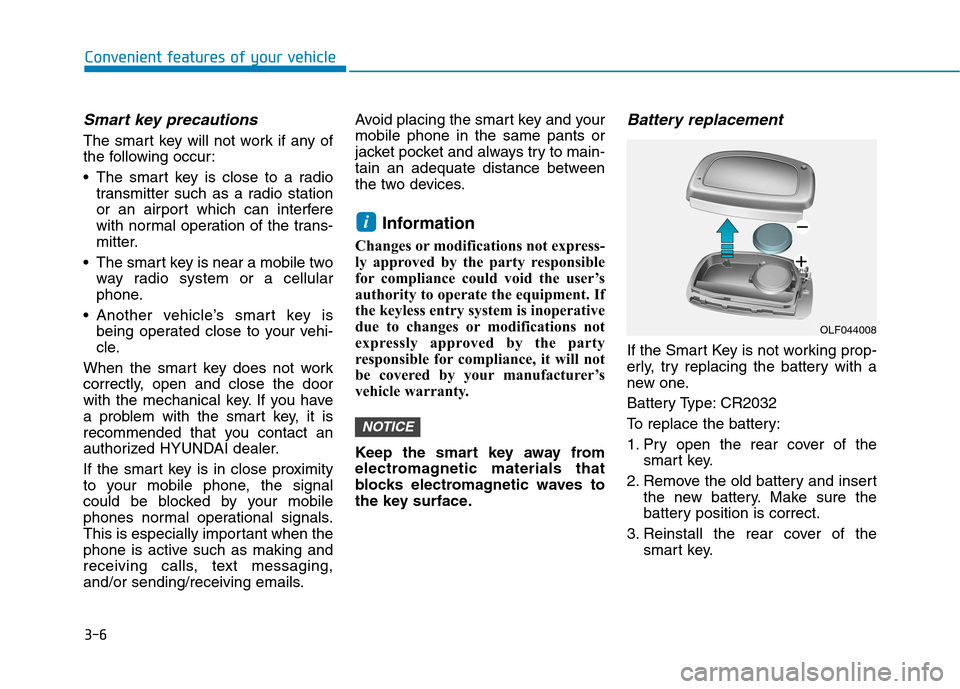
If the Smart Key is not working prop-
erly, try replacing the battery with a
new one.
Battery Type: CR2032
To replace the battery:
1. Pry open the rear cover of the smart key.
2. Remove the old battery and insert the new battery. Make sure the
battery position is correct.
3. Reinstall the rear cover of the smart key.
NOTICE
i
OLF044008