Page 303 of 637
4-46
Multimedia System
With the System Button
Press the [SETUP/CLOCK] button �
Select [System]
Memory Information (if equipped)
Displays currently used memory and
total system memory.
Select [Memory Information] �OK
The currently used memory is dis-
played on the left side while the total
system memory is displayed on the
right side.
❈May differ depending on the
selected audio.
Language
This menu is used to set the display
and voice recognition language.
Select [Language]
The system will reboot after the lan-
guage is changed.
• Language support by region
Setup Mode
(Type A-5, Type A-6)
With the Display Button
Press the [SETUP/CLOCK]button �
Select [Display]
Mode Pop up
[Mode Pop up] �Changes [On]
selection mode
• During On state, press the
[RADIO] or [MEDIA]button to dis-
play the mode change pop up
screen.
Page 304 of 637
4-47
Multimedia System
4
Text Scroll
[Text Scroll] �Set [On/Off]
• [On] : Maintains scroll
• [Off] : Scrolls only one (1) time.
Media Display
When playing an MP3 file, select the
desired display info from ‘Folder/File’
or ‘Album/Artist/Song’.
With the Sound Button
Press the [SETUP/CLOCK]button
�Select [Sound]
Sound Settings
This menu allows you to set the
‘Bass, Middle, Treble’ and the Sound
Fader and Balance.Select [Sound Settings]�Select menu
• Return : While adjusting values, re-
pressing the TUNEknob will
restore the parent menu.
• Bass, Middle, Treble : Selects the
sound tone.
• Fader, Balance : Moves the sound
fader and balance.
• Default : Restores default settings.
Speed Dependent Volume Control
This feature is used to automatically
control the volume level according to
the speed of the vehicle.
Select [Speed Dependent Vol.] �
Set [Off/On]
Page 305 of 637
4-48
Multimedia System
With the Clock Button
Press the [SETUP/CLOCK]button�
Select [Clock]
Clock Settings
This menu is used to set the time.
Select [Clock Settings]
Adjust the number currently in focus
to set the [hour] and press the TUNE
knob to set the [minute].
Calendar Settings
This menu is used to set the date.
Select [Calendar Settings]
Adjust the number currently in focus to
make the settings and press the TUNE
knob to move to the next setting.
Clock Display when Power is OFF
Select [Clock Disp.(Pwr Off)] �Set
[On/Off]
•[On]: Displays time/date on screen
•
[Off]: Turn off.
Page 306 of 637
![Hyundai Elantra 2017 Owners Manual 4-49
Multimedia System
4
With the Phone Button
(if equipped)
Press the [SETUP/CLOCK] button�
Select [Phone]To pair a
Bluetooth®Wireless
Technology enabled mobile
phone, authentication and con-
necti](/manual-img/35/14543/w960_14543-305.png "Hyundai Elantra 2017 Owners Manual 4-49
Multimedia System
4
With the Phone Button
(if equipped)
Press the [SETUP/CLOCK] button�
Select [Phone]To pair a
Bluetooth®Wireless
Technology enabled mobile
phone, authentication and con-
necti")
4-49
Multimedia System
4
With the Phone Button
(if equipped)
Press the [SETUP/CLOCK] button�
Select [Phone]To pair a
Bluetooth®Wireless
Technology enabled mobile
phone, authentication and con-
nection processes are first
required. As a result, you cannot
pair your mobile phone while driv-
ing the vehicle. First park your
vehicle before use.
Pair Phone
Select [Pair Phone]
➀Search for device names as dis-
played on your mobile phone and
connect.
❈SSP : Secure Simple Pairing
Non SSP supported device :
➁After a few moments, a screen is
displayed where the passkey is
entered.Enter the passkey “0000” to pair your
Bluetooth®Wireless Technology
device with the car audio system.
SSP supported device :
➁After a few moments, a screen is
displayed 6 digits passkey.
Check the passkey on your
Bluetooth®Wireless Technology
device and confirm.
The device name and passkey will
be displayed on the screen for up to
3 minutes. If pairing is not completed
within the 3 minutes, the mobile
phone pairing process will automati-
cally be canceled.
➂Pairing completion is displayed.
In some mobile phones, pairing will
automatically be followed by connec-
tion.
It is possible to pair up to five
Bluetooth®Wireless Technology
enabled mobile phones.
NOTICE
Page 309 of 637
![Hyundai Elantra 2017 Owners Manual 4-52
Multimedia System
Auto Download
When connecting a mobile phone, it
is possible to automatically download
new Contacts and Call Histories.
Select [Auto Download]�Set [On/Off]
Outgoing Volume
This](/manual-img/35/14543/w960_14543-308.png "Hyundai Elantra 2017 Owners Manual 4-52
Multimedia System
Auto Download
When connecting a mobile phone, it
is possible to automatically download
new Contacts and Call Histories.
Select [Auto Download]�Set [On/Off]
Outgoing Volume
This")
4-52
Multimedia System
Auto Download
When connecting a mobile phone, it
is possible to automatically download
new Contacts and Call Histories.
Select [Auto Download]�Set [On/Off]
Outgoing Volume
This is used to set the volume of your
voice as heard by the other party
while on a
Bluetooth®Wireless
Technology enabled handsfree call.
Select [Outgoing Volume]�Set vol-
ume
While on a call, the volume can be
changed by using the [SEEK
TRACK]button.
Bluetooth System Off
This feature is used when you do not
wish to use the
Bluetooth®Wireless
Technology system.
Select [Bluetooth System Off]
If a phone is already connected, dis-
connect the currently connected
phone and turn the
Bluetooth®
Wireless Technology system off.
Using the Bluetooth®Wireless
Technology
To use Bluetooth®Wireless
Technology when the system is cur-
rently off, follow these next steps.
• Turning On
Bluetooth®Wireless
Technology through the [PHONE]
button
Press the [PHONE]button�Screen
Guidance
Moves to the screen where
Bluetooth®Wireless Technology
functions can be used and displays
guidance.
• Turning On
Bluetooth®Wireless
Technology through the
[SETUP/CLOCK] buttonPress the [SETUP/CLOCK]button�
Select [Phone]
➀A screen asking whether to turn on
Bluetooth®Wireless Technology will
be displayed.
➁On the screen, select [YES] to turn
on
Bluetooth®Wireless Technology
and display guidance.
If the
Bluetooth®Wireless Technology
system is turned on, the system will
automatically try to connect the most
recently connected
Bluetooth®
Wireless Technology mobile phone.
Page 310 of 637
4-53
Multimedia System
4
With the System Button
Press the [SETUP/CLOCK]button�
Select [System]
Memory Information (if equipped)
Displays currently used memory and
total system memory.
Select [Memory Information] �OK
The currently used memory is dis-
played on the left side while the total
system memory is displayed on the
right side.
Language
This menu is used to set the display.
Select [Language]
The system will reboot after the lan-
guage is changed.
• Language support by region.
English, Português, Español
Page 313 of 637
4-56
Multimedia System
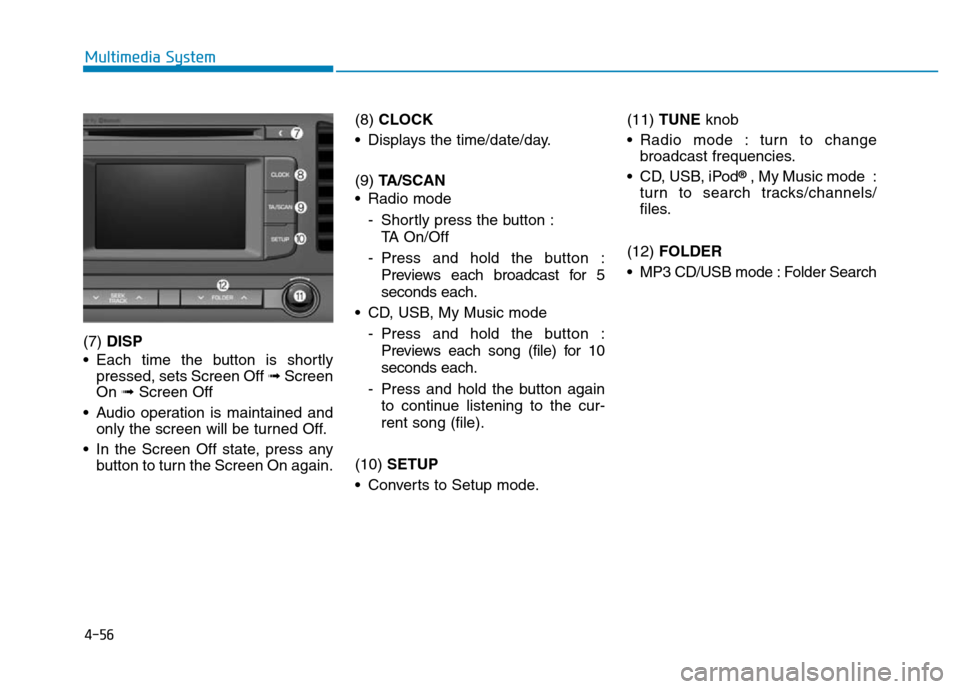
(7) DISP
• Each time the button is shortly
pressed, sets Screen Off ➟Screen
On ➟Screen Off
• Audio operation is maintained and
only the screen will be turned Off.
• In the Screen Off state, press any
button to turn the Screen On again.(8) CLOCK
• Displays the time/date/day.
(9) TA/SCAN
• Radio mode
- Shortly press the button :
TA On/Off
- Press and hold the button :
Previews each broadcast for 5
seconds each.
• CD, USB, My Music mode
- Press and hold the button :
Previews each song (file) for 10
seconds each.
- Press and hold the button again
to continue listening to the cur-
rent song (file).
(10) SETUP
• Converts to Setup mode.(11) TUNE knob
• Radio mode : turn to change
broadcast frequencies.
• CD, USB, iPod
®, My Music mode :
turn to search tracks/channels/
files.
(12) FOLDER
• MP3 CD/USB mode : Folder Search
Page 316 of 637
4-59
Multimedia System
4
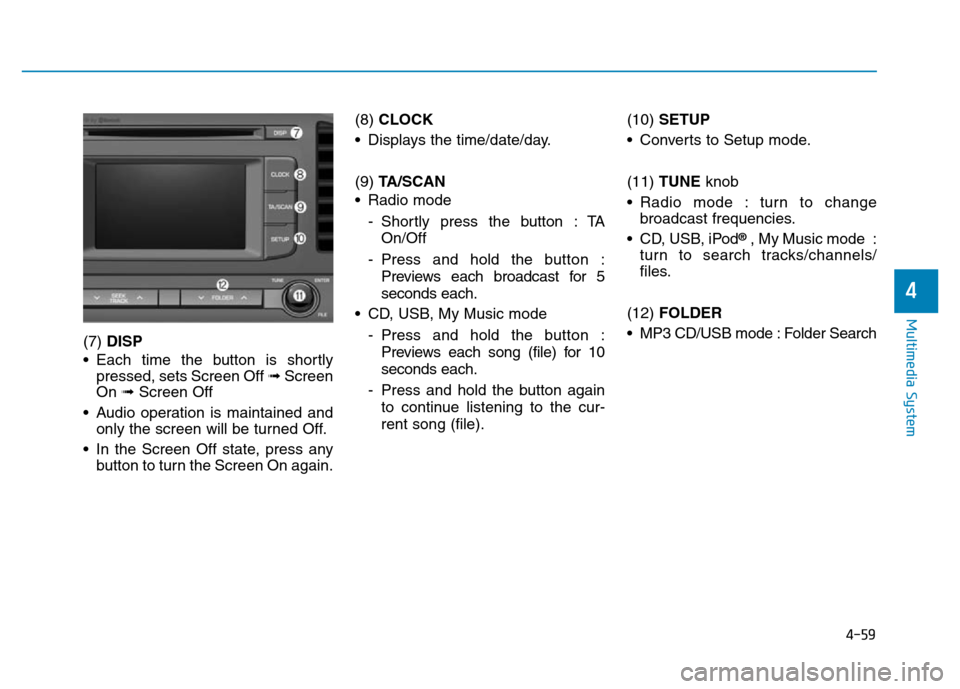
(7) DISP
• Each time the button is shortly
pressed, sets Screen Off ➟Screen
On ➟Screen Off
• Audio operation is maintained and
only the screen will be turned Off.
• In the Screen Off state, press any
button to turn the Screen On again.(8) CLOCK
• Displays the time/date/day.
(9) TA/SCAN
• Radio mode
- Shortly press the button : TA
On/Off
- Press and hold the button :
Previews each broadcast for 5
seconds each.
• CD, USB, My Music mode
- Press and hold the button :
Previews each song (file) for 10
seconds each.
- Press and hold the button again
to continue listening to the cur-
rent song (file).(10) SETUP
• Converts to Setup mode.
(11) TUNE knob
• Radio mode : turn to change
broadcast frequencies.
• CD, USB, iPod
®, My Music mode :
turn to search tracks/channels/
files.
(12) FOLDER
• MP3 CD/USB mode : Folder Search