Page 97 of 637

Trip computer .......................................................3-90
Conventional cluster .......................................................3-90
Supervision cluster .........................................................3-94
Light .......................................................................3-99
Exterior lights ..................................................................3-99
Welcome system ...........................................................3-106
Interior lights..................................................................3-107
Wipers and washers ..........................................3-110
Windshield wipers .........................................................3-110
Windshield washers ......................................................3-112
Driver assist system ..........................................3-114
Rear view camera .........................................................3-114
Rear parking assist system ........................................3-115
Parking assist system ..................................................3-118
Defroster .............................................................3-122
Rear window defroster ...............................................3-122
Manual climate control system........................3-123
Heating and air conditioning......................................3-124
System operation ..........................................................3-129
System maintenance ....................................................3-132
Automatic climate control system ...................3-134
Automatic heating and air conditioning ..................3-135
Manual heating and air conditioning .......................3-136
System operation ..........................................................3-143
System maintenance ....................................................3-146
Windshield defrosting and defogging ............3-148
Manual climate control system .................................3-148
Automatic climate control system ............................3-149
Defogging logic..............................................................3-150
Auto defogging system ...............................................3-151
Climate control additional features.................3-152
Cluster ionizer ................................................................3-152
Sunroof inside air recirculation.................................3-152
Storage compartment ........................................3-153
Center console storage ...............................................3-153
Sliding armrest ...............................................................3-153
Glove box ........................................................................3-154
Sunglass holder .............................................................3-154
Multi box .........................................................................3-155
3
Page 99 of 637
3-4
Convenient features of your vehicle
Remote key
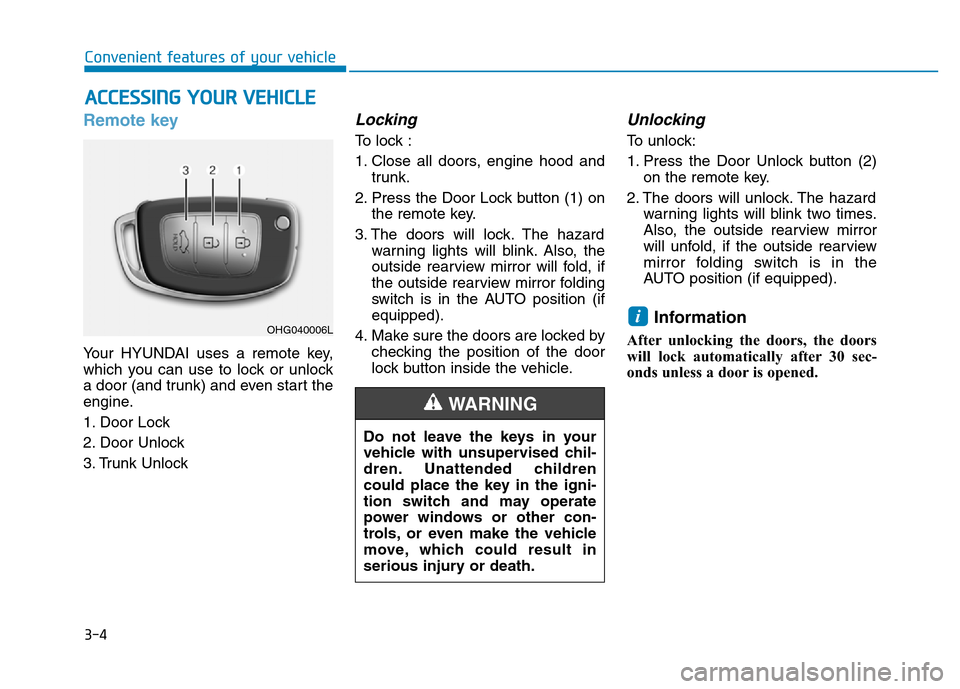
Your HYUNDAI uses a remote key,
which you can use to lock or unlock
a door (and trunk) and even start the
engine.
1. Door Lock
2. Door Unlock
3. Trunk Unlock
Locking
To lock :
1. Close all doors, engine hood and
trunk.
2. Press the Door Lock button (1) on
the remote key.
3. The doors will lock. The hazard
warning lights will blink. Also, the
outside rearview mirror will fold, if
the outside rearview mirror folding
switch is in the AUTO position (if
equipped).
4. Make sure the doors are locked by
checking the position of the door
lock button inside the vehicle.
Unlocking
To unlock:
1. Press the Door Unlock button (2)
on the remote key.
2. The doors will unlock. The hazard
warning lights will blink two times.
Also, the outside rearview mirror
will unfold, if the outside rearview
mirror folding switch is in the
AUTO position (if equipped).
Information
After unlocking the doors, the doors
will lock automatically after 30 sec-
onds unless a door is opened.
i
ACCESSING YOUR VEHICLE
Do not leave the keys in your
vehicle with unsupervised chil-
dren. Unattended children
could place the key in the igni-
tion switch and may operate
power windows or other con-
trols, or even make the vehicle
move, which could result in
serious injury or death.
WARNING
OHG040006L
Page 104 of 637

3-9
Convenient features of your vehicle
Even though you press the outside
door handle button, the doors will not
lock and the chime will sound for
three seconds if any of the following
occur:
• The Smart Key is in the vehicle.
• The Engine Start/Stop button is in
ACC or ON position.
• Any door except the trunk is open.Unlocking
To unlock:
1. Carry the Smart Key.
2. Either press the door handle but-
ton or press the Door Unlock but-
ton (2) on the smart key.3. The doors will unlock. The hazard
warning lights will blink two times.
Also, the outside rearview mirror
will unfold, if the outside rearview
mirror folding switch is in the AUTO
position. (if equipped)
Information
• The door handle button will only
operate when the smart key is with-
in 0.7~1 m (28~40 in.) from the out-
side door handle. Other people can
also open the doors without the
smart key in possession.
• After unlocking the doors, the doors
will lock automatically after 30 sec-
onds unless a door is opened.
i3
Do not leave the Smart Key in
your vehicle with unsupervised
children. Unattended children
could press the Engine Start/
Stop button and may operate
power windows or other con-
trols, or even make the vehicle
move, which could result in
serious injury or death.
WARNINGOAD045001
OAD045001R
■Left-hand drive
■Right-hand drive
Page 111 of 637

3-16
Convenient features of your vehicle
Operating door locks from
inside the vehicle
With the door lock button
• To unlock a door, pull the door lock
button (1) to the “Unlock” position.
The red mark (2) on the door lock
button will be visible.
• To lock a door, push the door lock
button (1) to the “Lock” position. If
the door is locked properly, the red
mark (2) on the door lock button
will not be visible.
• To open a door, pull the door han-
dle (3) outward.
• If the inner door handle of the dri-
ver’s (or front passenger’s) door is
pulled when the door lock button is
in the lock position, the button is
unlocked and door opens.
• Front doors cannot be locked if the
key is in the ignition switch and any
front door is open.
• Doors cannot be locked if the
smart key is in the vehicle and any
door is open.Information
If a power door lock ever fails to func-
tion while you are in the vehicle try
one or more of the following tech-
niques to exit:
Operate the door unlock feature
repeatedly (both electronic and manu-
al) while simultaneously pulling on the
door handle.
Operate the other door locks and han-
dles, front and rear.
Lower a front window and use the
mechanical key to unlock the door
from outside.
i
OAD045003
OAD045003R
■Left-hand drive
■Right-hand drive
U U
n n
l l
o o
c c
k k
/ /
L L
o o
c c
k k
L L
o o
c c
k k
/ /
U U
n n
l l
o o
c c
k k
Page 113 of 637

3-18
Convenient features of your vehicle
Auto door lock/unlock features
Impact sensing door unlock
system (if equipped)
All doors will be automatically
unlocked when an impact causes the
air bags to deploy.
Speed sensing door lock system
(if equipped)
All doors will be automatically locked
when vehicle speed exceeds 15
km/h (9 mph).
You can activate or deactivate the
Auto Door Lock/Unlock features from
the User Settings Mode on the LCD
display.For more details, refer to
"LCD Display" in this chapter. Always secure your vehicle
Leaving your vehicle unlocked
increases the potential risk to
you or others from someone
hiding in your vehicle.
To secure your vehicle, while
depressing the brake, move the
shift lever to the P (Park) posi-
tion (for automatic transmis-
sion/dual clutch transmission)
or first gear or R (Reverse, for
manual transmission), engage
the parking brake, and place the
ignition switch in the LOCK/OFF
position, close all windows,
lock all doors, and always take
the key with you.
WARNING
Opening a door when something
is approaching may cause dam-
age or injury. Be careful when
opening doors and watch for
vehicles, motorcycles, bicycles
or pedestrians approaching the
vehicle in the path of the door.
WARNING
Page 121 of 637

3-26
Convenient features of your vehicle
MIRRORS
Inside rearview mirror
Before you start driving, adjust the
rearview mirror to the center on the
view through the rear window.
When cleaning the mirror, use a
paper towel or similar material
dampened with glass cleaner. Do
not spray glass cleaner directly on
the mirror as that may cause the
liquid cleaner to enter the mirror
housing.
Day/night rearview mirror
(if equipped)
Make this adjustment before you
start driving and while the day/night
lever is in the day position.
Pull the day/night lever toward you to
reduce glare from the headlights of
the vehicles behind you during night
driving.
Remember that you lose some
rearview clarity in the night position.
NOTICEMake sure your line of sight is
not obstructed. Do not place
objects in the rear seat, cargo
area, or behind the rear head-
rests which could interfere with
your vision through the rear
window.
WARNING
To prevent serious injury during
an accident or deployment of
the air bag, do not modify the
rearview mirror and do not
install a wide mirror.
WARNING
NEVER adjust the mirror while
driving. This may cause loss of
vehicle control resulting in an
accident.
WARNING
OAD045009 DayNight
Page 126 of 637
3-31
Convenient features of your vehicle
3
Power windows (if equipped)
(1) Driver’s door power window
switch
(2) Front passenger’s door power
window switch
(3) Rear door (left) power window
switch
(4) Rear door (right) power window
switch
(5) Window opening and closing
(6) Automatic power window*
(7) Power window lock switch
* : if equipped
WINDOWS
OAD045020
■Left-hand drive
Page 127 of 637
3-32
Convenient features of your vehicle
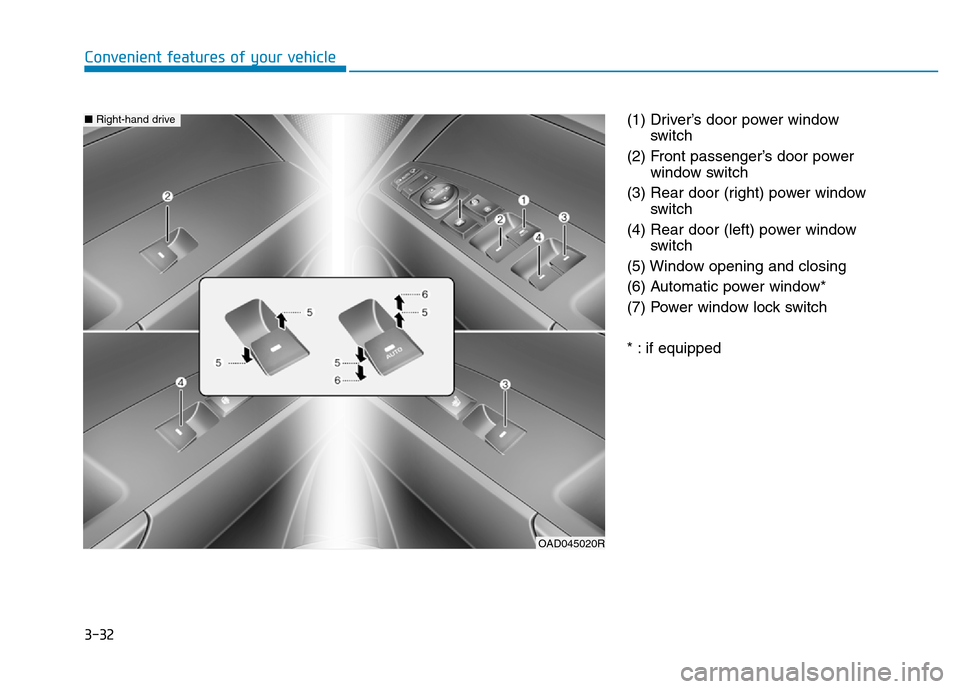
(1) Driver’s door power window
switch
(2) Front passenger’s door power
window switch
(3) Rear door (right) power window
switch
(4) Rear door (left) power window
switch
(5) Window opening and closing
(6) Automatic power window*
(7) Power window lock switch
* : if equipped
OAD045020R
■Right-hand drive