2017 HONDA RIDGELINE trunk
[x] Cancel search: trunkPage 186 of 606

185
uuInterior Lights/Convenience Items uIn-Bed Convenience Items
Controls
There are three hooks for plastic grocery bags
at the back of the trunk. They are designed to
hold light items. Heavy objects may damage
the hooks.
■Cargo Hooks
Hooks
Page 397 of 606

396
Driving
Before Driving
Driving Preparation
Check the following items before you start driving.
• Make sure there are no obstructions on the windows, door mirrors, exterior
lights, or other parts of the vehicle.
u Remove any frost, snow, or ice.
u Remove any snow on the roof, as this can slip down and obstruct your field of
vision while driving. If frozen solid , remove ice once it has softened.
u When removing ice from around the wheel s, be sure not to damage the wheel
or wheel components.
• Make sure the hood is securely closed.
u If the hood opens while driving, your front view will be blocked.
• Make sure the tires are in good condition.
u Check air pressure, check for damage and excessive wear.
2 Checking and Maintaining Tires P. 531
•Make sure the tailgate is fully closed when it is not being used as an extended
pickup bed.
• Make sure the trunk is secu rely closed and locked.
• Make sure there are no people or objects behind or around the vehicle.
u There are blind spots from the inside.
■Exterior Checks1Exterior Checks
NOTICE
When doors are frozen s hut, use warm water around
the door edges to melt any ice. Do not try to force
them open, as this can damage the rubber trim
around the doors. When done, wipe dry to avoid
further freezing.
Do not pour warm water into the key cylinder.
You will be unable to insert the key if the water
freezes in the hole.
Heat from the engine and exhaust can ignite
flammable material s left under the hood, causing a
fire. If you’ve parked y our vehicle for an extended
period, inspect and remove any debris that may have
collected, such as dried grass and leaves that have
fallen or have been carried in for use as a nest by a
small animal. Also check under the hood for leftover
flammable materials after you or someone else has
performed maintenance on your vehicle.
Page 401 of 606

uuBefore Driving uMaximum Load Limit
400
Driving
(4) The resulting figure equals the available amount of cargo and
luggage load capacity. For example, if the “XXX” amount
equals 1,400 lbs. and there will be five 150 lb. passengers in
your vehicle, the amount of av ailable cargo and luggage load
capacity is 650 lbs. (1,400 - 750 (5 x 150) = 650 lbs.)
(5) Determine the combined weight of luggage and cargo being
loaded on the vehicle. That we ight may not safely exceed the
available cargo and luggage load capacity calculated in step 4.
(6) If your vehicle will be towing a tra iler, load from your trailer will
be transferred to your vehicl e. Consult this manual to
determine how this reduces th e available cargo and luggage
load capacity of your vehicle.1 Maximum Load Limit
Gross Vehicle Weight Rating (GVWR):
The maximum allowable weight of the vehicle, all
occupants, all a ccessories, all cargo, and the tongue
load. 2 Specifications P. 586
Gross Axle Weight Rating (GAWR):
The maximum allowable weight of the vehicle axle. 2 Specifications P. 586
3WARNING
Never let passengers ride in the
pickup bed, in the trunk space, or
on the bed rails. This could cause
very serious injuries or death. No
one should ride in any position on
your vehicle that is not equipped
with seats and seat belts.
Exceeding load limits or
improperly loading cargo on the
vehicle can cause a crash in which
you can be seriously injured or
killed.
Load the cargo carefully before
starting to drive.
Page 403 of 606

402
uuBefore Driving uCarrying Cargo
Driving
Carrying Cargo
Your vehicle can carry a large amount of cargo in the pickup bed.
However, the pickup bed is not intended for carrying passengers.
People who ride in the pickup bed can be ve ry seriously injured or killed in a crash.
• When loading and unloading cargo, make sure all passengers or any objects are
clear of the tailgate before opening or closing it. The tailgate should be closed
securely before driving when it is not used as the extended pickup bed.
• The maximum allowable loading weight for the trunk is 300 lbs (136 kg).
Do not exceed this weight limi t, or you may damage the trunk.
• The maximum allowable loading weight on the pickup bed is 1,100 lbs (500 kg).
Do not exceed the load limit.
2 Maximum Load Limit P. 399
•Distribute cargo evenly on the pickup bed. Place the heaviest items on the bottom
and as far forward as possible of the rear axle. Tie down and secure all items that
could be thrown out of the vehicle during a crash or sudden stop.
• If you stack items higher than the bed si des, tailgate, or back window, secure
them with a net or cover.
This will reduce the risk of items being thrown out of the pickup bed during a
crash or sudden stop.
• When the tailgate is dropped open, it can be used as an extended pickup bed.
The maximum allowable weight on the tailgate while driving is 300 lbs (136 kg).
Exceeding this limit could damage the tailgate.
• Carrying heavy cargo in the pickup bed will raise your vehicle’s center of gravity.
This can affect handling and performance. Drive more slowly and cautiously, and
allow extra time and distance for braking.
■Carrying Cargo in the Pickup Bed1 Carrying Cargo
3WARNING
Allowing passengers to ride in the pickup
bed or on the tailgate can result in death or
serious injury in a crash.
Make sure all passengers ride in a seat and
wear a seat belt properly.
3WARNING
Never let passengers ride in the pickup bed,
in the trunk space, or on the bed rails. This
could cause very serious injuries or death.
No one should ride in any position on your
vehicle that is not eq uipped with seats and
seat belts.
Exceeding load limits or improperly loading
cargo on the vehicle can cause a crash in
which you can be seriously injured or killed.
Load the cargo carefully before starting to
drive.
Page 421 of 606

uuWhen Driving uStarting the Engine
420
Driving
You can remotely start the engine using the smart entry remote.
■Remote Engine Start*1Remote Engine Start*
If there are buildings an d obstacles between your
vehicle and the remote, th e range will be reduced.
This distance may vary by external electrical
interference.
The engine may not start by the remote engine start
if:
•You have disabled a remo te engine start setting
using the audio/information screen.
•You do not press and hold the button
within 5 seconds after the button is pressed.
•The power mode is not in VEHICLE OFF (LOCK).•The shift lever is in a position other than ( P.
•The hood is open, or any door or the trunk is
unlocked.
•You have already used the remote twice to start
the engine.
•Another registered smart entry remote is in the
vehicle.
3WARNING
Engine exhaust contains toxic carbon
monoxide.
Breathing carbon monoxide can kill you or
cause unconsciousness.
Never use the remote engine starter when
the vehicle is parked in a garage or other
area with limited ventilation.
* Not available on all models
Page 422 of 606

Continued421
uuWhen Driving uStarting the Engine
Driving
■To start the engine
The engine runs for up to 10 minutes without you starting the vehicle.
To extend the run time for another 10 minutes during the first run, press the
button, then press an d hold the button.
u Some exterior lights come back on three times, twice, if a 10-minute extension
request was transmitted successfully.1Remote Engine Start*
•There is any antenna failure.•Door is unlocked with the built-in key.
•The engine oil pressure is low.
•The engine coolant temper ature is extremely high.•The telematics unit malfunctions.
•The security system alarm is not set.
The engine may stop whil e it is running if:
•You do not start the vehicl e within 10 minutes of
starting the engine with the smart entry remote.
•The engine is stopped by using the smart entry
remote.
•There is any antenna failure.•The security system alarm is not set.
•Door is unlocked with the built-in key.
•The hood is open, or any door, or the trunk is
unlocked.
•The shift lever is in a position other than ( P.
•The telematics unit malfunction.
•The engine coolant temper ature is extremely high.•The battery is low.
•The engine oil pressure is low.
•The Malfunction Indicator Lamp (MIL) comes on if
there is a problem with the emissions control
systems.
Press the button, then press and hold
the button.
Some exterior lights flash once.
LED: Blinks when any button is pressed. Go within the range,
and try again.
Some exterior lights flash six
times if the engine runs
successfully. Some exterior lights will not
flash if the engine does not
start.
* Not available on all models
Page 447 of 606

uuWhen Driving uAdaptive Cruise Control (ACC)*
446
Driving
The system may automatically shut off and the ACC indicator will come on under
certain conditions. Some examples of th ese conditions are listed below. Other
conditions may reduce some of the ACC functions.
2 Front Sensor Camera* P. 434
■Environmental conditions
Driving in bad weather (r ain, fog, snow, etc.).
■Roadway conditions
Driving on a snowy or wet roadway (obscure d lane marking, vehicle tracks, reflected
lights, road spray, high contrast).
■Vehicle conditions
• The outside of the windshie ld is blocked by dirt, mud, leaves, wet snow, etc.
• An abnormal tire or wheel condition (wro ng sized, varied size or construction,
improperly inflated, comp act spare tire, etc.).
• The camera temperature gets too high.
• The parking brake is applied.
• When the radar sensor cover is dirty.
• When the front of the vehicle tilts up due to heavy cargo in the trunk or rear seats.
• When tire chains are installed.
■ACC Conditions and Limitations1ACC Conditions and Limitations
The radar sensor for ACC is shared with the collision
mitigation braking system
TM (CMBSTM).
2 Collision Mitigation Braking SystemTM
(CMBSTM)* P. 478
Do not put a sticker on the radar sensor cover or
replace the radar sensor cover.
Have your vehicle checked by a dealer if you find any
unusual behavior of the system (e.g., the warning
message appears too frequently).
If the front of the vehicle is impacted in any of the
following situations, the ra dar sensor may not work
properly. Have your vehi cle checked by a dealer:
•The vehicle mounted onto a bump, curb, chock,
embankment, etc.
•You drive the vehicle where the water is deep.
•Your vehicle has a frontal collision.
You can read about handling information for the
camera equipped with this system. 2 Front Sensor Camera
* P. 434
* Not available on all models
Page 546 of 606
545
uuCleaning uExterior Care
Continued
Maintenance
Exterior Care
Dust off the vehicle body after you drive.
Regularly inspect your vehicle for scra tches on painted surfaces. A scratch on a
painted surface can result in body rust. If you find a scratch, promptly repair it.
Wash the vehicle regularly. Wash more frequently when driving in the following
conditions:
• If driving on roads with road salt.
• If driving in coastal areas.
• If tar, soot, bird droppings, insects, or tree sap are stuck to painted surfaces.
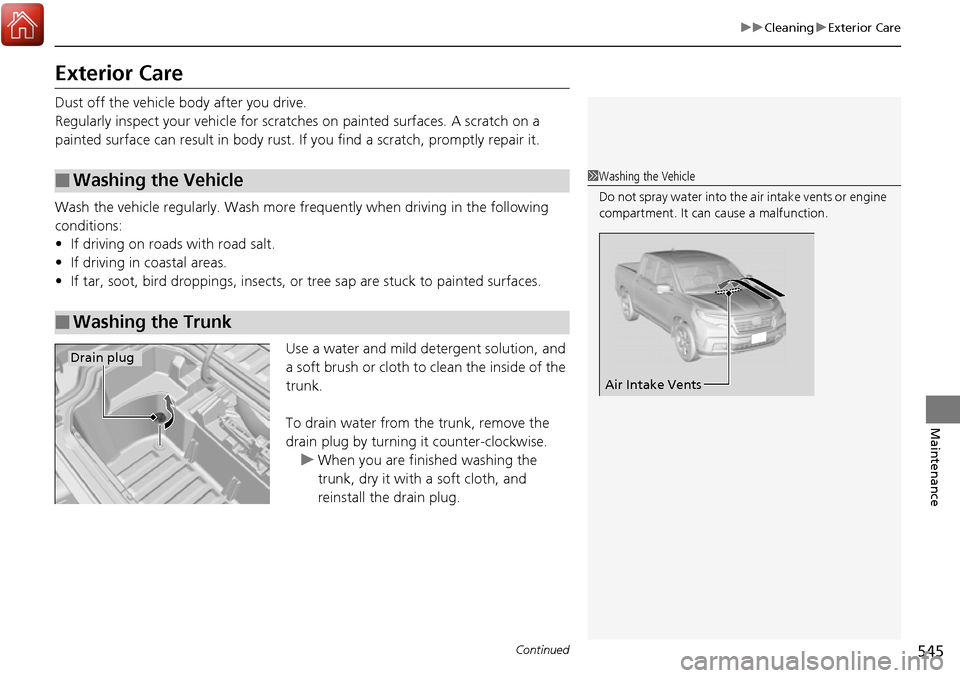
Use a water and mild detergent solution, and
a soft brush or cloth to clean the inside of the
trunk.
To drain water from the trunk, remove the
drain plug by turning it counter-clockwise.
u When you are finished washing the
trunk, dry it with a soft cloth, and
reinstall the drain plug.
■Washing the Vehicle
■Washing the Trunk
1Washing the Vehicle
Do not spray water into the air intake vents or engine
compartment. It can cause a malfunction.
Air Intake Vents
Drain plug