Page 484 of 606
483
uuBraking uCollision Mitigation Braking SystemTM (CMBSTM)*
Continued
Driving
■Vehicle conditions
• Headlight lenses are dirty or the h eadlights are not properly adjusted.
• The outside of the windshield is blocked by dirt, mud, leaves, wet snow, etc.
• The inside of the windshield is fogged.
• An abnormal tire or wheel condition (wro ng sized, varied size or construction,
improperly inflated, co mpact spare tire, etc.).
• When tire chains are installed.
• The vehicle is tilted due to a heavy load or suspension modifications.
• The camera temperature gets too hot.
• Driving with the parking brake applied.
• When the radar sensor in the front grille gets dirty.
Page 491 of 606
490
uuParking Your Vehicle uParking Sensor System*
Driving
■When the distance between your vehicle and obstacles behind becomes shorter
*1: At this stage, only the center sensors detect obstacles.
Length of the
intermittent beepDistance between the Bumper and ObstacleIndicatorAudio/information screenCorner SensorsCenter Sensors
Moderate—Rear: About 43-32 in (110-80 cm) Blinks in Yellow*1
Short
Front: About 24-18 in (60-45 cm)
Rear: About 32-22 in (80-55 cm)
Rear: About 32-22 in
(80-55 cm)
Blinks in Amber
Very short
Front: About 18-14 in (45-35 cm)
Rear: About 22-18 in (55-45 cm)
Rear: About 22-18 in
(55-45 cm)
Continuous
Front: About 14 in (35 cm) or less
Rear: About 18 in (45 cm) or less
Rear: About 18 in
(45 cm) or lessBlinks in Red
Indicators light where the
sensor detects an obstacle
Page 497 of 606
496
Driving
Multi-View Rear Camera
About Your Multi-View Rear Camera
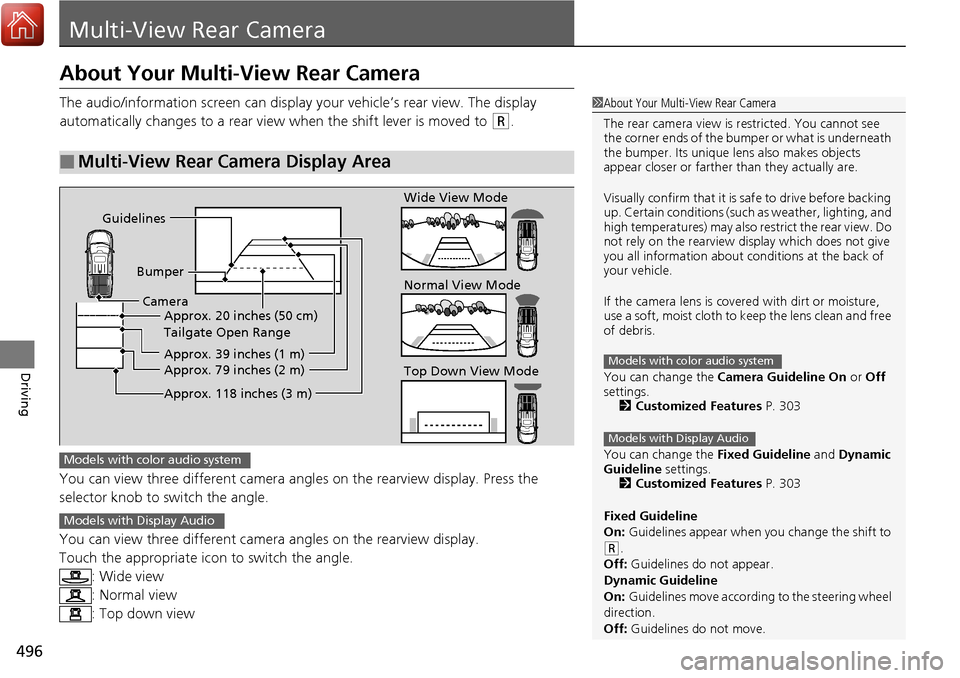
The audio/information screen can display your vehicle’s rear view. The display
automatically changes to a rear view when the shift lever is moved to
(R.
You can view three different camera angl es on the rearview display. Press the
selector knob to switch the angle.
You can view three different camera angles on the rearview display.
Touch the appropriate icon to switch the angle. : Wide view
: Normal view
: Top down view
■Multi-View Rear Camera Display Area
1About Your Multi-View Rear Camera
The rear camera view is restricted. You cannot see
the corner ends of the bum per or what is underneath
the bumper. Its unique le ns also makes objects
appear closer or farther than they actually are.
Visually confirm that it is safe to drive before backing
up. Certain conditions (such as weather, lighting, and
high temperatures) may also restrict the rear view. Do
not rely on the rearview display which does not give
you all information about conditions at the back of
your vehicle.
If the camera lens is cove red with dirt or moisture,
use a soft, moist cloth to keep the lens clean and free
of debris.
You can change the Camera Guideline On or Off
settings. 2 Customized Features P. 303
You can change the Fixed Guideline and Dynamic
Guideline settings. 2 Customized Features P. 303
Fixed Guideline
On: Guidelines appear when you change the shift to
(R.
Off: Guidelines do not appear.
Dynamic Guideline
On: Guidelines move according to the steering wheel
direction.
Off: Guidelines do not move.
Models with color audio system
Models with Display Audio
Guidelines
BumperCamera Approx. 20 inches (50 cm)
Tailgate Open Range
Approx. 39 inches (1 m)
Approx. 79 inches (2 m)
Approx. 118 inches (3 m)
Wide View Mode
Normal View Mode
Top Down View Mode
Models with color audio system
Models with Display Audio
Page 504 of 606

503
Maintenance
This chapter discusses basic maintenance.
Before Performing MaintenanceInspection and Maintenance ............ 504
Safety When Performing Maintenance ... 505
Parts and Fluids Used in Maintenance Service ........................................... 506
Maintenance Minder
TM..................... 507
Maintenance Under the Hood Maintenance Items Under the Hood .... 511
Opening the Hood ........................... 512
Engine Compartment Cover ............. 513
Recommended Engine Oil ................ 514
Oil Check ......................................... 515
Adding Engine Oil ............................ 516
Changing the Engine Oil and Oil Filter ...517 Engine Coolant ................................ 519
Transmission Fluid ............................ 521
Brake Fluid ....................................... 522
Refilling Window Washer Fluid......... 522
Replacing Light Bulbs ....................... 523Checking and Maintaining Wiper
Blades .......................................... 529
Checking and Maintaining Tires
Checking Tires ................................. 531
Tire and Loading Information Label ... 532
Tire Labeling .................................... 532
DOT Tire Quality Grading (U.S. Vehicles) .... 534Wear Indicators................................ 536 Tire Service Life ................................ 536
Tire and Wheel Replacement ........... 537
Tire Rotation .................................... 538
Winter Tires ..................................... 539
Battery ............................................... 540
Remote Transmitter Care Replacing the Button Battery ........... 541
Heating and Cooling System*/Climate
Control System* Maintenance............. 542Cleaning Interior Care .................................... 543
Exterior Care.................................... 545
Accessories and Modifications ........ 549
* Not available on all models
Page 505 of 606

504
Maintenance
Before Performing Maintenance
Inspection and Maintenance
For your safety, perform all listed inspections and maintenance to keep your vehicle
in good condition. If you become aware of any abnormality (noise, smell, insufficient
brake fluid, oil residue on the ground, etc.), have your vehicle inspected by a dealer.
(Note, however, that service at a dealer is not mandatory to keep your warranties in
effect.)
■Daily inspections
Perform inspections before long distance trips, when washing the vehicle, or when
refueling.
■Periodic inspections
• Check the automatic transmission fluid level monthly.
2 Automatic Transmission Fluid P. 521
•Check the brake fluid level monthly.
2 Checking the Brake Fluid P. 522
•Check the tire pressure monthly. Examin e the tread for wear and foreign objects.
2Checking and Maintaining Tires P. 531
•Check the operation of the exterior lights monthly.
2Replacing Light Bulbs P. 523
•Check the condition of the wiper bl ades at least every six months.
2Checking and Maintaining Wiper Blades P. 529
■Types of Inspection and Maintenance
1Inspection and Maintenance
Maintenance, replacement, or repair of
emissions control devices and systems may be
done by any automotive repair establishment or
individuals using parts that are “certified” to
EPA standards.
According to state and fede ral regulations, failure to
perform maintenance on the maintenance main
items marked with # will not void your emissions
warranties. However, all maintenance services should
be performed in accordan ce with the intervals
indicated by the mult i-information display.
2 Maintenance Service Items P. 509
If you want to perform complex maintenance tasks
that require more skills a nd tools, you can purchase a
subscription to the Service Express website at
www.techinfo.honda.com .
2 Authorized Manuals P. 595
If you want to perform ma intenance yourself, make
sure that you have the necessary tools and skills first.
After performing ma intenance, update the records in
the separate maintenance booklet.
U.S. models
Page 513 of 606
512
uuMaintenance Under the Hood uOpening the Hood
Maintenance
Opening the Hood
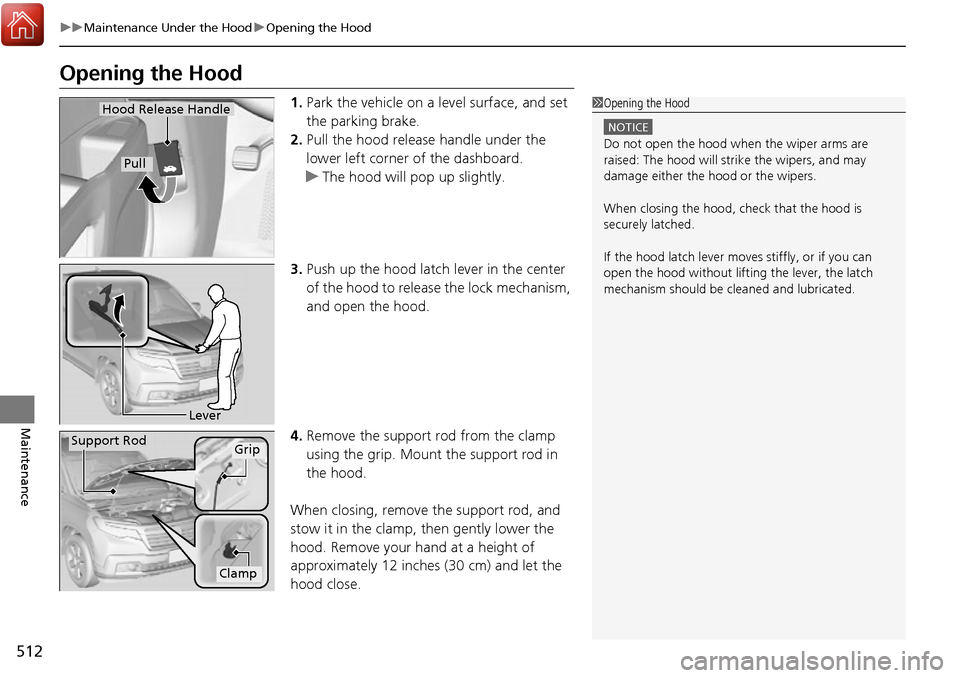
1. Park the vehicle on a level surface, and set
the parking brake.
2. Pull the hood release handle under the
lower left corner of the dashboard.
u The hood will pop up slightly.
3. Push up the hood latch lever in the center
of the hood to release the lock mechanism,
and open the hood.
4. Remove the support rod from the clamp
using the grip. Mount the support rod in
the hood.
When closing, remove the support rod, and
stow it in the clamp, then gently lower the
hood. Remove your hand at a height of
approximately 12 inches (30 cm) and let the
hood close.1 Opening the Hood
NOTICE
Do not open the hood when the wiper arms are
raised: The hood will stri ke the wipers, and may
damage either the hood or the wipers.
When closing the hood, check that the hood is
securely latched.
If the hood latch lever moves stiffly, or if you can
open the hood without lifti ng the lever, the latch
mechanism should be cleaned and lubricated.
Hood Release Handle
Pull
Lever
Support RodGrip
Clamp
Page 519 of 606

uuMaintenance Under the Hood uChanging the Engine Oil and Oil Filter
518
Maintenance
4. Remove the oil filter and dispose of the
remaining oil.
5. Check that the filter ga sket is not stuck to
the engine contact surface.
u If it is stuck, you must detach it.
6. Wipe away dirt and dust adhering to the
contact surface of the oil filter base, and
install a new oil filter.
u Apply a light coat of new engine oil to
the oil filter rubber seal.
7. Put a new washer on the drain bolt, then
reinstall the drain bolt.
u Tightening torque:
29 lbf∙ft (39 N∙m, 4.0 kgf∙m)
8. Pour the recommended engine oil into the
engine.
u Engine oil change capacity (including
filter):
5.7 US qt (5.4 ℓ)
9. Reinstall the engine oil fill cap securely and
start the engine.
10. Run the engine for a few minutes, and
then check that there is no leak from the
drain bolt or oil filter.
11. Stop the engine, wait for three minutes,
and then check the oil level on the
dipstick.
u If necessary, add more engine oil.1Changing the Engine Oil and Oil Filter
You will need a special wrench to replace the oil
filter. You can buy this wrench from a dealer.
When installing the new oil filter, follow the
instructions supplied with the oil filter.
Reinstall the engine oil fill cap. Start the engine. The
low oil pressure indicator should go off within five
seconds. If it does not, turn off the engine, and check
your work.
Oil Filter
Page 524 of 606

523Continued
Maintenance
Replacing Light Bulbs
Headlight Bulbs
When replacing, use the following bulbs.1.Remove the engine compartment cover.
2 Engine Compartment Cover P. 513
2. Remove the clips.
3. Remove the air intake duct.
High beam headlight: 60 W (HB3 for halogen bulb type)
Low beam headlight:
LED type
55 W (H11 for halogen bulb type)
■High Beam Headlight
1Headlight Bulbs
NOTICE
Halogen bulbs get very hot when lit.
Oil, perspiration, or a scratch on the glass can cause
the bulb to overhe at and shatter.
The headlight aim is set by the factory, and does not
need to be adjusted.
However, if you regularly carry heavy items in the
cargo area, have the aiming readjusted at a dealer or
by a qualified technician.
When replacing a halogen bu lb, handle it by its base,
and protect the glass from c ontact with your skin or
hard objects. If you touch the glass, clean it with
denatured alcohol and a clean cloth.Models with Auto high-beam system
Models without Auto high-beam system
ClipsDriver side

