2017 HONDA PILOT change time
[x] Cancel search: change timePage 383 of 673

382
uuCustomized Features u
Features
*1:Default SettingSetup
Group Customizable Features Descri
ption Selectable Settings
Clock/
Info
Clock
Clock/Wallpaper
TypeClock
See System on P. 368
Wallpaper
Clock
Adjustment*
Clock Format
Date Format
Auto Time Zone*
Manual Time
Zone
Auto Daylight
Clock Display
Clock Location
Clock Reset
HondaLinkDiagnostic & Location DataTurns HondaLink® on and off.On/Off
OtherInfo Screen PreferenceChanges the information screen type.Info Top /Info Menu /Off*1
DefaultCancels/Resets all cust omized items in the
Clock/Info settings group as default.Yes/No
* Not available on all models
17 PILOT-31TG76100.book 382 ページ 2016年9月20日 火曜日 午後4時9分
Page 385 of 673

384
uuCustomized Features u
Features
*1:Default SettingSetup
Group Customizable Features Desc
ription Selectable Settings
Camera
Rear Camera
Fixed Guideline
Selects whether the fixed guidelines come on the
rear camera monitor.
2Multi-view rear camera* P. 561
On*1/Off
Dynamic Guideline
Selects whether the dynamic guidelines come on the
rear camera monitor.
2 Multi-view rear camera* P. 561
On*1/Off
DefaultCancels/Resets all cust omized items in the Rear
Camera setting group as default.Yes/No
LaneWatch*
Show with Turn
SignalSelects whether the LaneWatch display comes on
when you move the turn signal lever to indicate a
right turn.
On*1/Off
Display Time after
Turn Signal OffChanges the length of time the LaneWatch display
stays on after the turn si gnal lever returns to the
center.
0 second*1/ 2 seconds
Reference LineSelects whether the reference lines come on the
LaneWatch monitor.On*1/ Off
DefaultCancels/Resets all cust omized items in the
LaneWatch group as default.Yes/No
Cross Traffic Monitor*Turns on and off the cross traffic monitor.On/Off
* Not available on all models
17 PILOT-31TG76100.book 384 ページ 2016年9月20日 火曜日 午後4時9分
Page 425 of 673

uuBluetooth ® HandsFreeLink ®u HFL Menus
424
Features
■To change the currently paired phone
1. Go to the phone settings screen.
2 Phone settings screen P. 418
2.Select Bluetooth Device List .
3. Select a phone to connect.
u HFL disconnects the connected phone
and starts searching for another paired
phone.
4. Select Connect Phone/Audio , Connect
Phone , or Connect Audio.
■To change the pairing code setting
1. Select .
2. Select Settings .
3. Select Bluetooth/Wi-Fi .
4. Select the Bluetooth tab.
5. Select Edit Pairing Code .
6. Select Random or Fixed .
1To change the currently paired phone
If no other phones are found or paired when trying to
switch to another phone, HFL will inform you that the
original phone is connected again.
To pair other phones, select Add Bluetooth Device
from the Bluetooth device list screen.
1To change the pairing code setting
The default pair ing code is 0000 until you change the
setting.
To create your own, select Fixed, and delete the
current code, then enter a new one.
For a randomly generated pa iring code each time you
pair a phone, select Random.
17 PILOT-31TG76100.book 424 ページ 2016年9月20日 火曜日 午後4時9分
Page 447 of 673

uuBluetooth ® HandsFreeLink ®u HFL Menus
446
Features
■Automatic collisi on notification
If your vehicle’s airbags deploy or if the unit
detects that the vehicle is severely impacted,
your vehicle automatically will attempt to
connect to the HondaLink ® operator. If
connected, information about your vehicle, its
location, and its condition can be sent to the
operator
*1; you also can speak to the operator
when connected.
IMPORTANT: For vehicles equipp ed with HondaLink® Assist, owner activation
constitutes authorization for Honda to collect information from your vehicle needed
to provide the service, and agr eement to the Terms of Use at www.hondalink.com/
TermsAndConditions . In a crash, HondaLink ® Assist will attempt to notify emergency
services but NEITHER HONDA NOR ITS SERVICE PROVIDERS GUARANTEE THAT
SUCH NOTIFICATION WILL OCCUR.
Honda reserves the right to terminate HondaLink ® Assist services at any time or for
any reason, and in the future may not be ab le to provide services due to changes in,
or obsolescence of, technology integral to the service or changes in governmental
regulation.
*1: Depending on your phone and adequa te cellular coverage, your vehicle's
location may not be sent to the operator.
■In Case of Emergency1 In Case of Emergency
Your vehicle may not be able to connect to the
operator if the battery level is low, the line is
disconnected, or you do not have adequate cellular
coverage.
You cannot use this emergency service when:
•You travel outside the HondaLink ® service coverage
areas.
•There is a problem with the connecting devices,
such as the microphones, speakers, or the unit
itself.
You cannot operate othe r phone-related functions
using the screen while talking to the operator.
Select Hang Up to terminate the connection to your
vehicle.
1 Automatic collision notification
If the unit fails to connect to the operator, it
repeatedly tries until it succeeds.
17 PILOT-31TG76100.book 446 ページ 2016年9月20日 火曜日 午後4時9分
Page 491 of 673

uuWhen Driving uAuto Idle-stop*
490
Driving
To turn the Auto Idle-s top system off, press
this button. Th e Auto Idle-stop system stops.
u The Auto Idle-stop system will stop and
the indicator (Amber) in meter will come
on.
The Auto Idle Stop syst em is turned on every
time you start the engine, even if you turned it
off the last time you drove the vehicle.
The vehicle stops with the gear position in
(D and the brake pedal depressed.
■Auto Idle-stop does not activate when:
• The driver’s seat belt is not fastened.
• The engine coolant temperature is low or high.
• The transmission fluid temperature is low or high.
• The vehicle comes to a stop again befo re the vehicle speed reaches 3 mph (5
km/h) after the engine starts.
• Stopped on a steep incline.
• A gear position other than
(D.
• The engine is started with the hood open.
u Turn off the engine. Close the hood before you restart the engine to activate
Auto Idle-stop.
• The battery charge is low.
• The internal temperature of the ba ttery is 14°F (−10°C). or less.
■Auto Idle-stop System ON/OFF1Auto Idle-stop System ON/OFF
Press the Auto Idle-stop OFF button to restart the
engine from the idling stop.
■Auto Idle-stop Activates When:1 Auto Idle-stop Activates When:
Do not open the hood while the Auto Idle-stop
function is activated. If the hood is opened, the
engine will not re start automatically.
In this case, restart the engine with the ENGINE
START/STOP button. 2 Starting the Engine P. 471
Pressing the ENGINE START/STOP button changes
the power mode to ACCESSORY even while Auto
Idle-stop is in operation. Once in ACCESSORY, the
engine no longer restarts automatically. Follow the
standard procedure to start the engine.
2 Starting the Engine P. 471
17 PILOT-31TG76100.book 490 ページ 2016年9月20日 火曜日 午後4時9分
Page 510 of 673
Continued509
uuWhen Driving uAdaptive Cruise Control (ACC)*
Driving
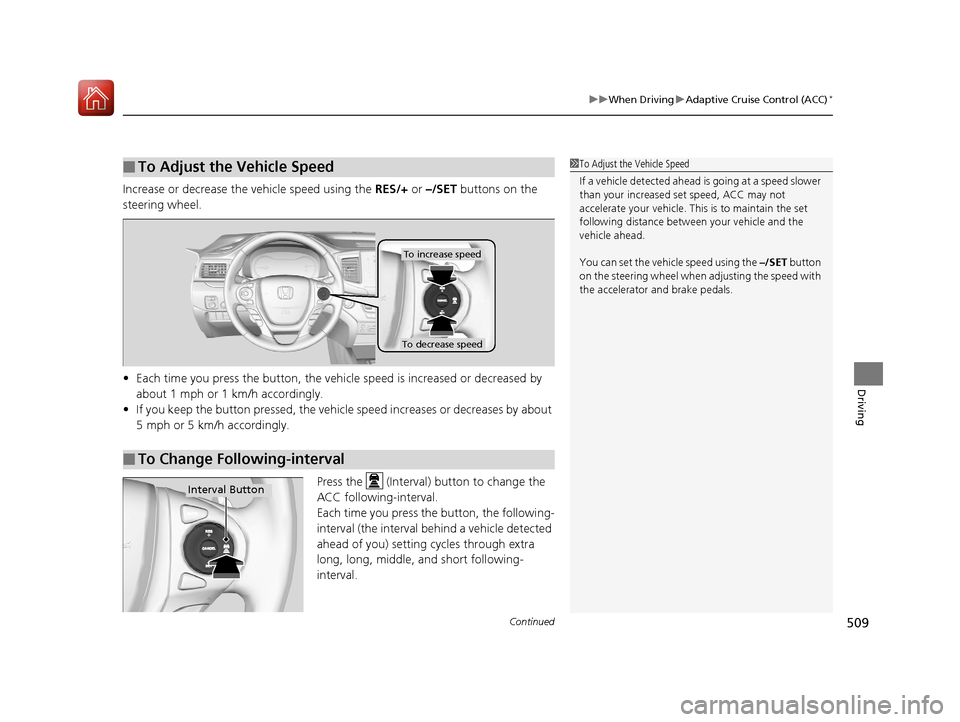
Increase or decrease the vehicle speed using the RES/+ or –/SET buttons on the
steering wheel.
• Each time you press the button, the vehicl e speed is increased or decreased by
about 1 mph or 1 km/h accordingly.
• If you keep the button pressed, the vehicle speed increases or decreases by about
5 mph or 5 km/h accordingly.
Press the (Interval) button to change the
ACC following-interval.
Each time you press th e button, the following-
interval (the interval behind a vehicle detected
ahead of you) setting cycles through extra
long, long, middle, and short following-
interval.
■To Adjust the Vehicle Speed1 To Adjust the Vehicle Speed
If a vehicle detected ahead is going at a speed slower
than your increased set speed, ACC may not
accelerate your vehicle. This is to maintain the set
following distance between your vehicle and the
vehicle ahead.
You can set the vehicle speed using the –/SET button
on the steering wheel when adjusting the speed with
the accelerator and brake pedals.
■To Change Following-interval
To increase speed
To decrease speed
Interval Button
17 PILOT-31TG76100.book 509 ページ 2016年9月20日 火曜日 午後4時9分
Page 523 of 673

uuWhen Driving uLane Keeping Assist System (LKAS)*
522
Driving
3. Keep your vehicle near the center of the
lane while driving.
u The dotted outer lines change to solid
ones once the system starts operating
after detecting the left and right lane
markings.
To cancel the LKAS:
Press the MAIN or LKAS button.
The LKAS is turned off every time you stop the
engine, even if you turned it on the last time
you drove the vehicle.
Models with ACC is shown.
■To cancel
1 When the System can be Used
The LKAS temporarily deactivates when it fails to
detect lane lines. When the system detects the lines
again, it comes back on automatically.
1To cancel
Pressing the MAIN button also turns ACC on and off.
MAIN Button
LKAS Button
17 PILOT-31TG76100.book 522 ページ 2016年9月20日 火曜日 午後4時9分
Page 529 of 673

uuWhen Driving uVehicle Stability Assist (VSA® ), aka Electronic Stability Control (ESC), System
528
Driving
This button is on the driver side control panel.
To partially disable VSA ® functionality/
features, press and hold it until you hear a
beep.
The traction control stops fully functioning,
allowing the wheels to sp in more freely at low
speed. The VSA ® OFF indicator will also come
on and a message on the MID informs you
that the mode is changed.
Traction control mode can not be changed
during Mud or Sand modes. If you are driving
on mud or sand, Mud or Sand Intelligent
Traction Management modes can also be
used to free a stuck vehicle. On other road
surfaces, change to No rmal or Snow mode,
then press and hold the (VSA ® OFF) button.
To restore VSA ® functionality/features, press
the (VSA ® OFF) button until you hear a
beep.
VSA ® is turned on every time you start the
engine, even if you turned it off the last time
you drove the vehicle.
■VSA ® On and Off1 Vehicle Stability Assist (VSA ®), aka Electronic Stability Control
(ESC), System
With the button pressed, your vehicle will have
normal braking and corn ering ability, but VSA®
traction and stability enhancement becomes less
effective.
In certain unusual conditions when your vehicle gets
stuck in shallow mud or fr esh snow, it may be easier
to free it with the button pressed.
When the button is pressed, the traction control
function becomes less effective. This allows for the
wheels to spin more freely at low speed. You should
only attempt to free your vehicle with the button
pressed if you are not able to free it without.
Immediately after freeing your vehicle, be sure to
press the button again. We do not recommend
driving your vehicle wi th the button pressed
(indicator on).
You may hear a motor sound coming from the
engine compartment while system checks are being
performed immediately after starting the engine or
while driving. This is normal.
VSA ® OFF Indicator
17 PILOT-31TG76100.book 528 ページ 2016年9月20日 火曜日 午後4時9分