Page 208 of 673
Continued207
uuHeating and Cooling*uUsing Vents, Heating and A/C
Controls
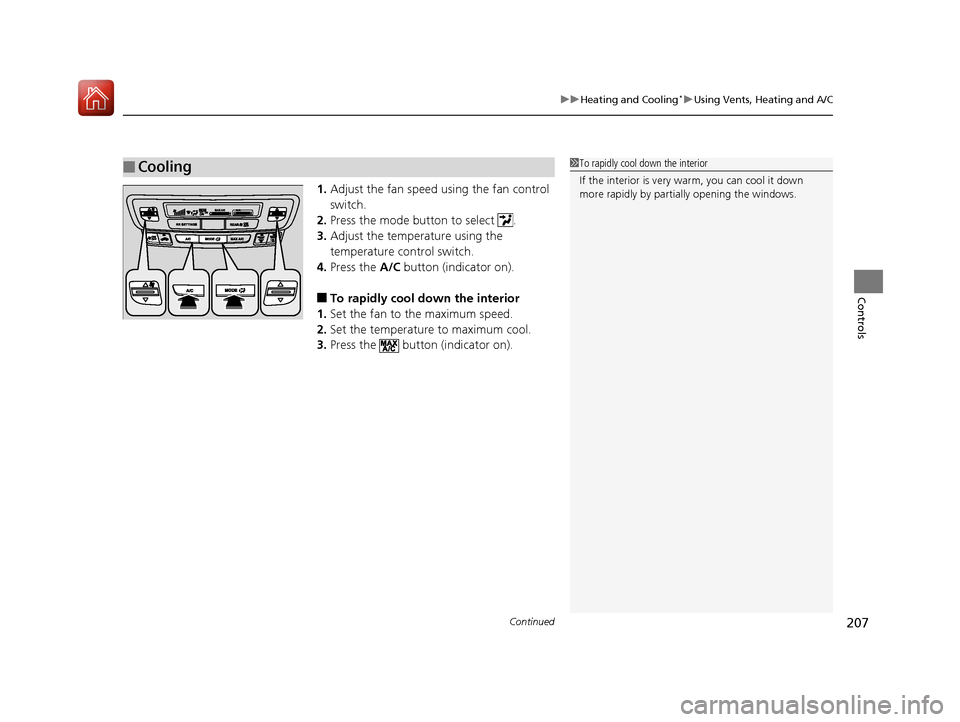
1. Adjust the fan speed using the fan control
switch.
2. Press the mode button to select .
3. Adjust the temperature using the
temperature control switch.
4. Press the A/C button (indicator on).
■To rapidly cool down the interior
1. Set the fan to the maximum speed.
2. Set the temperature to maximum cool.
3. Press the button (indicator on).
■Cooling1To rapidly cool down the interior
If the interior is very warm, you can cool it down
more rapidly by parti ally opening the windows.
17 PILOT-31TG76100.book 207 ページ 2016年9月20日 火曜日 午後4時9分
Page 209 of 673
uuHeating and Cooling*uUsing Vents, Heating and A/C
208
Controls
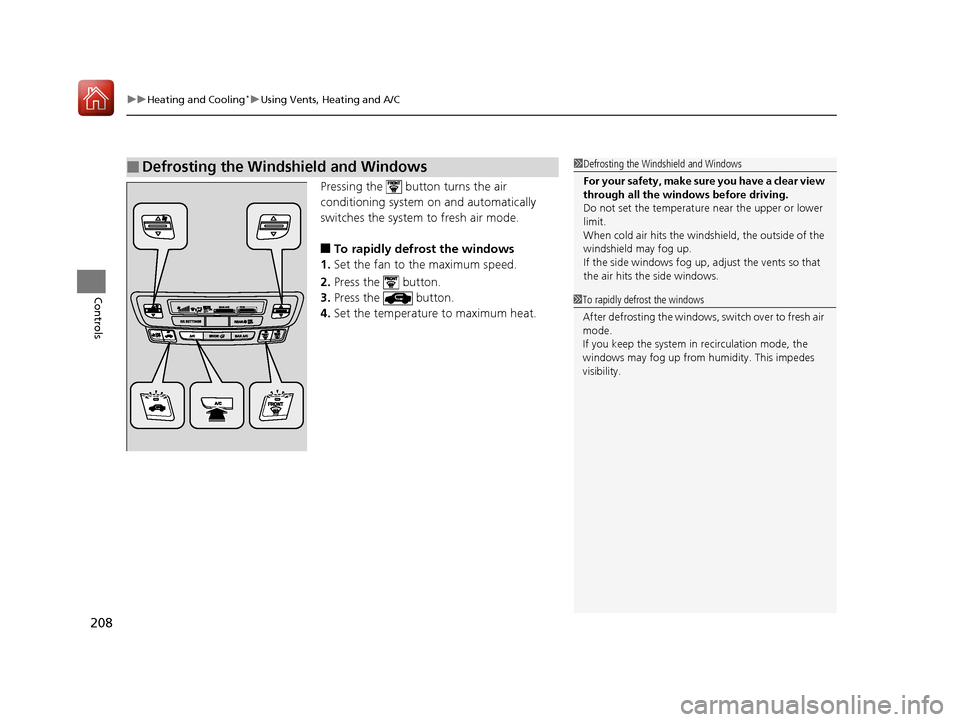
Pressing the button turns the air
conditioning system on and automatically
switches the system to fresh air mode.
■To rapidly defrost the windows
1. Set the fan to the maximum speed.
2. Press the button.
3. Press the button.
4. Set the temperature to maximum heat.
■Defrosting the Windshield and Windows1Defrosting the Windshield and Windows
For your safety, make sure you have a clear view
through all the windows before driving.
Do not set the temperatur e near the upper or lower
limit.
When cold air hits the windshield, the outside of the
windshield may fog up.
If the side windows fog up, adjust the vents so that
the air hits th e side windows.
1To rapidly defrost the windows
After defrosting the windows, switch over to fresh air
mode.
If you keep the system in recirculation mode, the
windows may fog up from humidity. This impedes
visibility.
17 PILOT-31TG76100.book 208 ページ 2016年9月20日 火曜日 午後4時9分
Page 211 of 673

210
Controls
Climate Control System*
Using Automatic Climate Control
The automatic climate control system maintains the interior temperature you select.
The system also selects the proper mix of heated or cooled air that will as quickly as
possible, raise or lower the interior temperature to your preference.
Use the system when the engine is running.
1. Press the AUTO button.
2. Adjust the interior temperature using the driver’s side or passenger’s side
temperature control switch.
3. Press the ON/OFF button to cancel.1Using Automatic Climate Control
If any buttons are presse d while using the climate
control system in auto, the function of the button
that was pressed will take priority.
The AUTO indicator will go off, but functions
unrelated to the button th at was pressed will be
controlled automatically.
During the Auto Idle-stop, the air conditioning
system will be turned off.
To prevent cold air from bl owing in from outside, the
fan may operate at low speed for a while after the
AUTO button has been pressed.
Once you have set the de sired temperature, do not
use the temperature control switches more than
necessary.
Doing so may delay the time it takes to reach the set
temperature.
If the interior is very warm, you can cool it down
more rapidly by partial ly opening the windows,
turning the system on auto, and setting the
temperature to low. Change the fresh mode to
recirculation mode until the temperature cools down.
When you set the temperat ure to the lower or upper
limit, Lo or Hi is displayed.
Pressing the ON/OFF button switches the
climate control system be tween on and off. When
turned on, the system returns to your last selection.
Models with Auto Idle-stop
All models
Floor and
defroster
vents
Floor vents
Dashboard and floor,
and back of the
center console vents
Dashboard and
back of the center
console vents
AUTO Button
Driver’s Side
Temperature
Control Switch
(Recirculation) Button
Fan Control Button A/C (Air Conditioning)
Button
Passenger’s Side
Temperature Control
Switch
(On/Off) Button
(Windshield Defroster)
Button
SYNC (Synchronized) Button
* Not available on all models
17 PILOT-31TG76100.book 210 ページ 2016年9月20日 火曜日 午後4時9分
Page 212 of 673

Continued211
uuClimate Control System*uUsing Automatic Climate Control
Controls
■Switching between the recirc ulation and fresh air modes
Press the button and switch the mode depending on environmental conditions.
Recirculation Mode (indicator on): Recirculates air from the vehicle’s interior through
the system.
Fresh Air Mode (indicator off): Maintains outside ventilation. Keep the system in
fresh air mode in normal situations.
Pressing the button turns the air
conditioner system on and automatically
switches the system to fresh air mode.
Press the button again to turn off, the
system returns to the previous settings.
■Defrosting the Windshield and Windows1Defrosting the Windshield and Windows
For your safety, make sure you have a clear view
through all the windows before driving.
Do not set the temperatur e near the upper or lower
limit.
When cold air hits the windshield, the outside of the
windshield may fog up.
If you press the button during Auto Idle-stop, the
engine restarts automatically.
If the side windows fog up, adjust the vents so that
the air hits th e side windows.
Models with Auto Idle-stop
17 PILOT-31TG76100.book 211 ページ 2016年9月20日 火曜日 午後4時9分
Page 213 of 673
uuClimate Control System*uUsing Automatic Climate Control
212
Controls
■To rapidly defrost the windows
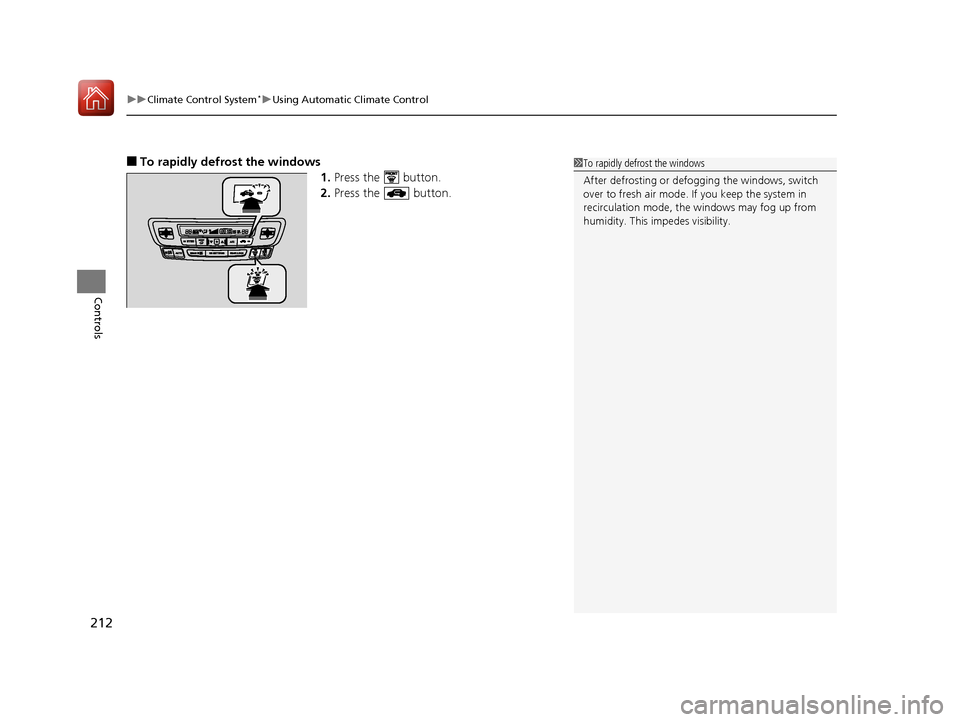
1.Press the button.
2. Press the button.1To rapidly defrost the windows
After defrosting or defogging the windows, switch
over to fresh air mode. If you keep the system in
recirculation mode, the windows may fog up from
humidity. This impedes visibility.
17 PILOT-31TG76100.book 212 ページ 2016年9月20日 火曜日 午後4時9分
Page 264 of 673
263
uuAudio System Basic Operation uVoice Control Operation
Continued
Features
Voice Control Operation
Your vehicle has a voice control syst em that allows hands-free operation.
The voice control system uses the (Tal k) and (hang-up/back) buttons on the
steering wheel and a microphone near the map lights on the ceiling.
To achieve optimum voice recognition when using the voice control system:
• Make sure the correct screen is displa yed for the voice command that you are
using.
• Close the windows and moonroof
*.
• Adjust the dashboard and side vents so air does not blow onto the microphone
on the ceiling.
• Speak clearly in a clear, natural speaking voice without pausing between words.
• Reduce any background noise if possible. The system may misinterpret your
command if more than one person is speaking at the same time.
■Voice Recognition
1Voice Control Operation
When you press the button, a helpful prompt asks
what you would like to do. Press and release the
button again to bypass th is prompt and give a
command.
1 Voice Recognition
The voice control system can only be used from the
driver’s seat because the microphone unit removes
noises from the front passenger’s side.
* Not available on all models
17 PILOT-31TG76100.book 263 ページ 2016年9月20日 火曜日 午後4時9分
Page 350 of 673

349
uuBlu-ray/DVD Rear Entertainment System*uPlayable Discs
Features
Compression video not supported, Compression audio specification are following.
■Recommended Discs
MediaCD-R/CD-RW
DVD-R/DVD-RW
DVD+R/DVD+RW
Disc formatCD-ROM Mode1
CD-ROM Mode2 Form1 DVD-ROM
File formatISO9660 Level 1 & 2Romeo, Joliet
Audio formatMP3WMAAAC
Audio format
specificationMPEG-1 AUDIO LAYER3
MPEG-2 AUDIO LAYER3
MPEG-2.5 AUDIO LAYER3Microsoft Windows Media Audio Ver7,8,9MPEG4-AAC
m4a files created by iTunes (Apple)
Sampling
frequency
[kHz]MPEG-1: 32/44.1/48
MPEG-2: 16/22.05/24
MPEG-2.5: 8/11.025/128/11.025/12/16/22.05/24/ 32/44.1/48
Exceptions not supported by DVD Player:12/24
8/11.025/12/16/22.05/24/
32/44.1/48
Bit rate [kbps]
MPEG1: 32/40/48/56/64/80/96/112/128/160/192/ 224/256/320
MPEG2: 8/16/24/32/40/48/
56/64/80/96/112/128/144/ 160
MPEG2.5: 8/16/24/32/40/
48/56/64/80/96/112/128/ 144/1605/8/16/24/32/40/48/64/80/96/128/160/192/224/256/
320/384
Exceptions not supported by DVD Player: 24/224/3848/16/20/24/28/32/40/48/56/
64/80/96/112/128/160/192/224/256/320/384/448/512/
576
Exceptions not supported by DVD Player: 384/448/512/ 576
File extension.mp3/.MP3.wma/.WMA.m4a/.M4A
1Recommended Discs
Large files may take longer to change audio or fast-
forward/fast-rewind.
Some CD-R/CD-RW/DVD-R/DVD -RW may not be read
due to the discs’ encoding properties. Use discs
recorded with disc-at-once or track-at-once for this
unit.
“AVCHD” and the “AVCHD” logo are trademarks of
Panasonic Corporation and Sony Corporation.
17 PILOT-31TG76100.book 349 ページ 2016年9月20日 火曜日 午後4時9分
Page 391 of 673

390
Features
Bluetooth® HandsFreeLink ®
Bluetooth® HandsFreeLink ® (HFL) allows you to place and receive phone calls using
your vehicle’s audio system, without handling your cell phone.
Using HFL
(Pick-up) button: Press to go directly to the ph one screen or to answer an
incoming call. (Hang-up/Back) button: Press to end a call or to cancel a command.
(Talk) button: Press to call a number with a stored voice tag.
(Phone) button: Press to go directly to the phone screen.
Selector knob: Rotate to select an item on the screen, then press .
■HFL Buttons
1 Using HFL
Place your phone where y ou can get good reception.
To use HFL, you need a Bluetooth-compatible cell
phone. For a list of compatible phones, pairing
procedures, and special fe ature capabilities, visit
www.handsfreelink.honda.com , or call 1-888-528 -
7876.
Voice control tips
•Aim the vents away from the ceiling and close the
windows, as noise coming fr om them may interfere
with the microphone.
•Press and release the button when you want to
call a number using a st ored voice tag. Speak
clearly and naturally after a beep.
•If the microphone picks up vo ices other than yours,
the command may be misinterpreted.
•To change the volume level, use the audio system's
volume knob or the remote audio controls on the
steering wheel.
State or local laws may pr ohibit the operation of
handheld electronic devi ces while operating a
vehicle.
If you receive a call while using the audio system, the
system resumes its operati on after ending the call.
Up to 20 speed dial entries can be stored. If there is
no entry in the system, Speed Dial is disabled. 2 Speed Dial P. 405
Up to 20 call histories can be stored. If there is no call
history, Call History is disabled.
Models with color audio system
Microphone
(Talk) Button
(Hang-up/Back) Button
(Pick-up) Button
Selector Knob
(Phone) Button
Volume up
Volume down
17 PILOT-31TG76100.book 390 ページ 2016年9月20日 火曜日 午後4時9分