2017 HONDA PILOT heating
[x] Cancel search: heatingPage 568 of 673

567
Maintenance
This chapter discusses basic maintenance.
Before Performing MaintenanceInspection and Maintenance ............ 568
Safety When Performing Maintenance ..569
Parts and Fluids Used in Maintenance Service ........................................... 570
Maintenance Minder
TM..................... 571
Maintenance Under the Hood Maintenance Items Under the Hood .. 575
Opening the Hood ........................... 576
Engine Compartment Cover ............. 577
Recommended Engine Oil ................ 578
Oil Check ......................................... 579
Adding Engine Oil ............................ 580
Changing the Engine Oil and Oil Filter ...581 Engine Coolant ................................ 583
Transmission Fluid ............................ 585
Brake Fluid ....................................... 586
Refilling Window Washer Fluid......... 586
Replacing Light Bulbs ....................... 587Checking and Maintaining Wiper Blades... 593Checking and Maintaining Tires
Checking Tires ................................. 597
Tire and Loading Information Label .. 598
Tire Labeling .................................... 598
DOT Tire Quality Grading (U.S. Vehicles).. 600Wear Indicators................................ 602
Tire Service Life ................................ 602 Tire and Wheel Replacement ........... 603
Tire Rotation .................................... 604
Winter Tires ..................................... 605
Battery ............................................... 606
Remote Transmitter Care ................. 608
Remote Control and Wireless Headphone Care
*........................... 609Heating and Cooling System*/Climate
Control System* Maintenance............. 611Cleaning Interior Care .................................... 613
Exterior Care.................................... 615
Accessories and Modifications ........ 618
* Not available on all models
17 PILOT-31TG76100.book 567 ページ 2016年9月20日 火曜日 午後4時9分
Page 598 of 673

597
Maintenance
Checking and Maintaining Tires
Checking Tires
To safely operate your vehicle, your tires must be of the proper type and size, in
good condition with adequate tread, and properly inflated.
■Inflation guidelines
Properly inflated tires provid e the best combination of hand ling, tread life, and comfort.
Refer to the driver’s doorjamb label or spec ification’s page for the specified pressure.
Underinflated tires wear unev enly, adversely affect handling and fuel economy, and
are more likely to fail from overheating.
Overinflated tires make your vehicle ride ha rshly, are more prone to road hazards,
and wear unevenly.
Every day before you drive, look at each of the tires. If one looks lower than the
others, check the pressure with a tire gauge.
At least once a month or before long trips , use a gauge to measure the pressure in
all tires, including the spare. Even tires in good condition can lose 1-2 psi (10-20 kPa,
0.1-0.2 kgf/cm
2) per month.
■Inspection guidelines
Every time you check inflation, also examine the tires and valve stems.
Look for:
• Bumps or bulges on the side or in the tr ead. Replace the tire if you find any cuts,
splits, or cracks in the side of the tire . Replace it if you see fabric or cord.
• Remove any foreign objects and inspect for air leaks.
• Uneven tread wear. Have a deal er check the wheel alignment.
• Excessive tread wear.
2 Wear Indicators P. 602
•Cracks or other damage around valve stem.
1Checking Tires
Measure the air pressure when tires are cold. This
means the vehicle has been parked for at least three
hours, or driven less than 1 mile (1.6 km). If
necessary, add or releas e air until the specified
pressure is reached.
If checked when hot, tire pressure can be as much as
4–6 psi (30–40 kPa, 0.3–0.4 kgf/cm
2) higher than if
checked when cold. 2 Tire Pressure Monitoring System (TPMS)
with Tire Fill Assist P. 535
Have a dealer check the tires if you feel a consistent
vibration while driving. Ne w tires and any that have
been removed and reinst alled should be properly
balanced.
3WARNING
Using tires that are excessively worn or
improperly inflated can cause a crash in
which you can be seriously hurt or killed.
Follow all instruction s in this owner’s
manual regarding tire inflation and
maintenance.
17 PILOT-31TG76100.book 597 ページ 2016年9月20日 火曜日 午後4時9分
Page 612 of 673
611
Maintenance
Heating and Cooling System*/Climate Control System* Maintenance
Air Conditioning
To ensure proper and safe operation, the Society of Automotive Engineers (SAE
J2845) recommends that the refrigerant system only be serviced by trained and
certified technicians.
Never repair or replace the air conditio ning evaporator (cooling coil) with one
removed from a used or salvaged vehicle.
New replacement mobile air conditioning evaporators must be certified (and
labeled) as meeting SAE Standard J2842.1 Heating and Cooling System*/Climate Control System*
Maintenance
NOTICE
Vented refrigerant is harmful to the environment.
To avoid refrigerant from venting, never replace the
evaporator with one re moved from a used or
salvaged vehicle.
Refrigerant in your vehicle’s air conditioning system is
flammable and can be igni ted during servicing if
proper procedures are not followed.
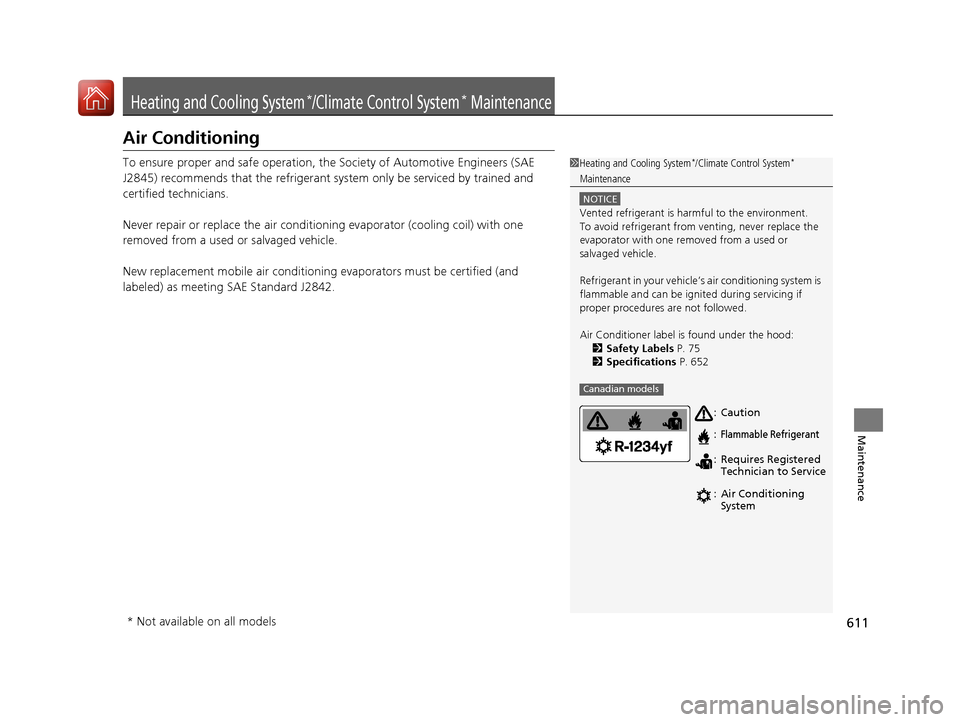
Air Conditioner label is found under the hood: 2 Safety Labels P. 75
2 Specifications P. 652
Canadian models
Caution
Flammable Refrigerant
Requires Registered
Technician to Service
Air Conditioning
System
:
:
:
:
* Not available on all models
17 PILOT-31TG76100.book 611 ページ 2016年9月20日 火曜日 午後4時9分
Page 613 of 673

612
uuHeating and Cooling System*/Climate Control System* Maintenance uDust and Pollen Filter
Maintenance
Dust and Pollen Filter
The climate control system is equipped wi th a dust and pollen filter that collects
pollen, dust, and other debris in the air. The Maintenance MinderTM messages will let
you know when to replace the filter.
We recommend that you replace the dust and pollen filter sooner when using your
vehicle in areas with high concentrations of dust.
1Dust and Pollen Filter
If the airflow from the climate control system
deteriorates noticeably, and the windows fog up
easily, the filter may need to be replaced. Please
contact a dealer for replacement.
17 PILOT-31TG76100.book 612 ページ 2016年9月20日 火曜日 午後4時9分
Page 620 of 673

619
Handling the Unexpected
This chapter explains how to handle unexpected troubles.
ToolsTypes of Tools .................................. 620
If a Tire Goes Flat Changing a Flat Tire ......................... 621
Engine Does Not Start Checking the Engine ........................ 629
If the Smart Entry Remote Battery is Weak .......................................... 630
Emergency Engine Stop ................... 631
Shift Lever Does Not Move*............ 632
Jump Starting .................................... 633 Overheating
How to Handle Overheating............. 636
Indicator, Coming On/Blinking
If the Low Oil Pressure Indicator Comes On ............................................. 638
If the Charging System Indicator Comes
On ................................................. 638
If the Malfunction Indicator Lamp Comes On or Blinks ................................... 639
If the Brake System Indicator (Red) Comes On .................................................... 640
If the Electric Power Steering (EPS) System
Indicator Comes On ............................... 640
If the Low Tire Pressure/Tire Pressure Monitoring System (TPMS) Indicator Comes
On or Blinks........................................ 641
If the Transmission I ndicator Blinks along
with the Warning Message*.......... 641
Fuses
Fuse Locations ................................. 642
Inspecting and Changing Fuses ........ 646
Emergency Towing ........................... 647
When You Cannot Unlock the Fuel Fill Door.. 648
RefuelingRefueling From a Portable Fuel Container .... 649
When You Cannot Open the Tailgate.. 650
* Not available on all models
17 PILOT-31TG76100.book 619 ページ 2016年9月20日 火曜日 午後4時9分
Page 637 of 673

636
Handling the Unexpected
Overheating
How to Handle Overheating
Overheating symptoms are as follows:
•The temperature gauge needle is at the mark or the engine suddenly loses
power.
• Steam or spray comes out of the engine compartment.
■First thing to do
1. Immediately park the vehicle in a safe place.
2. Turn off all accessories and turn on the hazard warning lights.
u No steam or spray present: Keep the engine running and open the hood.
u Steam or spray is present: Turn off the engine and wait until it subsides.
Then, open the hood.
1 How to Handle Overheating
NOTICE
Continuing to drive with the temperature gauge
needle at the mark may damage the engine.
3WARNING
Steam and spray from an overheated
engine can seriously scald you.
Do not open the hood if steam is coming
out.
H
H
17 PILOT-31TG76100.book 636 ページ 2016年9月20日 火曜日 午後4時9分
Page 638 of 673

637
uuOverheating uHow to Handle Overheating
Handling the Unexpected
■Next thing to do
1.Check that the cooling fan is operating and
stop the engine once the temperature
gauge needle goes down.
u If the cooling fan is not operating,
immediately stop the engine.
2. Once the engine has cooled down, inspect
the coolant level and check the cooling
system components for leaks.
u If the coolant level in the reserve tank is
low, remove the engine compartment
cover then add coolant until it reaches
the MAX mark.
2Engine Compartment Cover P. 577
uIf there is no coolant in the reserve tank,
check that the radiator is cool. Cover the
radiator cap with a heavy cloth and open
the cap. If necessary, add coolant up to
the base of the filler neck, and put the
cap back on.
■Last thing to do
Once the engine has cooled sufficiently, re start it and check the temperature gauge.
If the temperature gauge needle has gone dow n, resume driving. If it has not gone
down, contact a dealer for repairs.
1 How to Handle Overheating
If the coolant is leaking, contact a dealer for repairs.
Use water as an emergency/temporary measure only.
Have a dealer flush the system with proper antifreeze
as soon as possible.
3WARNING
Removing the radiator cap while the
engine is hot can cause the coolant to spray
out, seriously scalding you.
Always let the engine and radiator cool
down before removing the radiator cap.
Reserve Tank
MAXMIN
17 PILOT-31TG76100.book 637 ページ 2016年9月20日 火曜日 午後4時9分
Page 664 of 673

Index
663
Index
Index
A
ABS (Anti-lock Brake System).................. 541
AC Power Outlet ...................................... 197
Accessories and Modifications ................ 618
Accessory Power Sockets ......................... 196
Adaptive Cruise Control (ACC) ................ 502
Indicator ................................................... 92
Adaptive Cruise Control (ACC) with Low
Speed Follow (LSF) Indicator ................................................... 92
Additives
Coolant .................................................. 583
Engine Oil ............................................... 578
Washer ................................................... 586
Additives, Engine Oil ............................... 578
Adjusting Armrest .................................................. 186
Front Seats.............................................. 174
Head Restraints ....................... 179, 180, 181
Mirrors.................................................... 172
Rear Seats ............................................... 183
Second Row Seat .................................... 176
Steering Wheel ....................................... 171
Temperature ........................................... 116
Agile Handling Assist System .................. 529
Air Conditioning System (Climate Control System) ...................................... 210
Changing the Mode................................ 211
Defrosting the Windshield and Windows .............................................. 211
Dust and Pollen Filter .............................. 612 Recirculation/Fresh Air Mode ................... 211
Sensor ..................................................... 216
Synchronized Mode ................................. 213
Using Automatic Climate Control ............ 210
Air Conditioning System (Heating and
Cooling System) ...................................... 205
Cooling ................................................... 207
Defrosting the Windshield and
Windows ............................................... 208
Heating ................................................... 206
Air Pressure ....................................... 598, 653
Airbags ........................................................ 45
Advanced Airbags ..................................... 51
After a Collision ......................................... 49
Airbag Care ............................................... 57
Event Data Recorder .................................... 0
Front Airbags (SRS) .................................... 48
Indicator .............................................. 55, 83
Passenger Airbag Off Indicator .................. 56
Sensors ...................................................... 45
Side Airbags .............................................. 52
Side Curtain Airbags .................................. 54
All-wheel drive (AWD) Indicator ............... 89
AM/FM Radio .................................... 231, 267
Android Auto
TM........................................ 306
Anti-lock Brake System (ABS) .................. 541
Indicator .................................................... 83
Apple CarPlay
TM........................................ 303
Armrest ..................................................... 186
Audio Remote Controls ............................ 222
Audio System ............................ 218, 224, 242 Adjusting the Sound........................ 229, 260
AM/FM Radio .................................. 231, 267
Android Auto
TM....................................... 306
Apple CarPlayTM....................................... 303
Audio/Information Screen................ 225, 243
Auxiliary Input Jack.................................. 220
Changing the Home Screen Icon Layout .. 247
Closing Apps ........................................... 257
Display Setup .................................. 230, 261
Error Messages ........................................ 310
General Information ................................ 314
Home Screen........................................... 250
HondaLink ®............................................. 295
How to use Siri ® Eyes Free ....................... 302
iPod ................................................ 233, 281
Limitations for Manual Operation ............ 262
MP3/WMA/AAC ...................... 236, 278, 290
Pandora ®................................................. 288
Playing a CD............................................ 278
Playing Bluetooth ® Audio ................ 239, 293
Playing SiriusXM ® Radio .......................... 271
Reactivating ............................................ 221
Recommended CDs ................................. 315
Remote Controls ..................................... 222
Security Code .......................................... 221
Selecting an Audio Source ....................... 262
Song By Voice
TM (SBV) ............................. 284
Status Area ............................................. 256
Theft Protection ...................................... 221
Updating Apps ........................................ 258
USB Flash Drives ...................... 236, 290, 317
17 PILOT-31TG76100.book 663 ページ 2016年9月20日 火曜日 午後4時9分