Page 214 of 673
213
uuClimate Control System*uSynchronized Mode
Controls
Synchronized Mode
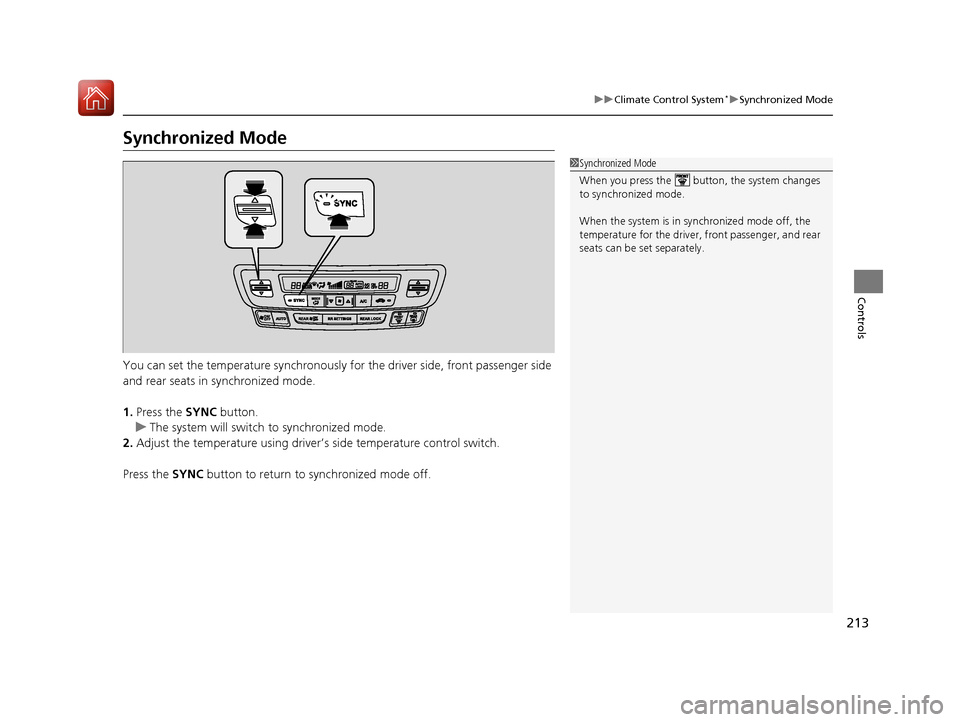
You can set the temperature synchronously for the driver side, front passenger side
and rear seats in synchronized mode.
1. Press the SYNC button.
u The system will switch to synchronized mode.
2. Adjust the temperature using driver’s side temperature control switch.
Press the SYNC button to return to synchronized mode off.
1Synchronized Mode
When you press the button, the system changes
to synchronized mode.
When the system is in synchronized mode off, the
temperature for the driver, front passenger, and rear
seats can be set separately.
17 PILOT-31TG76100.book 213 ページ 2016年9月20日 火曜日 午後4時9分
Page 215 of 673

214
uuClimate Control System*uRear Climate Control System
Controls
Rear Climate Control System
Use the system when the engine is running and the climate control system is
operating.
1. Press the REAR (Rear On/Off) button.
2. Press the RR SETTINGS button.
u The system adjusts the rear climate control system.
3. To turn off the rear climate control system, press the REAR (Rear On/Off)
button.
■Using the Rear Climate Control System From the Front Panel1 Rear Climate Control System
LOCK appears on the rear control panel while the
rear lock is on.
If the rear lock is on while in SYNC mode, the rear
control panel is disabled. LOCK SYNC appears on the
rear control panel.
1 Using the Rear Climate Control System From the Front Panel
Press the REAR LOCK button to turn the rear lock
mode on and off.
While the rear lock mode is on, the rear control panel
is disabled.
u REAR LOCK appears on the display.
REAR LOCK
Button
(Rear On/Off) Button RR SETTINGS Button
17 PILOT-31TG76100.book 214 ページ 2016年9月20日 火曜日 午後4時9分
Page 216 of 673
215
uuClimate Control System*uRear Climate Control System
Controls
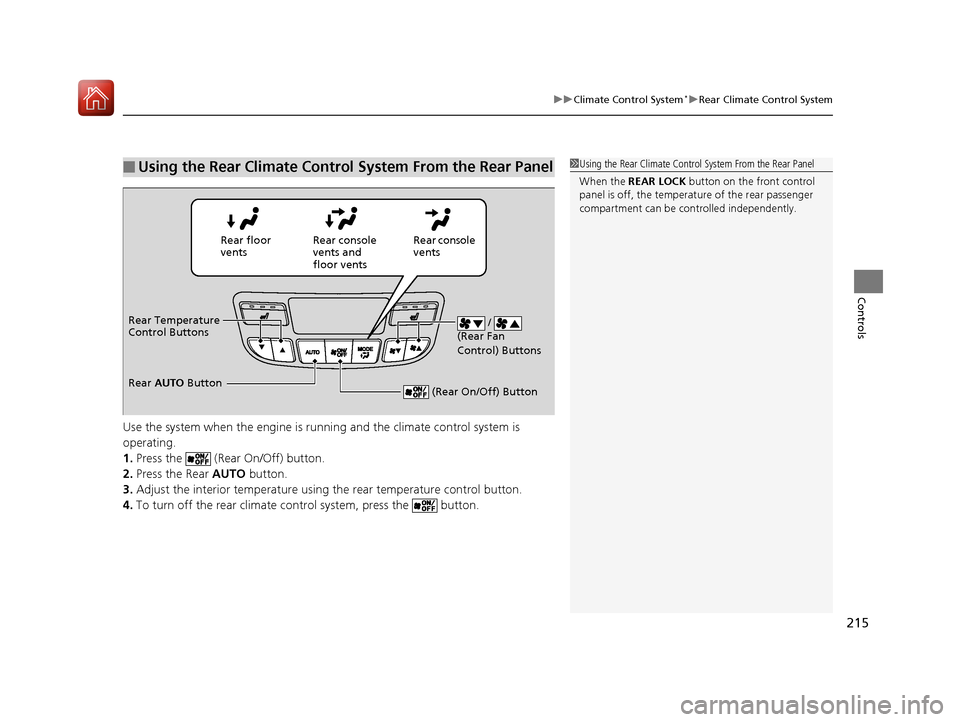
Use the system when the engine is runni ng and the climate control system is
operating.
1. Press the (Rear On/Off) button.
2. Press the Rear AUTO button.
3. Adjust the interior temperature usi ng the rear temperature control button.
4. To turn off the rear climate co ntrol system, press the button.
■Using the Rear Climate Control System From the Rear Panel1Using the Rear Climate Control System From the Rear Panel
When the REAR LOCK button on the front control
panel is off, the temperat ure of the rear passenger
compartment can be cont rolled independently.
Rear floor
ventsRear console
vents and
floor vents Rear console
vents
/
(Rear Fan
Control) Buttons
(Rear On/Off) Button
Rear Temperature
Control Buttons
Rear AUTO Button
17 PILOT-31TG76100.book 215 ページ 2016年9月20日 火曜日 午後4時9分
Page 217 of 673
216
uuClimate Control System*uAutomatic Climate Control Sensors
Controls
Automatic Climate Control Sensors
The automatic climate control system is
equipped with sensors. Do not cover or spill
any liquid on them.
Sensor
Sensor
17 PILOT-31TG76100.book 216 ページ 2016年9月20日 火曜日 午後4時9分
Page 266 of 673

265
uuAudio System Basic Operation uVoice Control Operation
Continued
Features
• Useful Commands
• Phone Commands
• Audio Commands
*
•On Screen Commands
• Music Search Commands*
•General Commands
• Climate Control Commands*
•All Commands
• Voice Settings
• Getting Started
The system accepts these commands on the
voice portal top screen.
• Call
• Call
• What time is it?
• What is today's date?
*1: Models with navigation system
■Useful Commands
The system accepts these commands on the
dedicated screen for the voice recognition
of the phone.
• Call by Number
• Call by Name
• Call
• Call
The system accepts these commands on the
dedicated screen for the voice recognition
of the audio.
■Radio FM Commands
• Radio tune to <87.7-107.9> FM
• Radio tune to <87.7 -107.9> HD <1-8>
FM
• Radio FM preset <1-12>
■Radio AM Commands
• Radio tune to <530-1710> AM
• Radio AM preset <1-6>
■Radio SXM Commands*
•SXM channel <1-999>
• SXM channel
• Radio SXM preset <1-12>
■Phone Commands
■Audio Commands*1
■DISC Commands*
•DISC play
• DISC play track <1-30>
■Pandora Commands*
•Pandora play
■iPod Commands
• iPod play
• iPod play track <1-30>
• Music Search
• What album is this?
• What am I listening to?
■USB Commands
• USB play
• USB play track <1-30>
• Music Search
• What album is this?
• What am I listening to?
■Bluetooth ® audio Commands
• Bluetooth ® audio play
NOTE:
Bluetooth ® Audio commands may not work
on some phones or Bluetooth® Audio
devices.
* Not available on all models
17 PILOT-31TG76100.book 265 ページ 2016年9月20日 火曜日 午後4時9分
Page 267 of 673

266
uuAudio System Basic Operation uVoice Control Operation
Features
■AUX-Audio commands
• AUX audio play
When On Screen Commands is selected,
the explanation screen is displayed.
The system accepts these commands on the
Music Search screen.
■Using Song By Voice
Song By VoiceTM is a feature that allows you
to select music from your iPod or USB device
using Voice Commands. To activate this
mode, you must push the talk switch and
say: “ Music search ”.
■Song By Voice Commands
• What am I listening to?
• Who am I listening to?
• Who is this?
• What's playing?
• Who's playing?
• What album is this?
*1: Models with navigation system
■On Screen Commands
■Music Search Commands*1
■Play Commands
• Play artist
• Play track/song
• Play album
• Play genre/category
• Play playlist
• Play composer
■List Commands
• List artist
• List album
• List genre/category
• List playlist
• List composer
• What time is it?
• What is today's date?
■General Commands
•Climate Control on
• Climate Control off
• Fan Speed <1-7>
• Temperature max heat
• Temperature max cool
• Temperature <57-87> degrees
• Defrost on
• Defrost off
• Air conditioner on
• Air conditioner off
• More
• Climate control automatic
• Vent
• Dash and floor
• Fan speed up
• Fan speed down
• Floor vents
• Floor and defrost
• Temperature up
• Temperature down
NOTE:
These commands toggl e the function on
and off, so the command may not match
your intended action.
■Climate Control Commands*1
17 PILOT-31TG76100.book 266 ページ 2016年9月20日 火曜日 午後4時9分
Page 469 of 673
468
uuTowing a Trailer uTowing Your Vehicle
Driving
• Monitor your temperature gauge. If it nears the red (Hot) mark, turn off the
climate control system and reduce speed. Pull to the side of the road safely to cool
down the engine if necessary.
• Shift to the position if the transmission shifts frequently.
• Change the gear position to
(S position if the transmission shifts frequently.
If the vehicle tires slip when retrieving a boat from the water, keep the transmission
in
(D. This prevents damage to the transmission.
If the vehicle tires slip when retrieving a boat from the water, keep the transmission
in
(D and do not use the sequential shift mode in (S. This prevents damage to the
transmission.
Towing Your Vehicle
Your vehicle is not designed to be towed behind a motor home. If your vehicle needs
to be towed in an emergency, refe r to the emergency towing information.
2Emergency Towing P. 647
■Driving in Hilly Terrain
■Retrieving a Boat
Automatic transmission models with shift lever
D4
Automatic transmission models with electronic gear selector
Automatic transmission models with shift lever
Automatic transmission models with electronic gear selector
17 PILOT-31TG76100.book 468 ページ 2016年9月20日 火曜日 午後4時9分
Page 472 of 673

471Continued
Driving
When Driving
Starting the Engine
1.Depress the brake pedal.
u Make sure the transmission is in
(P.
1. Check that the shift lever is in
(P, then
depress the brake pedal.
u Although it is possible to start the vehicle
in
(N, it is safer to start it in (P.
2. Press the ENGINE START/STOP button
without depressing the accelerator pedal.
The engine will crank until it starts.
1 Starting the Engine
Keep your foot firmly on the brake pedal when
starting the engine.
The engine is harder to st art in cold weather and in
thinner air found at altitudes above 8,000 feet (2,400
meters).
When starting the engine in cold weather, turn off all
electrical accessories such as the lights, climate control
system, and rear defogger in order to reduce battery drain.
If you live in a region where winter is extremely cold,
an engine block heater will improve starting and
warming of the engine. Cons ult a dealer for details.
If the exhaust system sounds abnormal or you can
smell exhaust gas inside the vehicle, have your vehicle
checked by a dealer. There may be a problem with
the engine or exhaust system.
Bring the smart entry remote close to the ENGINE
START/STOP button if the battery in the smart entry
remote is weak. 2 If the Smart Entry Remote Battery is Weak
P. 630
The engine may not start if the smart entry remote is
subjected to strong radio waves.
Do not hold the ENGINE START/STOP button to
start the engine.
If the engine does not start, wait at least 30 seconds
before trying again.
Brake Pedal
Models with electronic gear selector
Models without electronic gear selector
All models
17 PILOT-31TG76100.book 471 ページ 2016年9月20日 火曜日 午後4時9分