2017 HONDA PILOT radio controls
[x] Cancel search: radio controlsPage 233 of 673

uuAudio System Basic Operation uPlaying AM/FM Radio
232
Features
Provides text data information related to your selected RDS capable FM station.
■To find an RDS station from Station List
1. Press while listening to an FM station.
2. Rotate to select the station, then press .
■Update List
Updates your available station list at any time.
1. Press while listening to an FM station.
2. Rotate to select Update List, then press .
■Radio text
Displays the radio text informat ion of the selected RDS station.
1. Press the MENU/CLOCK button.
2. Rotate to select Settings, then press .
3. Rotate to select RDS Settings, then press .
4. Rotate to select Radio Text, then press .
■Scan
Samples each of the strongest stations on the selected band for 10 seconds.
1. Press the MENU/CLOCK button.
2. Rotate to select Scan, then press .
To turn off scan, press .
■Radio Data System (RDS)1 Playing AM/FM Radio
The ST indicator appears on the display indicating
stereo FM broadcasts.
Stereo reproduction in AM is not available.
You can store 6 AM stations and 12 FM stations into
reset button memory. FM1 and FM2 let you store 6
stations each.
Switching the Audio Mode
Press the SOURCE button on the steering wheel.
2 Audio Remote Controls P. 222
1Radio Data System (RDS)
When you select an RDS-capable FM station, the RDS
automatically turns on, and the frequency display
changes to the station name. However, when the
signals of that station become weak, the display
changes from the statio n name to the frequency.
17 PILOT-31TG76100.book 232 ページ 2016年9月20日 火曜日 午後4時9分
Page 269 of 673
uuAudio System Basic Operation uPlaying AM/FM Radio
268
Features
To store a station:
1. Tune to the selected station.
2. Select and hold the preset number for the station you want to store.
You can also store a preset station by the following procedure.
1. Tune to the selected station.
2. Select the open/close ic on to display a list.
3. Select the Preset tab.
4. Select and hold the preset number for the station you want to store.
Lists the strongest stations on the selected band.
1. Select the open/close ic on to display a list.
2. Select the Station List tab.
3. Select the station.
■Manual update
Updates your available station list at any time.
1. Select the open/close ic on to display a list.
2. Select the Station List tab.
3. Select Refresh .
Samples each of the strongest stations on the selected band for 10 seconds. To turn
off scan, select Cancel or .
■Preset Memory
■Station List
■Scan
1Playing AM/FM Radio
If the audio system has the memory capacity, the
tagged song information ca n be stored in it.
Models with HD RadioTM
1Preset Memory
The ST indicator appears on the display indicating
stereo FM broadcasts.
Stereo reproduction in AM is not available.
Switching the Audio Mode
Press the SOURCE button on the steering wheel or
select SOURCE on the screen.
2 Audio Remote Controls P. 222
You can store 6 AM stations and 12 FM stations into
preset memory.
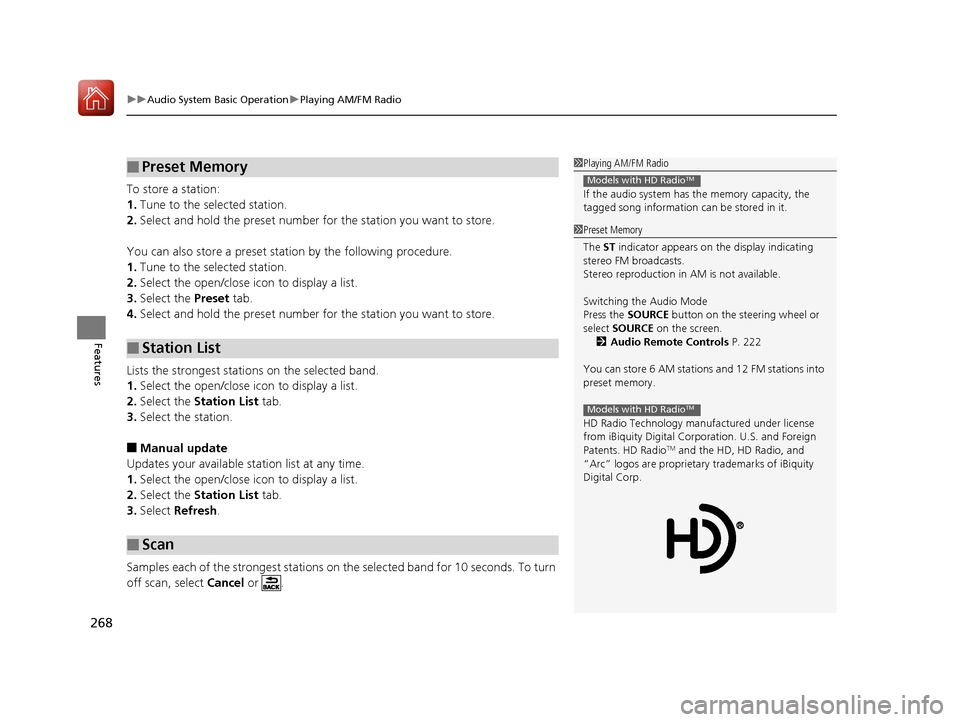
HD Radio Technology manufactured under license
from iBiquity Digital Cor poration. U.S. and Foreign
Patents. HD Radio
TM and the HD, HD Radio, and
“Arc” logos are proprietary trademarks of iBiquity
Digital Corp.
Models with HD RadioTM
17 PILOT-31TG76100.book 268 ページ 2016年9月20日 火曜日 午後4時9分
Page 273 of 673
uuAudio System Basic Operation uPlaying SiriusXM ® Radio*
272
Features
1. Select .
2. Select Tune Mode .
3. Select Channel Mode or Category Mode .
■To Change the Tune Mode1Playing SiriusXM ® Radio*
In the channel mode, all available channels are
selectable. In the categor y mode, you can select a
channel within a ca tegory (Jazz, Rock, Classical, etc.).
There may be instances when SiriusXM ® Radio does
not broadcast all the data fi elds (artist name, title).
This does not indicate a problem with your audio
system.
SiriusXM ® Radio stations load in ascending order,
which can take about a minute. Once they have
loaded you will be able to scroll up or down to make
your selections.
Switching the Audio Mode
Press the SOURCE button on the steering wheel or
select SOURCE on the screen.
2 Audio Remote Controls P. 222
Tune Start:
When you change to a preset channel, a song being
played on that channel restarts from the beginning
with this function. This can be turned on or off from
the Audio settings screen.
2 Customized Features P. 358
* Not available on all models
17 PILOT-31TG76100.book 272 ページ 2016年9月20日 火曜日 午後4時9分
Page 341 of 673

340
uuBlu-ray/DVD Rear Entertainment System*uPlaying Audio
Features
Playing Audio
You can play a USB, iPod, auxiliary video (rear), or auxiliary audio (front) from the
rear seats.
■System Controls
(Power) Button
Press to turn on the system.CH/FOLDER Bar
Press - or + to change the channel or folder.
(Light) Button
Press to illuminate
the buttons and bars
for a few seconds.
TUNE/SKIP Bar
Press or to tune the radi o frequency, change section in
the channel or track.
TITLE/SCROLL Button
Press to switch search mode on SiriusSXM ® mode.
CANCEL Button
Press to go back to the previous display or operation. 3
,4 , , and ENTER Buttons
Use 3, 4 , , or to highlight a menu item, and
press the ENTER button to make a selection.
CATEGORY Bar
Press - or + to change the category. AUX Button
Press to use a USB, iPod, auxiliary video (rear), or auxiliary audio (front).
FM/AM Button
Press to listen to AM or FM radio. SETUP Button
Press to display the setup items. SXM Button
Press to listen to SiriusSXM
® radio.
MENU Button
Press to the display audio menu for AM/FM radio,
SiriusSXM ® radio, or CD
* on the overhead screen.
* Not available on all models
17 PILOT-31TG76100.book 340 ページ 2016年9月20日 火曜日 午後4時9分
Page 342 of 673
Continued341
uuBlu-ray/DVD Rear Entertainment System*uPlaying Audio
Features
To play the AM/FM radio, press the AM/FM button on the remote.
When you press the MENU button on the remote while the radio is playing, the
audio menu appears on the overhead screen.
The available functions are the same as those of the front audio system. The TUNE/
SKIP bar on the remote works the same as the Skip/Seek icons (<>) on the front
touch screen for AM/FM radio operation.
2 Playing AM/FM Radio P. 267
To play the SiriusXM ® radio, press the SXM button on the remote.
When you press the MENU button on the remote while the radio is playing, the
audio menu appears on the overhead screen.
The available functions are the same as those of the front audio system. The TUNE/
SKIP bar on the remote works the same as the Skip/Seek icons (<>) on the front
touch screen for SiriusXM® radio operation.
2 Playing SiriusXM ® Radio* P. 271
To change the mode between ca tegory and channel, press the TITLE/SCROLL
button on the remote for five seconds.
■Playing AM/FM Radio in the Rear
■Playing SiriusXM® Radio in the Rear*
1System Controls
You can operate the Blu-ray/DVD rear entertainment
system on the front display.
* Not available on all models
17 PILOT-31TG76100.book 341 ページ 2016年9月20日 火曜日 午後4時9分
Page 664 of 673

Index
663
Index
Index
A
ABS (Anti-lock Brake System).................. 541
AC Power Outlet ...................................... 197
Accessories and Modifications ................ 618
Accessory Power Sockets ......................... 196
Adaptive Cruise Control (ACC) ................ 502
Indicator ................................................... 92
Adaptive Cruise Control (ACC) with Low
Speed Follow (LSF) Indicator ................................................... 92
Additives
Coolant .................................................. 583
Engine Oil ............................................... 578
Washer ................................................... 586
Additives, Engine Oil ............................... 578
Adjusting Armrest .................................................. 186
Front Seats.............................................. 174
Head Restraints ....................... 179, 180, 181
Mirrors.................................................... 172
Rear Seats ............................................... 183
Second Row Seat .................................... 176
Steering Wheel ....................................... 171
Temperature ........................................... 116
Agile Handling Assist System .................. 529
Air Conditioning System (Climate Control System) ...................................... 210
Changing the Mode................................ 211
Defrosting the Windshield and Windows .............................................. 211
Dust and Pollen Filter .............................. 612 Recirculation/Fresh Air Mode ................... 211
Sensor ..................................................... 216
Synchronized Mode ................................. 213
Using Automatic Climate Control ............ 210
Air Conditioning System (Heating and
Cooling System) ...................................... 205
Cooling ................................................... 207
Defrosting the Windshield and
Windows ............................................... 208
Heating ................................................... 206
Air Pressure ....................................... 598, 653
Airbags ........................................................ 45
Advanced Airbags ..................................... 51
After a Collision ......................................... 49
Airbag Care ............................................... 57
Event Data Recorder .................................... 0
Front Airbags (SRS) .................................... 48
Indicator .............................................. 55, 83
Passenger Airbag Off Indicator .................. 56
Sensors ...................................................... 45
Side Airbags .............................................. 52
Side Curtain Airbags .................................. 54
All-wheel drive (AWD) Indicator ............... 89
AM/FM Radio .................................... 231, 267
Android Auto
TM........................................ 306
Anti-lock Brake System (ABS) .................. 541
Indicator .................................................... 83
Apple CarPlay
TM........................................ 303
Armrest ..................................................... 186
Audio Remote Controls ............................ 222
Audio System ............................ 218, 224, 242 Adjusting the Sound........................ 229, 260
AM/FM Radio .................................. 231, 267
Android Auto
TM....................................... 306
Apple CarPlayTM....................................... 303
Audio/Information Screen................ 225, 243
Auxiliary Input Jack.................................. 220
Changing the Home Screen Icon Layout .. 247
Closing Apps ........................................... 257
Display Setup .................................. 230, 261
Error Messages ........................................ 310
General Information ................................ 314
Home Screen........................................... 250
HondaLink ®............................................. 295
How to use Siri ® Eyes Free ....................... 302
iPod ................................................ 233, 281
Limitations for Manual Operation ............ 262
MP3/WMA/AAC ...................... 236, 278, 290
Pandora ®................................................. 288
Playing a CD............................................ 278
Playing Bluetooth ® Audio ................ 239, 293
Playing SiriusXM ® Radio .......................... 271
Reactivating ............................................ 221
Recommended CDs ................................. 315
Remote Controls ..................................... 222
Security Code .......................................... 221
Selecting an Audio Source ....................... 262
Song By Voice
TM (SBV) ............................. 284
Status Area ............................................. 256
Theft Protection ...................................... 221
Updating Apps ........................................ 258
USB Flash Drives ...................... 236, 290, 317
17 PILOT-31TG76100.book 663 ページ 2016年9月20日 火曜日 午後4時9分
Page 665 of 673

664
Index
USB Port .................................................. 219
Voice Operation....................................... 263
Wallpaper Setup .............................. 227, 248
Wi-Fi Connection ..................................... 300
Audio/Information Screen ................ 225, 243
Authorized Manuals ................................. 661
Auto Door Locking/Unlocking ................. 134
Customize ............................................... 376
Auto High-Beam System .......................... 160
Auto high-beam system Indicator ............. 87
Auto Idle-stop ........................................... 489
OFF Button .............................................. 490
Auto Idle-stop Indicator (Green) ............... 90
Auto Idle-stop System Indicator (Amber) .. 90
Automatic Intermittent Wipers ............... 165
Automatic Lighting .................................. 157
Automatic Transmission ........................... 478
Creeping ................................................. 478
Fluid ........................................................ 585
Kickdown ................................................ 478
Operating the Shift Button....................... 483
Shift Lever Does Not Move....................... 632
Shift Lever Operation ............................... 480
Shifting............................................ 479, 481
Auxiliary Input Jack .................................. 220
Average Fuel Economy ............................. 116B
Back-Up Light........................................... 592
Battery ...................................................... 606
Charging System Indicator................. 79, 638
Jump Starting .......................................... 633
Maintenance (Checking the Battery) ........ 606
Belts (Seat) .................................................. 37
Beverage Holders ..................................... 194
Blind spot information (BSI) System ........ 530
Indicator.................................................... 94
Bluetooth® Audio............................. 239, 293
Bluetooth® HandsFreeLink ®............. 390, 415
Blu-ray/DVD Rear Entertainment System ..................................................... 322
Audio Sources for Front and Rear Seats ... 343
Auxiliary Console Panel ........................... 323
DVD or Blu-ray
TM Player Error Messages ... 350
Front Control Panel Operation ................. 336
HDMI
TM Port ............................................ 324
Initial Settings.......................................... 334
Operating the Blu-ray/DVD rear entertainment system ............................ 336
Operating the System .............................. 325
Overhead Screen ..................................... 325
Playable Disc Region Codes ..................... 348
Playable Disc Types .................................. 348
Playable Discs .......................................... 344
Playing a Disc in the Rear......................... 342
Playing a DVD/Blu-ray
TM........................... 326
Playing AM/FM Radio in the Rear............. 341 Playing an iPod and a USB Flash Drive in
the Rear ................................................ 342
Playing Audio.......................................... 340
Playing SiriusXM ® Radio in the Rear ........ 341
Rear DVD or Blu-ray
TM Menu ................... 327
Rear System Setup .................................. 337
Recommended Discs ............................... 349
Screen and Surround Settings ................. 330
Selecting the Audio S ource using Front
Control Panel ........................................ 336
Setting the DVD or Blu-ray
TM Menu ......... 338
System Controls .............................. 326, 340
USB Ports ................................................ 324
Wireless Headphones .............................. 322
Booster Seats (For Children) ...................... 73
Brake System ............................................ 539
Anti-lock Brake System (ABS) .................. 541
Brake Assist System................................. 542
Brake System Indicator .............................. 78
Fluid ....................................................... 586
Foot Brake .............................................. 540
Indicator ........................................... 78, 640
Parking Brake.......................................... 539
Brake System (Amber) Indicator ................................................... 78
Brake System (Red) Indicator ........................................... 78, 640
Brightness Control (Instrument Panel) ... 167
Bulb Replacement .................................... 587
Back-Up Light ......................................... 592
Brake Light and Turn Signal Light ............ 591
17 PILOT-31TG76100.book 664 ページ 2016年9月20日 火曜日 午後4時9分
Page 666 of 673

665
Index
Daytime Running Light............................ 589
Headlights .............................................. 587
High-Mount Brake Light.......................... 592
Rear License Plate Light ........................... 592
Side Turn Signal/Emergency Indicator Light ..................................................... 590
Taillight and Rear Side Marker Light ........ 591
Bulb Specifications ................................... 652
C
Car Wash Mode........................................ 485
Carbon Monoxide Gas ............................... 74
Carrying Cargo ................................. 453, 455
CD Player .................................................. 278
Certification Label ................................... 654
Changing Bulbs ........................................ 587
Charging System Indicator ................ 79, 638
Child Safety ................................................ 58
Childproof Door Locks ............................ 133
Child Seat ................................................... 58
Booster Seats ............................................ 73
Child Seat for Infants ................................ 60
Child Seat for Small Children .................... 61
Installing a Child Seat with a Lap/Shoulder
Seat Belt ................................................. 67
Larger Children ......................................... 72
Rear-facing Child Seat............................... 60
Selecting a Child Seat ............................... 62
Childproof Door Locks ............................. 133
Cleaning the Exterior ............................... 615 Cleaning the Interior
................................ 613
Client Service Information ....................... 662
Climate Control System ............................ 210
Changing the Mode ................................ 210
Defrosting the Windshield and
Windows ............................................... 211
Dust and Pollen Filter ............................... 612
Recirculation and Fresh Air Mode ............ 211
Sensors .................................................... 216
Synchronized Mode ................................. 213
Using Automatic Climate Control ............ 210
Clock .......................................................... 120
Coat Hook ................................................. 198
Collision Mitigation Braking System
TM
(CMBSTM) .................................................. 543
Collision Mitigation Braking SystemTM
(CMBSTM)
Indicator .............................................. 95, 96
Compact Spare Tire .......................... 621, 653
Compass .................................................... 448
Console Compartment ............................. 191
Controls ..................................................... 119
Coolant (Engine) ....................................... 583
Adding to the Radiator ............................ 584
Adding to the Reserve Tank ..................... 583
Overheating ............................................ 636
Creeping (Automatic Transmission) ........ 478
Cross Traffic Monitor ................................ 557
Cruise Control ........................................... 497
CRUISE CONTROL Indicator ....................... 88
CRUISE MAIN Indicator .............................. 88 Indicator.................................................... 88
Cup Holders .............................................. 194
Customized Features ................................ 351
D
Daytime Running Lights .......................... 163
Dead Battery ............................................. 633
Defaulting All the Settings ...................... 386
Defrosting the Windshield and
Windows ......................................... 208, 211
Detachable Anchor .................................... 42
Devices that Emit Radio Waves ............... 655
Dimming Headlights ............................................... 156
Rearview Mirror....................................... 172
Dipstick (Engine Oil) ................................. 579
Directional Signals (Turn Signal) ............. 155
Display Button .......................................... 243
Door Mirrors ............................................. 173
Doors ......................................................... 121
Auto Door Locking .................................. 134
Auto Door Unlocking .............................. 134
Door Open Message.................................. 36
Keys ........................................................ 121
Locking/Unlocking the Doors from the Inside .............................................. 15, 131
Locking/Unlocking the Doors from the Outside ................................................. 124
Lockout Prevention System ...................... 130
DOT Tire Quality Grading ........................ 600
17 PILOT-31TG76100.book 665 ページ 2016年9月20日 火曜日 午後4時9分