Page 607 of 673

606
Maintenance
Battery
Checking the Battery
The battery condition is being monitored by the sensor on the negative terminal.
If there is a problem with the sensor, the warning message on MID will let you know.
Have your vehicle checked by a dealer.
If your vehicle’s battery is disconnected or goes dead:
• The audio system is disabled.
2 Audio System Theft Protection P. 221
•The clock resets.
2 Clock P. 120
Charging the Battery
Disconnect both battery cables to prevent da maging your vehicle’s electrical system.
Always disconnect the negative (–) cable first, and reconnect it last.
1 Battery
WARNING: Battery post, terminals,
and related accessories contain lead
and lead compounds.
Wash your hands after handling.
When you find corrosion, cl ean the battery terminals
by applying a baking powder and water solution.
Clean the terminals with a damp towel. Cloth/towel
dry the battery. Coat the terminals with grease to
help prevent future corrosion.
When replacing the battery, the replacement must be
of the same specifications.
Please consult a dealer for more information.
3WARNING
The battery gives off explosive hydrogen
gas during normal operation.
A spark or flame can cause the battery to
explode with enough force to kill or
seriously hurt you.
When conducting any battery
maintenance, wear prot ective clothing and
a face shield, or have a skilled technician do
it.
17 PILOT-31TG76100.book 606 ページ 2016年9月20日 火曜日 午後4時9分
Page 615 of 673
uuCleaning uInterior Care
614
Maintenance
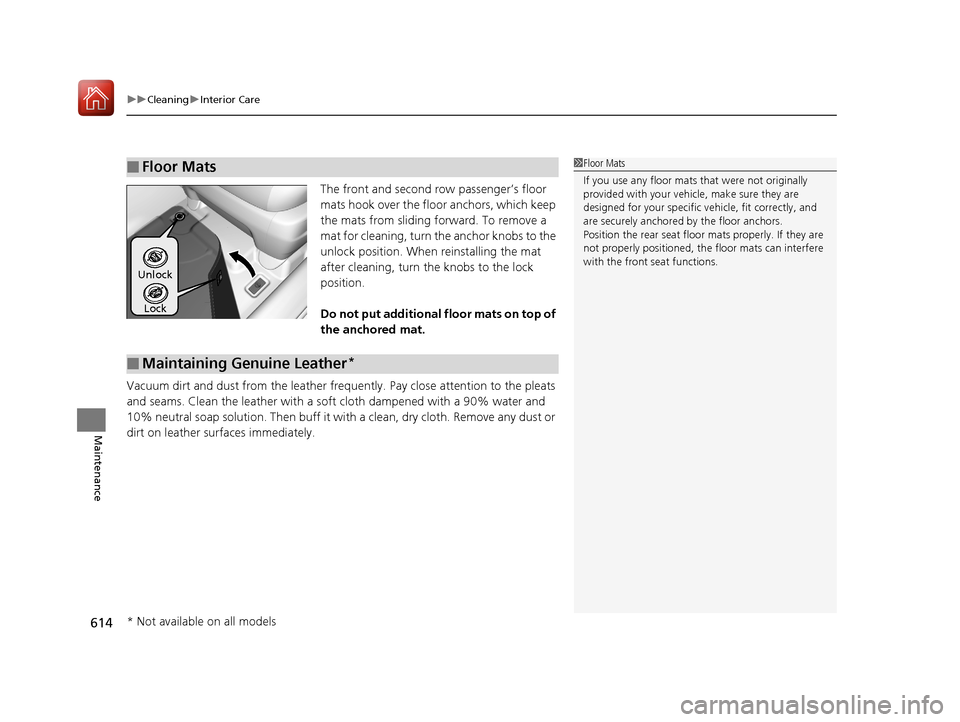
The front and second row passenger’s floor
mats hook over the fl oor anchors, which keep
the mats from sliding forward. To remove a
mat for cleaning, turn th e anchor knobs to the
unlock position. When reinstalling the mat
after cleaning, turn the knobs to the lock
position.
Do not put additional floor mats on top of
the anchored mat.
Vacuum dirt and dust from the leather freq uently. Pay close attention to the pleats
and seams. Clean the leather with a so ft cloth dampened with a 90% water and
10% neutral soap solution. Then buff it with a clean, dry cloth. Remove any dust or
dirt on leather surfaces immediately.
■Floor Mats1 Floor Mats
If you use any floor mats that were not originally
provided with your vehicle, make sure they are
designed for your specific ve hicle, fit correctly, and
are securely anchored by the floor anchors.
Position the rear seat floor mats properly. If they are
not properly positioned, the floor mats can interfere
with the front seat functions.
Lock
Unlock
■Maintaining Genuine Leather*
* Not available on all models
17 PILOT-31TG76100.book 614 ページ 2016年9月20日 火曜日 午後4時9分
Page 620 of 673

619
Handling the Unexpected
This chapter explains how to handle unexpected troubles.
ToolsTypes of Tools .................................. 620
If a Tire Goes Flat Changing a Flat Tire ......................... 621
Engine Does Not Start Checking the Engine ........................ 629
If the Smart Entry Remote Battery is Weak .......................................... 630
Emergency Engine Stop ................... 631
Shift Lever Does Not Move*............ 632
Jump Starting .................................... 633 Overheating
How to Handle Overheating............. 636
Indicator, Coming On/Blinking
If the Low Oil Pressure Indicator Comes On ............................................. 638
If the Charging System Indicator Comes
On ................................................. 638
If the Malfunction Indicator Lamp Comes On or Blinks ................................... 639
If the Brake System Indicator (Red) Comes On .................................................... 640
If the Electric Power Steering (EPS) System
Indicator Comes On ............................... 640
If the Low Tire Pressure/Tire Pressure Monitoring System (TPMS) Indicator Comes
On or Blinks........................................ 641
If the Transmission I ndicator Blinks along
with the Warning Message*.......... 641
Fuses
Fuse Locations ................................. 642
Inspecting and Changing Fuses ........ 646
Emergency Towing ........................... 647
When You Cannot Unlock the Fuel Fill Door.. 648
RefuelingRefueling From a Portable Fuel Container .... 649
When You Cannot Open the Tailgate.. 650
* Not available on all models
17 PILOT-31TG76100.book 619 ページ 2016年9月20日 火曜日 午後4時9分
Page 622 of 673
621Continued
Handling the Unexpected
If a Tire Goes Flat
Changing a Flat Tire
If a tire goes flat while driving, grasp the steering wheel firmly, and brake gradually
to reduce speed. Then, stop in a safe plac e. Replace the flat tire with a compact
spare tire. Go to a dealer as soon as possib le to have the full-size tire repaired or
replaced.
1. Park the vehicle on firm, level, non-slip pery surface and apply the parking brake.
2. Change the gear position to
(P.
3. Turn on the hazard warning lights an d set the power mode to VEHICLE OFF
(LOCK).
1 Changing a Flat Tire
Periodically check the tire pressure of the compact
spare. It should be set to the specified pressure.
Specified Pressure: 60 psi (420 kPa, 4.2 kgf/cm
2)
When driving with the compact spare tire, keep the
vehicle speed under 50 mph (80 km/h). Replace with
a full-size tire as soon as possible.
The compact spare tire and wheel in your vehicle are
specifically for this model. Do not use them with
another vehicle. Do not us e another type of compact
spare tire or wheel with your vehicle.
Do not mount tire chains on a compact spare tire.
If a chain-mounted front tire goes flat, remove one of
the full-size rear tires and replace it with the compact
spare tire. Remove the flat front tire and replace it
with the full-size tire that was removed from the rear.
Mount the tire chains on the front tire.
Do not use a puncture-repairi ng agent on a flat tire,
as it can damage the tire pressure sensor.
17 PILOT-31TG76100.book 621 ページ 2016年9月20日 火曜日 午後4時9分
Page 625 of 673
624
uuIf a Tire Goes Flat uChanging a Flat Tire
Handling the Unexpected
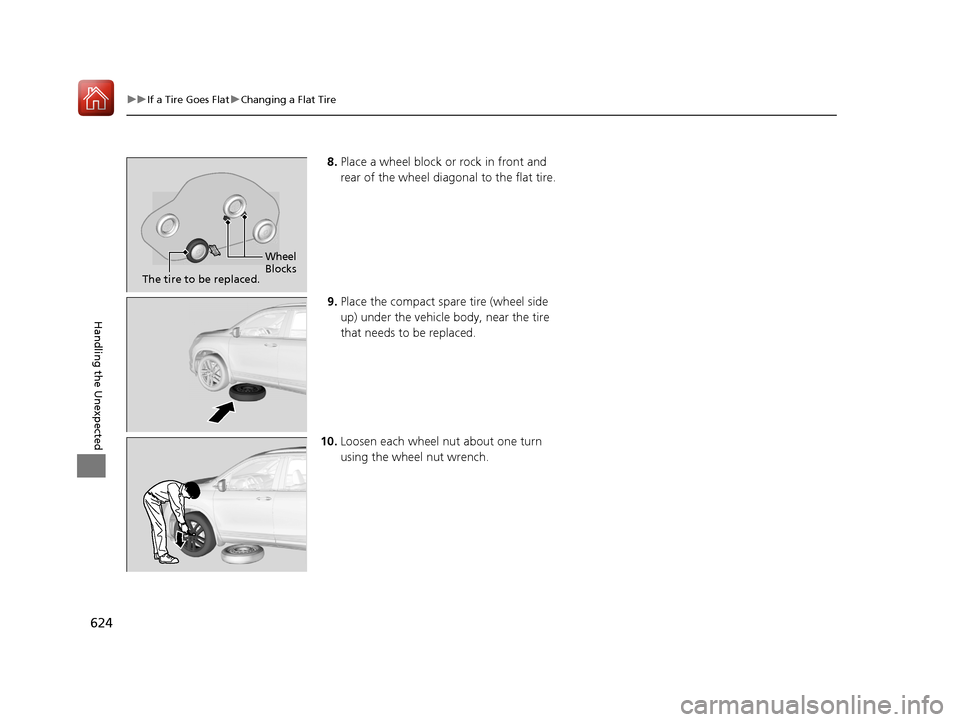
8. Place a wheel block or rock in front and
rear of the wheel diagonal to the flat tire.
9. Place the compact spare tire (wheel side
up) under the vehicle body, near the tire
that needs to be replaced.
10. Loosen each wheel nut about one turn
using the wheel nut wrench.
Wheel
Blocks
The tire to be replaced.
17 PILOT-31TG76100.book 624 ページ 2016年9月20日 火曜日 午後4時9分
Page 628 of 673
Continued627
uuIf a Tire Goes Flat uChanging a Flat Tire
Handling the Unexpected
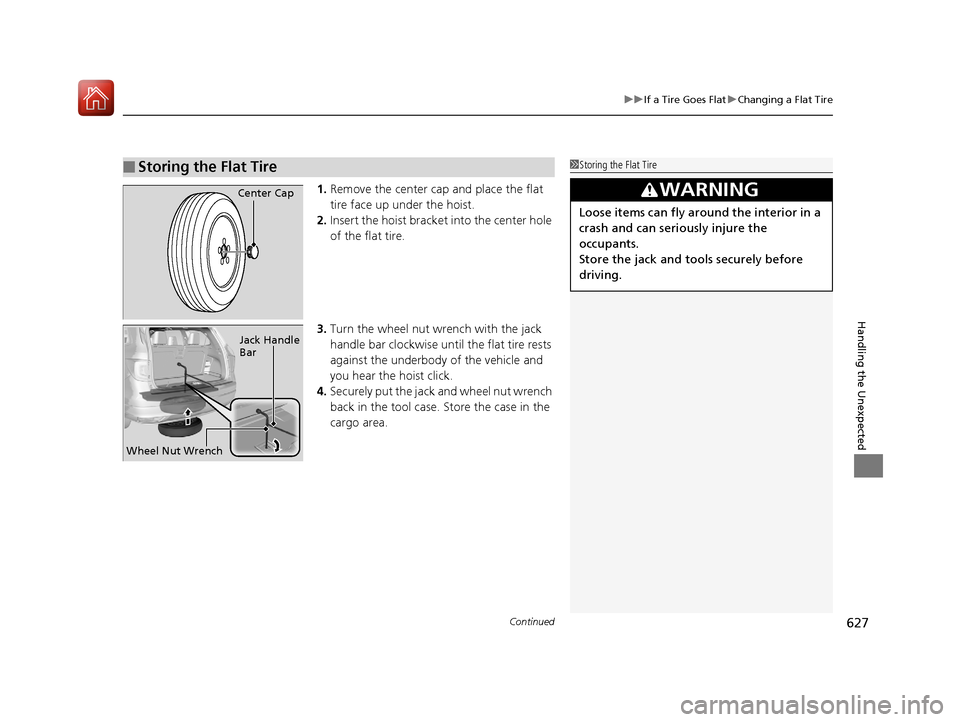
1. Remove the center cap and place the flat
tire face up under the hoist.
2. Insert the hoist bracke t into the center hole
of the flat tire.
3. Turn the wheel nut wrench with the jack
handle bar clockwise until the flat tire rests
against the underbody of the vehicle and
you hear the hoist click.
4. Securely put the jack and wheel nut wrench
back in the tool case. Store the case in the
cargo area.
■Storing the Flat Tire1Storing the Flat Tire
3WARNING
Loose items can fly around the interior in a
crash and can seriously injure the
occupants.
Store the jack and tools securely before
driving.
Center Cap
Wheel Nut Wrench Jack Handle
Bar
17 PILOT-31TG76100.book 627 ページ 2016年9月20日 火曜日 午後4時9分
Page 632 of 673

631
uuEngine Does Not Start uEmergency Engine Stop
Handling the Unexpected
Emergency Engine Stop
The ENGINE START/STOP button may be used to stop the engine due to an
emergency situation even while driving. If you must stop the engine, do either of the
following operations:
• Press and hold the ENGINE START/STOP button for about two seconds.
• Firmly press the ENGINE START/STOP button twice.
The steering wheel will not lock. However, because turning off the engine disables
the power assist the engine provides to the steering and braking systems, it will
require significantly more physical effort an d time to steer and slow the vehicle. Use
both feet on the brake pedal to slow down the vehicle and stop immediately in a
safe place.
The gear position auto matically changes to
(P after the vehicle comes to a complete
stop. Then, the power mode changes to VEHICLE OFF.
The gear position auto matically changes to
(P after the vehicle comes to a complete
stop. Then press the ENGINE START/STOP button twice without depressing the
brake pedal to change the mode VEHICLE OFF.
The power mode is in ACCESSORY when the engine is stopped.
To change the mode to VEHICLE OF F, change the gear position to
(P after the
vehicle comes to a complete stop.
Then press the ENGINE START/STOP button twice without depressing the brake
pedal.
1 Emergency Engine Stop
Do not press the button while driving unless it is
absolutely necessary for th e engine to be switched
off.
Automatic transmission models with electronic gear selector for U.S. models
Automatic transmission models with elec tronic gear selector for Canadian models
Automatic transmission models with shift lever
Automatic transmission models with shift lever for Canadian models
17 PILOT-31TG76100.book 631 ページ 2016年9月20日 火曜日 午後4時9分
Page 633 of 673
632
Handling the Unexpected
Shift Lever Does Not Move*
Follow the procedure below if you cannot move the shift lever out of the (P
position.
1.Set the parking brake.
2. Remove the built-in key from the smart
entry remote.
3. Open the lid of the console compartment.
4. Wrap a cloth around the tip of a small flat-
tip screwdriver. Put it into the shift lock
release slot as shown in the image, and
remove the cover.
5. Insert the key into the sh ift lock release slot.
6. While pushing the key down, press the shift
lever release button and place the shift lever
into
(N.
u The lock is now released. Have the shift
lever checked by a dealer as soon as
possible.
■Releasing the Lock
Cover
Release
Button
Shift Lock
Release Slot
* Not available on all models
17 PILOT-31TG76100.book 632 ページ 2016年9月20日 火曜日 午後4時9分