Page 315 of 673

314
Features
General Information on the Audio System
SiriusXM® Radio Service*
1. You need your radio ID ready before regist ering for subscription. To see the ID in
the screen, select Channel to 0.
2. Have your radio ID ready, and either call or visit the SiriusXM® website to
subscribe.
Switch to the SiriusXM ® mode by using the SOURCE button on the steering wheel,
or through the audio/information screen, and stay in this mode for about 30
minutes until the service is activated. Make sure your vehicle is in an open area with
good reception.
Channel Not Subscribed:
You are not subscribed to the channel selected.
Subscription Update:
SiriusXM ® radio is receiving information update from the network.
Channel Not Available:
No such channel exits, or the artist or title information is unavailable.
No Signal:
The signal is too weak in the current location.
Antenna Disconnected:
The SiriusXM ® antenna is disconnected. Contact a dealer.
■Subscribing to SiriusXM ® Radio
■Receiving SiriusXM® Radio
■SiriusXM® Radio Display Messages
1 Subscribing to SiriusXM ® Radio
Contact Information for SiriusXM ® Radio:
•US: SiriusXM ® Radio at www.siriusxm.com or 1-
800-852-9696
•Canada: SiriusXM ® Canada at www.siriusxm.ca, or
1-877-209-0079
1 Receiving SiriusXM ® Radio
The SiriusXM ® satellites are in orbit over the equator;
therefore, objects south of the vehicle may cause
satellite reception interruptions. Sa tellite signals are
more likely to be blocked by tall buildings and
mountains the farther north you travel from the
equator.
You may experience rece ption problems under the
following circumstances:
•In a location with an obstruction to the south of
your vehicle.
•In tunnels
•On the lower level of a multi-tiered road•Large items carried on the roof rack
* Not available on all models
17 PILOT-31TG76100.book 314 ページ 2016年9月20日 火曜日 午後4時9分
Page 316 of 673
315
uuGeneral Information on the Audio System uRecommended CD*
Continued
Features
Recommended CD*
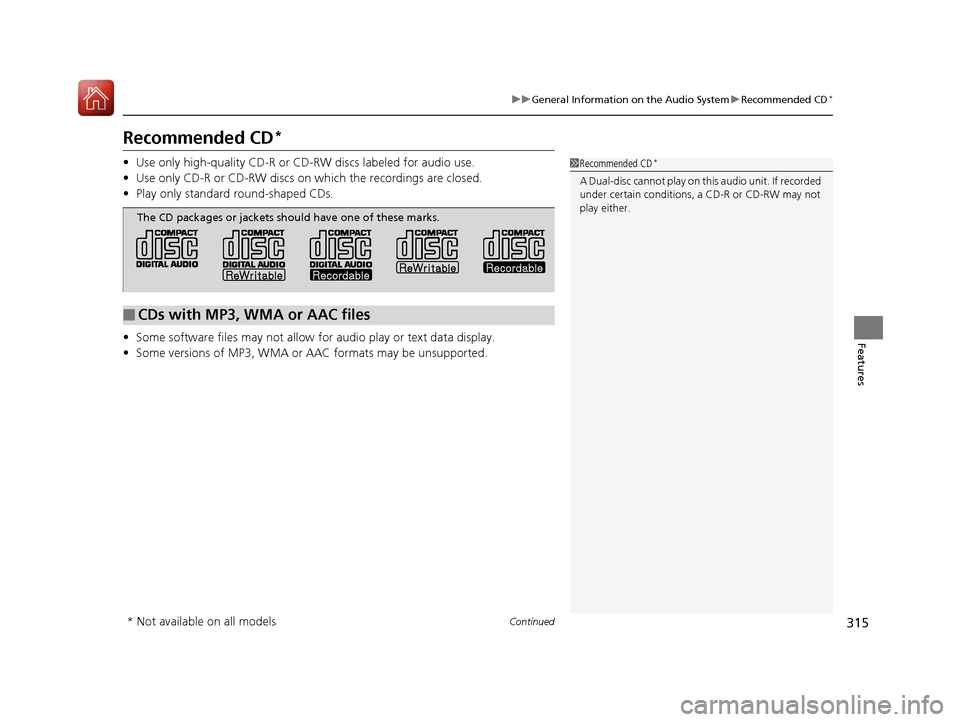
• Use only high-quality CD-R or CD-RW discs labeled for audio use.
• Use only CD-R or CD-RW discs on wh ich the recordings are closed.
• Play only standard round-shaped CDs.
• Some software files may not allow for audio play or text data display.
• Some versions of MP3, WMA or AAC formats may be unsupported.1Recommended CD*
A Dual-disc cannot play on th is audio unit. If recorded
under certain conditions, a CD-R or CD-RW may not
play either.
■CDs with MP3, WMA or AAC files
The CD packages or jackets should have one of these marks.
* Not available on all models
17 PILOT-31TG76100.book 315 ページ 2016年9月20日 火曜日 午後4時9分
Page 318 of 673
317
uuGeneral Information on the Audio System uCompatible iPod, iPhone, and USB Flash Drives
Features
Compatible iPod, iPhone , and USB Flash Drives
*1: Models with Display Audio
•A USB flash drive of 256 MB or higher is recommended.
• Some digital audio players may not be compatible.
• Some USB flash drives (e.g., a device with security lockout) may not work.
• Some software files may not allow for audio play or text data display.
• Some versions of MP3, WMA, or AAC formats may be unsupported.
■iPod and iPhone Model Compatibility
Model
iPod (5th generation)
iPod classic 80GB/160GB (launch in 2007)
iPod classic 120GB (launch in 2008)
iPod classic 160GB (launch in 2009)
iPod nano (1st to 7th generation) launch in 2010
iPod touch (1st to 4th generation) launch in 2010
iPhone 3G/iPhone 3GS/iPhone 4/iPhone 4s/iPhone 5/iPhone 5c*1/iPhone 5s*1/
iPhone 6*1/iPhone 6 Plus*1/iPhone 6s*1/iPhone 6s Plus*1
■USB Flash Drives
1 iPod and iPhone Model Compatibility
This system may not work with all software versions
of these devices.
1USB Flash Drives
Files on the USB flash drive are played in their stored
order. This order may be different from the order
displayed on your PC or device.
17 PILOT-31TG76100.book 317 ページ 2016年9月20日 火曜日 午後4時9分
Page 319 of 673
318
uuGeneral Information on the Audio System uLegal Information on Apple CarPlayTM/Android AutoTM
Features
Models with Display Audio
Legal Information on Apple CarPlayTM/Android AutoTM
USE OF APPLE CARPLAY IS SUBJECT TO YOUR AGREEMENT TO THE CARPLAY TERMS OF USE, WHICH ARE INCLUDED AS PART OF THE
APPLE iOS TERMS OF USE. IN SUMMARY, THE CARPLAY TERMS OF USE DISCLAIM APPLE AND I TS SERVICE PROVIDERS’ LIABILITY IF THE
SERVICES FAIL TO PERFORM CORRECTLY OR ARE DISCONTINUED, STRICTLY LIMIT APPLE AND ITS SERVICE PROVIDERS’ OTHER
LIABILITIES, DESCRIBE THE KINDS OF USER INFORMATION (INCLUDING, FOR EXAMPLE, VE HICLE LOCATION, VEHICLE SPEED, AND
VEHICLE STATUS) BEING GATHERED AND STORED BY APPLE AND I TS SERVICE PROVIDERS, AND DISCLOSE CERTAIN POSSIBLE RISKS
ASSOCIATED WITH THE USE OF CARPLAY, INCLUDING THE POTENTI AL FOR DRIVER DISTRACTION. SEE APPLE’S PRIVACY POLICY FOR
DETAILS REGARDING APPLE'S USE AND HANDLING OF DATA UPLOADED BY CARPLAY.
USE OF ANDROID AUTO IS SUBJECT TO YOUR AGREEMENT TO THE ANDROID AUTO TERMS OF USE WHICH MUST BE AGREED TO WHEN
THE ANDROID AUTO APPLICATION IS DOWNLOADED TO YOUR ANDROI D PHONE. IN SUMMARY, THE ANDROID AUTO TERMS OF USE
DISCLAIM GOOGLE AND ITS SERVICE PROVIDERS’ LIABILITY IF THE SERVICES FAIL TO PERFORM CORRECTLY OR ARE DISCONTINUED,
STRICTLY LIMIT GOOGLE AND ITS SERVICE PROVIDERS’ OTHER LIABILIT IES, DESCRIBE THE KINDS OF USER INFORMATION (INCLUDING,
FOR EXAMPLE, VEHICLE LOCATION, VEHICLE SPEED, AND VEHI CLE STATUS) BEING GATHERED AND STORED BY GOOGLE AND ITS
SERVICE PROVIDERS, AND DISCLOSE CERT AIN POSSIBLE RISKS ASSOCIATED WITH TH E USE OF ANDROID AUTO, INCLUDING THE
POTENTIAL FOR DRIVER DISTRACTION. SEE GOOGLE’S PRIVACY POLICY FOR DETAIL S REGARDING GOOGLE’S USE AND HANDLING OF
DATA UPLOADED BY ANDROID AUTO.
■OWNER’S MANUAL LICENSE/LIABILITY STATEMENTS
17 PILOT-31TG76100.book 318 ページ 2016年9月20日 火曜日 午後4時9分
Page 321 of 673
320
uuGeneral Information on the Audio System uAbout Open Source Licenses
Features
About Open Source Licenses
To see the open source license information, follow these steps.
1. Select .
2. Select Settings .
3. Select System , then open the Others tab.
4. Select Detail Information .
5. Select About device.
6. Select Legal information .
7. Select Open source licenses .
Models with Display Audio
17 PILOT-31TG76100.book 320 ページ 2016年9月20日 火曜日 午後4時9分
Page 327 of 673
326
uuBlu-ray/DVD Rear Entertainment System*uPlaying a DVD/Blu-rayTM*
Features
Playing a DVD/Blu-rayTM*
To play a DVD or Blu-rayTM *, insert a DVD or Blu-rayTM * into the lower slot of the
front audio system, and press the REAR button.
u The system automatically starts the DVD or Blu-ray
TM *. DVD or Blu-rayTM * is
available for the rear seat passenger only.
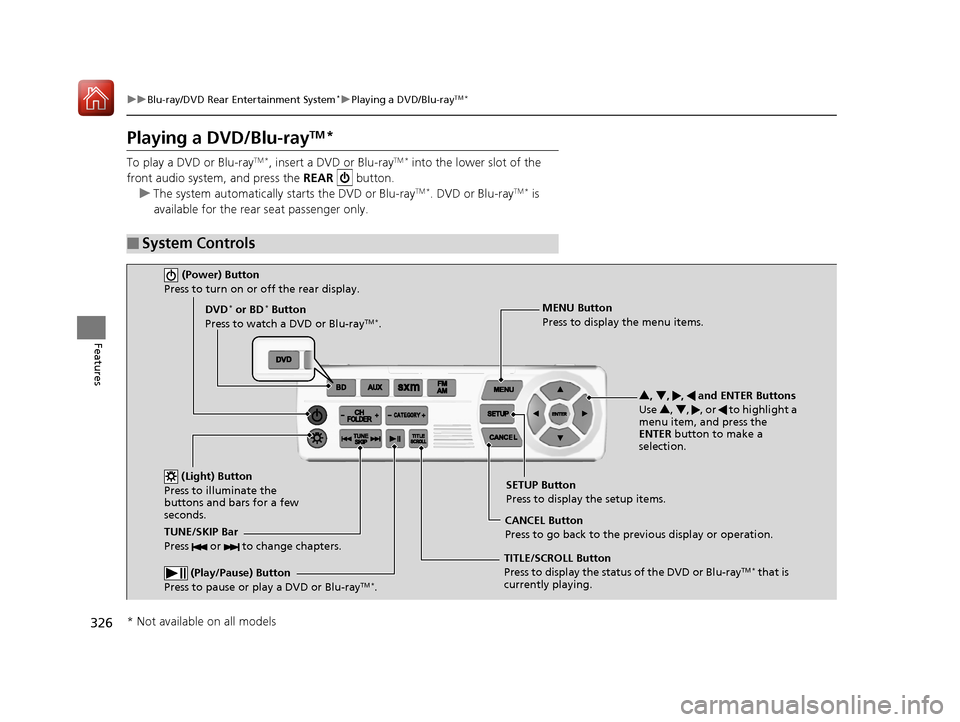
■System Controls
(Power) Button
Press to turn on or off the rear display.
DVD* or BD* Button
Press to watch a DVD or Blu-rayTM *.
(Light) Button
Press to illuminate the
buttons and bars for a few
seconds.
TUNE/SKIP Bar
Press or to change chapters.
(Play/Pause) Button
Press to pause or play a DVD or Blu-rayTM *.
TITLE/SCROLL Button
Press to display the status of the DVD or Blu-rayTM * that is
currently playing. MENU Button
Press to display the menu items.
SETUP Button
Press to display the setup items.
CANCEL Button
Press to go back to the previous display or operation. 3
, 4 , , and ENTER Buttons
Use 3, 4 , , or to highlight a
menu item, and press the
ENTER button to make a
selection.
* Not available on all models
17 PILOT-31TG76100.book 326 ページ 2016年9月20日 火曜日 午後4時9分
Page 328 of 673

Continued327
uuBlu-ray/DVD Rear Entertainment System*uPlaying a DVD/Blu-rayTM*
Features
1. Press the MENU button on the remote to
display the Menu screen.
2. Select an item and then press the ENTER
button on the remote.
The following items are available:
• Top Menu : Displays the top menu of the DVD or Blu-ray
TM *.
• Popup Menu : Displays the menu of the Blu-rayTM *.
• Play Mode : Displays while a DVD or Blu-rayTM * is playing and changes the DVD
or Blu-rayTM * preferences.
2 Setting the Play Mode P. 328
•Search / NumInput : Skips to a title or chapte r by entering the number.
2Searching a Title/Chapter P. 329
•Repeat :
TITLE REPEAT: Repeats the current title.
CHAPTER REPEAT: Repeats the current chapter.
• Menu (When playing a DVD): Displays the menu.
• Pause / Play: Pauses or resumes the playback.
• Stop : Stops the playback.
• Return (When playing a DVD): Return s to the previous screen.
• BD Control Menu (When playing a Blu-ray
TM): Displays the Blu-rayTM control
menu.
■Rear DVD or Blu-rayTM* Menu1 Rear DVD or Blu-rayTM* Menu
During Blu-ray
TM operation, when the source is
changed or the vehicle is turned off, Blu-rayTM
operation stops. For certain Blu-rayTM discs, it can only
be restarted from the RES.
* Not available on all models
17 PILOT-31TG76100.book 327 ページ 2016年9月20日 火曜日 午後4時9分
Page 329 of 673
328
uuBlu-ray/DVD Rear Entertainment System*uPlaying a DVD/Blu-rayTM*
Features
If you press the MENU button on the remote while the DVD or Blu-rayTM * is not
playing, the option Play Mode changes to Initial Settings .
2Initial Settings P. 334
■Setting the Play Mode
1.Press the MENU button on the remote to
display the Menu screen.
2. Select Play Mode.
3. Select an item and then press the ENTER
button on the remote.
The following items are available:
• Audio: Selects the language of the DVD audio.
• Subtitle : Selects the language of the DVD subtitle.
• Angle : Selects the angle of the scen e shot with multiple cameras.
* Not available on all models
17 PILOT-31TG76100.book 328 ページ 2016年9月20日 火曜日 午後4時9分