Page 415 of 565
uuWhen Driving uShifting
414
Driving
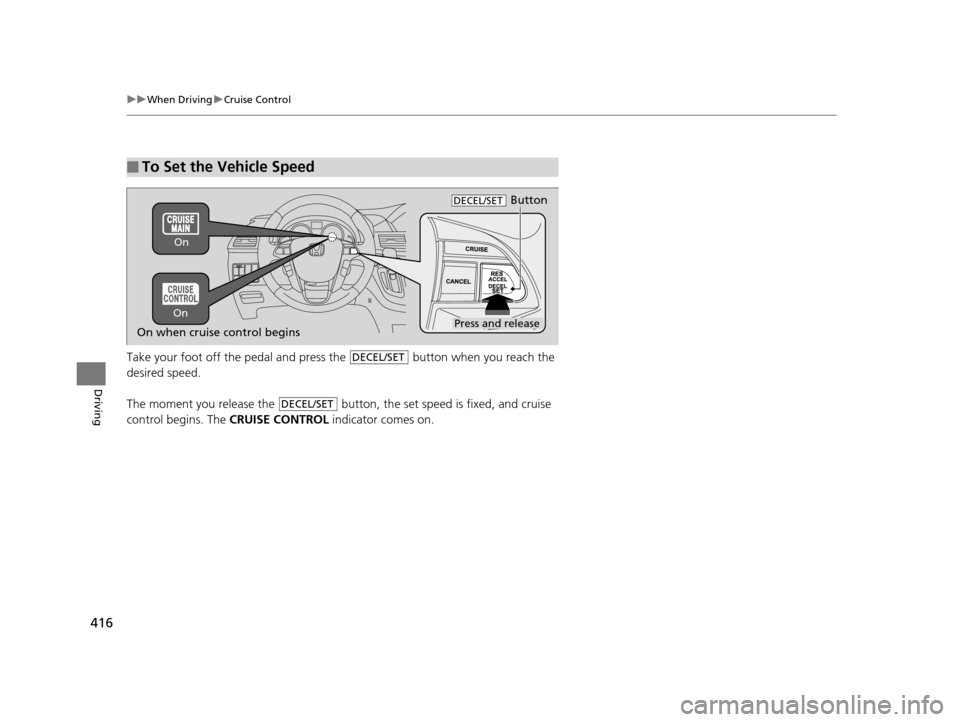
■Shift Lever Operation1Shift Lever Operation
NOTICE
When you change the shift lever from (D to (R and
vice versa, come to a complete stop and keep the
brake pedal depressed.
Operating the shift lever be fore the vehicle has come
to a complete standstill can damage the transmission.
Use the shift lever positi on indicator to check the
lever position befo re pulling away.
If the transmission indicator blinks when driving, in
any shift position, there is a problem with the
transmission.
Avoid sudden acceleration and have the transmission
checked by a dealer as soon as possible.
The fuel supply may be cut of f if you drive at engine
speeds in or over the tachometer’s red zone (engine
speed limit). If this happe ns, you may experience a
slight jolt.
It may not be possible to operate the shift lever if the
brake pedal is applied while the shift lever release
button is held down.
Depress the brake pedal first.
Tachometer's red zone Shift Lever Position Indicator
Depress the brake pedal and
press the shift lever release button to shift.
Shift without pressing the shift lever
release button.
Press the shift lever release button and
shift.
D4 Indicator
17 US ODYSSEY (KA KC)-31TK86600.book 414 ページ 2016年10月24日 月曜日 午後4時2分
Page 416 of 565
415
uuWhen Driving uCruise Control
Continued
Driving
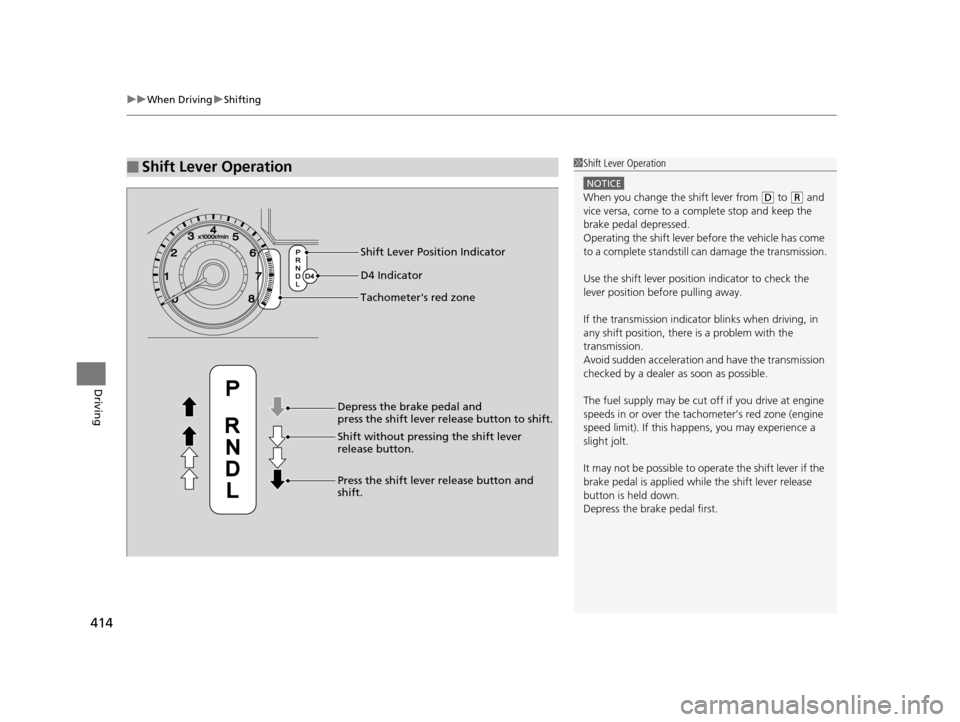
Cruise Control
Maintains a constant vehicle speed without having to keep your foot on the
accelerator. Use cruise control on freeways or open road s where you can travel at a
constant speed with little ac celeration or deceleration.1Cruise Control
It may not be possible to maintain a constant speed
when driving uphill or downhill.
When not using cruise control:
Turn off cruise control by pressing the CRUISE
button.
3WARNING
Improper use of the cruise control can lead
to a crash.
Use the cruise control only when traveling
on open highways in good weather.When to use
■Shift positions for cruise control:
In ( D or D4
Always keep sufficient distance
between you and the vehicle in
front of you.
■Vehicle speed for cruise control:
Desired speed in a range above
roughly 25 mph (40 km/h) ~
How to useCRUISE MAIN is on in the
instrument panel.
Cruise control is ready to use.■Press the CRUISE button on
the steering wheel.
17 US ODYSSEY (KA KC)-31TK86600.book 415 ページ 2016年10月24日 月曜日 午後4時2分
Page 417 of 565
416
uuWhen Driving uCruise Control
Driving
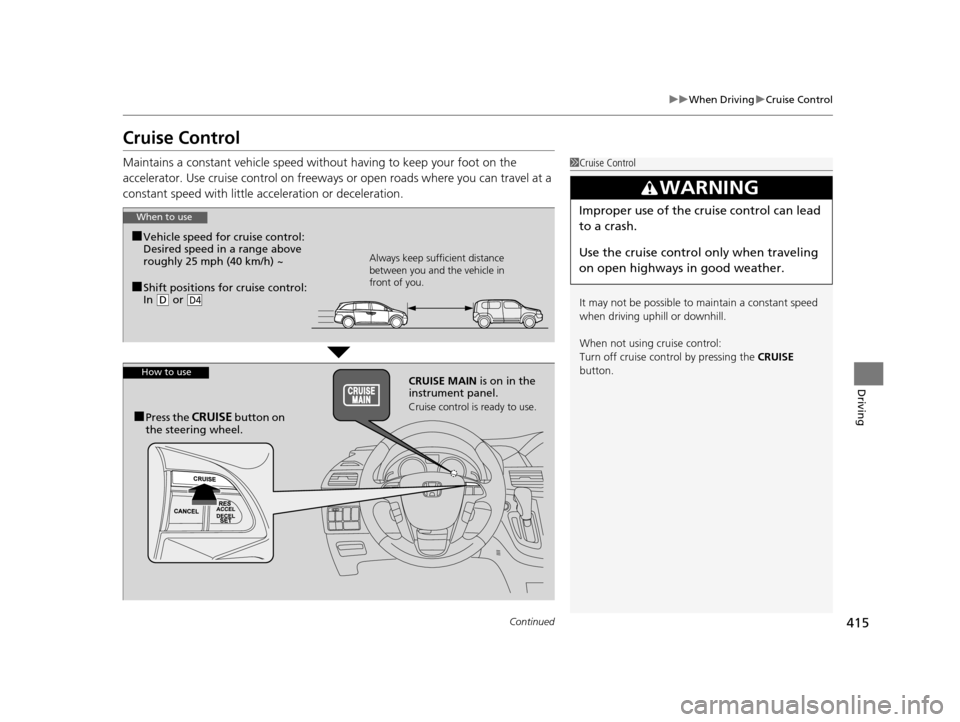
Take your foot off the pedal and press the button when you reach the
desired speed.
The moment you release the button, the set speed is fixed, and cruise
control begins. The CRUISE CONTROL indicator comes on.
■To Set the Vehicle Speed
ButtonDECEL/SET
On when cruise control beginsPress and release
On On
DECEL/SET
DECEL/SET
17 US ODYSSEY (KA KC)-31TK86600.book 416 ページ 2016年10月24日 月曜日
午後4時2分
Page 418 of 565
417
uuWhen Driving uCruise Control
Driving
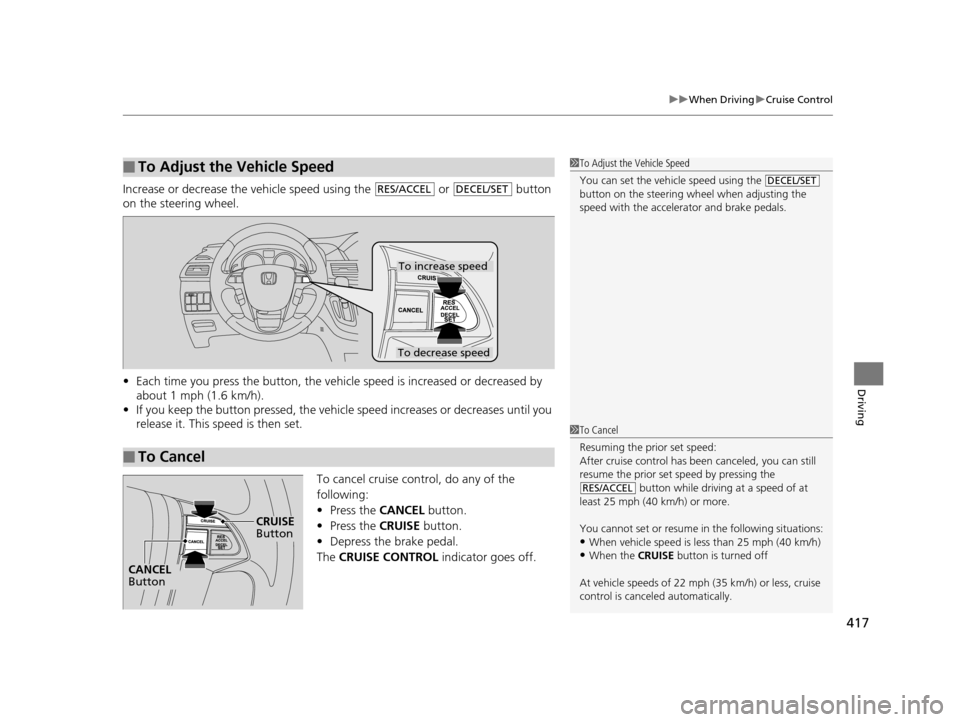
Increase or decrease the vehicle speed using the or button
on the steering wheel.
• Each time you press the button, the vehicl e speed is increased or decreased by
about 1 mph (1.6 km/h).
• If you keep the button pressed, the vehicl e speed increases or decreases until you
release it. This speed is then set.
To cancel cruise control, do any of the
following:
• Press the CANCEL button.
• Press the CRUISE button.
• Depress the brake pedal.
The CRUISE CONTROL indicator goes off.
■To Adjust the Vehicle Speed1To Adjust the Vehicle Speed
You can set the vehicle speed using the
button on the steering wheel when adjusting the
speed with the accelera tor and brake pedals.
DECEL/SETRES/ACCELDECEL/SET
■To Cancel
To decrease speed
To increase speed
1To Cancel
Resuming the prior set speed:
After cruise control has be en canceled, you can still
resume the prior set speed by pressing the
button while driving at a speed of at
least 25 mph (40 km/h) or more.
You cannot set or resume in the following situations:
•When vehicle speed is less than 25 mph (40 km/h)•When the CRUISE button is turned off
At vehicle speeds of 22 m ph (35 km/h) or less, cruise
control is canceled automatically.
RES/ACCEL
CRUISE Button
CANCEL Button
17 US ODYSSEY (KA KC)-31TK86600.book 417 ページ 2016年10月24日 月曜日 午後4時2分
Page 419 of 565
418
uuWhen Driving uForward Collision Warning (FCW)*
Driving
Forward Collision Warning (FCW)*
Alerts you when it determines that there is a possibility that your vehicle may collide
with a vehicle detected in front of yours.
If the system determines a collision is possible, it gives both visual and audible alerts.
u Take appropriate action to prevent a col lision (apply the brakes, change lanes,
etc.).
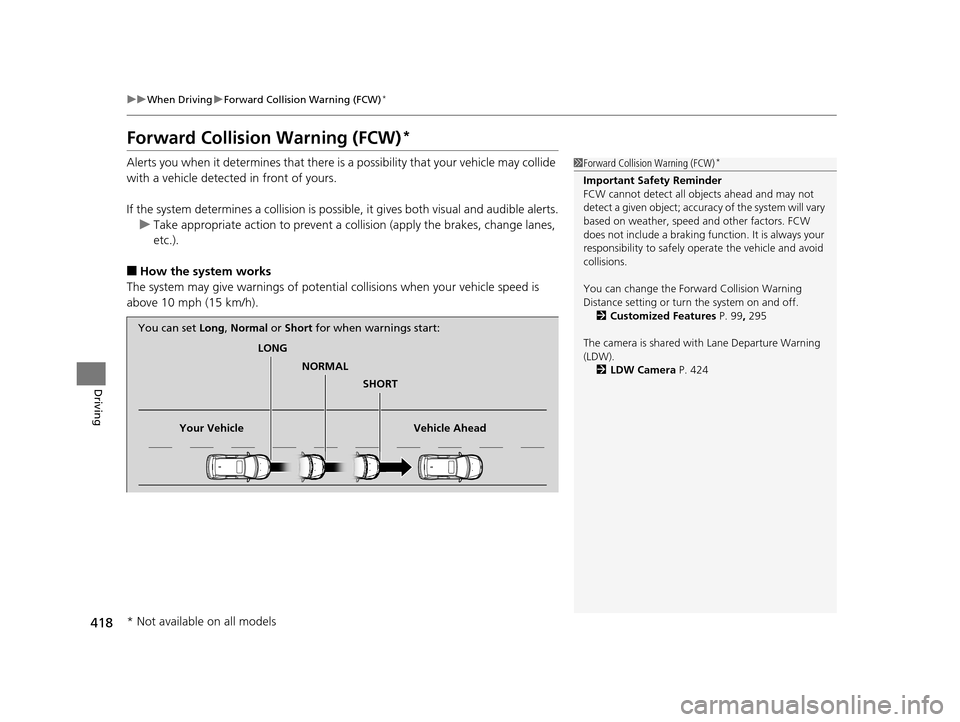
■How the system works
The system may give warnings of potential collisions when your vehicle speed is
above 10 mph (15 km/h).
1 Forward Collision Warning (FCW)*
Important Safety Reminder
FCW cannot detect all ob jects ahead and may not
detect a given object; accura cy of the system will vary
based on weather, speed and other factors. FCW
does not include a braking func tion. It is always your
responsibility to sa fely operate the vehicle and avoid
collisions.
You can change the Forward Collision Warning
Distance setting or turn the system on and off. 2 Customized Features P. 99, 295
The camera is shared with Lane Departure Warning
(LDW). 2 LDW Camera P. 424
LONG
NORMAL SHORT
Your Vehicle Vehicle Ahead
You can set
Long, Normal or Short for when warnings start:
* Not available on all models
17 US ODYSSEY (KA KC)-31TK86600.book 418 ページ 2016年10月24日 月曜日 午後4時2分
Page 421 of 565
uuWhen Driving uForward Collision Warning (FCW)*
420
Driving
■Automatic shutoff
FCW may automatically shut itself off and the FCW indicator comes and stays on when:
• The temperature inside the system is high.
• The windshield is blocked by di rt, mud, leaves, wet snow, etc.
Once the conditions that caused FCW to shut off improve or are addressed (e.g.,
cleaning), the system comes back on.1 Automatic shutoff
To help reduce the likel ihood that high interior
temperatures will cause the camera system to shut
off, when parking, find a sh ady area or face the front
of the vehicle away from the sun. If you use a
reflective sun shade, do not allow it to cover the
camera housing. Covering the camera can
concentrate heat on the camera.
If the CAMERA HOT message appears:
If the symbol appears:
•Use the climate control system to cool down the
interior and, if necessary , the defroster mode when
windows are fogged.
•Start driving the vehicle to lower the windshield
temperature, which cool s down the area around
the FCW system.
Models with information display
Models with multi-information display
17 US ODYSSEY (KA KC)-31TK86600.book 420 ページ 2016年10月24日 月曜日 午後4時2分
Page 423 of 565
422
uuWhen Driving uLane Departure Warning (LDW)*
Driving
Lane Departure Warning (LDW)*
Alerts you when the system detects a possibility of your vehicle unintentionally
crossing over detected side lane markings.
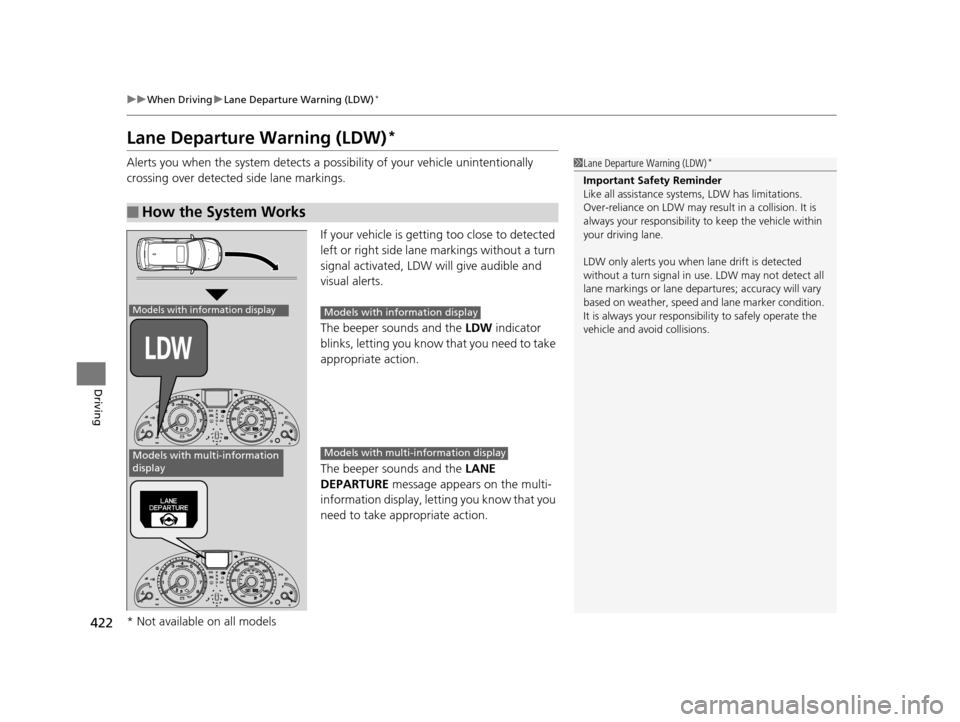
If your vehicle is getting too close to detected
left or right side lane markings without a turn
signal activated, LDW will give audible and
visual alerts.
The beeper sounds and the LDW indicator
blinks, letting you know that you need to take
appropriate action.
The beeper sounds and the LANE
DEPARTURE message appears on the multi-
information display, letting you know that you
need to take appropriate action.
■How the System Works
1 Lane Departure Warning (LDW)*
Important Safety Reminder
Like all assistance systems, LDW has limitations.
Over-reliance on LDW may result in a collision. It is
always your respons ibility to keep the vehicle within
your driving lane.
LDW only alerts you when lane drift is detected
without a turn signal in us e. LDW may not detect all
lane markings or lane departures; a ccuracy will vary
based on weather, speed and lane marker condition.
It is always your responsibility to safely operate the
vehicle and avoid collisions.
Models with information display
Models with multi-information
display
Models with info rmation display
Models with multi- information display
* Not available on all models
17 US ODYSSEY (KA KC)-31TK86600.book 422 ページ 2016年10月24日 月曜日 午後4時2分
Page 424 of 565
Continued423
uuWhen Driving uLane Departure Warning (LDW)*
Driving
The system begins to search for lane marki ngs when all the following conditions are met:
• The vehicle is traveling between 40-90 mph (64-145 km/h).
• The vehicle is on a straight or slightly curved road.
• The turn signals are off.
• The brake pedal is not depressed.
■How the System Activates1How the System Activates
LDW may automaticall y shut off and the LDW
indicator comes and stays on.
2 Indicators P. 70
17 US ODYSSEY (KA KC)-31TK86600.book 423 ページ 2016年10月24日 月曜日 午後4時2分