Page 82 of 565
81
uuIndicators u
Continued
Instrument Panel
*1:Models with the smart entry system have an ENGINE START/STOP button instead of an ignition switch.
*2:On the left: Models with information display
On the right: Models with multi-information display
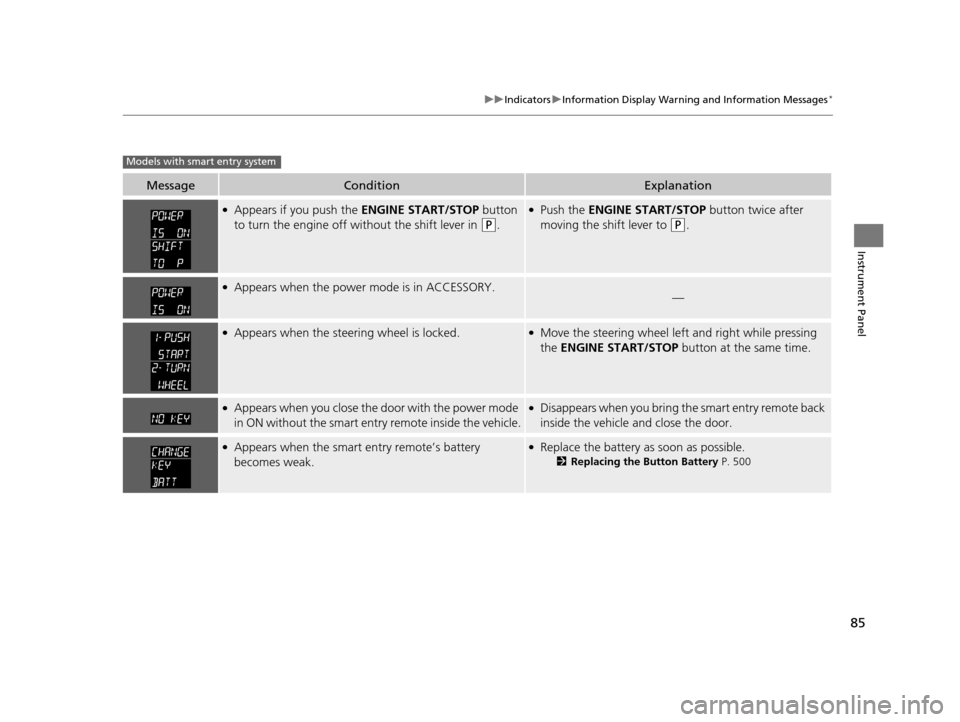
IndicatorNameOn/BlinkingExplanationMessage*2
Lane Departure
Warning (LDW)
Indicator
*
●Comes on for a few seconds when
you turn the ignition switch to ON
(w*1, then goes off.●Comes on if there is a problem with
the LDW system.
●Stays on constantly - Have your
vehicle checked by a dealer.
●Blinks when your ve hicle is too close
to the lane lines. The beeper sounds.
●Blinks while driving - Take
appropriate action to keep your vehicle
within the lane lines.
——
●Comes on when the LDW system
shuts itself off.●Stays on - The temperature inside the
LDW camera is too high.
The system acti vates when the
temperature inside the camera cools
down.
2 LDW Camera P. 424
●Stays on - The area around the camera
is blocked by dirt, mud, etc. Stop your
vehicle in a safe place, and wipe it off
with a soft cloth.
●Have your vehicle checked by a dealer if
the indicator and message come back
on after you cleaned the area around
the camera.
2 LDW Camera P. 424
Models with info rmation display
* Not available on all models
17 US ODYSSEY (KA KC)-31TK86600.book 81 ページ 2016年10月24日 月曜日 午後4時2分
Page 83 of 565
82
uuIndicators u
Instrument Panel
*1:Models with the smart entry system have an ENGINE START/STOP button instead of an ignition switch.
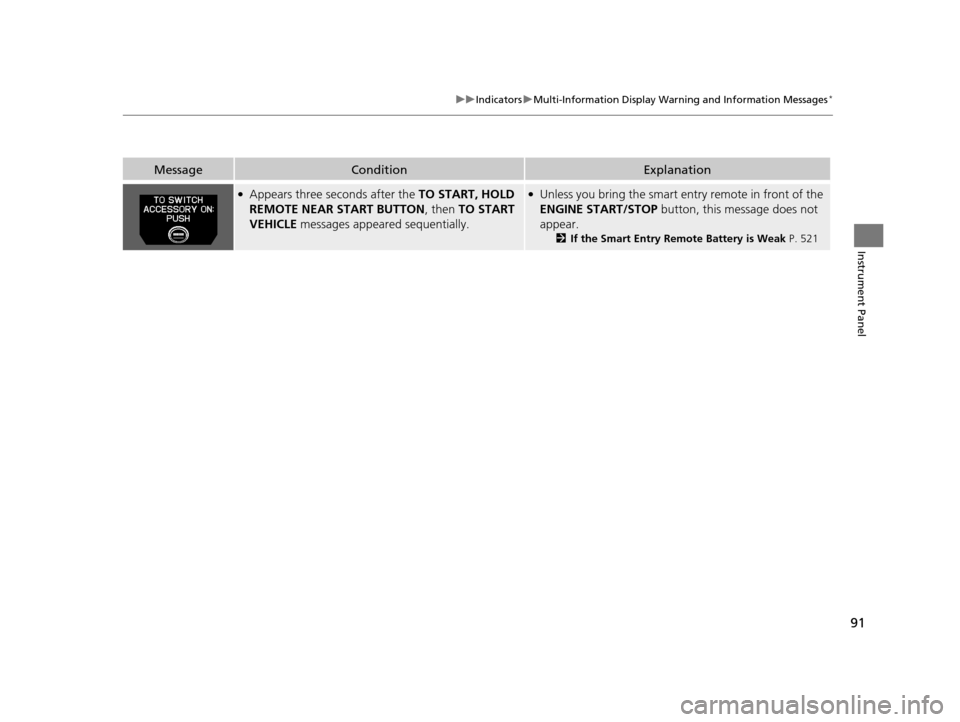
IndicatorNameOn/BlinkingExplanationMessage*
Fuel Economy
Indicator●Comes on and stays on while you are
driving with good fuel economy.——
CRUISE MAIN
Indicator●Comes on when you press the
CRUISE button.2Cruise Control P. 415—
CRUISE
CONTROL
Indicator●Comes on if you have set a speed for
cruise control.
2 Cruise Control P. 415—
Washer Level
Indicator*
●Comes on when the washer fluid is
low.●Refill the washer fluid.
2Refilling Window Washer Fluid
P. 474—
Maintenance
Minder Indicator*
●Comes on when the scheduled
maintenance is due soon.2 Maintenance MinderTM P. 455—
Power Tailgate
Indicator*
●Comes on for a few seconds when
you turn the igniti on switch to ON
(w*1, then goes off.●Comes on if there is a problem with
the power tailgate system.
●Stays on constantly or does not
come on at all - You can still open or
close the tailgate manually. Have your
vehicle checked by a dealer.
—
U.S.
Canada
* Not available on all models
17 US ODYSSEY (KA KC)-31TK86600.book 82 ページ 2016年10月24日 月曜日 午後4時2分
Page 84 of 565

83
uuIndicators u
Instrument Panel
*1:Models with the smart entry system have an ENGINE START/STOP button instead of an ignition switch.
IndicatorNameOn/BlinkingExplanationMessage*
Power Sliding
Door Indicator*
●Comes on for a few seconds when
you turn the ignition switch to ON
(w*1, then goes off.●Comes on if there is a problem with
the power sliding door system.
●Stays on constantly or does not
come on at all - Turn off the main
switch and manually operate the power
sliding doors. Have your vehicle checked
by a dealer.
2 Opening/Closing the Power
Sliding Doors* P. 129
—
Blind spot
information (BSI)
Indicator
*
●Comes on for a few seconds when
you turn the igniti on switch to ON
(w*1, then goes off.●Stays on while BSI is turned off.●Comes on when mud, snow, or ice
accumulates in the vicinity of sensor.
●Comes on if there is a problem with
the system.
—
●Comes on while driving - Stop in a
safe place and remove the obstacle
from vicinity of the sensor.
●Comes on while driving - Have your
vehicle checked by a dealer.
U.S.
Canada
* Not available on all models
17 US ODYSSEY (KA KC)-31TK86600.book 83 ページ 2016年10月24日 月曜日 午後4時2分
Page 86 of 565
85
uuIndicators uInformation Display Warning and Information Messages*
Instrument Panel
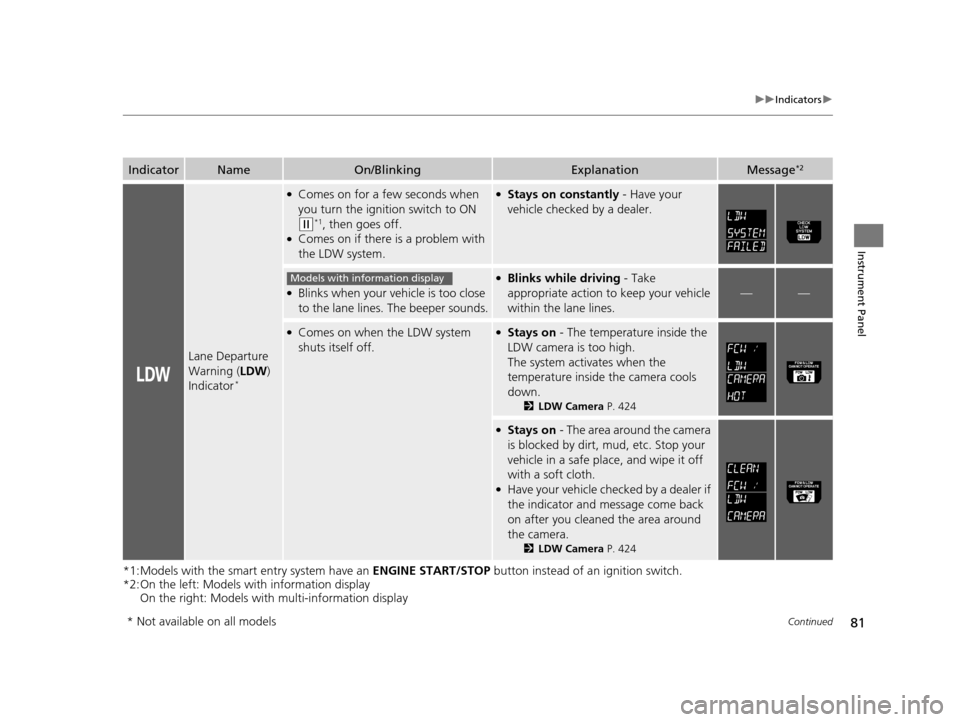
MessageConditionExplanation
●Appears if you push the ENGINE START/STOP button
to turn the engine off wi thout the shift lever in
(P.
●Push the ENGINE START/STOP button twice after
moving the shift lever to
(P.
●Appears when the power mode is in ACCESSORY.—
●Appears when the steering wheel is locked.●Move the steering wheel left and right while pressing
the ENGINE START/STOP button at the same time.
●Appears when you close the door with the power mode
in ON without the smart entry remote inside the vehicle.●Disappears when you bring the smart entry remote back
inside the vehicle and close the door.
●Appears when the smart entry remote’s battery
becomes weak.●Replace the battery as soon as possible.
2Replacing the Button Battery P. 500
Models with smart entry system
17 US ODYSSEY (KA KC)-31TK86600.book 85 ページ 2016年10月24日 月曜日 午後4時2分
Page 88 of 565
87
uuIndicators uMulti-Information Display Warn ing and Information Messages*
Continued
Instrument Panel
●Appears if there is a problem with the DRL system.●Have your vehicle checked by a dealer.
2Daytime Running Lights P. 150
●Appears when the starter system has a problem.●As a temporary measure, press and hold the ENGINE
START/STOP button for up to 15 seconds while
pressing the brake pedal and ma nually start the engine.
Have your vehicle checked by a dealer.
●Appears when the washer fluid is low.●Refill the washer fluid.
2 Refilling Window Washer Fluid P. 474
MessageConditionExplanation
U.S.
Canada
Canadian models
17 US ODYSSEY (KA KC)-31TK86600.book 87 ページ 2016年10月24日 月曜日 午後4時2分
Page 90 of 565

89
uuIndicators uMulti-Information Display Warn ing and Information Messages*
Continued
Instrument Panel
MessageConditionExplanation
●Flashes when the system senses a likely collision with
a vehicle in front of you.●Take appropriate action to prev ent a collision (apply the
brakes, change lanes, etc.).
2 Forward Collision Warning (FCW)* P. 418
●Appears when your vehicle is too close to the traffic
lane lines. The beeper sounds.●Take appropriate action to keep your vehicle within the
lane lines.
2 Lane Departure Warning (LDW)* P. 422
●Appears while you are customizing the settings and
the shift lever is moved out of
(P.2Customized Features P. 99
●Appears if you try to go to CUSTOMIZE SETTINGS
from the multi-information display while the audio/
information screen shows the Vehicle Settings
menu.●Select either display to customize a setting. You cannot
have CUSTOMIZE SETTINGS displayed on the multi-
information display and Vehicle Settings on the audio/
information screen simultaneously.
2 Customized Features P. 99, 295
●Appears when you set the power mode to
ACCESSORY or ON.
2Starting the Engine P. 407
●Appears when the steering wheel is locked.●Move the steering wheel left and right while pressing
the ENGINE START/STOP button.
* Not available on all models
17 US ODYSSEY (KA KC)-31TK86600.book 89 ページ 2016年10月24日 月曜日 午後4時2分
Page 91 of 565
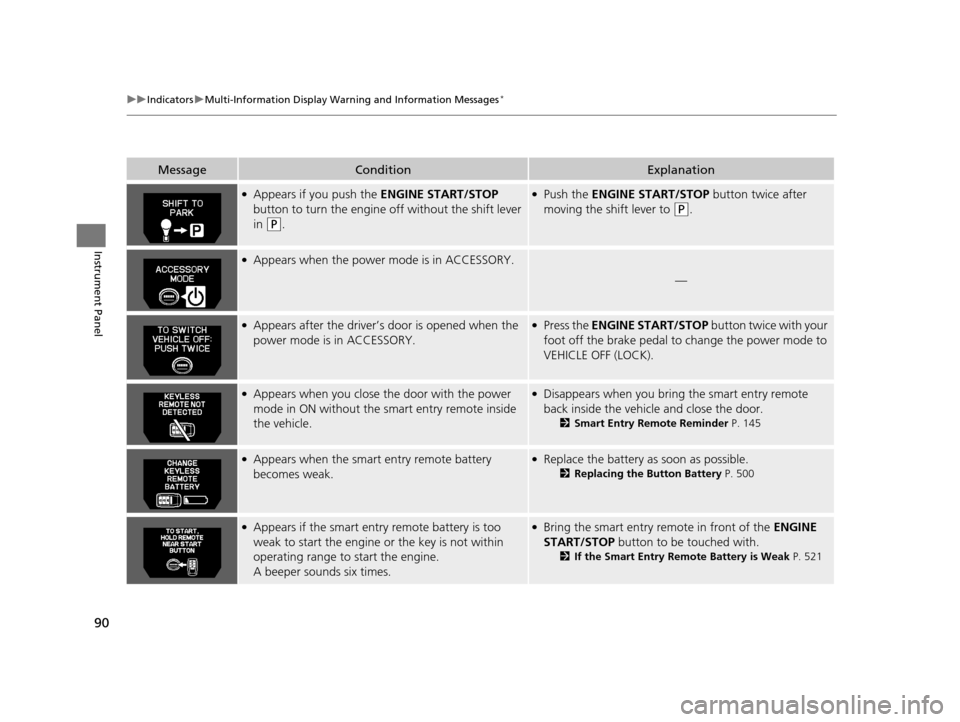
90
uuIndicators uMulti-Information Display Warn ing and Information Messages*
Instrument Panel
MessageConditionExplanation
●Appears if you push the ENGINE START/STOP
button to turn the engine off without the shift lever
in
(P.
●Push the ENGINE START/STOP button twice after
moving the shift lever to
(P.
●Appears when the power mode is in ACCESSORY.
—
●Appears after the driver’s door is opened when the
power mode is in ACCESSORY.●Press the ENGINE START/STOP button twice with your
foot off the brake pedal to change the power mode to
VEHICLE OFF (LOCK).
●Appears when you close th e door with the power
mode in ON without the smart entry remote inside
the vehicle.●Disappears when you bring the smart entry remote
back inside the vehicle and close the door.
2 Smart Entry Remote Reminder P. 145
●Appears when the smart entry remote battery
becomes weak.●Replace the battery as soon as possible.
2Replacing the Button Battery P. 500
●Appears if the smart entry remote battery is too
weak to start the engine or the key is not within
operating range to start the engine.
A beeper sounds six times.●Bring the smart entry remote in front of the ENGINE
START/STOP button to be touched with.
2If the Smart Entry Remote Battery is Weak P. 521
17 US ODYSSEY (KA KC)-31TK86600.book 90 ページ 2016年10月24日 月曜日 午後4時2分
Page 92 of 565
91
uuIndicators uMulti-Information Display Warn ing and Information Messages*
Instrument Panel
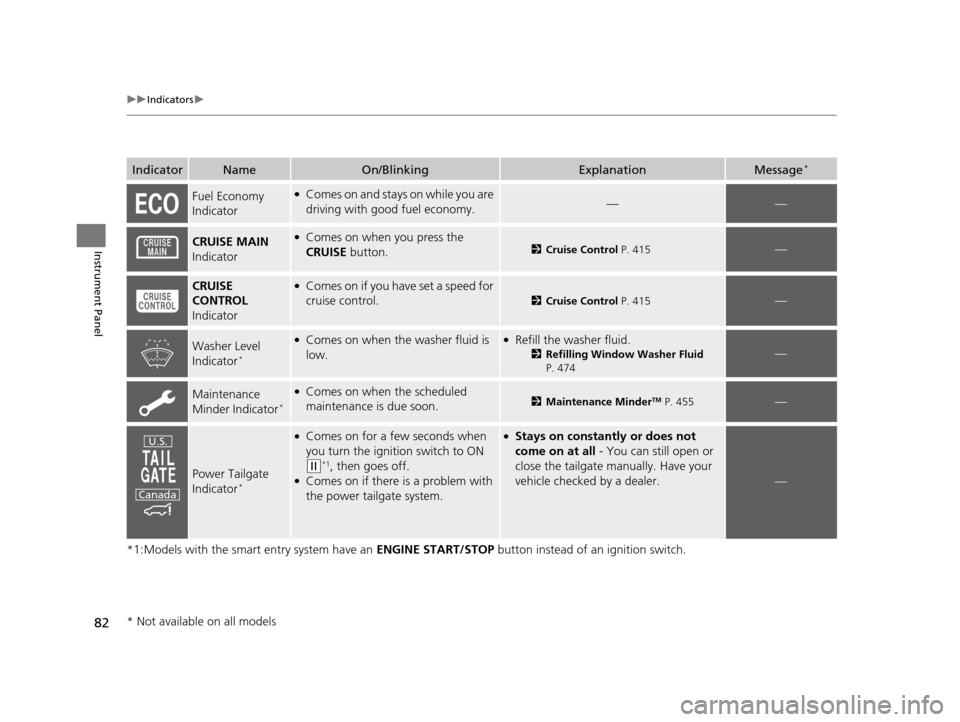
MessageConditionExplanation
●Appears three seconds after the TO START, HOLD
REMOTE NEAR START BUTTON , then TO START
VEHICLE messages appeared sequentially.●Unless you bring the smart entry remote in front of the
ENGINE START/STOP button, this message does not
appear.
2 If the Smart Entry Remote Battery is Weak P. 521
17 US ODYSSEY (KA KC)-31TK86600.book 91 ページ 2016年10月24日 月曜日 午後4時2分