Page 138 of 565
137
uuSecurity System uSecurity System Alarm*
Controls
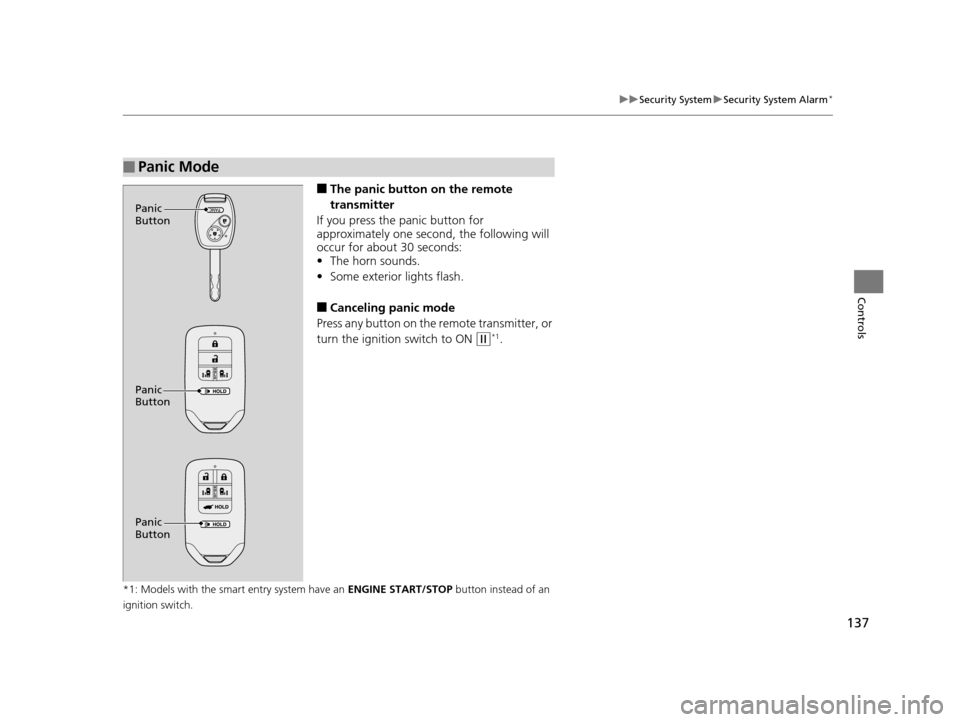
■The panic button on the remote
transmitter
If you press the panic button for
approximately one second, the following will
occur for about 30 seconds:
• The horn sounds.
• Some exterior lights flash.
■Canceling panic mode
Press any button on the remote transmitter, or
turn the ignition switch to ON
(w*1.
*1: Models with the smart entry system have an ENGINE START/STOP button instead of an
ignition switch.
■Panic Mode
Panic
Button
Panic
Button
Panic
Button
17 US ODYSSEY (KA KC)-31TK86600.book 137 ページ 2016年10月24日 月曜日 午後4時2分
Page 140 of 565
139
uuOpening and Closing the Windows uOpening/Closing the Power Windows
Continued
Controls
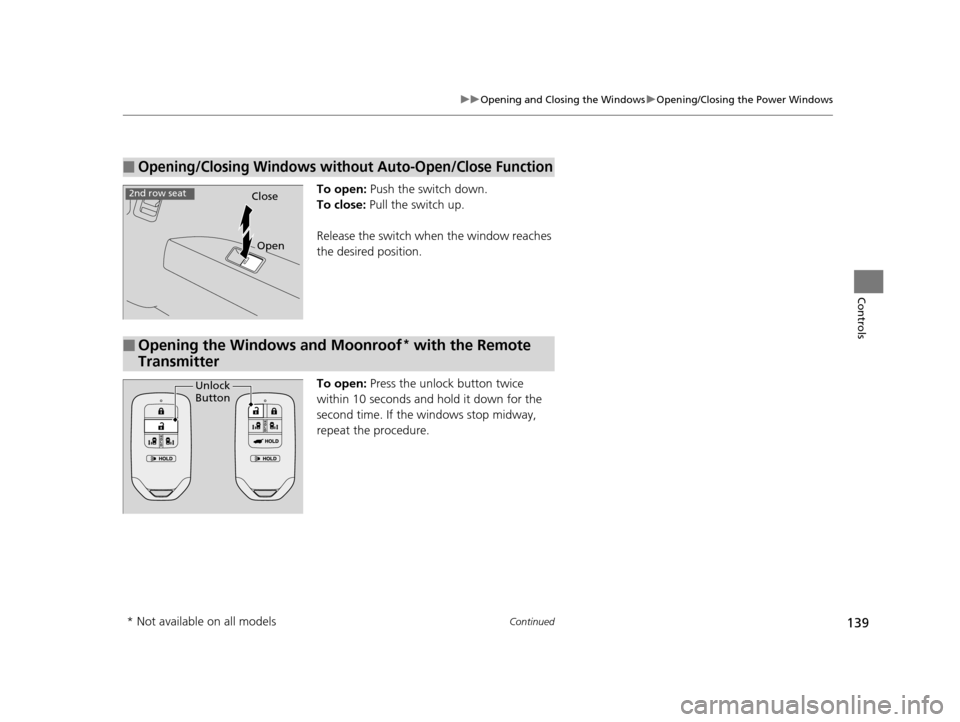
To open: Push the switch down.
To close: Pull the switch up.
Release the switch when the window reaches
the desired position.
To open: Press the unlock button twice
within 10 seconds and hold it down for the
second time. If the windows stop midway,
repeat the procedure.
■Opening/Closing Windows without Auto-Open/Close Function
Close
Open
2nd row seat
■Opening the Windows and Moonroof* with the Remote
Transmitter
Unlock
Button
* Not available on all models
17 US ODYSSEY (KA KC)-31TK86600.book 139 ページ 2016年10月24日 月曜日 午後4時2分
Page 142 of 565
141
Controls
Opening and Closing the Moonroof*
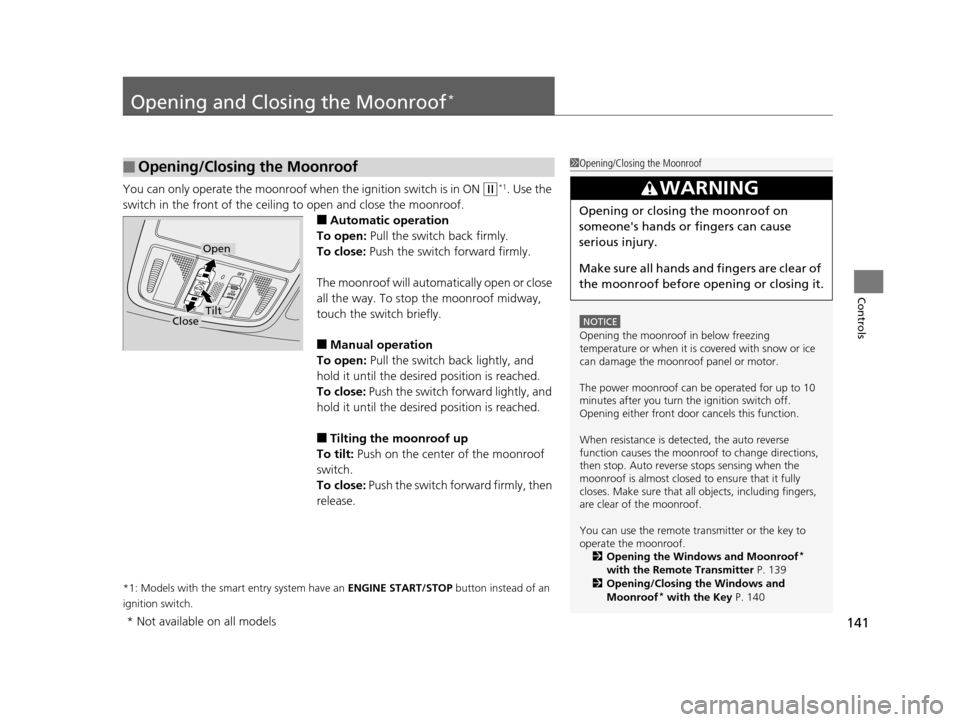
You can only operate the moonroof when the ignition switch is in ON (w*1. Use the
switch in the front of the ceiling to open and close the moonroof.
■Automatic operation
To open: Pull the switch back firmly.
To close: Push the switch forward firmly.
The moonroof will automatically open or close
all the way. To stop the moonroof midway,
touch the switch briefly.
■Manual operation
To open: Pull the switch back lightly, and
hold it until the desired position is reached.
To close: Push the switch forward lightly, and
hold it until the desired position is reached.
■Tilting the moonroof up
To tilt: Push on the center of the moonroof
switch.
To close: Push the switch forward firmly, then
release.
*1: Models with the smart entry system have an ENGINE START/STOP button instead of an
ignition switch.
■Opening/Closing the Moonroof1 Opening/Closing the Moonroof
NOTICE
Opening the moonroof in below freezing
temperature or when it is covered with snow or ice
can damage the moonr oof panel or motor.
The power moonroof can be operated for up to 10
minutes after you turn the ignition switch off.
Opening either front door cancels this function.
When resistance is detected, the auto reverse
function causes the moonroof to change directions,
then stop. Auto reverse stops sensing when the
moonroof is almost closed to ensure that it fully
closes. Make sure that al l objects, including fingers,
are clear of the moonroof.
You can use the remote transmitter or the key to
operate the moonroof. 2 Opening the Windows and Moonroof
*
with the Remote Transmitter P. 139
2 Opening/Closing the Windows and
Moonroof
* with the Key P. 140
3WARNING
Opening or closing the moonroof on
someone's hands or fingers can cause
serious injury.
Make sure all hands and fingers are clear of
the moonroof before opening or closing it.
Open
CloseTilt
* Not available on all models
17 US ODYSSEY (KA KC)-31TK86600.book 141 ページ 2016年10月24日 月曜日 午後4時2分
Page 145 of 565
144
uuOperating the Switches Around the Steering Wheel uENGINE START/STOP Button*
Controls
If you leave the vehicle for 30 to 60 minutes with the shift lever in (P and the power
mode in ACCESSORY, the vehicle automati cally goes into the mode similar to
VEHICLE OFF (LOCK) to avoid the battery drain.
When in this mode:
The steering wheel does not lock.
You cannot lock or unlock doors with th e remote transmitter or the smart entry
system.
Press the ENGINE START/STOP button twice to switch the mode to VEHICLE OFF
(LOCK).
■Automatic Power Off
17 US ODYSSEY (KA KC)-31TK86600.book 144 ページ 2016年10月24日 月曜日 午後4時2分
Page 153 of 565
uuOperating the Switches Around the Steering Wheel uWipers and Washers
152
Controls
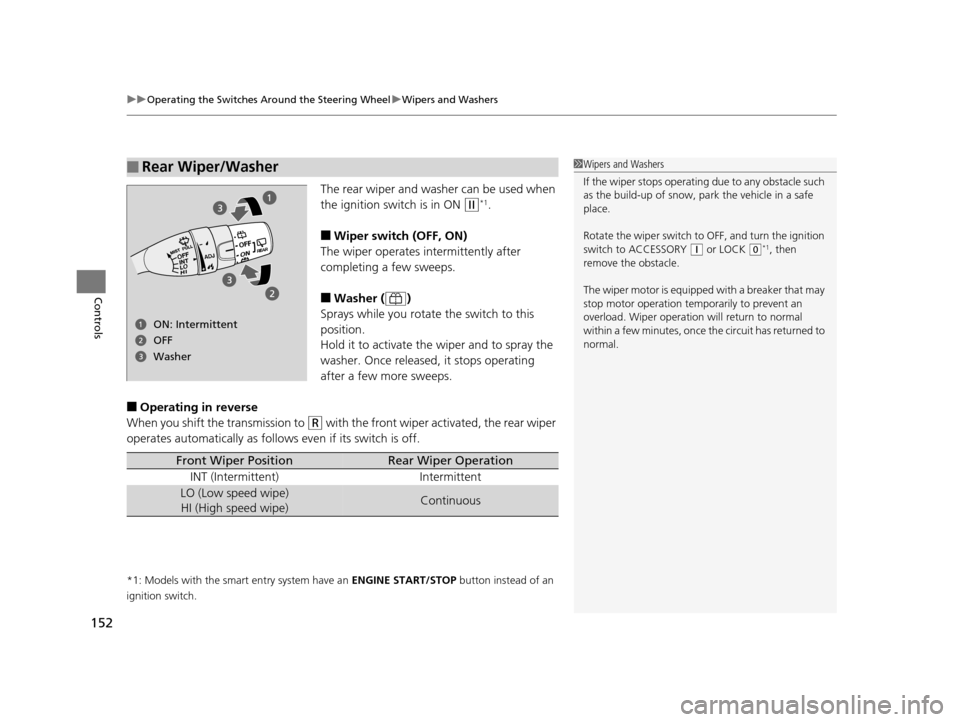
The rear wiper and washer can be used when
the ignition switch is in ON
(w*1.
■Wiper switch (OFF, ON)
The wiper operates intermittently after
completing a few sweeps.
■Washer ( )
Sprays while you rotate the switch to this
position.
Hold it to activate the wiper and to spray the
washer. Once released, it stops operating
after a few more sweeps.
■Operating in reverse
When you shift the transmission to
(R with the front wiper activated, the rear wiper
operates automatically as follow s even if its switch is off.
*1: Models with the smart entry system have an ENGINE START/STOP button instead of an
ignition switch.
■Rear Wiper/Washer1 Wipers and Washers
If the wiper stops operating due to any obstacle such
as the build-up of snow, pa rk the vehicle in a safe
place.
Rotate the wiper switch to OFF, and turn the ignition
switch to ACCESSORY
( q or LOCK (0*1, then
remove the obstacle.
The wiper motor is equipped with a breaker that may
stop motor operation temp orarily to prevent an
overload. Wiper operation will return to normal
within a few minutes, once the circuit has returned to
normal.
ON: Intermittent
Washer OFF
Front Wiper PositionRear Wiper Operation
INT (Intermittent) Intermittent
LO (Low speed wipe) HI (High speed wipe)Continuous
17 US ODYSSEY (KA KC)-31TK86600.book 152 ページ 2016年10月24日 月曜日 午後4時2分
Page 156 of 565
155
uuOperating the Switches Around the Steering Wheel uDriving Position Memory System*
Continued
Controls
Driving Position Memory System*
You can store two driver’s seat and outside mirrors position with the driving position
memory system.
When you unlock and open the driver’s door with a remote, the seat and outside
mirrors adjust automatically to on e of the two preset positions.
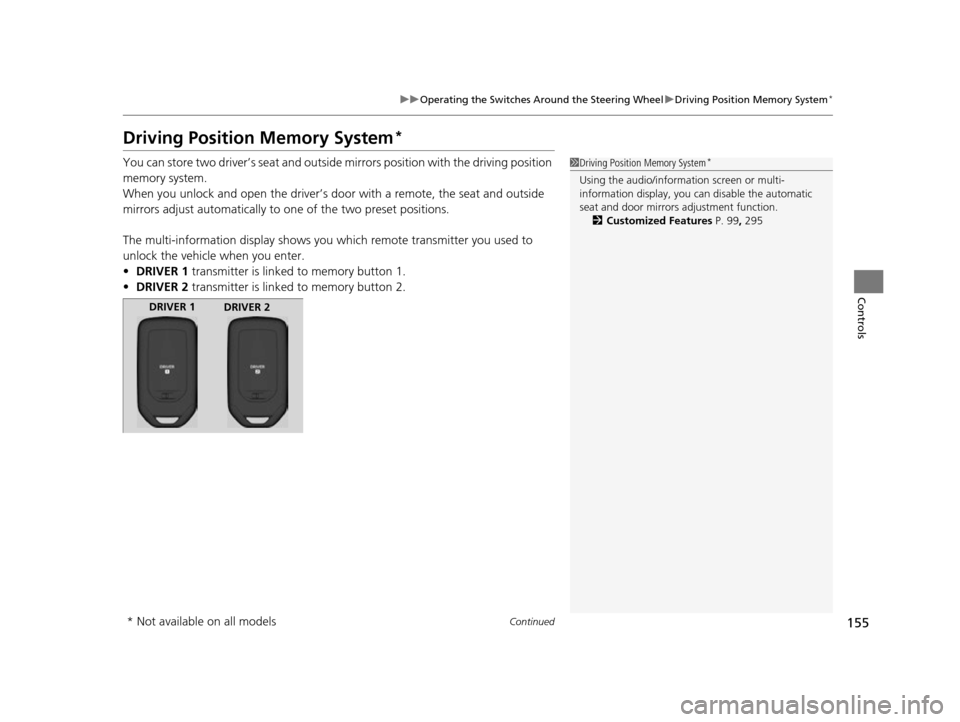
The multi-information display shows you which remote transmitter you used to
unlock the vehicle when you enter.
• DRIVER 1 transmitter is linked to memory button 1.
• DRIVER 2 transmitter is linked to memory button 2.1Driving Position Memory System*
Using the audio/information screen or multi-
information display, you can disable the automatic
seat and door mirrors adjustment function. 2 Customized Features P. 99, 295
DRIVER 1
DRIVER 2
* Not available on all models
17 US ODYSSEY (KA KC)-31TK86600.book 155 ページ 2016年10月24日 月曜日 午後4時2分
Page 162 of 565
161Continued
Controls
Adjusting the Seats
Adjusting the Seat Positions
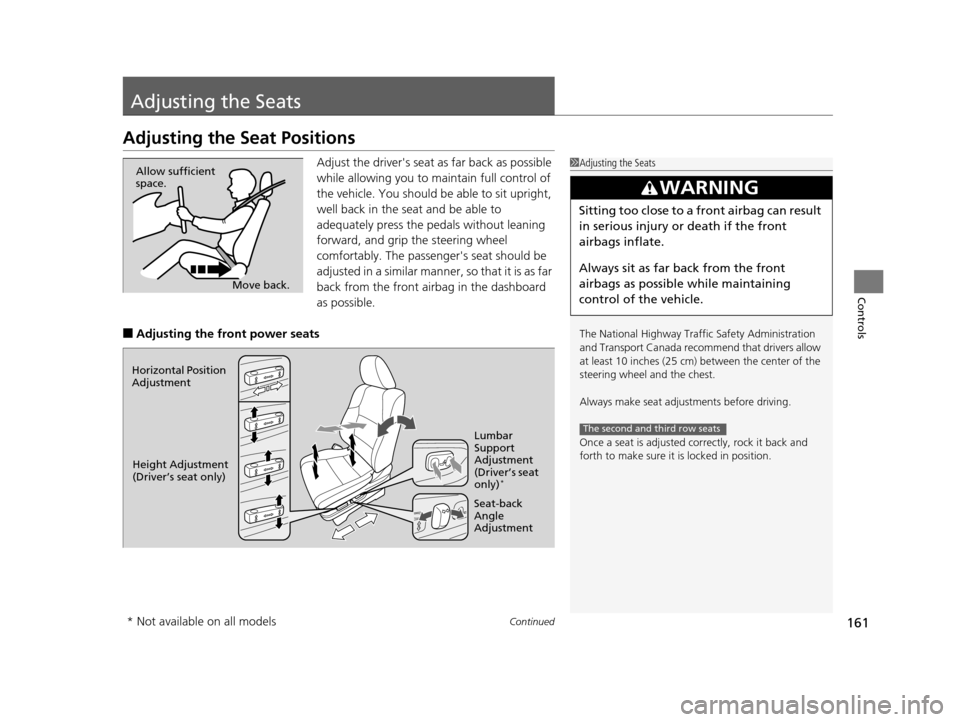
Adjust the driver's seat as far back as possible
while allowing you to ma intain full control of
the vehicle. You should be able to sit upright,
well back in the seat and be able to
adequately press the pedals without leaning
forward, and grip the steering wheel
comfortably. The passenger's seat should be
adjusted in a similar manner, so that it is as far
back from the front airbag in the dashboard
as possible.
■Adjusting the fro nt power seats
1Adjusting the Seats
The National Highway Traffic Safety Administration
and Transport Cana da recommend that drivers allow
at least 10 inches (25 cm) between the center of the
steering wheel and the chest.
Always make seat adjustments before driving.
Once a seat is adjusted co rrectly, rock it back and
forth to make sure it is locked in position.
3WARNING
Sitting too close to a front airbag can result
in serious injury or death if the front
airbags inflate.
Always sit as far back from the front
airbags as possible while maintaining
control of the vehicle.
The second and third row seats
Move back.
Allow sufficient
space.
Horizontal Position
Adjustment
Height Adjustment
(Driver’s seat only) Seat-back
Angle
AdjustmentLumbar
Support
Adjustment
(Driver’s seat
only)
*
* Not available on all models
17 US ODYSSEY (KA KC)-31TK86600.book 161 ページ 2016年10月24日 月曜日
午後4時2分
Page 206 of 565
205
Features
This chapter describes how to operate technology features.
Audio SystemAbout Your Audio System ................ 206
USB Port .......................................... 207
Auxiliary Input Jack .......................... 207
Audio System Theft Protection
*....... 208
Region Setting ................................. 209
Audio Remote Controls .................... 210
Audio System Basic Operation ........ 211
Audio/Information Screen ................ 212
Display Setup ................................... 217
Adjusting the Sound ........................ 216
Playing AM/FM Radio ....................... 218
Models with one display
Playing a CD .................................... 221
Playing an iPod ................................ 224
Playing Internet Radio ...................... 227
Playing a USB Flash Drive ................. 229
Playing Bluetooth ® Audio................. 232
Audio System Basic Operation ........ 234
Audio with Touch Screen ................. 235
Audio/Information Screen ................ 238
Display Setup ................................... 244
Adjusting the Sound ........................ 243
Playing AM/FM Radio ....................... 245
Playing SiriusXM ® Radio
*................. 249
Models with two displays
Playing a CD .................................... 252
Playing an iPod ................................ 255
Playing Internet Radio ...................... 259
Playing a USB Flash Drive ................. 262
Playing Bluetooth ® Audio ................ 265
Audio Error Messages ...................... 267
General Information on the Audio System ............................................. 272
Rear Entertainment System
*........... 276
Customized Features ........................ 295
HomeLink ® Universal Transceiver
*.. 325
Bluetooth ® HandsFreeLink® ..... 327, 360
Compass
*.......................................... 392
* Not available on all models
17 US ODYSSEY (KA KC)-31TK86600.book 205 ページ 2016年10月24日 月曜日 午後4時2分