Page 155 of 565
154
uuOperating the Switches Around the Steering Wheel uRear Defogger/Heated Door Mirror* Button
Controls
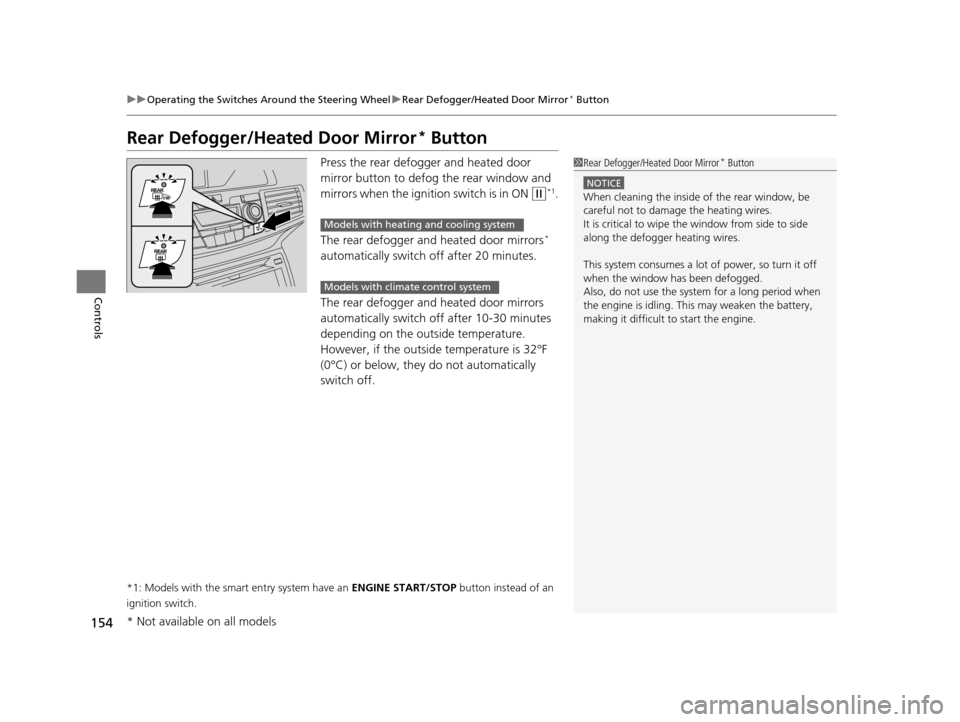
Rear Defogger/Heated Door Mirror* Button
Press the rear defogger and heated door
mirror button to defog the rear window and
mirrors when the igniti on switch is in ON
(w*1.
The rear defogger and heated door mirrors
*
automatically switch off after 20 minutes.
The rear defogger and heated door mirrors
automatically switch off after 10-30 minutes
depending on the outside temperature.
However, if the outside temperature is 32°F
(0°C) or below, they do not automatically
switch off.
*1: Models with the smart entry system have an ENGINE START/STOP button instead of an
ignition switch.
1 Rear Defogger/Heated Door Mirror* Button
NOTICE
When cleaning the inside of the rear window, be
careful not to damage the heating wires.
It is critical to wipe the window from side to side
along the defogger heating wires.
This system consumes a lot of power, so turn it off
when the window has been defogged.
Also, do not use the system for a long period when
the engine is idling. This may weaken the battery,
making it difficult to start the engine.
Models with heating and cooling system
Models with climate control system
* Not available on all models
17 US ODYSSEY (KA KC)-31TK86600.book 154 ページ 2016年10月24日 月曜日 午後4時2分
Page 181 of 565
uuInterior Lights/Interior Convenience Items uInterior Convenience Items
180
Controls
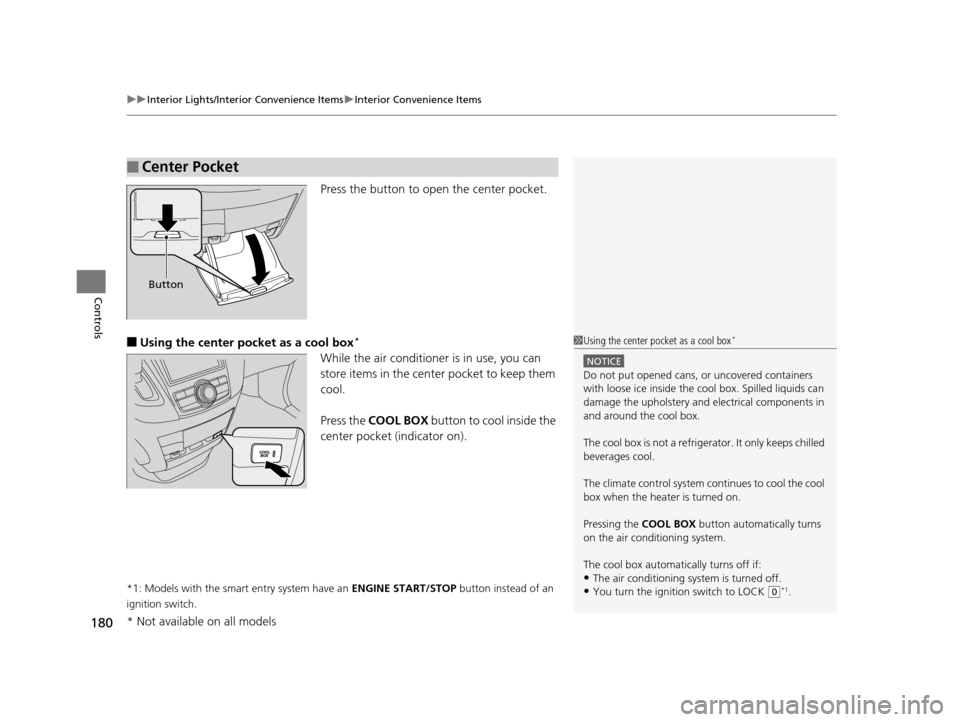
Press the button to open the center pocket.
■Using the center pocket as a cool box*
While the air conditioner is in use, you can
store items in the center pocket to keep them
cool.
Press the COOL BOX button to cool inside the
center pocket (indicator on).
*1: Models with the smart entry system have an ENGINE START/STOP button instead of an
ignition switch.
■Center Pocket
Button
1 Using the center pocket as a cool box*
NOTICE
Do not put opened cans, or uncovered containers
with loose ice inside the cool box. Spilled liquids can
damage the upholstery and electrical components in
and around the cool box.
The cool box is not a refrige rator. It only keeps chilled
beverages cool.
The climate control system continues to cool the cool
box when the heater is turned on.
Pressing the COOL BOX button automatically turns
on the air conditioning system.
The cool box automatically turns off if:
•The air conditioning system is turned off.
•You turn the ignition switch to LOCK ( 0*1.
* Not available on all models
17 US ODYSSEY (KA KC)-31TK86600.book 180 ページ 2016年10月24日 月曜日 午後4時2分
Page 184 of 565
Continued183
uuInterior Lights/Interior Convenience Items uInterior Convenience Items
Controls
■Third row seat beverage holders
The accessory power so ckets can be used when the i gnition switch is in ACCESSORY
(q or ON (w*1.
■Accessory power socket (console panel)
Open the cover to use it.
*1: Models with the smart entry system have an ENGINE START/STOP button instead of an
ignition switch.
■Accessory Power Sockets1 Accessory Power Sockets
NOTICE
Do not insert an automotive type cigarette lighter
element.
This can overheat the power socket.
The accessory power socket is designed to supply
power for 12 volt DC access ories that are rated 120
watts (10 amps) or less.
To prevent battery drain, only use the power socket
with the engine running.
When each socket is bei ng used simultaneously, the
combined power rating of the accessories should not
exceed 120 watts (10 amps).
17 US ODYSSEY (KA KC)-31TK86600.book 183 ページ 2016年10月24日 月曜日 午後4時2分
Page 358 of 565
Continued357
uuBluetooth ® HandsFreeLink ®u HFL Menus
Features
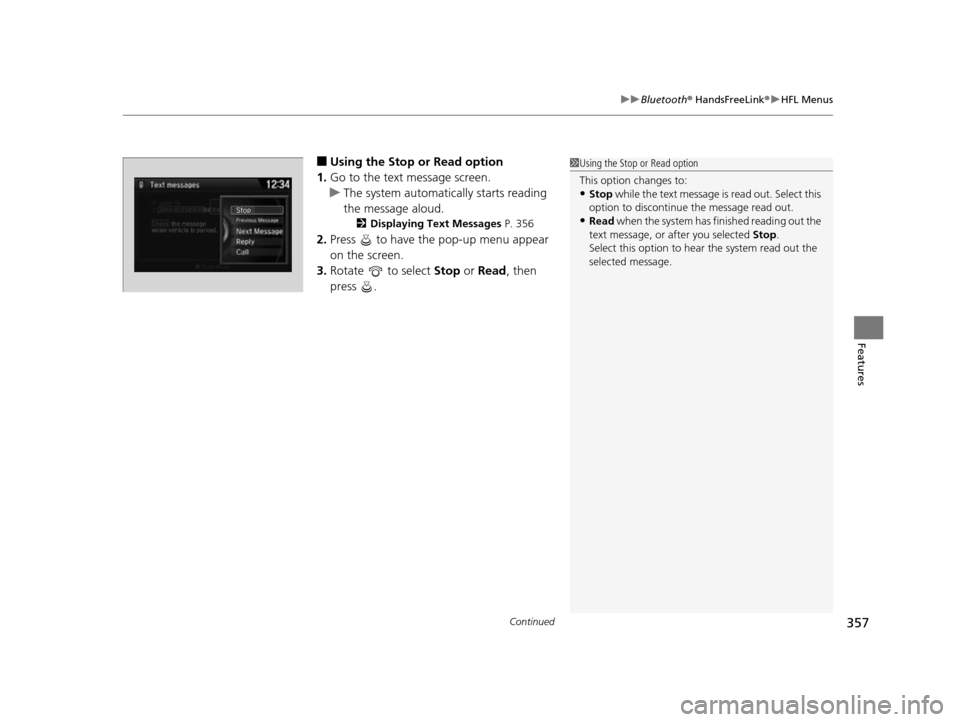
■Using the Stop or Read option
1. Go to the text message screen.
u The system automatically starts reading
the message aloud.
2 Displaying Text Messages P. 356
2.Press to have the pop-up menu appear
on the screen.
3. Rotate to select Stop or Read , then
press .
1 Using the Stop or Read option
This option changes to:
•Stop while the text message is read out. Select this
option to discontinue the message read out.
•Read when the system has finished reading out the
text message, or after you selected Stop.
Select this option to hear the system read out the
selected message.
17 US ODYSSEY (KA KC)-31TK86600.book 357 ページ 2016年10月24日 月曜日 午後4時2分
Page 391 of 565
uuBluetooth ® HandsFreeLink ®u HFL Menus
390
Features
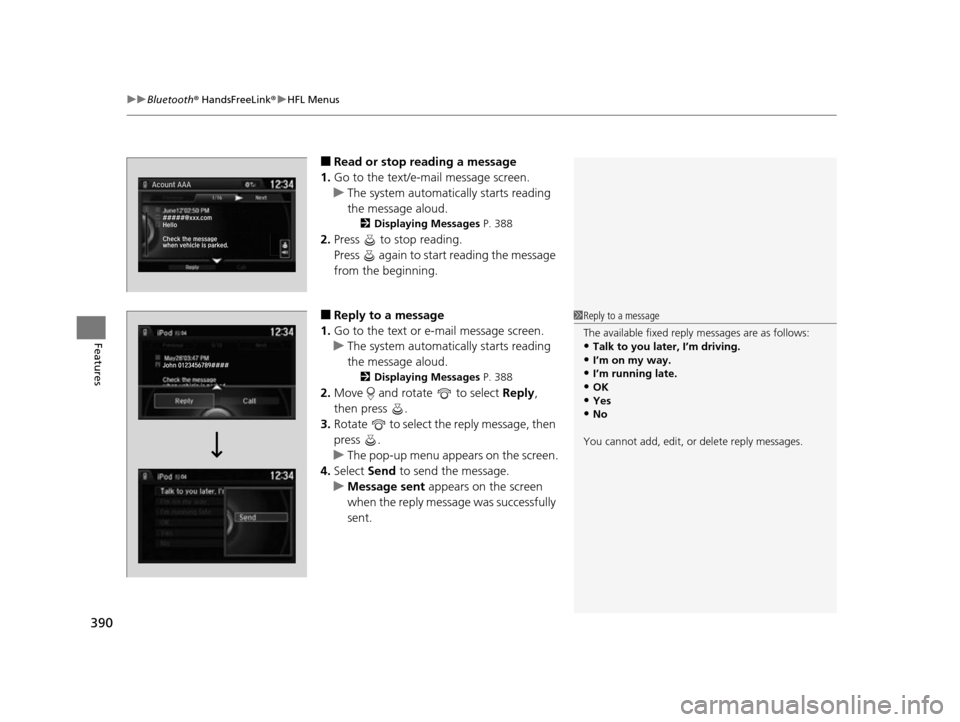
■Read or stop re ading a message
1. Go to the text/e-mail message screen.
u The system automatically starts reading
the message aloud.
2 Displaying Messages P. 388
2.Press to stop reading.
Press again to start reading the message
from the beginning.
■Reply to a message
1. Go to the text or e-mail message screen.
u The system automatically starts reading
the message aloud.
2 Displaying Messages P. 388
2.Move and rotate to select Reply,
then press .
3. Rotate to select the reply message, then
press .
u The pop-up menu appears on the screen.
4. Select Send to send the message.
u Message sent appears on the screen
when the reply message was successfully
sent.
1 Reply to a message
The available fixed reply messages are as follows:
•Talk to you later, I’m driving.
•I’m on my way.•I’m running late.
•OK
•Yes•No
You cannot add, edit, or delete reply messages.
17 US ODYSSEY (KA KC)-31TK86600.book 390 ページ 2016年10月24日 月曜日 午後4時2分
Page 396 of 565

395
Driving
This chapter discusses driving, refueling, and information on items such as accessories.
Before Driving
Driving Preparation .......................... 396
Maximum Load Limit........................ 399
Towing a Trailer Towing Preparation .......................... 401
Driving Safely with a Trailer .............. 405
Towing Your Vehicle ........................ 406
When Driving Starting the Engine .................. 407, 409
Precautions While Driving................. 411
Automatic Transmission ................... 412
Shifting ............................................ 413 Cruise Control ................................. 415
Forward Collision Warning (FCW)*.. 418
Lane Departure Warning (LDW)*..... 422
Vehicle Stability Assist (VSA®), aka Electronic
Stability Control (ESC), System ............... 426
Tire Pressure Monitoring System (TPMS) ... 428
Tire Pressure Monitoring System (TPMS) - Required Federal Explanation ......... 429
Blind Spot Information (BSI) System*.... 432
LaneWatchTM*.................................. 434 Braking
Brake System ................................... 436
Anti-lock Brake System (ABS) ........... 438
Brake Assist System ......................... 439
Parking Your Vehicle When Stopped ................................ 440
Parking Sensor System
*................... 441
Rearview Camera ............................. 445
Refueling Fuel Information .............................. 446
How to Refuel ................................. 447
Fuel Economy and CO
2 Emissions .... 449
Accessories and Modifications ........ 450
* Not available on all models
17 US ODYSSEY (KA KC)-31TK86600.book 395 ページ 2016年10月24日 月曜日 午後4時2分
Page 414 of 565
413
uuWhen Driving uShifting
Continued
Driving
Shifting
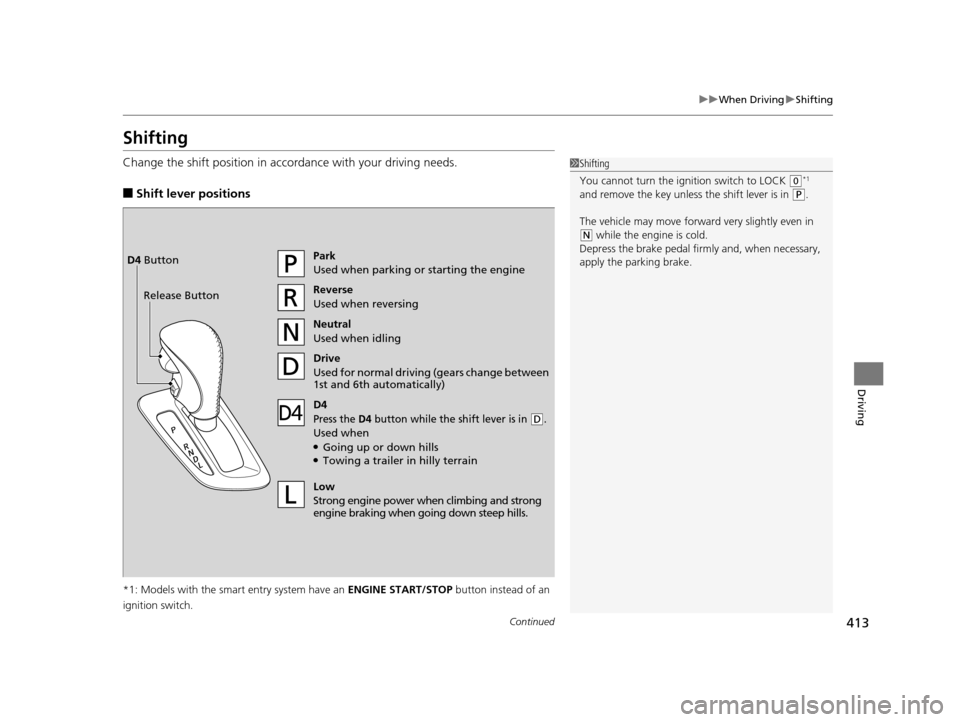
Change the shift position in accordance with your driving needs.
■Shift lever positions
*1: Models with the smart entry system have an ENGINE START/STOP button instead of an
ignition switch.
1 Shifting
You cannot turn the ignition switch to LOCK
(0*1
and remove the key unless the shift lever is in
( P.
The vehicle may move forward very slightly even in
(N while the engine is cold.
Depress the brake pe dal firmly and, when necessary,
apply the parking brake.
Park
Used when parking or starting the engine
Reverse
Used when reversing
Neutral
Used when idling
Drive
Used for normal drivin g (gears change between
1st and 6th automatically)
Low
Strong engine power wh en climbing and strong
engine braking when going down steep hills.
Release ButtonD4 Button
D4
Press the D4 button while the sh
ift lever is in (D.
Used when●Going up or down hills●Towing a trailer in hilly terrain
17 US ODYSSEY (KA KC)-31TK86600.book 413 ページ 2016年10月24日 月曜日 午後4時2分
Page 428 of 565
427
uuWhen Driving uVehicle Stability Assist (VSA ®), aka Electronic Stability Control (ESC), System
Driving
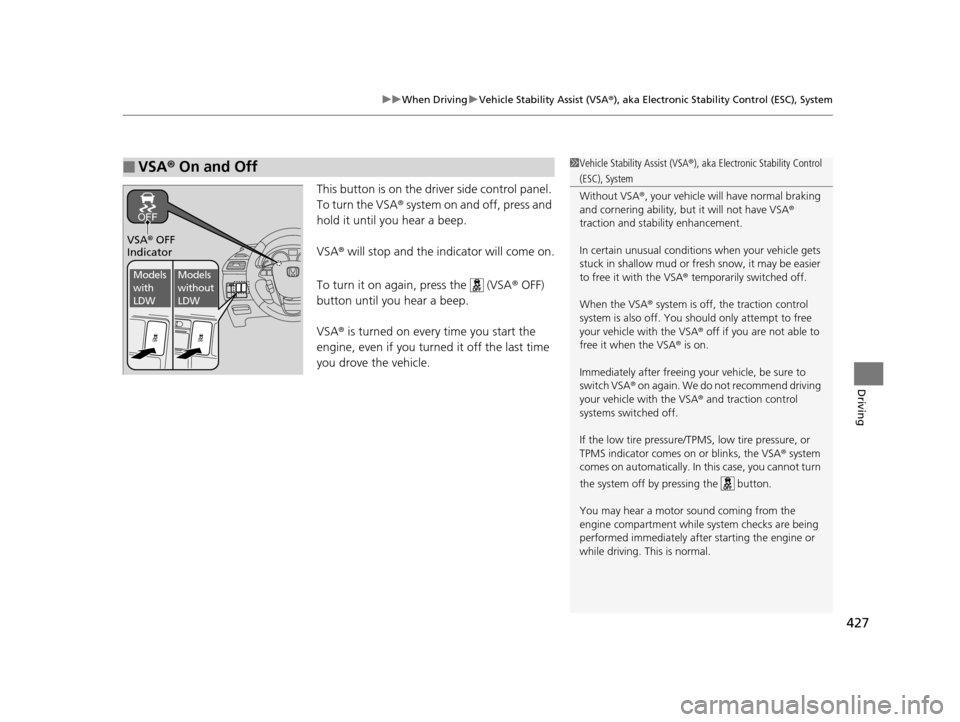
This button is on the driver side control panel.
To turn the VSA® system on and off, press and
hold it until you hear a beep.
VSA ® will stop and the indicator will come on.
To turn it on again, press the (VSA ® OFF)
button until you hear a beep.
VSA ® is turned on every time you start the
engine, even if you turned it off the last time
you drove the vehicle.
■VSA ® On and Off1 Vehicle Stability Assist (VSA ®), aka Electronic Stability Control
(ESC), System
Without VSA ®, your vehicle will have normal braking
and cornering ability, bu t it will not have VSA®
traction and stability enhancement.
In certain unusual conditions when your vehicle gets
stuck in shallow mud or fr esh snow, it may be easier
to free it with the VSA ® temporarily switched off.
When the VSA ® system is off, the traction control
system is also off. You should only atte mpt to free
your vehicle with the VSA ® off if you ar e not able to
free it when the VSA ® is on.
Immediately after freeing your vehicle, be sure to
switch VSA ® on again. We do not recommend driving
your vehicle with the VSA ® and traction control
systems switched off.
If the low tire pressure/TPMS, low tire pressure, or
TPMS indicator comes on or blinks, the VSA ® system
comes on automatically. In this case, you cannot turn
the system off by pressing the button.
You may hear a motor sound coming from the
engine compartment while system checks are being
performed immediately after starting the engine or
while driving. This is normal.
VSA ® OFF
Indicator
Models
with
LDWModels
without
LDW
17 US ODYSSEY (KA KC)-31TK86600.book 427 ページ 2016年10月24日 月曜日 午後4時2分